

Surfer SEO alternatives split into two lists, not one. Surfer now sells a draft-grading editor and a tracker that watches whether you get cited in AI answers. Those halves have different rivals. Pick the wrong list and you buy a product that does not do the job you left for.
- What Surfer actually sells now
- The price on the card is not the price on the card
- The card says uncapped. The policy says 500 a month
- It is not just Surfer. The whole category moved
- What the pages ranking for this actually say
- Which half are you replacing?
- The unit each tool bills you in
- Seats, and the writer who does not have one
- What it costs to touch your own article again
- If you need the editor
- Clearscope, if the writing team is the point
- Frase, if you want research and drafting in one login
- NeuronWriter, if the objection was purely price
- PageOptimizer Pro, if you refresh more than you publish
- MarketMuse, if the question is what to write next
- InLinks, if you have stopped believing in term counts
- Outranking, if the draft has to come out the other end
- What Surfer still does better than the cheap answers
- If you only ever needed the brief
- If you need the AI answer tracker
- If it is already inside something you pay for
- If the text cannot leave your machine
- Is there an open source version?
- If you would rather build it than buy it
- Do you need a tool in this category at all?
- Why no price here survives being copied
- What “Start for Free” actually opens
- Before you switch, ask what comes with you
- Does any of this actually make a page rank?
- What if the vendor changes the plans mid-year?
- How we picked
- What we left out, and why
- Frequently Asked Questions
- What is the cheapest Surfer SEO alternative?
- Does Surfer have a free plan?
- Is Surfer SEO 49 or 99 dollars a month?
- Does editing an article again cost another credit?
- Can I get a refund if I cancel a Surfer annual plan?
- Is there an open source alternative to Surfer SEO?
- What replaces Surfer’s AI visibility tracking?
- Why do comparison pages quote different prices for Surfer?
- My Take
If you have never used one: a content optimisation tool reads the pages currently ranking for your keyword, works out which terms and topics they share, and grades your draft against them while you type. Surfer was the best-known one. It now also sells a tracker that checks whether AI assistants cite your page when someone asks about your topic.
I did not buy anything to write this. I read pricing pages, flipped the billing toggles, opened the signup form, and pulled the numbers out of the markup where the page hides them. Prices here were checked on 28 August 2026. Every one of them is on a page you can open yourself in a minute.
What Surfer actually sells now
The first line of Surfer’s pricing page reads: “Pricing & Plans for teams that want to win AI search, not guess it.” The page then splits into two products. One is called Full AI SEO. The other is AI Search Analytics, and it is sold on its own for 158 USD a month.
That matters more than it sounds. The thing separating the upper plans is not how much you write. It is how many AI prompts you track.
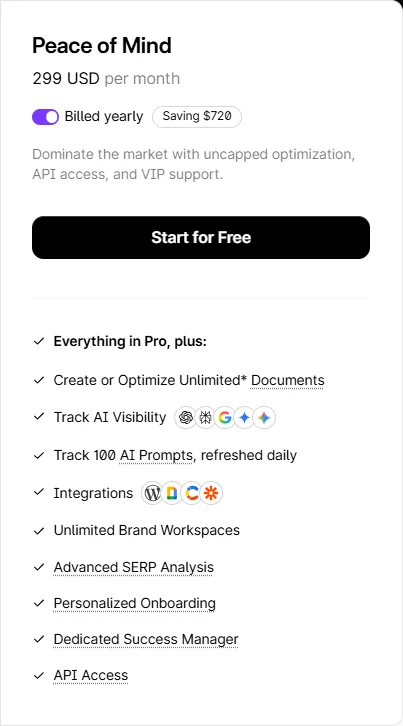
Discovery, the cheapest plan, tracks zero. Standard tracks 25, refreshed weekly. Pro tracks 50, refreshed daily. Peace of Mind tracks 100, refreshed daily. So the half of the product the homepage leads with is not sold at the entry price at all.
The price on the card is not the price on the card
Every plan shows a monthly figure. Under each one sits the phrase “billed yearly.” Flip the toggle and the number changes, but the page does not redraw it in front of you fast enough to notice. The two figures live side by side in the markup, on the same element.
Here is the whole ladder, both columns.
The arithmetic is clean. Every “Save” tag on the page equals the monthly price minus the yearly price, times twelve, to the dollar. Surfer’s own FAQ puts it at “a discount of up to 17% in comparison to the monthly payments,” and 49 against 59 is 16.9%. Nothing here is sloppy. It is just quiet.
The toggle moves one more thing. Standard on annual billing reads “360 Documents.” Standard on monthly billing reads “30 Documents.” Do the division before you get annoyed: 30 a month for twelve months is 360, so the allowance is the same size either way.
The difference is when you can spend it. Annual pools the whole year, so a heavy March costs you nothing in April. Monthly meters it, and what you do not use in March is gone. That one is a point in Surfer’s favour, and it is the opposite of the renewal traps we counted in squarespace pricing.
The card says uncapped. The policy says 500 a month
The Peace of Mind card, at 299 a month, describes itself in one line: “Dominate the market with uncapped optimization, API access, and VIP support.”
Further down the same card: “Create or Optimize Unlimited* Documents.” The asterisk resolves at the bottom of the page to “Fair usage policy applies.” Follow that link and you reach a table on Surfer’s own documentation site.
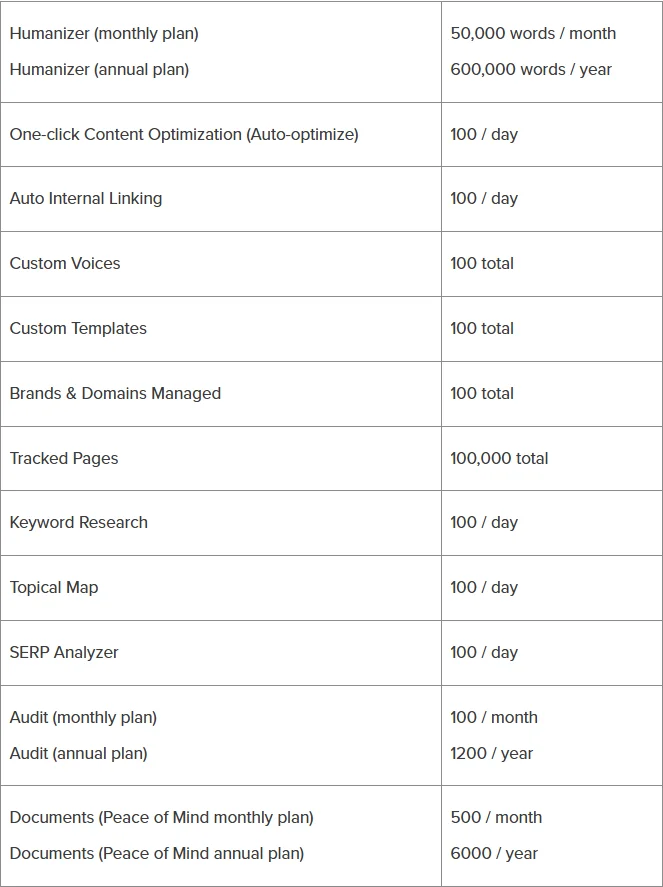
Two things about this. The word “uncapped” carries no asterisk. Only “Unlimited” does, and the two words sit four lines apart on the same card.
Then the policy contradicts itself out loud. Its scope rule reads: “This Fair Usage Policy applies only to features for which usage limits are not explicitly stated on the pricing page or in the plan details.” Next line: “If a limit is clearly defined in the pricing, that limit always takes precedence.”
So which is it. The pricing page does state a limit for documents. The limit it states is unlimited. The rule meant to settle the conflict points back at the page that created it.
500 documents a month is a lot. It is also not unlimited, and both numbers are Surfer’s.
Most people will never touch 500 documents in a month. That is not the point. The point is that the page you buy from and the page that governs what you bought describe the same allowance two different ways, and nothing on the card sends you to the second page.
It is not just Surfer. The whole category moved
I opened Surfer, Clearscope and Frase on the same afternoon. All three now sell themselves on AI search.
Clearscope’s Essentials plan is 129 a month. The first line of its feature list is not documents or reports. It is “50 Tracked Prompts.” Pages come second.
Frase names a feature on its pricing page “Existing pages audited and scored.” The description underneath reads: “Frase scores the pages you already have for SEO, GEO, and AI visibility.” Three products, one direction of travel.
Now go and read what ranks for this search. I audited the nine editorial results one by one. Six of them never mention a tracked prompt at all. They compare these products the way they compared them two years ago, as tools that grade the density of words on a page.
More Read

The guides are not just quoting old prices. They are describing a category that moved out from under them. We watched the same thing happen to AI writers, and we wrote it up when the tool everyone was ranking stopped being the tool you could buy, in jasper alternatives.
There is a smaller version of this in our own archive, and it is fair to point at it. When we priced Jasper in jasper ai pricing, we noted that its Surfer integration is a separate subscription and told readers to check the current price on Surfer’s own site. That was the right instruction and a thin answer. This page is the long version of it.
What the pages ranking for this actually say
I pulled all nine editorial results for surfer seo alternatives and checked every price claim in them against the live pricing page. The results are worth your two minutes, because they explain why every guide you have opened this week quotes a different number.
Three of the nine print 89 USD as Surfer’s price. That figure appears nowhere on the live ladder, in either billing mode. The cheapest real number is 49 on annual and 59 on monthly.
The page that ranks first contradicts itself. In prose it says Surfer is “starting at 99 monthly.” In its own comparison table, on the same page, the Surfer row reads 89 a month. Neither figure is the entry price, and the page carries a date of April 2025.
The freshest page in the field does something subtler. It was updated two days before I looked. It writes that one rival “starts at 19 a month billed annually.” Then, in the very next sentence, it puts two other tools, Surfer included, at “49 a month.”
The annual qualifier is supplied for one product and dropped for the next. Both numbers then sit in the same comparison as if they were the same kind of number. They are not.
Exactly one page carries the whole current ladder with the tier names right. It prints all five figures in euros, to a reader searching from the United States.
None of this is fraud. It is what happens when a guide is written once, updated by find and replace, and published by a company whose own tool sits in the list. Counting three years of ownership on a builder taught us the same lesson in wix vs squarespace: the number on the card and the number on the card twelve months later are different questions.

Which half are you replacing?
Answer this before you compare anything. It is the only question on this page that changes your shortlist completely. Not one of the nine guides ranking for surfer seo alternatives asks it.
There is one rule that keeps people from buying the wrong thing here. A tracker that only reports is not a replacement for an editor. Otterly and Peec tell you where you stand in AI answers and stop there. Profound and Athena HQ add a layer that tells you what to change. If you left Surfer because you missed the writing guidance, a reporting dashboard will not give it back at any price.
A worked example, because the fork sounds abstract until you price it. Say you publish six articles a month and want to know whether AI answers mention your brand. Surfer Standard at 99 a month, and that 99 means committing to a year, gets you both halves, 25 prompts refreshed weekly, and 360 documents a year you will not use. Otterly at 29 plus NeuronWriter at 23 gets you a working editor, tracking, and a bill of 52 a month.
Otterly’s entry plan watches 15 prompts against Surfer’s 25, so that is the trade. Cheaper, and a smaller net.
Now flip it. If you publish forty articles a month and nobody has ever asked about AI citations, the tracking is dead weight and Discovery at 49, which tracks zero prompts, is the honest plan. None of the nine guides I read makes you answer this, which is how people end up buying a platform to solve half a problem.
The unit each tool bills you in
Nine tools charging “from 49 a month” are not charging for the same thing. This is where comparison pages fall apart: they put nine prices in a row and call it a comparison, without ever saying what each price buys.
Surfer meters documents. Clearscope meters tracked prompts, pages, topic explorations and drafts, separately. Frase meters articles. PageOptimizer Pro meters credits, and different actions cost different numbers of them. NeuronWriter meters content writer analyses and AI credits, two buckets. MarketMuse meters queries, tracked topics and briefs.
Look at the third column before the fourth. Six of seven say “not stated.” That is not me failing to find the answer. I opened the pricing page and feature list of every tool in that table, and the documentation where it exists. For MarketMuse the paid tiers now go through a quote, so there is no page to read. Everywhere else, the answer is simply not published.
There is no honest way to convert these units into each other. “One analysis of one page” comes closest, and it collapses the moment you ask whether editing costs a new one. We ran into the same wall counting envelopes and seats when we compared e-signature tools in docusign alternatives, and again pricing schedulers in calendly alternatives. When vendors count different things, price per unit is a number with no meaning.
Seats, and the writer who does not have one
If you work with freelancers, the seat rule moves your bill more than the plan does. Three writers on a per-seat tool is three times the sticker price. The same three writers on a tool with shareable links is zero extra.
Clearscope is explicit about this, and it is the reason agencies keep it despite the entry price. Reports share by link, the way a document does, so an outside writer opens the brief without occupying a paid seat. Surfer lists “External Collaboration Links” on every tier, but does not say on the pricing page whether the person opening one consumes a seat. That is a question for support, in writing, before you sign.
Surfer’s own seat ladder runs 1 seat on Discovery, 3 on Standard, 5 on Pro and 10 on Peace of Mind. So the plan that gives you the AI tracking you came for also decides how many people can be in the room. Two constraints, one price, and they are unrelated to each other in practice.
Price an actual team and the gap opens up. Four in-house writers and two freelancers is six people. On Surfer that is Pro at 182 a month on annual billing. Pro carries five seats; the plan below it carries three. The two freelancers still need somewhere to sit. On Clearscope that is 129 a month, because the four in-house share the plan and the freelancers open a link.
I cannot close that comparison completely, and I will say why rather than fudge it. Clearscope does not publish a seat count on its pricing page, and Surfer does not say whether opening an External Collaboration Link consumes one of your seats. Two questions, both for support, both worth asking before you commit to twelve months.
On the tracker side the picture flips. Peec advertises unlimited users on its published plans, which makes sense: a visibility dashboard is something a whole team glances at and nobody drafts in. If a tracker charges you per seat, ask why.
What it costs to touch your own article again
Most content work is not new writing. It is going back to something you published eighteen months ago and bringing it up to date. So the question that decides your real bill is simple. When you reopen a page you already optimised, does the meter run again?
Surfer’s card bills “Create or Optimize” as one action. It never says whether optimising something you already created draws a fresh credit. Neither does anyone else, with exactly one exception.
PageOptimizer Pro publishes a price list.
Read that table twice. The only company in this field that tells you what going back costs is the one that charges you for it. Everyone else leaves the meter unexplained, which is not the same as leaving it off.
The single question that decides your real bill is the one no vendor answers on the page where you pay.
PageOptimizer Pro uses the same asterisk Surfer does. Its plans say “unlimited POP runs*” and the footnote reads “Within our fair use policy.” The difference is that POP then prints what the asterisk covers, action by action. Surfer prints a document cap on a page the card never points to.
If you are shortlisting, ask every finalist this in writing and keep the reply. It moves the effective price more than the number on the card does.

If you need the editor
Seven tools grade a draft against the pages currently ranking and show a score that moves while you write. Clearscope is the pick for teams, NeuronWriter for anyone who left over price, and PageOptimizer Pro for anyone whose real work is refreshing old pages. The rest answer narrower questions. Each price below says which billing it is, because that is the whole point of this page.
Clearscope, if the writing team is the point
129 a month for Essentials, 399 for Business, no annual lock advertised. The header says “No contracts. No hidden costs. 14 day free trial.” Essentials gives 50 tracked prompts, 50 pages, 20 topic explorations and 20 drafts a month. Business takes the first two to 300 each, six times as many, and topic explorations to 50. Drafts stay at 20.
Add-ons are priced openly, which is rarer than it should be. Extra pages run 25 or 15 a month depending on volume, extra drafts 50 or 20. Reports share by link, so freelance writers do not each need a seat.
Who it works for: an editor with outside writers who wants one clean grade everyone trusts. Who it wastes: a solo writer publishing four articles a month. At 129 that is 32 a piece before you write a word.
Frase, if you want research and drafting in one login
Frase publishes a free tier and a spread of paid figures, roughly 19, 29, 39, 49, 99, 129 and 299 a month, and it advertises a seven day free trial with no credit card. It meters articles, in tiers of 10, 40 and 100 a month.
I am not going to pretend I can pair those two lists for you. The page presents plan names, article counts and billing periods in a way I could not resolve into a clean ladder without an account, so I am not printing one. If a guide hands you “Frase from 19” without saying what 19 buys or how it is billed, that guide did not resolve it either.
Its pricing page names a feature “Existing pages audited and scored.” So refreshing old content is a named feature. What it costs in articles is still not written down.
Who it works for: one person doing research, brief and draft without switching tools. Who it wastes: a team that already has a research stack and only wants the grader.
NeuronWriter, if the objection was purely price
Entry sits around 23 a month, and it is the closest thing here to a straight swap for the grading job at a fraction of the money. It splits its meter in two, content writer analyses and AI credits, so read both numbers, not the first one.
Who it works for: anyone who left over the invoice and not over the output. Who it wastes: teams that need seats, permissions and an audit trail.
PageOptimizer Pro, if you refresh more than you publish
Basic is 40 a month billed monthly, with a seven day refund guarantee, and plans carry 20, 50 or 120 credits. It is the one tool on this page where you can price a year of maintenance before you buy, because the cost of every re-run is published.
Who it works for: a catalogue owner whose real work is updating old pages. Who it wastes: someone who wants one clean score and no arithmetic.
MarketMuse, if the question is what to write next
MarketMuse models coverage across a whole site rather than grading one draft, and it still keeps a free tier. Its paid numbers now go through a quote rather than a public page, which tells you who it is being sold to these days.
Who it works for: someone planning three months of content, not editing today’s post. Who it wastes: a writer who wanted a score and got a strategy tool.
InLinks, if you have stopped believing in term counts
InLinks works on entities and internal linking rather than term frequency. It is the one structurally different answer among the surfer seo alternatives that call themselves optimisers. It is also the hardest to judge quickly. There is no familiar score to argue about.
Who it works for: a site whose internal linking is actually broken. Who it wastes: anyone who needs the familiar number to hand a writer.
Outranking, if the draft has to come out the other end
Outranking meters what it calls SEO documents and leans harder into generation than the others here. Its public entry price is low. Read the document allowance before the price, because the two move independently.
Who it works for: volume operations that want draft plus optimisation in one pass. Who it wastes: editors who want guidance on writing they are doing themselves.
What Surfer still does better than the cheap answers
Surfer buys you three things the cheaper options on this page do not, and a fair comparison has to name them. This page has been hard on its pricing pages. It has not been hard on the product.
The two halves are integrated, and that is not marketing. On Standard and above, the same account grades your draft and tracks whether AI answers cite the page afterwards. Buying that as two products means two logins, two bills and no line connecting the edit you made to the citation you did or did not get. Clearscope is the only other tool here that joins both, and it starts at 129 rather than 99.
The tracking is also broad. Peace of Mind refreshes 100 prompts daily across several answer engines. Otterly’s entry plan is 15 prompts. If your brand needs watching across a full prompt set rather than a sample, the cheap tracker runs out first. The expensive platform does not.
And the arithmetic on the page is honest even where the presentation is not. Every discount tag matches the difference to the dollar. The fair usage caps are published, in a table, on a page anyone can open. Plenty of vendors in this category publish neither, and a cap you can read is better than a cap you discover in month four.
If you only ever needed the brief
A lot of people pay for an editor and use one screen in it. They take the brief, send it to a writer, and never open the live score. If that is you, the editor is the wrong purchase, and most surfer seo alternatives are the wrong shortlist.
Thruuu analyses a results page and builds an outline. Keyword Insights clusters keywords and generates briefs at scale. MarketMuse models topical coverage and still keeps a free tier, though its paid numbers now go through a quote rather than a page. None of these give you a score that moves as you type, and that absence is the point of buying them, not a shortcoming.
Check the unit before you sign up. A brief tool that meters queries and a brief tool that meters briefs will bill the same workload very differently. Clustering a thousand keywords once is one kind of purchase. Producing forty briefs a month is another, and the tool that is cheap for one is expensive for the other.
One warning from the field audit. Dashword turns up on these lists constantly, and at least one ranking page says plainly that it has had no meaningful feature updates in over twelve months. We did not verify that ourselves, so treat it as a reason to check the changelog rather than as a verdict.
If you need the AI answer tracker
Four products track whether AI answers cite you. Not one of them is named on any of the nine guides ranking for this search, and I checked all nine for all four. If you came to Surfer for the AI tracking rather than the editor, this is your shortlist.
Peec shows the arithmetic openly, and it is the clearest explanation of this unit anywhere. 25 prompts across three models for 30 days is 25 times 3 times 30. That is 2,250 AI answers analysed. That is why “25 prompts” at one vendor and “50 prompts” at another are not comparable numbers.
Athena bills in credits where one credit is one AI response, which is a third unit again. Four products, three ways of counting, and every guide that lists them by price is comparing prompts to responses to prompt-model-days.
If you only need one number
Surfer sells its tracker separately at 158 a month. That sits between Otterly’s entry plan at 29 and its middle plan at 189, and well under Athena’s Starter at about 295 a month. Buying Surfer’s full platform to get the tracker is the expensive route unless you want the editor too.
If it is already inside something you pay for
Before you buy a fifth subscription, check the four you have. Some of the best surfer seo alternatives are things you are already paying for. Semrush ships a writing assistant. SE Ranking has a content marketing module. Search Atlas leads with its content assistant. Rank Math’s Content AI scores drafts inside WordPress, and Yoast Premium does a lighter version of the same thing.
None of these will match a dedicated editor on depth. They do not have to. If a module you already own covers 80% of what you used the standalone tool for, the standalone tool is a line item you can delete.
Run the test properly before you cancel anything. Take the last three articles you optimised, open the module you already pay for, and see whether the guidance it gives you differs from the guidance you paid extra for. Most people have never done this, which is exactly why the second subscription survives renewal after renewal.
The honest limits: bundled modules tend to update their data less often, give you fewer competitor controls, and rarely let an outside writer in without a seat. If any of those three matter to how you work, the bundled version will not hold, and the shortlist of surfer seo alternatives above is where you should be looking instead.
The same logic applies to the writing side. We priced what the free tiers of AI writers actually give you in copy.ai alternatives, and mapped who owns which assistant in grammarly alternatives. More of your stack overlaps than the vendors would like you to notice. Writesonic went the other way and turned itself into a search visibility platform, which we documented in the writesonic review.
If the text cannot leave your machine
Some drafts are not yours to upload. Client work under NDA, an unannounced product, anything legal. Every cloud editor on this page takes your text to a server.
There is one real desktop answer, WebSite Auditor from the SEO PowerSuite set. It installs on your machine and includes a content editor with live term guidance. But read the licensing page before you assume you are buying software.
It costs 149 USD a year. The page calls that a “Subscription fee.”
The FAQ is blunt: “Is SEO PowerSuite sold as a subscription? Yes. You will be billed annually for the plan you purchase.” On leaving, it is blunter: “You can cancel your subscription at any time, but we cannot issue refunds for partial use of service.”
Cloud editor, cloud tracker, desktop software: you rent, you pay by the year, and nobody refunds the part you did not use.
Buy it once and own it does not exist in this category. The local option is the same annual rental as the cloud one, minus the server.
Is there an open source version?
Yes, and I want to be precise about how little that means. Two public projects do this job. I checked both against the GitHub API on 28 August 2026 rather than trusting a description.
One has an audience and no code pushed in nearly three years. Its own readme says “Under heavy development. Not for production.” The other was pushed this March and has zero stars. Both need a paid results-page API to get the ranking data, so neither is free in the way the word suggests.
The class exists. It is two attempts, and both are running on fumes. That is a more useful answer than either “there is nothing” or “yes, use open source.”
If you would rather build it than buy it
Strip a content optimiser down and it does three things. It pulls the pages currently ranking for a query, extracts the terms and structure they share, and compares your draft against that. All three are available as parts.
DataForSEO bills per results-page request, ten results to a request, and publishes 1,000 of them at 60 cents with a 50 minimum top-up. SerpApi bills per successful search and states plainly that “cached, errored, and failed searches are not” counted. Add a general model and an automation platform and you have the pipeline.
Two warnings before anyone opens an editor. First, the maths only works at volume; below a few hundred pages a month a 49 subscription wins. Second, and this is the part nobody writes down, check what the data provider’s terms allow. Serper’s terms forbid users to “modify, copy, prepare derivative works of, decompile, or reverse engineer” its materials. DataForSEO and SerpApi say nothing either way about building a derived scoring product on their output. Silence is not permission, and it is worth ten minutes with the actual terms before you write code.
Do you need a tool in this category at all?
Probably not, if you write alone. Every page ranking for this search is published by someone selling a tool, so the question never gets asked there.
The free layer is better than it was. Search Console gives you the queries people actually used to reach you, at no cost, from your own data rather than a model of it. The results page itself is open in a tab. And a general assistant will happily read ten competing pages you paste into it and tell you what they cover that you do not. We looked at where those assistants earn their keep in chatgpt alternatives.
What you lose is consistency and speed. Ten writers eyeballing a results page produce ten opinions. A score, whatever you think of scores, produces one number everybody argues with equally. That is the actual product being sold here, and if you write alone, you may not need it.
There is a second thing you lose, and it is the one people underestimate. A tool remembers. It keeps the term list from eighteen months ago, the score the page had before you touched it, and the version you shipped. Doing this by hand means none of that survives past the tab you closed. For one writer that is fine. For a team handing pages between people, it is the whole job.
So the test is not whether the free route can grade a page. It can. The test is whether anyone besides you needs to see the grade, this month or next year. If the answer is no, every one of the surfer seo alternatives on this page is a solution to a problem you do not have.
Why no price here survives being copied
I checked three secondary sources against the live pages while writing this. All three had the currency wrong.
These vendors localise. Surfer’s own signup form pre-filled a country code that had nothing to do with the United States, based on where it thought we were sitting. So a price copied from a guide is a price someone else was shown, on a day you do not know, in a currency you cannot see.
Check the number on your own screen. That includes the numbers on this page.
What “Start for Free” actually opens
Every Surfer plan card carries a button reading “Start for Free.” I opened it, stopped at the form, and read what it asks.
The page is titled “Sign up for Surfer.” It offers Google or email. Then it asks for a password, and for a phone number, labelled “For validation and onboarding. No spam.”
The word “free” does not appear on it. Neither does “trial,” nor “credit card,” nor a number of days. The button that promises free leads to a page that never uses the word.
The pricing page is careful in the other direction. It asks “If I choose the annual plan, do I have to pay upfront for the entire year?” and answers “Yes. Upon finalizing the purchase, you’ll be charged for the entire year.”
The cancellation answer explains auto-renewal at length. You can switch it off. “You’ll have access to the app until the end of the already-paid billing period.” Fair enough.
The word “refund” appears zero times on that page. I counted.
Credits, per the same FAQ, “reset yearly or after changing your plan.” So on annual billing you buy twelve months at once, the allowance resets once, and nothing on the page describes getting money back.
Before you switch, ask what comes with you
Switching cost is the line no comparison of surfer seo alternatives puts in its table, and it is usually bigger than the price difference that started the conversation.
Four questions, in the order they will bite you. First, can you export the briefs you already built, and in what format? Second, does the term list behind each score come out, or only the finished text? Third, does version history survive, or does the record of what a page scored before you edited it live only inside the account you are closing? Fourth, if a client asks in a year why a page was written the way it was, can you still answer?
Ask each one before you cancel, not after. An annual plan you have already paid for is the cheapest possible window to do the export, because you keep access until the period ends, and none of the vendors here refund the unused part.
There is a timing trick here. Because cancelling turns off renewal rather than closing the account, the sensible move is to switch off auto-renewal the day you decide, then keep working normally until the paid period runs out. You lose nothing, and you stop the next twelve months from charging while you are still deciding between two surfer seo alternatives.
And run the new tool in parallel for one cycle if you can. Two subscriptions for a month costs less than discovering in week three that the thing you actually used every day was a feature nobody listed on either pricing page.
Does any of this actually make a page rank?
Nobody in this field publishes an answer, and after pricing seven surfer seo alternatives I think that is the most important sentence on this page.
Here is what does not exist, as far as I could establish: an independent, controlled measurement showing that pages optimised to one of these scores rank better than pages that were not. The case studies you will find belong to the vendors. The guides ranking for this search are written by companies selling competing tools, so their comparisons are about features, never about outcomes. I looked for a third-party study and did not find one. If it exists, none of the nine pages ranking for this topic cites it.
So be clear about what you are buying. You are buying a repeatable way to answer “is this draft finished,” one that six people can agree on. That is worth money. It is not the same thing as buying rankings, and any page that implies otherwise is selling you something.
It is also why I would not spend 299 a month on it. The coordination problem a score solves is worth roughly what a team costs, and no more.
What if the vendor changes the plans mid-year?
Not one of the surfer seo alternatives on this page says. I looked, because you are being asked to pay twelve months in advance and the question follows directly from that.
What the field does tell you is that plans get retired. Three of the nine guides quote Surfer tier names that no longer appear on its pricing page, which means the ladder was rebuilt at some point and the old names stopped being sold. What happened to the people mid-contract on those plans is not written down anywhere I could find.
Treat that as the real cost of annual billing. You are not just committing money for a year, you are committing to whatever the product becomes during it, with no published rule about what you are owed if it changes.

How we picked
Everything above came from public pages read on one day. Here is exactly what that does and does not cover.
- We bought nothing. No plan on this page was tested from the inside. Anyone claiming otherwise about a dozen tools at once is claiming a lot.
- What we did read: pricing pages, feature lists, fair usage policies, cancellation answers, documentation, and the signup form up to the point before payment.
- Prices came off live pages on 28 August 2026, read from the markup where a page hides the second figure behind a toggle.
- Where a vendor does not publish an answer, this page says “not stated” instead of guessing. That gap is a finding, not a hole.
- We publish content and care about search, so we are not a neutral party to a debate about content tools. We have no product in this category and no horse in the race between these vendors, but you should know the first part.
What we left out, and why
Four names show up on almost every list of surfer seo alternatives and do not belong on any of them.
- Ahrefs. A backlink index and keyword database. It answers different questions and does not grade a draft against ranking pages in an editor.
- Screaming Frog. A desktop crawler for broken links, redirects and site structure. Excellent, unrelated.
- Yoast free. Checks readability formulas and a keyword you type in yourself. It never looks at what is currently ranking.
- Bulk article generators. Tools built to publish hundreds of pages without an editor are answering a different question than “help me improve this draft.”
That last one is worth a sentence more. Two of the ten pages ranking for this search today are published by bulk generation engines. So a fifth of the results for “how do I replace my writing editor” are written by products designed to take the writer out. Nine of the nine editorial results are published by companies selling a competing tool, which is the same pattern we found when we audited who writes the guides in linkedin automation tools.
Field notes
- The hidden column: Surfer’s cards show only the annual-commitment rate; the monthly rate sits in the page markup and runs 10 to 60 USD a month higher. Every “Save” tag equals the difference times twelve, exactly.
- Unlimited, capped: the Peace of Mind card says “uncapped optimization” and “Unlimited* Documents”; the linked fair usage policy caps that plan at 500 documents a month and 6000 a year. The word “uncapped” carries no asterisk.
- The refresh question: six of seven editors never state whether reworking a page you already optimised costs a fresh unit. PageOptimizer Pro is the exception and prices it at 1 to 2 credits per re-run.
- The category moved: Surfer, Clearscope and Frase all now lead with AI search; Clearscope’s plan card opens with 50 tracked prompts. Six of the nine editorial pages ranking for this search never mention a tracked prompt.
- Who writes the guides: nine of nine editorial results are published by vendors of competing tools, naming their own product between 8 and 49 times; the oldest ranks first, dated April 2025.
- Rented everywhere: the one desktop option, WebSite Auditor, is 149 USD a year billed annually, and its own FAQ says it cannot refund partial use. Surfer’s pricing page never uses the word refund.
- Sources: vendor pricing pages for Surfer, Clearscope, Frase, NeuronWriter, PageOptimizer Pro, Otterly, Peec, Profound, Athena HQ and Link-Assistant; Surfer’s fair usage policy and pricing FAQ; the GitHub API for both open source projects; all read 28 August 2026.
Frequently Asked Questions
What is the cheapest Surfer SEO alternative?
NeuronWriter, at roughly 23 USD a month, is the cheapest tool that does the same core job. Frase starts lower on some plans but meters articles rather than analyses. Free is also an answer. Search Console plus the results page plus a general assistant covers a solo writer’s use, and costs nothing.
Does Surfer have a free plan?
Not one its pages describe. Every plan card carries a “Start for Free” button, but the signup page it opens does not use the word free, does not mention a trial, and does not name a number of days. It asks for an email or Google account, a password and a phone number.
Is Surfer SEO 49 or 99 dollars a month?
Both, for different plans, and only if you pay for a year up front. Discovery is 49 USD a month billed yearly and 59 billed monthly. Standard is 99 billed yearly and 119 billed monthly. Discovery tracks zero AI prompts, so if you came for the AI tracking, 49 is not your price.
Does editing an article again cost another credit?
At PageOptimizer Pro, yes, and it publishes the price: 1 credit to update a page’s optimisation score, 2 to re-run after page changes. Everywhere else, including Surfer, the answer is not stated on any page we could open. Ask before you buy and keep the reply in writing.
Can I get a refund if I cancel a Surfer annual plan?
Surfer’s pricing page does not say. It explains that annual plans are charged for the entire year up front, and that cancelling turns off auto-renewal while leaving access until the paid period ends. The word refund does not appear on the page at all. Third-party blogs mention a money-back guarantee; we could not find it on a Surfer page.
Is there an open source alternative to Surfer SEO?
Two public projects exist, and both have problems. ContentSwift has 163 stars but its last code push was October 2023, and its own readme says it is not for production. The other, content-optimizer, was pushed in March 2026 and has no stars. Both still need a paid results-page API for the ranking data.
What replaces Surfer’s AI visibility tracking?
Otterly from 29 USD a month and Peec from 80 report where you stand in AI answers. Profound from 99 and Athena HQ from about 295 also tell you what to change. Surfer sells the same job standalone at 158 a month, so compare against that number rather than against its full platform price.
Why do comparison pages quote different prices for Surfer?
Three reasons, all of which we found while checking. Some pages quote plan names Surfer no longer sells. Some quote the annual-commitment figure as a monthly price without saying so. And some were served a localised page, which is how a guide ends up printing euros for a US reader. Three separate sources we checked had the currency wrong.
My Take
If you run a catalogue and spend more time updating old pages than writing new ones, I would hand you PageOptimizer Pro, and not because it grades better. It is the only vendor here that lets you price a year of maintenance before you pay for it. Forty a month billed monthly, with the cost of every re-run printed on the page, beats a cheaper plan whose meter you cannot model. If you run a writing team instead of a catalogue, Clearscope at 129, with link sharing so freelancers do not need seats, is the cleaner buy.
I would not hand any of them to someone publishing four articles a month. At that volume the maths stops working. 129 a month is 32 an article before you write a word. Search Console plus a careful read of the results page gets a solo writer most of the way for nothing. And if you came here for the AI tracking rather than the editor, do not buy a platform to get one module. Surfer sells that half on its own at 158, and Otterly starts at 29. The mistake this repositioning invites is buying the whole thing to fix half a problem.