

The search for arc browser alternatives now starts on Arc’s own homepage: “Arc receives Chromium updates only. For active security patches and enterprise-grade protection, download Dia instead.” The vendor wrote that, above two working download buttons. I spent a day checking what moves with you, what each route costs, and which recommended replacements won’t run on your machine.
- The vendor told you to leave. Here is the exact wording
- What does “Chromium updates only” actually mean?
- The number nobody quotes: 5.52%
- What the official replacement costs
- What is a “Task”? The unit you’re actually buying
- What moves with you, and what doesn’t
- Can you export your Spaces from Arc?
- How I ranked these alternatives
- The candidates at a glance
- The official route: Dia
- The lookalikes: Zen and Floorp
- The power option: Vivaldi
- The boring picks that just work: Edge, Brave, Firefox
- Workspaces as a paid product: SigmaOS, Wavebox, Ghost Browser
- The WebKit outlier: Orion
- Is an extension enough to replace Arc?
- The route nobody sells: keep your browser
- Who owns your browser now?
- How to choose your route
- Frequently Asked Questions
- Is Arc browser dead?
- Is Arc still safe to use?
- What is the best Arc browser alternative?
- Is Dia free?
- Can I export my Spaces and pinned tabs from Arc?
- Does Zen Browser work with Netflix?
- Do Arc alternatives work on Windows?
- What happens to my Dia subscription if I cancel?
- Can Dia import my Arc data?
- Why did The Browser Company stop developing Arc?
- My Take
Every price in this guide was read on the vendor’s own page on August 27, 2026. This is a desktop guide for Mac and Windows. Arc’s mobile apps and iOS replacements are a separate question, and I’m not going to pretend one article covers both.
The vendor told you to leave. Here is the exact wording
Arc is not dead, and its maker says so in writing. The same maker also stopped building it. Both statements sit in the company’s 2025 letter to Arc members, and the difference between them is the whole reason this article exists.
The letter says: “As we started exploring what might come next, we never stopped maintaining Arc. We do regular Chromium upgrades, fix security vulnerabilities, related bugs, and more.” Two paragraphs later: “But it is true: we are not actively developing the core product experience like we used to.” And then the line people quote least: “we’re not trying to shut Arc down. We know you use it and rely on it.”
So the product runs. The product also gets no new work. The homepage translates that into one sentence with a recommendation attached: Chromium updates only, download Dia instead. I took the screenshot below because I didn’t believe a vendor would print it over its own download buttons. It did.
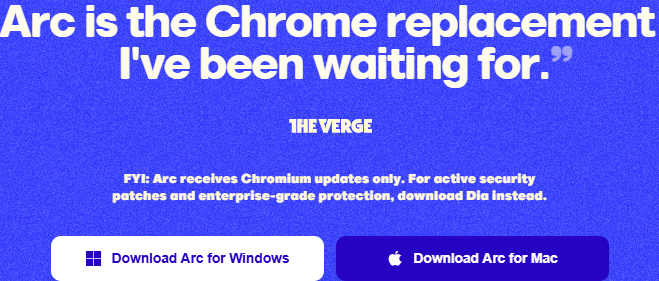
One more detail from the same site. Arc’s official FAQ page is stamped “UPDATED · MAY 1, 2024” and still asks itself “How does Arc plan to make money?” The successor answered that question with a pricing page. We’ll get to it.
More Read

What does “Chromium updates only” actually mean?
It means the engine gets patched and the product around it doesn’t. Chromium’s own release documentation says security fixes land on a stable branch “for use by embedders,” with weekly refreshes to keep the patch gap short. Arc merges those. That part of the promise is real.
Here is the boundary. The same security documentation puts the rest on the browser built on top: “it is the responsibility of any such project to understand what code they are shipping, and how it is compiled.” Upstream ships fixes for the engine. It ships nothing for Arc’s sidebar, Spaces, sync, or any of the interface code that made Arc worth using. That code is exactly what stopped getting active development.
I’m not going to tell you Arc is unsafe. I am going to point out who told you to leave: the company that owns the code, on its own homepage, in the same sentence where it links the replacement. Read it as a boundary statement, because that’s what it is. The engine is patched. The product is frozen. If you stay, set yourself one tripwire: the first Arc-specific breakage that doesn’t get fixed, a dead integration, a sidebar bug that sits for months, is the product telling you maintenance has found its limit. Leave on that signal, not on a date.
That framing also explains why searching for arc browser alternatives feels different from a normal browser comparison. You’re not shopping for an upgrade. You’re relocating from a building whose owner posted a notice in the lobby, and the notice points at a building the same owner charges rent on.
The number nobody quotes: 5.52%
The most useful number in this whole story sits in the vendor’s own letter, and none of the ranking pages I measured quote it. Here it is, word for word: “Only 5.52% of DAUs use more than one Space regularly. Only 4.17% use Live Folders (including GitHub Live Folders). It’s 0.4% for one of our favorite features, Calendar Preview on Hover.”
Only 5.52% of Arc’s daily users regularly used more than one Space.
Sit with that. The multi-Space workflow, the thing every migration thread mourns, was regularly used by about one in eighteen daily users. The letter’s framing is blunt: “What people actually used, loved, and valued differs from what the average tweet or Reddit comment assumes.”
The same letter prints the comparison that explains where the company went. “By contrast, core features in Dia, like chatting with tabs and personalization features, are used by 40% and 37% of DAUs respectively.” Whatever you think of AI browsers, that’s a 40% adoption number against a 5.52% one, published by the people who can see the telemetry.
This changes how you should read every “Arc is dead, the vendor betrayed us” listicle. The pivot wasn’t a mystery. It was arithmetic, and the company showed its work. Your job now is different from grieving: figure out which of Arc’s ideas you personally used, and pay for only that. That question drives the rest of this guide.
Arc and Dia are distinct product cohorts, not parts of one total. Arc’s 5.52% figure refers to daily users regularly opening more than one Space.
One more thing that number does: it tells you who this guide is for. If you used one Space and a tidy sidebar, any browser below will do, and the free rows should win. If you genuinely lived in the 5.52%, running clients and projects in isolated contexts all day, you are the niche the market barely serves. Everything below is priced and sorted with both of you in mind.
What the official replacement costs
Dia’s free tier is a real browser and costs nothing. The half of Dia that the marketing is about runs $20 or $100 a month. That split is printed on the vendor’s pricing page. Here’s the part that made me write this guide: every list of arc browser alternatives I measured recommends Dia. Not one of the four top-ranking pages prints a single dollar figure for it. One of them prints prices for three other products on the same page. For Dia, silence.
The trial deserves a closer look. Every new user gets 14 days of the top plan, the $100 one, with no card required. When it ends, AI features pause and Dia keeps working as a free browser. That’s a clean trial design, and it also means your first two weeks are calibrated to a tier most people won’t buy. If the free tier is what you’d actually live on, test that tier on purpose, the same way we price any tool by its renewal, not its trial.
Cancellation is self-serve in account settings, and access runs to the end of the billing cycle. The page adds one line I’d want you to read before subscribing: “Unused usage isn’t refunded when you cancel or downgrade, unless the law where you live requires otherwise.” We watched the same shape when Copy.ai retired the plan everyone signed up for: the free layer is real until the vendor decides which side of the wall you’re on.
The free browser is real. The browser you were promised runs $20 to $100 a month.
Better Answers meters AI usage in Tasks. Better Days promises six times more tasks and chats. The no-card 14-day trial uses Better Days, not the free non-AI browser. Usage limits apply.
What is a “Task”? The unit you’re actually buying
A Task is Dia’s own unit for metering AI usage, and the definition is elastic by design. The pricing page: “Usage is measured in Tasks, our unit for calculating effort. Simple requests can use fractions of a Task, while requests that involve more tools, context, or longer outputs can use more.”
I went into the terms of use to find the edges of that unit. There’s one sentence you should know about before handing over a card: “We may change the method by which tasks are calculated, and the factors it takes into account at any time.” The allowance in your plan is likewise “determined by us in our discretion.” Paid fees are non-refundable except where law requires, and if you hit your allowance, paid features pause until you buy more usage or the month resets. There’s an auto-purchase option for overage blocks. I’d leave it off.
I’ve priced a lot of metered plans for this site. SurveyMonkey meters survey responses and auto-bills per extra one. DocuSign meters envelopes and won’t print its overage rate. Both of those meter something you can count. A Task is a unit whose recipe the vendor can rewrite mid-subscription, which makes it the softest meter I’ve seen on a mainstream product this year. That’s not an accusation. It’s the text of the agreement you’d be signing.
Try pricing a month of it in advance. With a per-seat plan you multiply seats by the rate and you’re done. With Tasks, the same question has no arithmetic: a simple request costs a fraction of a Task, a complex one costs more, and the vendor decides the recipe. With auto-purchase off, the invoice itself stays fixed at $20 or $100; what floats is how much of the month your allowance survives. You’ll learn that the way everyone learns it with usage meters, by watching the counter after you’ve subscribed.
One page-level oddity worth flagging: as of my check, Dia’s terms page carried two different effective dates at once, August 17, 2026 and August 29, 2025. Small thing. It also tells you how fast this document is moving. We compare tools on what the card is actually charged, and with Dia the honest answer is: whatever a Task turns out to be that month.
What moves with you, and what doesn’t
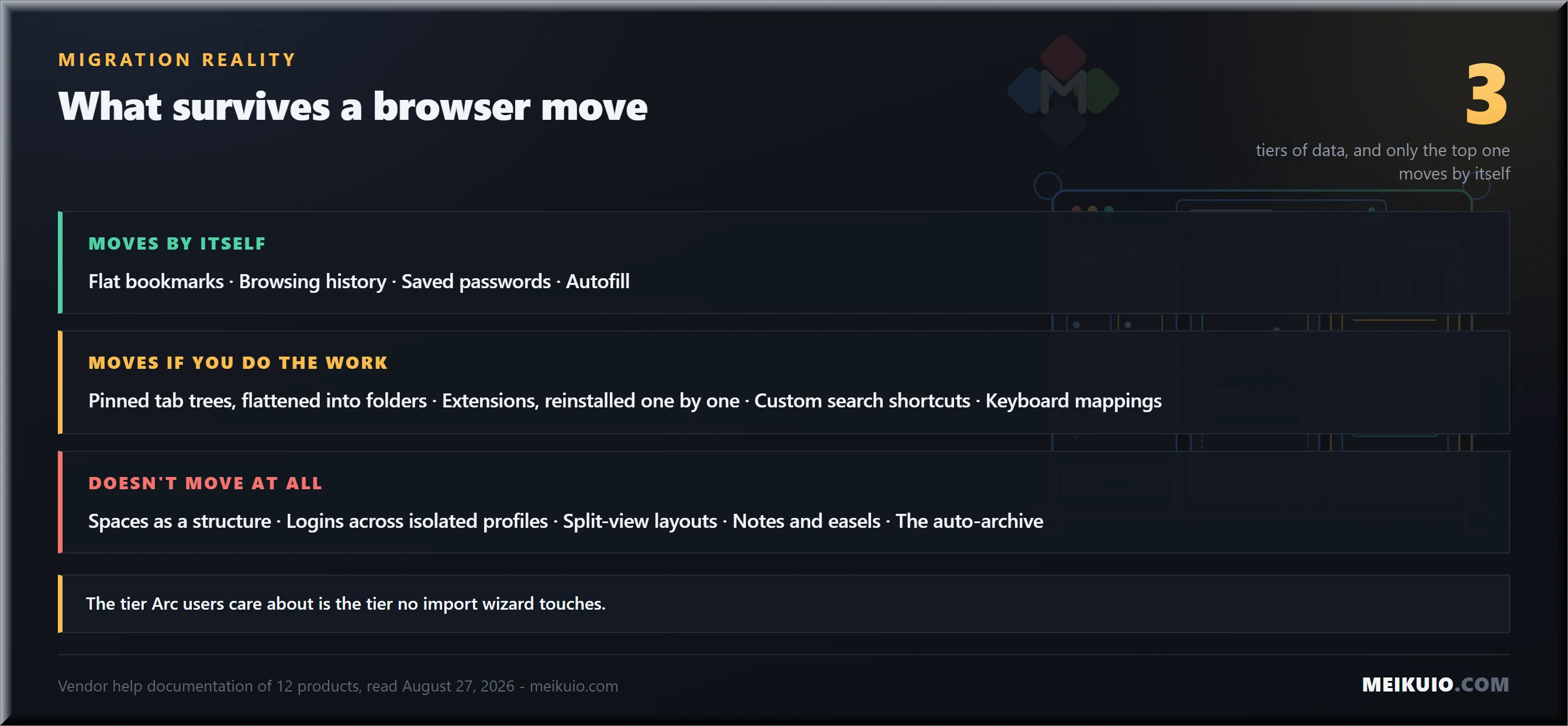
Before comparing arc browser alternatives feature by feature, sort your own data into three tiers, because knowing them in advance saves you a weekend. Tier one moves by itself: flat bookmarks, browsing history, saved passwords, autofill. Every serious browser has an import wizard for these, and Dia’s own page confirms it pulls “bookmarks, extensions, passwords, and history” from Chrome, Safari, Edge, and Arc.
Tier two moves if you do the work: pinned tab trees flattened into bookmark folders, extensions reinstalled and reconfigured one by one, custom search shortcuts retyped, keyboard mappings rebuilt. Tedious, but bounded. Budget an evening.
Tier three doesn’t move at all, and it’s the tier Arc users actually care about. Your Spaces as a structure. Logins spread across isolated profile contexts, which all need re-authenticating on the other side. Split-view layouts. Notes and easels, Arc’s built-in documents and whiteboards, which exist nowhere else. The auto-archive of every tab you didn’t close since you installed the thing. No import wizard on any candidate pulls this tier out of Arc, and the re-login pass across a few dozen work and personal accounts is the single most underestimated cost of the move. We found the same shape when we mapped Grammarly alternatives: the data you can export is never the data that keeps you locked in.
Can you export your Spaces from Arc?
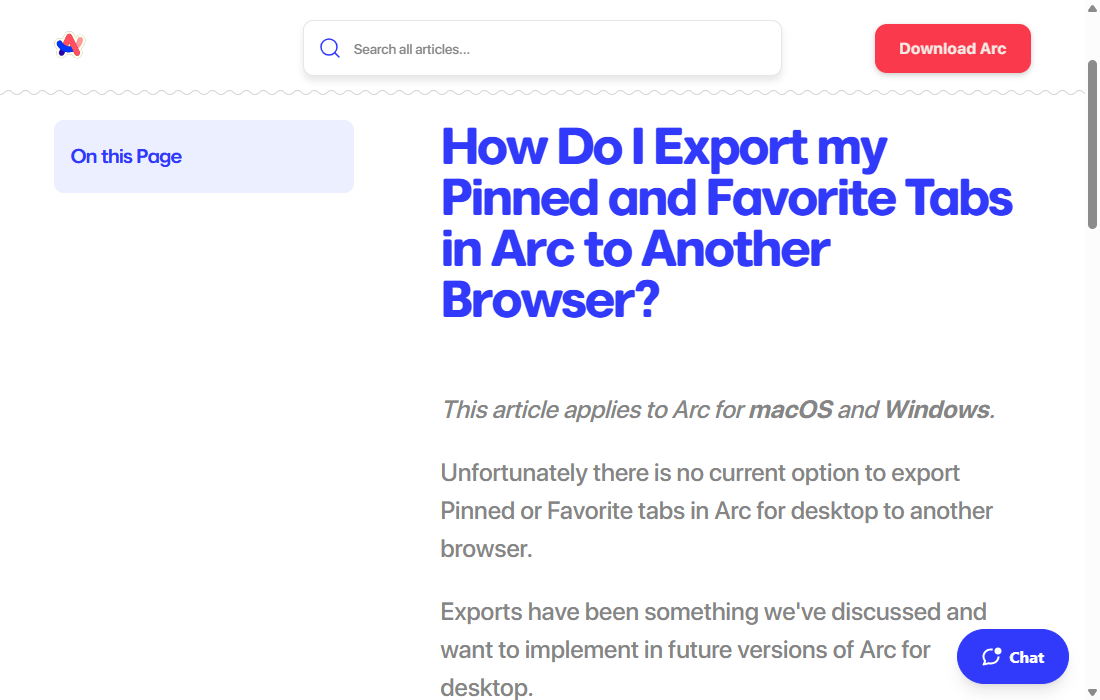
No. That isn’t my reading of it. It’s Arc’s help center, in an article covering both macOS and Windows: “Unfortunately there is no current option to export Pinned or Favorite tabs in Arc for desktop to another browser.” The next sentence is the one that stings: “Exports have been something we’ve discussed and want to implement in future versions of Arc for desktop.” Future versions. Of the product that no longer gets active development.
The vendor’s own workaround is printed on the same page. Put your pinned and favorite tabs into a folder, right-click it, choose “Copy All Links,” and paste them into a document. Then rebuild your bookmarks by hand in the next browser. That’s the official migration path for the product’s signature feature. The article sits in their help center with a negative vote count. Next to it, without a hint of irony, lives a full guide titled “Import Bookmarks, Logins, History, & Extensions from Your Previous Browser.” Importing your old life is a feature. Exporting it was a discussion.
The community closed the gap the vendor left open. People wrote their own open-source exporters that parse Arc’s internal sidebar files and turn them into standard bookmark HTML, including the auto-archived tabs the official interface never surfaces. A GitHub search for Arc bookmarks exporter turns up several. They’re unofficial, they can break with any update, and the fact that they had to exist is the review.
Notice what even the official workaround leaves behind. “Copy All Links” walks your pinned folders. It never touches the archive, the tabs Arc quietly filed away for you over months of browsing. For a lot of long-time users that archive is the most valuable thing in the product: half-read research, pages they meant to return to. The only road to it runs through those community scripts.
Now the part no listicle prints. I went through the help documentation of every one of these arc browser alternatives asking one question: once I’m in, can I get my structure back out? Flat bookmarks export almost everywhere as HTML. Workspace structure exports nowhere as a portable file. Wavebox moves it, but only through its own encrypted config file. Ghost Browser moves it, but only by copying the whole profile folder between machines, and its docs note plainly that cookies don’t transfer. Everyone else either has no documented export at all or exports a flat list that forgets your organization.
Every browser on this list accepts your bookmarks. Not one hands your Spaces back.
That table is the real ranking criterion hiding under this whole category. You are about to rebuild your organization inside a new product. Check the exit before you admire the lobby. Next time you’d like the move to cost an afternoon. With most of these, it will cost exactly what leaving Arc costs now.
Before you uninstall Arc
Do the vendor’s own workaround first: gather pinned and favorite tabs into one folder per Space, right-click, “Copy All Links,” and paste each list into a document with the Space’s name. It’s manual, it’s ugly, and it’s the only officially supported way to carry your structure’s map out. Keep Arc installed until the new browser has survived two real work weeks. The uninstaller can wait; your logins can’t be re-created from memory.
How I ranked these alternatives
Ranked lists of arc browser alternatives have a structural problem. Five of the nine pages on Google’s first screen are written by companies selling their own replacement product, and of the two I measured closely, one ranks itself first out of nine and the other names itself the best choice, twice. I don’t make a browser. So instead of a top ten, I sorted by the reason you’re leaving. Then I checked four things for every candidate on August 27, 2026: which platforms it actually ships on, what it imports, what it exports, and what it costs on the vendor’s own page.
One more filter the listicles skip: whether the product is still alive. This category buries its dead quietly. Ghostery’s private browser was discontinued with a plain warning that continued use is at your own risk. Sidekick, still recommended by ranking pages, now redirects its own domain to Perplexity’s Comet. If a “best of” list you’re reading includes Sidekick as an independent choice, you know how recently it was checked.
Note
Every price and platform claim below was read on the vendor’s page on August 27, 2026. This category is moving fast right now. If you’re reading this months later, click through before you decide anything on a number.
The candidates at a glance
Here is the whole field of arc browser alternatives on one screen, checked against each vendor’s own pages on August 27, 2026. Two columns here don’t exist in any ranking I measured: which platforms actually ship today, and what the thing costs once the meter is included.
Now the routes, one by one, with the honest case for and against each.
The official route: Dia
Platforms: macOS and Windows. Engine: Chromium. Price: free tier, then $20 or $100 a month for the AI half.
The honest case for Dia starts with continuity. It’s the only candidate whose import from Arc is a first-class, vendor-built path, and it inherits the weekly security work. The free tier is a competent browser: profiles, tab groups, split view, a built-in blocker. If what you loved about Arc was that it felt cared for, the care moved here. The AI features are the company’s whole bet, and 40% of Dia’s daily users chatting with tabs suggests the bet isn’t imaginary. If you want the assistant layer without a browser swap, the standalone assistants cover most of it for less.
The honest case against: Dia is a different product wearing the family name. It launched around a horizontal tab bar, not Arc’s sidebar, and the workspace ideas are being reintroduced gradually rather than inherited. Your Spaces don’t import as structure. Nothing is documented as exporting out of Dia at all. And the paid wall is rolling out by platform and by cohort. “Paid plans begin rolling out to most new Mac users on August 17.” Existing users “keep what they have for free,” with at least 30 days’ email notice before that changes. The FAQ answers Windows users with “Not yet.” The word to notice in “Dia on Windows stays as it is for now” is “for now.” What “as it is” includes today, the page doesn’t spell out; the paid gates simply haven’t reached Windows yet. Free isn’t a property of the product here. It’s your place in the rollout queue.
Verdict: try it, it’s the path of least resistance and the trial costs nothing. Just decide in advance which tier you’re testing, and don’t move anything in that you’d mind rebuilding a second time. Same advice we gave on Motion’s AI calendar: when the AI layer carries the subscription, price the product as if the AI is the product, because it is.
The lookalikes: Zen and Floorp
Platforms: Windows, macOS, Linux, both. Engine: Firefox’s Gecko, both. Price: free, open source, both.
Zen is the community’s favorite among arc browser alternatives and the closest visual match: sidebar, workspaces, split view, compact mode, all free and open source. Migration threads name it more than anything else. It’s a young community project, and the honest way to hold that: the code being open means the worst case is a fork, not a funeral. Now the part almost nobody prints, and I’m taking it from Zen’s own FAQ: “Zen Browser currently lacks DRM support, as it does not yet have a Widevine license. This means DRM-protected media cannot be played in Zen Browser for the foreseeable future.” Their own list of what won’t play: HBO Max, Netflix, Spotify, Disney+, Amazon Prime Video, Apple Music, Google Play Movies & TV. Their own suggested fix: use a browser with a Widevine license, such as Firefox, for streaming.
Measure that against the field: the page that mentions Zen twenty times in its ranking mentions this zero times. A license application is pending with Google, so this may resolve. Until it does, Zen is a work browser, and your evening browser stays something else. If that split fits how you live, Zen is the best free imitation of Arc’s layout there is.
Two practical notes before you commit. Extensions come from the Firefox ecosystem, not the Chrome store, so audit your must-haves by name first; most mainstream ones exist, the long tail doesn’t. And because Zen’s own docs say it “inherits its webpage bookmarking system primarily from Firefox itself,” your exit is effectively Firefox’s exit, HTML through the built-in library. Zen’s documentation stops at that inheritance line, so test the export before you rely on it. Even so, a free community fork with an inherited way out beats the official successor, which documents no way out at all.
Floorp is the quieter Firefox fork with native vertical tabs and workspaces. It’s capable, but its documentation openly defers to Firefox for anything it doesn’t cover, workspace structure has no documented file export, and the community around it is a fraction of Zen’s. Reasonable second look, not a first pick.
The power option: Vivaldi
Platforms: Windows, macOS, Linux. Engine: Chromium. Price: free.
Vivaldi is what happens when a browser assumes you want every knob. Native vertical tabs, two-level tab stacks, workspaces, split views, panels, and enough settings to reproduce most of Arc’s behavior if you’re willing to spend an afternoon in preferences. That’s the trade: Arc shipped opinions, Vivaldi ships options. Chrome extensions work, since it’s Chromium underneath.
Expect the first afternoon to be configuration. You’ll move the tab bar to the side, build your first workspace, map the keyboard, and turn off panels you don’t want. That’s real time, and it buys you a browser that will still look like your browser in five years, because nobody upstream is pivoting it to chase a trend.
On the exit test it’s middle of the pack: bookmarks out as HTML, passwords out as CSV, workspace structure not exportable as a file. On the ownership test it’s one of the calmest names here. Independent, with, in its own words, “no external investors.” Its money comes from partner deals with search engines and bookmark partners, plus donations, not from a subscription it needs you to grow into. For a power user who wants one browser for everything, including streaming, this is the strongest single answer on the list.
The boring picks that just work: Edge, Brave, Firefox
Platforms: Windows, macOS, Linux for all three. Engines: Chromium twice, Gecko once. Price: free.
Edge is the sleeper. Native vertical tabs that collapse to icons, workspaces, tab sleeping, split screen, profile separation, and it’s already on your Windows machine. Migration threads that start as funerals for Arc keep ending with someone sheepishly admitting Edge does the job. The costs are Microsoft’s ecosystem pushiness and a settings hunt to turn off what you didn’t ask for. Functionally, it’s the closest mainstream browser to Arc’s daily mechanics.
Brave gives you vertical tabs with one toggle, the strongest default blocking on this list, and a familiar Chromium base. It has no real Spaces model, so the multi-context part of your Arc habit doesn’t come back. As a fast, private, boring daily driver that plays everything, it’s hard to argue with. Ignore the crypto features; the browser doesn’t need them to justify itself.
Firefox plus the Sidebery extension is the tinkerer’s build. You get tree-style tabs in a sidebar, plus the one capability nothing else in this section has: Multi-Account Containers, which isolate logins per container inside one window. To be precise about what’s what: containers are a Firefox feature, Sidebery is the sidebar extension that organizes tabs and can group them by container. Two installs, one browser. That’s the closest thing to Arc’s profile separation that exists outside a niche product. The honest cost: Sidebery is an extension living inside a browser that wasn’t designed around it. The tab strip needs a manual hide, through a config tweak rather than a setting. And that customization layer, the tweak and the sideloaded setup, is exactly what a managed work profile tends to strip; Firefox itself may be approved while your rebuild of Arc inside it is not. Budget a weekend, get 80% of Arc, keep a browser whose maker has outlived every product on this page.
One deployment note for all three: if your laptop is company-managed, these are usually the only viable candidates anyway. IT departments allow Edge, Firefox, and sometimes Brave. They do not, as a rule, approve a venture-funded niche browser, and your corporate sign-on may simply refuse to run there. Whether Atlassian’s ownership eventually puts Dia on those approved lists is an open question; today, assume it isn’t there. Check before you fall in love.
Workspaces as a paid product: SigmaOS, Wavebox, Ghost Browser
This is the corner of the market that charges browser-as-software prices, and the corner where reading the vendor’s page matters most.
SigmaOS: macOS only, and that’s a quote, “SigmaOS is currently only available on macOS.” It runs WebKit with Chromium extension support. The design is workspace-first, and the migrator turns each of your windows into a workspace. Free tier, then $20 a month for Pro, $30 for Max. It’s the most Arc-like paid product on the Mac, and Windows readers can stop reading this paragraph.
Wavebox: Chromium, built for people juggling a dozen web apps and accounts, with profiles mapped into Spaces and groups. Free tier covers two spaces with two apps each and one extension; Pro is $8.33 a month paid annually. It’s the cheapest paid workspace product here, and the only one whose structure export exists at all, through its own config file. If your Arc habit was really a work-dashboard habit, this is the honest replacement.
Ghost Browser: Chromium, built around isolated identity sessions per workspace, which is the mechanism Arc’s profiles approximated. Free version runs up to three identities with no card and no account. Paid plans are per month, billed annually: Basic from $21, Pro from $46, and Basic doesn’t include the proxy control feature the product is known for. It’s a tool for people who live in twelve logins at once, with proxies and teams in the mix. If your dozen logins are ordinary work accounts, Firefox’s containers at zero or Wavebox at $8.33 cover it; Ghost earns its fee when proxy separation is the job. If that’s not you, you’re paying for machinery you won’t touch.
Seven of eleven candidate browser routes cost zero; paid plan rows expand the same vendors into separate offers. Wavebox and Ghost Browser amounts are monthly equivalents billed annually.
The WebKit outlier: Orion
Platforms: macOS, iOS and iPadOS, Linux. Windows: an alpha “in active development,” the site says coming soon. Engine: WebKit. Price: free; the browser has no paid tier.
Orion, from the Kagi search people, is the light, fast, native-feeling option. WebKit speed, zero telemetry by design. And a party trick nothing else here has: it runs both Chrome and Firefox extensions. There is a membership called Orion+. The page is unusually straight about what it is: “While the Orion browser is free to use, Orion+ is an optional way for you to support the Orion project and mission.” Five a month plus tax, or a lifetime option. You’re not unlocking the browser; you’re funding it. After a guide full of metered units, I find that model refreshing.
The catches: bookmark export doesn’t exist yet as a documented feature, and structure lives in local backup files. If you’re on Windows, this is a bookmark for later, not an answer for today.
If you’re on Windows
Your real shortlist is shorter than any ranking admits. SigmaOS is macOS only by its own FAQ. Orion for Windows is an alpha marked coming soon. Dia runs on Windows, with paid plans arriving Mac-first and the vendor promising notice “before anything changes.” What’s fully yours today: Zen, Floorp, Vivaldi, Edge, Brave, Firefox with Sidebery, Wavebox, and Ghost Browser.
Is an extension enough to replace Arc?
Sometimes, and the answer decides whether you need this whole guide or just one install. Half the debate around arc browser alternatives is really a debate about extensions. So I went through the extension platform documentation on both engines, because two thirds of this argument usually runs on vibes. Three hard limits fall out of the docs.
First, cookie isolation. Extensions can read and partition cookies by site and by container, but there is no API that isolates sessions per tab inside one window. Firefox’s containers are the closest real mechanism, and they’re a browser feature an extension can use, not something an extension can conjure in Chrome. Second, the frame itself. An extension can replace your new-tab page; it cannot remove or replace the native tab strip and window chrome. Firefox users can hide the tab bar, but through userChrome.css, which is you editing the application, not an extension doing it. Chrome offers no equivalent at all. Third, shortcuts. Chrome’s own documentation says certain OS and browser shortcuts “always take priority over Extension command shortcuts and cannot be overridden.” Arc owned its keyboard. An extension borrows one.
So when is the extension route actually enough? Three conditions. Your Arc habit was mostly the vertical tab tree, not isolated identities. You live on one machine, so a config that took a weekend doesn’t need syncing everywhere. And your must-have extensions already exist for the browser you’re staying on, which for developer tooling usually means Chromium. Hit all three, install Sidebery or a tree-tabs equivalent, and you’ve saved yourself a migration entirely. Miss the first one and you’ll be back here in a month.
The route nobody sells: keep your browser
There’s a version of this migration where you change nothing but habits. No list of arc browser alternatives written by a browser company will ever pitch it, because there’s no product in it. Notice what Arc’s Spaces were actually doing for most people: keeping work dashboards away from personal browsing. Your operating system already does that. Virtual desktops on Windows and macOS give you one browser window per context, with a keyboard shortcut to jump between them. Window tiling handles the split view.
The web-app wrapper pattern covers the rest: install your heavy web apps as standalone windows (PWAs, or a dedicated wrapper app), and suddenly the browser is just for browsing again. Chromium browsers can install any site as an app from the menu in a minute apiece. People in the migration threads genuinely run this setup: stock Chrome or Safari, a window manager, a few pinned web apps. Zero new subscriptions, zero lock-in, zero risk that the vendor pivots, because there is no vendor. We keep finding that the best answer to a subscription wrapped around a free thing is noticing the free thing. This is that answer for browsers.
The honest limit: this route reproduces separation, not Arc’s single-window feel, and nothing about it will delight you. It’s plumbing. Plumbing doesn’t get discontinued.
Who owns your browser now?
Ownership sounds like trivia until your browser’s roadmap changes hands, which is precisely what just happened. On September 4, 2025, Atlassian announced an agreement to acquire The Browser Company, “the team behind the incredible Dia and Arc browsers,” in the words of Atlassian’s own announcement. The maker of Jira now owns the roadmap of the browser being sold to you as Arc’s future, and Atlassian’s post talks about transforming how work gets done. That’s not sinister. It is a direction, and you should price it in: Dia’s own site already carries a For Work section and an enterprise security pitch, and the $100 tier is built around meetings, reports, and decks. The product is aimed at people whose employer pays.
Run the same ownership check down the list of arc browser alternatives and the category sorts itself. Vivaldi is independent and says plainly it has “no external investors.” Zen and Floorp are open source, so the worst case is a fork, not a funeral. Firefox is run by Mozilla, whose whole deal is outliving hype cycles. Edge and Brave are attached to companies with reasons to keep shipping. Orion is funded by Kagi’s paid-search business and optional memberships. SigmaOS, Wavebox, and Ghost are small venture-scale companies, which is fine, as long as you remember that Arc was one too. You’ve now watched what happens when a beloved niche browser meets a strategy change. The second time shouldn’t surprise you.
How quietly does this category bury products? I tried to find shutdown announcements, in the projects’ own words, for four browsers that older rankings still recommend: Station, Stack Browser, Dot Browser, and the Mercury mobile browser. I couldn’t find a single one. Catalogs mark them discontinued, domains rot, repositories sit archived, and no one ever writes the obituary. Arc, to its credit, at least published a letter. Most of this graveyard didn’t.
How to choose your route
Match the route to the thing that actually pushed you out, and to the thing you’d miss most. That’s the whole method, the same cost-of-ownership logic we apply to any platform choice. The prices are the ones I read on August 27, 2026; the exit column is from each vendor’s docs, and it’s the column pricing pages never volunteer.
Whichever row is yours, the move itself runs in the same order. This sequence is the difference between an afternoon and a lost week.
- Export the flat core out of Arc while it still runs: bookmarks where possible, and the vendor’s “Copy All Links” pass for every pinned folder, one document per Space. Passwords belong in a password manager, not a browser, and a migration is the right week to fix that.
- Install the new browser and run its importer before customizing anything. Import order matters: wizard first, then extensions by hand, then shortcuts. Doing it backwards means redoing it.
- Rebuild one Space, your busiest, and live in it for a week. The re-login pass across work accounts lands here. If the new home survives your worst Monday, rebuild the rest.
- Only then uninstall Arc. Its profile folder is the last copy of the structure you didn’t move.
And apply the one test this whole comparison of arc browser alternatives exists to teach: before you move your life in, open the new vendor’s help center and search “export.” You now know exactly what it looks like when that page says “unfortunately.”
Field notes
- The vendor’s own words: arc.net prints “Arc receives Chromium updates only. For active security patches and enterprise-grade protection, download Dia instead” above live download buttons; the help center answers export requests with “no current option”; the 2025 letter reports 5.52% of daily users regularly using more than one Space, 4.17% using Live Folders, 0.4% using Calendar Preview on Hover.
- The successor’s price: Dia Better Browser free with “no AI features”; Better Answers 20 dollars per month; Better Days 100 dollars per month; usage metered in Tasks; terms reserve the right to change how Tasks are calculated at any time; unused usage not refunded on cancel or downgrade; 14-day trial runs on the top tier.
- Platform gaps: SigmaOS macOS only by its own FAQ; Orion for Windows in alpha, marked coming soon; Dia paid plans rolling out to new Mac users first from August 17, Windows unchanged “for now”; Zen cannot play Widevine-protected video, by its own docs (Netflix, Disney+, Spotify, HBO Max, Prime Video among those listed).
- Export census: 12 products checked against their own help docs; flat bookmarks travel as HTML almost everywhere; no product documents exporting workspace structure as a portable file; Dia documents import from Arc and no export out; Wavebox and Ghost Browser move structure only via proprietary config or profile-folder copy.
- The field: 4 top-ranking alternatives articles measured on August 27, 2026 (2,385 to 6,893 words); pages printing any Dia price: 0 of 4; pages quoting the vendor letter’s usage numbers: 0 of 4; pages naming Zen’s missing Widevine license plainly: 1 of 4, softened.
- Ownership: Atlassian announced its agreement to acquire The Browser Company on September 4, 2025; meetsidekick.com now redirects to Perplexity’s Comet; Ghostery’s private browser is discontinued with a use-at-your-own-risk notice.
- Sources: The Browser Company letter, homepage and help center; diabrowser.com plans and terms of use; Zen Browser documentation; Chromium security and release documentation; Chrome and Firefox extension platform documentation; vendor pricing pages of Orion, SigmaOS, Wavebox and Ghost Browser; Atlassian company blog. All read August 27, 2026.
Frequently Asked Questions
Is Arc browser dead?
No, and its maker says so directly: “we’re not trying to shut Arc down.” It still runs and still receives Chromium engine updates. What ended is active development of the product itself, which the same letter confirms: “we are not actively developing the core product experience like we used to.”
Is Arc still safe to use?
The engine is patched; the product around it is frozen, and the vendor itself points elsewhere for “active security patches.” Chromium upgrades cover engine vulnerabilities. They don’t cover Arc’s own interface code, and no one is actively working on that. Fine for casual use today, but the vendor’s own homepage is telling you where this is headed.
What is the best Arc browser alternative?
Depends on why you’re leaving. Zen if you want Arc’s layout free, as long as streaming isn’t on that machine. Vivaldi or Edge if you want one browser for everything. Firefox with Sidebery or Ghost Browser if isolated logins were the point. Dia if you trust the vendor’s new direction, priced at 0 to 100 dollars a month depending on how much AI you buy.
Is Dia free?
The browser is free; the AI is not. Better Browser costs nothing and, in the vendor’s words, has “no AI features.” Better Answers is 20 dollars a month, Better Days is 100, usage is metered in Tasks, and the trial everyone gets runs on the top tier for 14 days.
Can I export my Spaces and pinned tabs from Arc?
Not officially. Arc’s help center: “there is no current option to export Pinned or Favorite tabs in Arc for desktop to another browser.” The supported workaround is copying links out of a pinned folder by hand. Community-built exporters can parse Arc’s internal files, including archived tabs, but they’re unofficial and can break with any update.
Does Zen Browser work with Netflix?
No, unless its pending Widevine license arrives. Zen’s own FAQ says it “currently lacks DRM support” and lists Netflix, HBO Max, Disney+, Amazon Prime Video, Spotify, Apple Music and Google Play among the services that won’t play. Their suggested fix is using a licensed browser, such as Firefox, for streaming.
Do Arc alternatives work on Windows?
Most do, and the exceptions matter. Zen, Floorp, Vivaldi, Edge, Brave, Firefox, Wavebox and Ghost Browser all run on Windows. SigmaOS is macOS only by its own FAQ. Orion’s Windows version is an alpha marked coming soon. Dia runs on Windows, with paid plans arriving on Mac first.
What happens to my Dia subscription if I cancel?
You keep AI access to the end of the billing cycle, then Dia continues as a free browser. The page is explicit that unused usage isn’t refunded on cancel or downgrade unless local law requires it, and the terms state paid fees are non-refundable. Cancel from account settings, and check the renewal date before the cycle turns.
Can Dia import my Arc data?
Yes, the flat data: Dia’s own page says you can import bookmarks, extensions, passwords, and history from Chrome, Safari, Edge, and Arc, across one or multiple profiles. What isn’t documented is your Spaces coming across as structure, and nothing is documented as exporting out of Dia afterwards. The flat stuff moves in; the organization doesn’t, in either direction.
Why did The Browser Company stop developing Arc?
Their letter gives two reasons in one document: usage and direction. The features that defined Arc were used by a sliver of daily users, 5.52% for multiple Spaces, while Dia’s core AI features reached 40% and 37% adoption. The company followed those numbers, and in September 2025 Atlassian announced an agreement to acquire it.
My Take
If a friend asked me tonight, I’d sort them in one minute. On a Mac, living the full multi-Space life: try Zen first, keep Firefox around for Netflix, and spend nothing. On Windows, or allergic to fiddling: turn on Edge’s vertical tabs and workspaces and be done by lunch. Running a dozen client logins: Firefox with containers if you’ll invest a weekend, Wavebox at 8.33 a month if you won’t. I’d hand Dia’s free tier to anyone curious, with one instruction. Decide on day one whether you’d ever pay 20 a month for the chat. That’s the product they’re building; the browser is the funnel.
Who I wouldn’t hand any of this to: anyone about to move years of accumulated structure into a new home without checking the exits. That’s the mistake, and it’s the one every ranking page skips because the answer embarrasses the whole category. Nothing here exports your workspaces back out, including the official successor. So pick your route, but write your structure down somewhere that isn’t inside a browser. You just watched why.