

LinkedIn’s developer documentation lists seventeen things software can ask permission to do on your behalf. Four of them let a tool write anything. Not one covers sending a connection request or a private message. That gap is the whole story behind the best LinkedIn automation tools in 2026, and no vendor list will tell you about it.
- What LinkedIn’s own rules actually say
- The one word everyone skips: “unauthorized”
- Is there an authorized way to do this?
- How to actually classify these tools
- Browser-extension tools
- Cloud-hosted senders
- Scrapers and data platforms
- The comparison that actually matters
- What the vendors’ own terms say about your account
- Waalaxy used to admit in writing that LinkedIn bans this software. That admission is no longer in its terms.
- What a restriction actually looks like
- If your account is restricted right now
- Who LinkedIn actually sues, and who it doesn’t
- The ban story nobody actually sourced
- Who writes these lists, and what they earn
- The layer under the tools
- What’s actually free, and what the platform gives you
- What this costs in year one and year two
- How we compared these tools
- Which one fits you, and when the answer is none
- Frequently Asked Questions
- Is LinkedIn automation safe in 2026?
- Can LinkedIn ban you for using automation tools?
- Does LinkedIn have an official API for sending connection requests?
- What happens when your LinkedIn account gets restricted?
- How long does a LinkedIn restriction last?
- Are cloud-based tools safer than browser extensions?
- Do you need Sales Navigator to use these tools?
- Has LinkedIn ever sued an automation vendor?
- What are the best free LinkedIn automation tools?
- My Take
I did not run these tools. You cannot run most of them without pointing them at a real LinkedIn account. And the fast way to lose a real account is to point automation software at it. So this is a different kind of roundup. I read the platform’s rules. I pulled the full permission list off LinkedIn’s developer docs. I read the vendors’ own terms of service, line by line. The picture that came back is not the one the listicles paint.
Here is the short version. Every tool in this category breaks LinkedIn’s User Agreement. That rule has not changed in two years. When people say there was a crackdown in 2026, what changed was enforcement, not policy. And the pages ranking for this search are written, almost without exception, by the companies selling the tools.
None of that means the tools do not work. They do. People book meetings with them every day, and the growth teams using them are not fools. What it means is that the honest way to rank the best LinkedIn automation tools is by the risk they hand you and who absorbs it, not by which one has the prettier sequence builder. That is the ranking nobody publishes, so that is the one below.
What LinkedIn’s own rules actually say
LinkedIn bans this software in plain language, on a page anyone can read without logging in. The clause sits in Section 8.2 of the User Agreement. It is repeated word for word on a help page titled “Prohibited software and extensions.” The wording leaves almost no room to argue.
The prohibited-software page says LinkedIn does not permit “the use of any third party software, including ‘crawlers’, bots, browser plug-ins, or browser extensions that scrape, modify the appearance of, or automate activity on LinkedIn’s website.” It goes on: any member who uses such tools “risk having their accounts restricted or shut down,” and the tools themselves “may become non-operational without notice.”
More Read

Read that again. The platform is telling you two things in one breath. Your account is at risk, and the product you paid for can stop working overnight, on LinkedIn’s schedule, not the vendor’s. Both of those are things the vendor’s marketing page will never put next to the checkout button.
The same page also bans “fake accounts or fake engagement,” including “any tools or services that try to manipulate LinkedIn’s content algorithms.” That clause reaches wider than most buyers expect. It covers the engagement pods and comment rings that get sold as growth services, and it sits in the same paragraph as the automation ban, which tells you how the platform files them: same shelf, same consequence.
The rule is older than the panic
LinkedIn’s prohibited-software page carries a visible timestamp: “Last updated: 2 years ago.” The policy that every 2026 “crackdown” article treats as breaking news has been sitting in the same place, in the same words, the whole time. What moved was how hard LinkedIn enforces it, not what the rule says.
This matters for how you read everything below. A tool is not safer because it is newer, cleverer, or more expensive. It is operating against a standing rule. The only real question is how visible its method is to the platform, and who pays when the platform notices.
One thing this is not, for an ordinary user: a crime. Breaking a User Agreement is a contract problem between you and LinkedIn. The remedy is the one named on that page. They restrict or close your account. The lawsuits later in this piece went after companies harvesting member data at industrial scale, not individuals running outreach sequences. That is the honest line: your exposure is your account, not a courtroom. Where it gets murkier is bulk data extraction, and that is a different product category with a different history, which I get to below.
The one word everyone skips: “unauthorized”
The exact User Agreement line reads: “Use bots or other unauthorized automated methods to access the Services, add or download contacts, send or redirect messages, create, comment on, like, share, or re-share posts, or otherwise drive inauthentic engagement.” I checked six of the pages ranking for this search. Not one of them uses the word “unauthorized,” and it is the most important word on the page.
“Unauthorized” implies that an authorized path could exist. That is the door every vendor wants you to believe they walk through. Some of them talk about “official API access” and “compliant integrations” in a way that sounds like a permission slip. So I went and checked whether that door is real.
It is not, at least not for the thing these tools actually do. And you do not have to take my word for it, because LinkedIn publishes the full list of what its API will and will not let software do.
Is there an authorized way to do this?
No. LinkedIn’s developer documentation lists seventeen permission scopes a third-party app can request, and none of them authorizes sending a connection invitation or a member-to-member message. This is the cleanest fact in the entire category, and it is published by LinkedIn itself, last updated on 28 July 2026.
Of the seventeen scopes, only four let an app write anything at all. They are worth quoting exactly, because the wording is the point. w_member_social lets an app “post, comment, and like posts on your behalf.” w_member_social_feed lets it “create, modify, and delete comments and reactions on posts on your behalf.” The other two do the same for an organization’s page. That is the entire writable surface. Posting, commenting, liking, reacting.
Search that page for the word “invitation” and you get zero results. Search for “connection request” and you get zero. Nothing in the writable set describes sending a private message to another member. LinkedIn documents every permission it grants, and no permission for invitations or member messages exists in that list. So a tool firing off invites at scale is not using a quieter official channel. There is no channel.
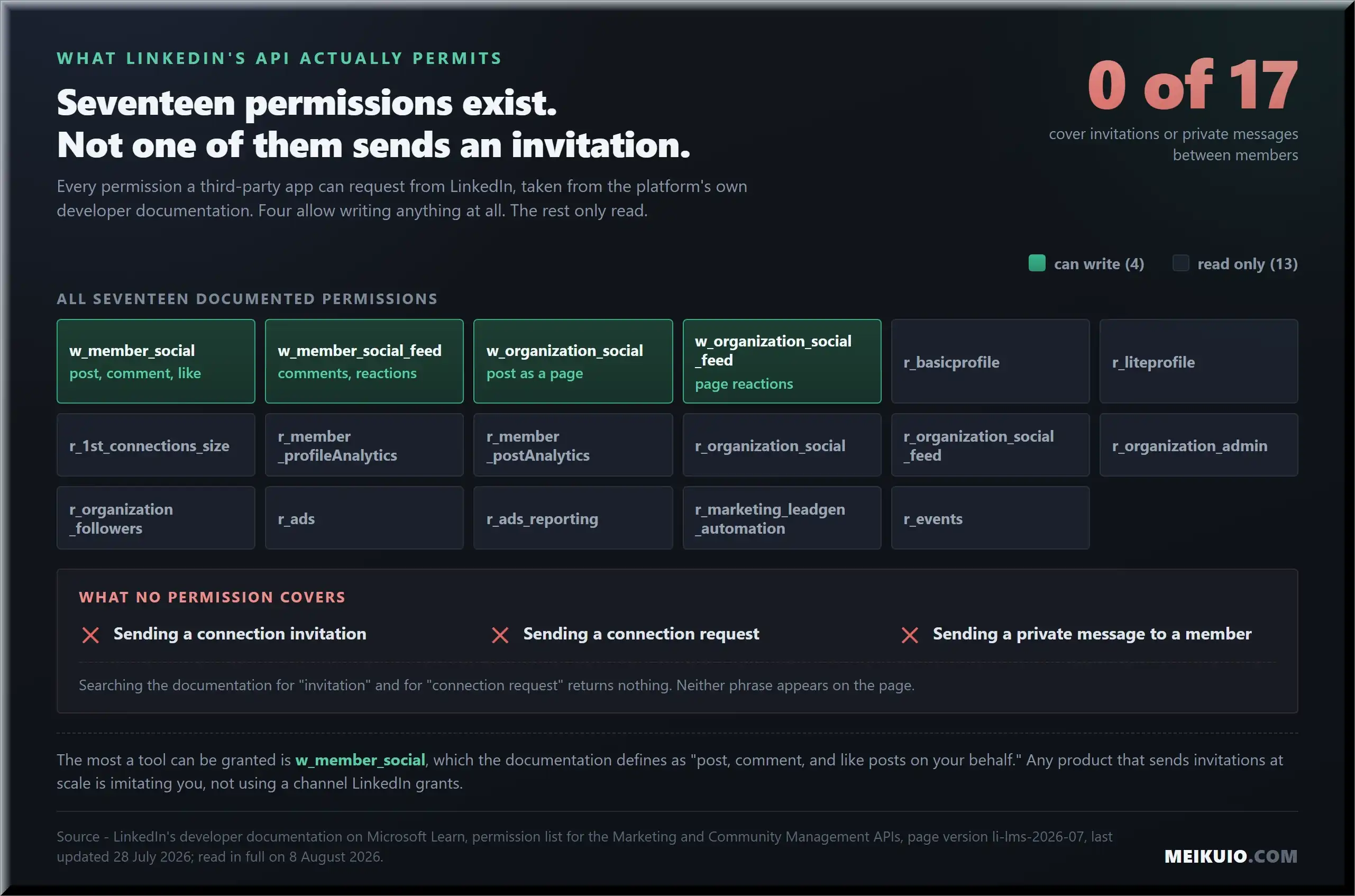
So when a tool sends a hundred connection requests a day, it is not using an official channel LinkedIn forgot to advertise. There is no such channel. It is imitating you, either through your own browser or through a copy of your logged-in session running on someone else’s server. That distinction, how the imitation happens, is the only honest way to sort these products.
How to actually classify these tools
Forget the feature lists. Every tool eventually builds the same features: connection sequences, follow-up messages, a shared inbox, some analytics. Features tell you nothing about the risk you are taking on. Architecture does, and there are only three real categories. It is the same sorting problem we hit with workflow software, where the useful question was never the feature grid but what the thing plugs into, as our AI automation tools breakdown found.
Browser extensions run in your own browser, on your machine, using your real session and your home IP. Cloud senders lift your session cookie onto a remote server and run it there, behind a proxy dressed up as your location. Scrapers pull profile and company data out, either to feed a sender or to build lists. A few products live in more than one box. I will flag those where they come up.
Architecture beats features for one reason. It decides your detection surface, and it decides who is holding your session when something breaks. A browser extension depends on your computer staying on. A cloud sender keeps running while you sleep. That is convenient until LinkedIn sees a login from a data-center IP in a city you have never visited, and reads it for exactly what it is. If you want the same architecture lens applied to publishing instead of outreach, our guide to the best social media scheduler options walks the same ground for content.
Browser-extension tools
Browser-extension tools run in your session, on your IP. That is their whole safety argument, and it is a real one: the traffic looks like you because it is coming from you. The trade is that they only work while your machine is awake and the browser is open, and they still automate actions the platform prohibits.
Dux-Soup is the oldest name here and runs as a Chrome extension driving your own session. Worth knowing before you read its marketing: the word “LinkedIn” does not appear anywhere in its Terms and Conditions. The document caps the company’s total liability to you at the amount you paid or 100 US dollars, and provides the service “as is” and “as available” with “all faults and defects without warranty of any kind.” The tool automates your LinkedIn activity; its contract declines to name the platform it automates.
Waalaxy started as a browser extension and now straddles into cloud sending. It is French, widely used, and it does one thing no other vendor here does: it prints the limit on the price tag. Its Pro plan is 16 dollars per user a month for 300 invitations, Advanced is 32 for 800. Every other tool sells you features and leaves the volume vague. Waalaxy also did something in its own paperwork that I come back to in the terms section, because it is the single most revealing thing I found in this category.
Linked Helper and Octopus CRM round out the serious extension options. Linked Helper runs as a standalone desktop application driving a browser, a heavier setup than a plug-in, and starts at 29.90 a month with a fourteen-day trial. Octopus CRM is the cheapest serious tool in this guide: 6.99 a month at entry, 24.99 at the top, and its own pricing table states every tier is “compatible with” Sales Navigator, which is a polite way of saying you will be buying that too. Both live on the same architectural bet: your session, your machine, your risk.
The extension category also includes the messy stuff nobody lists: engagement pods that automate likes and comments across a ring of accounts, and browser add-ons that inflate post reach. These are the fastest way to trip the “inauthentic engagement” clause, and I would keep them away from any account you care about.
One practical note on the extensions. Because they run in your browser, an update to LinkedIn’s page layout can break them mid-campaign, and a broken selector clicking at nothing is exactly the abnormal pattern detection watches for. The better extensions pause when the page changes. The cheaper ones keep clicking. I did not run them against a live account to see which does which, so I am not going to rank them on it. Ask the vendor directly before you buy: what happens when LinkedIn changes its layout, and does the tool stop on its own. A vendor that cannot answer that in one sentence has told you the answer.
Cloud-hosted senders
Cloud senders are the growth-team favorite because they run without you. Your campaigns keep firing overnight, over weekends, while your laptop is shut. The cost of that convenience is that your session is now living on a server that is not yours, reaching LinkedIn from an IP that is not yours, and the platform has gotten good at noticing the difference. Publishing tools solve the same convenience problem without touching the rules, because posting on your own behalf is one of the four things LinkedIn’s API actually permits.
HeyReach is the current agency darling, built around connecting many LinkedIn accounts at once and rotating sending between them. Its homepage, the day I checked, led with “10x your LinkedIn outbound. Unlimited senders, one fixed cost” and offered to “connect unlimited LinkedIn accounts for one flat fee and automatically rotate sending between them.” Its pricing page, one click away, opens at 79 US dollars per sender. The Agency tier is 999 a month for 25 senders. Unlimited senders exists as a tier and costs 2,999. Hold that thought. Account rotation is the exact pattern platform detection is built to catch, and HeyReach’s own recent history, which I will get to, is the clearest illustration in the category.
Expandi, Dripify, Skylead, and Zopto are the other established cloud names. Expandi publishes exactly one price, 99 dollars a month for its Business plan with a seven-day trial; its Agency and multi-seat tiers carry no number at all and route you to a sales call. Dripify runs 59, 79 and 99 per user on monthly billing, and shows 39, 59 and 79 on the page because the toggle lands on annual. They differ on sequence logic, inbox handling, and how much of the proxy setup they hide from you, but they share the architecture and therefore the core risk. Expandi is also the most candid of the group in its own terms, which I respect, and which I quote directly below.
One thing the cloud category quietly assumes: that a dedicated proxy matched to your city makes the remote session invisible. It does not make it invisible. It makes it less obvious. Those are different claims, and the gap between them is where accounts get restricted.
There is a second assumption worth naming. Cloud tools sell “safe daily limits” as though the number is the risk. The number is one input. A fixed count fired at the same clock time every day from a server in another state is a stranger pattern than a larger number sent by hand, unevenly, across a working day. Detection reads the shape of the behavior, not just the count, which is why no daily number is a safe number and I am not going to hand you one. Any vendor that answers the safety question purely with a limit is answering an easier question than the one you asked.
The agency case deserves its own line, because it is where most of the money in this category sits. Agencies buy cloud senders to run outreach for clients, which means the accounts at risk belong to the clients, not to the agency. Whether that arrangement is disclosed to the client, and who covers a restricted profile, is a question the software does not answer and most service agreements dodge. If you are on the buying side of one of those retainers, ask it in writing before the first campaign runs. The economics of that business, including what those retainers actually have to cover, are laid out in our guide to starting an AI automation agency, and the training market around it gets its own reality check in our review of AI automation agency courses.
Scrapers and data platforms
Scrapers do not send anything. They pull data out: names, roles, company details, sometimes emails and phone numbers, either to build a list or to feed a sender. They are a different legal animal, and LinkedIn treats them differently, because scraping at scale is what the platform actually takes to court.
PhantomBuster is the general-purpose automation and extraction platform most teams start with. Evaboot cleans and exports Sales Navigator lists. Wiza, Kaspr, and Lusha turn profiles into contact data. Clay gets called a LinkedIn tool constantly, and it does not belong on the list: it orchestrates data from many sources and can push leads into a sender, but it does not hold a LinkedIn session or send anything on LinkedIn itself. Calling Clay a LinkedIn automation tool confuses the pipeline with the thing at the end of it.
The scraping distinction is not academic. When LinkedIn sues, it sues scrapers, and it wins. That comes later in this piece, with the case names.
Worth flagging two more products that get filed here wrongly. Taplio shows up on automation lists constantly, and it is a content and personal-branding tool: it schedules posts and writes drafts, it does not run cold outreach. Lemlist is a cold email platform with LinkedIn steps bolted on, which makes it a multichannel sequencer rather than a LinkedIn tool. Both are decent at what they actually do. Both are the wrong answer to the question this page is about, and a list that ranks them next to a cloud sender is telling you it sorted by popularity, not by function.
The newer confusion is the AI SDR category, which markets itself as the successor to LinkedIn automation tools and mostly runs on the same plumbing underneath: a session, a proxy, a message queue, with a language model writing the copy. The model changes what gets said, not what the platform sees. We looked at which of these agents actually run in production rather than in a demo in our piece on AI agent examples, and the same test applies here: ask what it does when the page layout changes.
The comparison that actually matters
Here is what a buyer should be comparing across LinkedIn automation tools. Not features. Six things: how the tool reaches LinkedIn, whether it needs a paid Sales Navigator seat to be useful, whether it rotates across multiple accounts, what its own terms say about who eats the risk, whether it refunds you if your account gets restricted, and whether it publishes any activity limits at all. On that last one, exactly one vendor in this guide prints the number on the price tag, and it is Waalaxy.
One term in that list needs defining, because every tool assumes you know it. Sales Navigator is LinkedIn’s own paid product, sold by LinkedIn, permitted by LinkedIn, and it does the finding rather than the sending: advanced search filters, lead lists, alerts on target accounts. The third-party tools sit on top of it and do the part LinkedIn does not sell, the automated sending. That is the actual division of labour, and it explains why the two costs stack instead of replacing each other.
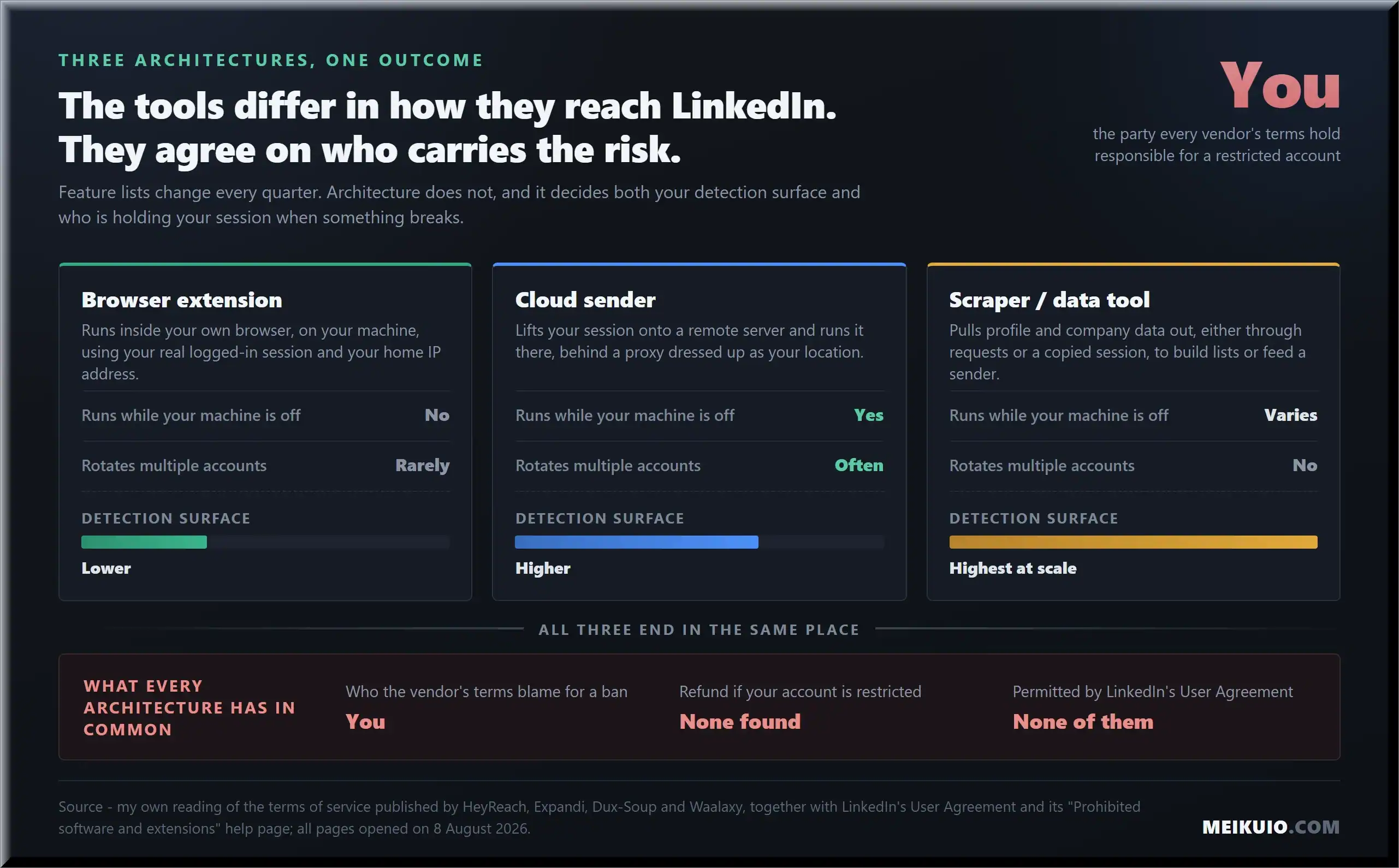
The bottom row is the one to sit with. Across every architecture, the refund answer is the same, and it is not the one the sales page implies.
What the vendors’ own terms say about your account
The marketing and the contract are two different documents, and they do not agree. The marketing says “safe.” The contract says the risk is yours. I read the terms of service behind four of the biggest LinkedIn automation tools, and they told a more honest story than any of their homepages.
HeyReach, whose terms took effect on 19 November 2025, puts it in capital letters: “PROVIDER IS NOT RESPONSIBLE FOR ANY ADVERSE ACTION TAKEN AGAINST THE CUSTOMER BY A THIRD-PARTY PLATFORM.” Elsewhere it says the customer “is responsible for complying with any relevant terms and conditions of the Third-Party Platform,” that the provider “may disable integrations of the Services with any Third-Party Platform at any time with or without notice,” and that “all fees are non-refundable.” The footer adds that HeyReach “is not associated with, or endorsed by, the LinkedIn Corporation.”
Expandi is the most direct of the group, and I will give it credit for that. Its terms state flatly: “Expandi is not authorized as an official feature of LinkedIn,” and “Expandi is not an official product published by LinkedIn.” On who carries a ban: “Expandi is not responsible or liable, in case of a banning of the user’s account due to the activities executed by the user.” Refunds: “Unless required by law, the subscription fees are nonrefundable.”
Dux-Soup, as noted, does not mention LinkedIn in its terms at all, and caps liability at 100 US dollars. And then there is Waalaxy, which is where this gets interesting.
Waalaxy used to admit in writing that LinkedIn bans this software. That admission is no longer in its terms.
Here is the timeline, and both ends of it are documented. The Waalaxy terms archived on 5 December 2023, dated “last update 16/03/2023,” contained this sentence: “LinkedIn does not allow automation tools, third party software and extensions. Any violations of LinkedIn’s user agreement can result in warnings, temporary and / or permanent bans of user accounts. By using Waalaxy, the user agrees that the use of Waalaxy is at the user’s own risk and Waalaxy will be held harmless from claims for any resulting warnings, loss of data or banned accounts.”
That old page now returns a 404. The current terms live at a different address, are written under French law, and I read them line by line. The admission is gone. There is no sentence saying LinkedIn does not allow these tools. There is no “at the user’s own risk.” The word “refund” does not appear on the page. What the customer once got in plain English, the customer no longer gets. I am not going to tell you why the wording changed, because I do not know. I can only tell you that it did, and show you both versions.
What a restriction actually looks like
A LinkedIn restriction is not a warning email you can ignore. It is a screen that logs you out and holds your account until a set date. The people it happens to describe the same thing over and over in public forums, and their accounts are the ones the vendors do not put in testimonials.
One of the clearest examples comes from a member of the r/linkedin community whose notice read: “We’ve restricted your account until February 14, 2024, 3:37 PM PST because we detected the use of software that automates activity. To protect our members’ privacy and help foster authentic interactions on LinkedIn, our User Agreement prohibits the use of these tools.” The poster had been using a browser extension for three weeks. The restriction arrived with no warning, on a normal day.
The most striking reply in that thread came from an account labeled “LinkedIn Official.” Its advice was blunt: “To help avoid this in the future, it’s best to turn off that extension and any other automation tools you might be using with LinkedIn.” That is the platform, in public, telling a paying customer of an automation tool to uninstall it. Every vendor homepage in this category promises the opposite. One of those two parties controls your account.
One more detail worth carrying with you: in the same thread, a different user got restricted for “an excessively high number of member profiles or pages” viewed, and said plainly, “I did not use any scrapers, bots, or automation software.” The detection is not perfect. It catches heavy manual use too. Which means the safety margin is thinner than the tools imply. As for getting the account back, LinkedIn publishes no criteria and no timeline for appeals that I could find, which is its own answer.
If your business runs on inbound conversations, this is the risk that should worry you more than the monthly fee. Losing the account means losing the network, the recommendations, and the history. That is also why the way LinkedIn’s feed surfaces your content, covered in our breakdown of the LinkedIn algorithm in 2026, is worth more attention than most automation features. Reach you earn from posting cannot be taken away by a detection system, and it compounds; sending volume does neither.
If your account is restricted right now
Stop the automation before you do anything else. If it is a browser extension, disable it, and disable every other LinkedIn extension you have, including the ones you forgot were installed. Most LinkedIn automation tools leave something running that you are not looking at. If it is a cloud sender, uninstalling nothing helps: the campaigns are running on the vendor’s server, not your machine, so log into the tool and pause them there. An account that stays locked while a server keeps sending on its behalf is the worst version of this.
Then read the notice properly. It names a date the restriction lifts. It carries a contact link. Use that link. Do not open a second account: a second profile is its own violation, and it turns a temporary problem into a permanent one. Keep your message short and factual: you used a third-party tool, you have removed it, you are asking for the restriction to be reviewed. Nothing you write speeds up a system that publishes no timeline, but a clean account with the tool gone is the only version of your case worth making.
What nobody can promise you is the outcome. LinkedIn publishes no criteria for reinstatement and no service level for appeals, and I found none while researching this. Plan for the account being unavailable through the date on the notice at minimum, and move anything urgent, live deals, interviews, client threads, to email or phone in the meantime.
Who LinkedIn actually sues, and who it doesn’t
LinkedIn does take companies to court, but not the outreach tools. It sues scrapers, the operations pulling member data out at industrial scale, and it wins. Knowing the difference tells you what the platform actually fears, and it is not a browser extension sending fifty invites a day.
The landmark case is Proxycurl, a scraping API. In January 2025 LinkedIn filed suit. By July, Proxycurl was shutting down. Its founders wrote the goodbye post themselves: “In January earlier this year (2025), LinkedIn filed a lawsuit against Proxycurl. Today, we are shutting Proxycurl down.” They were candid about why fighting was hopeless, citing “The American Rule,” which meant they could not recover legal fees even if they won, and the plain fact that “LinkedIn, owned by Microsoft, has more or less an unlimited war chest.” LinkedIn’s own newsroom confirmed the resolution, with a statement from its VP of Legal.
The platform’s own transparency reporting points the same way. Its community report breaks enforcement into four buckets: fake accounts, spam and scams, content violations, and copyright. There is no automation category and no scraping category at all. Automated outreach, when it gets counted, lands under spam, which the report defines as “inappropriate commercial activity and repetitive communications or invitations, often meant for financial gain.” So when a blog tells you what percentage of automation users got restricted last quarter, ask where that number came from, because the platform does not publish one.
There is a pattern in the litigation, and it is the tell. When LinkedIn genuinely goes after a company, three things exist: a court docket, a press release from LinkedIn, and usually a statement from the defendant. When a “lawsuit” against an outreach vendor circulates online, check for those three things. In the cases I traced, they were absent. Which brings us to the story the whole category is built on right now.
The ban story nobody actually sourced
In 2026 the automation space has one big news story: LinkedIn “banned HeyReach” and issued a “cease-and-desist,” and tens of thousands of users lost access. It is repeated everywhere. I went looking for the original document behind it, and there isn’t one. What exists is one real event, wrapped in a lot of secondhand retelling.
The real event: on 25 March 2026, LinkedIn removed HeyReach’s company page and a few of its executives’ personal profiles. We know this because HeyReach’s CEO wrote a public post about it the same day. His words: “You may have noticed LinkedIn recently removed our company page along with a few of our personal profiles (CTO, CRO, CMO).” He was calm about it: “This has zero impact on you or the product. Your automations are running exactly as before. Your LinkedIn account is completely safe.” He even claimed, “LinkedIn can’t detect who uses HeyReach,” and mentioned the company had crossed 13 million dollars in annual recurring revenue.
Notice what is not in that post. No cease-and-desist. No lawsuit. No thirty thousand banned users. The founder describes a page takedown, an administrative action, and then goes on to name every other tool it has happened to: “Apollo, Seamless, Evaboot, Lemlist, LGM.” The blogs that turned this into a legal war are, almost every one of them, run by companies selling a competing tool. The “40% of accounts got restricted” figure that travels with the story traces back to two sources, both of which sell in the same market, and one of which measured a test batch of a couple hundred accounts.
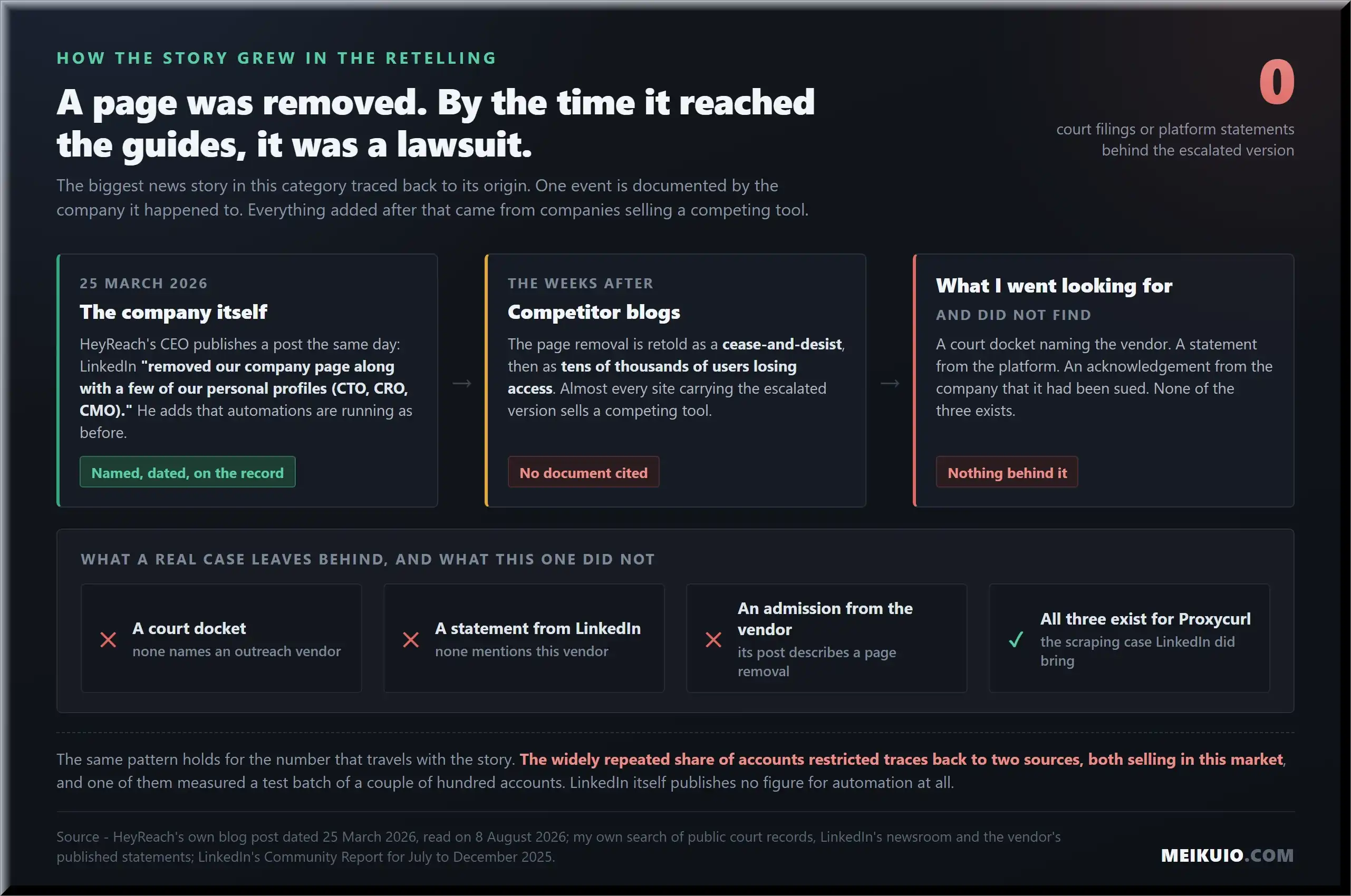
Here is the part that should stay with you, though. The founder’s post says “your LinkedIn account is completely safe.” His own company’s terms of service say the provider is “not responsible for any adverse action taken against the customer by a third-party platform.” Both sentences are from the same company. Only one of them is legally binding, and it is not the reassuring one.
Who writes these lists, and what they earn
I took the six guides ranking for this search and its close variants, opened each one, and counted. All six are published by companies that sell a tool in this category. Four of the six rank their own product first. The only page in the results that is not written by a seller is a Reddit thread, which tells you something on its own. And the deeper problem is not bias, it is omission: not one of the six mentions LinkedIn’s prohibited-software page, and not one uses the word “unauthorized.”
The money explains the shape of it. These vendors pay generous affiliate commissions, and the review sites are paid on referral. Expandi’s affiliate program advertises a sliding scale: “If you refer up to 10 referrals, you will get 20% commission. For over 10 new Expandi users, 25% commission. If you refer over 20 users, 30% + Custom commission for VIP Affiliate,” with a 60-day tracking cookie. Waalaxy’s program is more aggressive still, promising affiliates they can “earn up to 50% of your affiliates’ payments,” with lifetime recurring commissions.
Google is showing the consequence of that in the results themselves. On the first page for this query, a Reddit thread ranks second, above most of the vendor guides. In the related searches underneath, Google suggests adding the word “reddit” to the query. That is a search engine telling you, in its own way, that people read these lists and then go looking for someone who is not selling anything. The demand for an independent answer is measurable. The supply, judging by the guides I opened, is a forum thread.
Maximum affiliate commissions are a separate percentage unit: Expandi up to 30% (20% for first ten referrals, 25% above ten, 30% above twenty; 60-day cookie); Waalaxy up to 50%, recurring lifetime commissions. Those rates are not added to page counts.
When a list pays up to half of your subscription to whoever sent you, “best” stops meaning best. It means best-converting. That is not a conspiracy, it is an incentive, and once you see it you cannot unsee it in the rankings.
The layer under the tools
There is a whole tier of products that never shows up in a “best tools” list because it is infrastructure, not software, and agencies running volume buy all of it. Anti-detect browsers like GoLogin, Multilogin, and AdsPower create isolated browser fingerprints so many accounts can run from one machine without looking connected. Unlike everyday workspace tools where profile separation is built for personal productivity (as in our comparison of Arc Browser alternatives in 2026), anti-detect browsers exist solely to evade platform scrutiny. Residential proxy providers sell IP addresses that look like home connections. And at the far end, some services rent out aged LinkedIn accounts, so the profile taking the risk is not even yours.
This layer tells you what serious automation actually costs and actually requires. It is not one subscription. It is a stack, and every layer of the stack exists to make the automation harder to detect, which is a tacit admission that the automation is against the rules. The rented-account market is the logical endpoint: pay so that when an account gets burned, it is a stranger’s ten-year profile, not yours. I am reporting that this market exists. I am not recommending you touch it.
The pattern repeats all the way down the stack. These providers describe themselves in platform-neutral language, managing multiple accounts, isolating browser profiles, supplying residential addresses, and they push the choice of what you do with it onto you. Some tell you plainly to respect each platform’s terms, on the same page where they sell you the tool that makes breaking those terms harder to spot. Every layer, a different company, and the same answer about who carries the risk: you do.
What’s actually free, and what the platform gives you
People search for free LinkedIn automation tools constantly, so here is the honest answer. The free tiers of these tools are real but thin, usually a daily action cap low enough that you will hit it in one sitting. And “free” carries the same account risk as paid; the platform does not care what you paid the vendor.
The genuinely free option is the one nobody selling a tool wants to mention: LinkedIn’s own product does a lot without any third-party software. Saved searches, alerts on target accounts, and the native content and connection tools cover a surprising amount of prospecting inside the rules. It is slower. It is also the only method with zero chance of a restriction, because it is the platform using itself. If your outreach is low-volume and relationship-led, the free path may genuinely beat a paid tool once you price in the account risk.
There is a third option that gets ignored because it is not a tool at all: post, and let the right people come to you. Consistent posting is fully permitted, it compounds, and it cannot be switched off by a detection system. What actually moves that reach is covered in our work on how LinkedIn’s feed ranks content, and for most solo operators it produces better conversations than any of the best LinkedIn automation tools, at a fraction of the risk.
For the workflows around outreach that do not touch LinkedIn’s rules at all, ordinary automation platforms are a cleaner spend. Our roundup of the best AI automation tools covers the connect-your-apps category, and if you are building an outreach operation as a business, the math in our guide to starting an AI automation agency is a more useful read than any tool list.
What this costs in year one and year two
The sticker price on the tool is the smallest number in this decision, and the listicles quote only that one. The real annual cost is a stack, and most of the stack is invisible until you are inside it.
Here is what the LinkedIn automation tools in this guide actually ask for. I opened every pricing page on 8 August 2026 and read the numbers off the live page, monthly billing where both options exist, because monthly is what you pay in month one.
Two of those rows deserve a second look. HeyReach sells itself on the line “Unlimited senders, one flat monthly fee,” and its pricing page opens at 79 US dollars per sender, with the Agency tier at 999 dollars for 25 senders and an Unlimited tier at 2,999. Flat, in that sentence, means flat per sender. And Dripify shows 39 dollars per user when you land on the page, because the toggle defaults to annual billing; its own FAQ states the monthly figures are 59, 79 and 99. Paying month to month costs about half again more.
Then add Sales Navigator, because most of these tools are close to useless without it. Here the trail goes cold in a way worth naming: LinkedIn’s own plan-comparison page lists Core, Advanced and Advanced Plus with no price at all, sends you to a separate page to “view Core pricing,” and that page asks you to log in first. Advanced Plus does not get a number even then, it gets “request demo for pricing.” The mandatory second subscription in this stack is the one you cannot price without an account.
For a cloud sender running multiple accounts, add proxies. For an agency hiding many accounts on one machine, add an anti-detect browser. Year two, expect the tool’s renewal price rather than its intro price, and expect Sales Navigator to renew at its own rate on its own clock.
Then add the part that is not a subscription at all: your time. Someone has to write the sequences, watch the inbox, and clean up the replies that automation cannot handle, which are the only replies that matter. Teams that buy one of the best LinkedIn automation tools expecting it to replace that work end up paying for the software and doing the work anyway. The tool compresses the sending. It does not compress the selling.
Note
Every price above was read on the vendor’s own live pricing page on 8 August 2026, monthly billing unless stated. Prices in this category move, promotional banners run constantly, and several pages default their toggle to annual billing, which makes the headline number look lower than what you pay in month one. Check the page before you buy, and check which toggle it is showing you.
The point stands without the exact figures: budget for the stack, not the sticker. A tool that looks cheaper than a competitor often just hides more of the stack, pushing proxies and Sales Navigator onto you as “requirements” rather than line items. The tool that names its full stack up front is usually the cheaper one by the time the invoices land.
There is one more cost nobody budgets, and it is the one that actually bites: the cost of a restricted account while you wait on an appeal with no published timeline. Price that as lost pipeline, not as an inconvenience. If a month without your LinkedIn account would cost you more than a year of the tool, the tool is not cheap at any price, and no amount of comparing the best LinkedIn automation tools against each other changes that arithmetic.
How we compared these tools
Three things went into this, and it is worth being plain about all three. I read LinkedIn’s own documents: the User Agreement, the prohibited-software help page, the full developer permission list, and the platform’s own transparency report. I read the vendors’ own terms of service, on their live pages, and pulled an archived version where the current one had changed. And I read first-person accounts from people whose accounts were restricted, in their own words, in public.
I also opened every pricing page myself on 8 August 2026 and read the numbers off the live page rather than repeating them from a comparison site, which is how stale prices spread in this category. Where a page defaulted its toggle to annual billing, I recorded both figures.
What I did not do is buy and run each tool against a live account, because that is the exact behavior the platform restricts accounts for, and I was not going to burn a real profile to test a claim I could verify from documents. Where a fact came from a vendor’s blog rather than a primary source, I left it out. Where I could not open a court docket myself, I did not print a case number. The gaps are honest gaps, and I would rather show you a smaller set of things I am sure of than a larger set I am guessing at.
Which one fits you, and when the answer is none
If you are set on using one of the best LinkedIn automation tools despite everything above, match the architecture to your situation and go in with your eyes open. Here is how I would decide, and where I would stop.
If you run a single account and value it, a browser extension is the least reckless choice, because it acts from your real session and your real IP. Keep the volume low, keep the daily numbers well under what the tool allows, and accept that even that is against the rules. If you run an agency, the architecture that fits you is a cloud sender, because nothing else rotates accounts or survives your laptop closing, and HeyReach, Expandi, Dripify, Skylead and Zopto are the established names in that tier. Buy on two things the feature pages bury: whether the vendor states in its terms who carries a restricted account, and whether its proxies come included or land on you as a separate bill. Then understand what you are buying into. Rotation is the pattern detection is tuned for, the profiles at risk belong to your clients, and a page takedown or a wave of restrictions is not a tail risk in this business, it is a recurring event the vendors themselves describe as normal.
If you are a sales rep at a company, ask one question before you install anything: whose account is it. You are the one who signed up for LinkedIn, you keep the profile when you change jobs, and the quota belongs to someone else. Every vendor contract I read puts a restriction squarely on the account holder, which is you, not your employer and not the tool. Get the answer in writing or use the platform’s own publishing and scheduling route instead, where the worst case is a wasted hour rather than a lost profile.
If you are a recruiter or a consultant whose whole pipeline arrives through the profile, treat the best LinkedIn automation tools as a leverage play on an asset you cannot insure. The tool multiplies your output while it works. It does not replace the network if the network goes away, and there is no vendor on this page that will make you whole. That asymmetry is the entire decision, and it does not get better with a bigger plan.
And here is when the answer is none. If the LinkedIn account is the business, the founder’s face, the ten-year network, the source of inbound, then the math does not work. The upside is more messages sent. The downside is losing the asset the messages depend on, with no refund and an appeal process that answers to nobody’s schedule. When the thing you would automate is the thing you cannot afford to lose, the tool is not the deal it looks like. Book the meetings you win a slower way, and hand the follow-up to something that does not touch LinkedIn’s rules, like the scheduling options in our Calendly alternatives guide, or the production-grade systems in our look at AI agent examples that run where the rules are yours to set.
Field notes
- The rule: LinkedIn’s User Agreement and its “Prohibited software and extensions” page ban this entire class of tool; that help page carries the timestamp “Last updated: 2 years ago”, so 2026 changed enforcement, not policy.
- The API: 17 documented permission scopes, 4 of them writable, and not one covering invitations or member messages; the words “invitation” and “connection request” return nothing on the page.
- The audit: of the 6 guides ranking for this search, 6 of 6 are published by sellers, 0 of 6 mention the prohibited-software page, 0 of 6 use the word “unauthorized”, 2 of 6 quote the User Agreement, 1 of 6 says what to do with a restricted account.
- Vendor terms: every set of terms places account risk on the buyer, no refund for a LinkedIn restriction was found anywhere, Dux-Soup caps liability at 100 US dollars, and Waalaxy removed its written admission of the ban between its 2023 and current terms.
- Prices, checked 8 August 2026: entry tiers run 6.99 to 99 US dollars a month; HeyReach charges 79 per sender while advertising “unlimited senders, one flat monthly fee”; Dripify costs about half again more month to month; Sales Navigator shows no price until you log in.
- Affiliate rates: Expandi pays 20 to 30 percent with a 60-day cookie; Waalaxy advertises up to 50 percent with lifetime recurring commissions.
- Sources: LinkedIn User Agreement and its Prohibited software and extensions help page; LinkedIn developer documentation, page version li-lms-2026-07; LinkedIn Community Report for July to December 2025; the vendors’ own terms of service and pricing pages, all read on 8 August 2026.
Frequently Asked Questions
Is LinkedIn automation safe in 2026?
No, not in the sense the vendors imply. Every tool in this category violates LinkedIn’s User Agreement, which prohibits software that automates activity on the site. LinkedIn can restrict or shut down an account for using one, and it says so on its own help page. The tools reduce the odds of detection; none removes the rule they are breaking.
Can LinkedIn ban you for using automation tools?
Yes. LinkedIn’s prohibited-software page states that members using these tools “risk having their accounts restricted or shut down.” Restrictions arrive without warning and lock the account until a set date shown in the notice. The detection also catches heavy manual activity, so even careful use is not a guarantee, and LinkedIn publishes no appeal timeline.
Does LinkedIn have an official API for sending connection requests?
No. LinkedIn’s developer documentation lists seventeen permission scopes, and none authorizes sending a connection invitation or a member-to-member message. The four scopes that can write anything are limited to posting, commenting, liking, and reacting. Any tool that sends invites or messages is imitating you, not using a sanctioned channel, because no such channel exists.
What happens when your LinkedIn account gets restricted?
You get logged out and see a notice holding the account until a specific date, citing detected automation software. The notice tells you to remove the automation and offers a contact link. To appeal, you contact support and wait, and LinkedIn publishes no criteria or timeline for that process. During the hold, all inbound and outbound activity on the account stops.
How long does a LinkedIn restriction last?
A temporary restriction names a specific end date in the notice itself, sometimes days out. Beyond that date, nothing is guaranteed: LinkedIn publishes no timeline for appeals and no criteria for reinstatement. Repeat activity escalates the outcome, up to permanent restriction, so a second offense is riskier than the first.
Are cloud-based tools safer than browser extensions?
Not inherently, and often the reverse. A browser extension acts from your real session and home IP, so its traffic looks like you. A cloud sender runs a copy of your session on a remote server behind a proxy, which is convenient because it runs without you, but a login from a data-center IP is a clearer signal to detection. The safer-sounding option carries the more visible footprint.
Do you need Sales Navigator to use these tools?
For serious volume, usually yes. A free LinkedIn account hits search limits and the commercial-use cap quickly, and the targeting data these tools rely on sits behind a Sales Navigator seat. Octopus CRM states on its own pricing table that every tier is compatible with Sales Navigator, which tells you what it expects you to own. Budgeting for it is awkward, because LinkedIn’s comparison page shows no price and the pricing link asks you to log in first.
Has LinkedIn ever sued an automation vendor?
LinkedIn sues scrapers, not outreach tools. The clearest case is Proxycurl, a scraping API LinkedIn sued in January 2025; it shut down by that July, and its founders said so publicly. When a real lawsuit exists, there is a court docket and a LinkedIn statement. The widely repeated claim that LinkedIn sued a popular outreach tool in 2026 has neither behind it.
What are the best free LinkedIn automation tools?
The free tiers of the paid tools are real but capped low, and they carry the same account risk as the paid plans. The genuinely free option is LinkedIn’s own product: saved searches, account alerts, and native connection tools handle a lot of low-volume prospecting inside the rules. It is slower, and it is the only method with no restriction risk, because it is the platform using itself.
My Take
I would hand a browser extension to exactly one person: the solo operator with a single account, a low daily volume, and a clear head about the fact that even this breaks the rules. Run from your own session, keep the numbers boring, and treat every message as if LinkedIn is watching, because it is. That person can get real value out of a tool here without betting the profile.
I would keep it away from anyone whose LinkedIn account is the business. If the network is the asset, the founder is the brand, and inbound is the pipeline, then the downside is not a wasted subscription, it is the whole thing. No tool on this page refunds you a restricted account, and the platform itself told a paying customer, in public, to uninstall the software. When the thing you would automate is the thing you cannot afford to lose, the honest best LinkedIn automation tool is the one you do not install.