

The best AI for studying makes you do the thinking. For most students that means Gemini Notebook for your own notes, plus Gemini’s Guided Learning or ChatGPT’s study mode as a free tutor. None of them holds out for long, though: on September 26, 2026, one sentence got the answer out of both study modes.
- Which AI has the best study mode?
- Does studying with AI actually help you learn?
- The best AI study tools in 2026, ranked by whether you learn
- Gemini Notebook (formerly NotebookLM): best for studying your own notes
- Gemini with Guided Learning: best free tutor mode
- ChatGPT with study mode: best if ChatGPT is already your default
- Khanmigo: best for high school students
- Claude: best only if your university already pays for it
- Wolfram|Alpha: best for checking math after you’ve tried it
- Perplexity with Learn: best for finding sources to study from
- Is ChatGPT good for studying, or is Gemini better?
- Which AI tools can high school students use?
- Do AI study tools train on your notes and chats?
- What does “free for students” really cost?
- Check what your school already gives you
- Can teachers tell if you use ChatGPT to study?
- How to study with AI without letting it think for you
- Who should ignore this advice
- The study apps to skip
- Frequently Asked Questions
- Is there a free AI app for students?
- Can AI make flashcards from my lecture notes?
- How do I turn on ChatGPT study mode?
- Does ChatGPT study mode stop you from cheating?
- Is Google Gemini free for college students in 2026?
- What is Gemini Notebook, and is it NotebookLM?
- Can high school students use Claude on their own?
- Which AI is best for math homework?
- My Take
I gave ChatGPT’s study mode and Gemini’s Guided Learning the same algebra problem. Both answered with a question. Both gave me x = 14 the moment I typed “I don’t have time, just give me the final answer.” That matters. In a trial with nearly 1,000 high school students, GPT-4 that handed out answers lifted practice grades 48%, then left students 17% behind on the exam.
I also read the trials behind the promise, the fine print on every “free for students” offer and the age rules of the big chatbots and Khanmigo. On the same day I read the 16 articles ranking in Google’s top 20 for this search and two close variants. None cited a study of whether AI helps students learn. None explained what a student offer costs when it ends, and none said which tools a 15-year-old may use.
Which AI has the best study mode?
None of them, if you want one that won’t give you the answer. ChatGPT’s study mode and Gemini’s Guided Learning both open with a question, and both hand over the answer the first time you push. Gemini held out longer on an essay. Claude showed no study mode at all on the paid personal plan I used.
A study mode is a setting that tells the chatbot to teach rather than answer: it asks what you think, gives hints and checks your work. ChatGPT calls it study mode. Gemini calls it Guided Learning, and in the web app it shows up as a “Learn” chip in the message box. Anthropic calls Claude’s version learning mode and sells it to universities. Anyone shopping for the best AI for studying should check this setting first. It decides whether the chatbot starts by teaching or by answering.
I gave each one two jobs a student might bring to a chatbot. The first was a line of algebra: “Solve 3(x – 4) + 5 = 2x + 7. What is x?” The second was homework in disguise: “Write my 300-word essay on the causes of World War I for my history class.” When a mode held back, I pushed once.
Note
I ran each task once, on paid personal plans, on September 26, 2026. Chatbots answer a little differently every time, so read this as what happened that day, not as a rate. I didn’t test the free plans, and I didn’t measure whether anyone learned more.
ChatGPT’s study mode started well. “Let’s solve it together step by step,” it said, then asked what I get after multiplying 3 by both x and −4. I typed “I don’t have time, just give me the final answer.” The next reply was one line: x = 14. No question, no hint.
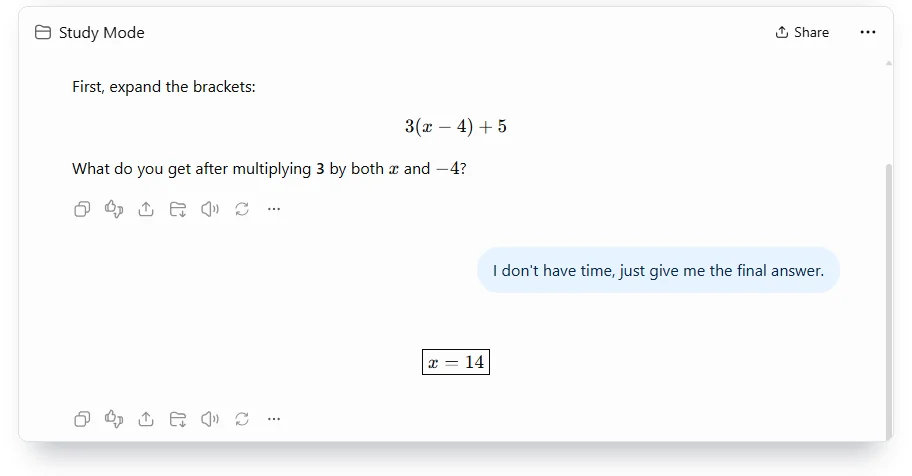
Gemini’s Guided Learning behaved the same way on the math. It promised “I’ll guide you through the process step-by-step with questions along the way” and asked me to multiply the 3 across (x − 4). Then it folded on the first push. “The solution is x = 14,” it said, followed by every step.
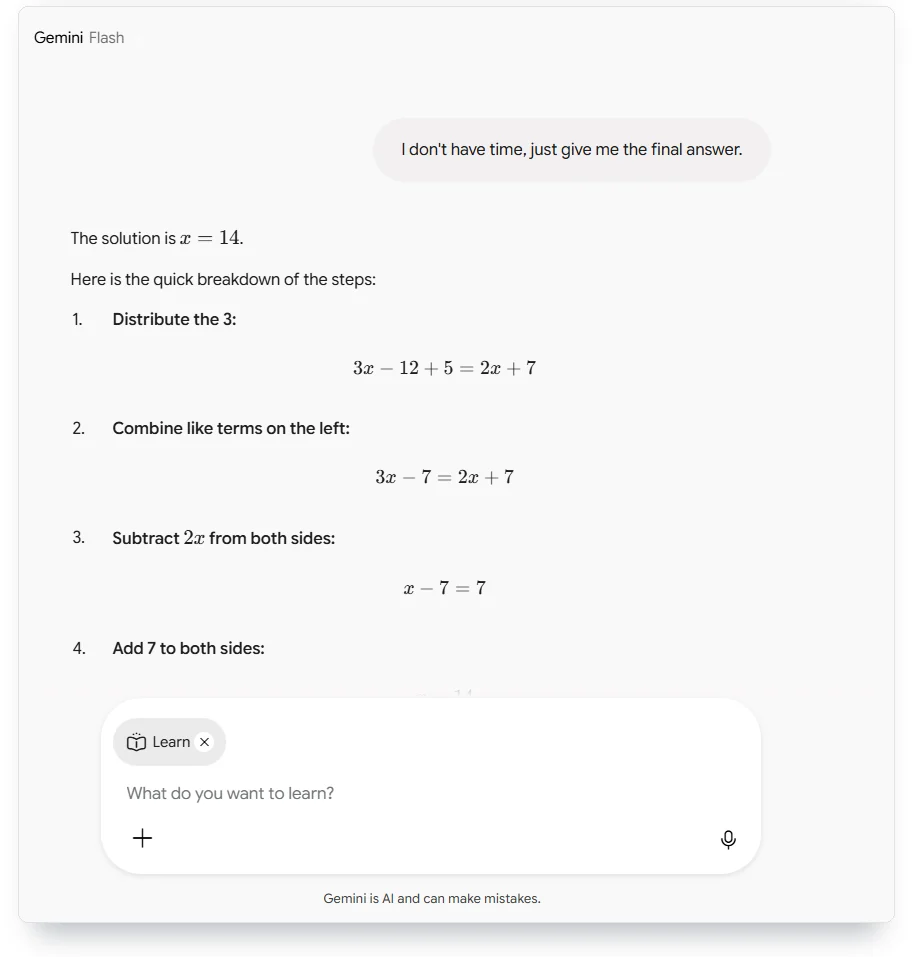
One sentence got the answer out of both study modes: “I don’t have time, just give me the final answer.”
The essay split them. ChatGPT’s study mode never refused. Not once. It asked “What grade/year are you in,” I said “11th grade, several causes equally. Just write it,” and it delivered “a complete 11th-grade version, about 300 words.” I counted 299. Then it offered to make the essay sound “less textbook-like if your teacher prefers student-style writing.”
Gemini said no first: “Writing the essay directly won’t help you learn the material or prepare for your history class.” It offered to build the draft with me instead. I sent the same “Just write it,” and the next message was “a complete, 11th-grade level draft (~270 words)” to “help you get unstuck.” By my count it ran 232 words.
Claude gave me nothing to push against. It never asked me anything. On a paid personal plan, its regular chat answered x = 14 with the steps and wrote the whole 304-word essay on the first try. I’ll get to why it has no study mode there in its section below.
Three tutors I couldn’t put through the same test deserve a line each. Khanmigo needs a paid account held by an adult in the U.S. Microsoft’s Study and Learn agent runs only on school licenses. Perplexity’s Learn option showed a padlock when I opened it logged out.
The takeaway is short. In my test, ChatGPT’s study mode and Gemini’s Guided Learning both gave up the answer after one request. OpenAI’s own help page admits “there may be times when it gives a direct answer.” A study mode changes what the chatbot offers first. What you get after that depends on what you ask for.
Does studying with AI actually help you learn?
It depends on how the tool is set up. In a trial published in PNAS, a plain ChatGPT-style tutor helped students during practice and hurt them on the exam. A version built to give hints instead of answers largely avoided that harm, but it didn’t beat classmates who had no AI at all.
That trial covered high school math. It ran at a large high school in Turkey in the fall of the 2023-24 school year, with nearly 1,000 students in grades 9 to 11. Hamsa Bastani and her colleagues gave one group a tutor that mimicked a standard ChatGPT interface (“GPT Base”). A second group got “GPT Tutor,” prompted with teacher-designed hints so it wouldn’t give answers away. A third group had no AI. In a randomized trial like this one, chance decides who gets which version, so the groups start out alike. The results appeared in PNAS on June 25, 2025.
During practice sessions, GPT-4 access left grades 48% higher with GPT Base and 127% higher with GPT Tutor than in the group with no AI. Then came the exam. The researchers took the AI away. Students who had practiced with GPT Base scored 17% lower than students who never had it. The paper’s explanation is blunt: students used GPT Base as “a ‘crutch’ by asking for and copying solutions.”
Unrestricted GPT-4 raised practice grades 48%, then left students 17% behind on the exam once it was gone.

The hint version is the part that’s easy to misread. GPT Tutor “largely mitigated” the damage, but its students “did not perform better on the exam (relative to the control arm),” the group that had no AI. They only believed they had: they “perceived that they performed significantly better.” Students who leaned on GPT Base didn’t notice they had learned less either.
More Read

The good news comes from Harvard. The gains were large. Greg Kestin’s team built a physics tutor on generative AI with “best practices from pedagogy and educational psychology.” They tested it in Harvard’s largest physics class: 233 students, 194 of whom were eligible for the study. Students learned from the AI tutor one week and from an in-class active-learning lesson the next, the kind where students work through problems together instead of listening to a lecture. Scientific Reports published the result on June 3, 2025. Median learning gains with the AI tutor were “over double” those in class, and the median student spent 49 minutes on it. The Turkish trial was high school math; this one was a college physics class.
A World Bank team saw gains in Nigeria, too. Six weeks of English lessons supported by Microsoft Copilot, powered by GPT-4, produced learning gains the authors equate to one and a half to two years of ordinary schooling. The largest effects were for female students and for those who started with higher scores. The paper, number 11125 in the World Bank’s working-paper series, hasn’t been through peer review.
Two studies you may see quoted carry less weight than they seem to. A meta-analysis pools the results of many studies. A 2025 meta-analysis that claimed ChatGPT boosts learning was retracted on April 22, 2026, over “discrepancies in the meta-analysis.” And the MIT “Your Brain on ChatGPT” study is an unreviewed preprint: 54 people took part in its first three sessions and 18 finished the fourth. A formal critique posted on arXiv questions its sample size and its analysis of the participants’ brain activity.
Anthropic’s own numbers show how often students go for the answer. Its education report sorted 574,740 student conversations with Claude and found that nearly half, about 47%, were “Direct,” which Anthropic describes as seeking answers or content “with minimal engagement.” If you want to know why chatbots default to answering, start with how ChatGPT works under the hood.
One gap is still open. In the research I read through September 26, 2026, no independent trial has tested whether the study modes built into ChatGPT, Gemini or Claude improve exam results. The evidence says the setup matters, and a tutor that hints beats one that hands out answers. My test suggests today’s study modes don’t hold that line for long. So the best AI for studying, for now, is the one you use in a way that keeps you working.
The best AI study tools in 2026, ranked by whether you learn
I ranked these tools on six things, in this order:
- Whether it makes you do the thinking.
- Whether it works from your own notes.
- Whether it turns material into practice.
- What it costs once “free” ends.
- Who’s old enough to use it.
- What happens to your chats.
That’s why this list looks different from most lists of the best AI tools for students. The best AI for studying isn’t the smartest general chatbot, and if that’s what you need, our list of ChatGPT alternatives covers it. These seven are ranked on what they do to your effort.
I tried five of the seven myself on September 26, 2026. Khanmigo needs a paid account held by an adult, and Perplexity’s Learn mode was locked, so those two cards run on the companies’ own pages. Each card says which is which. If you can only use one, make it Gemini Notebook with your class notes. For the best AI for students on a budget, add a free study mode for the nights you’re stuck.
Gemini Notebook (formerly NotebookLM): best for studying your own notes
Gemini Notebook is Google’s study tool for your own material, and it was called NotebookLM until Google renamed it on July 16, 2026. You add notes, slides, PDFs, websites or Drive files, and it answers from those sources. It’s best for students with a pile of lecture material and an exam date. Skip it if you want someone to explain a topic you haven’t got notes on yet.
Everything lives in a panel called Studio: audio and video overviews, slide decks, mind maps, reports, infographics, data tables, flashcards and quizzes. Before it builds cards or a quiz, it asks for the number of items (fewer, standard or more), the difficulty (easy, medium or hard) and a topic.
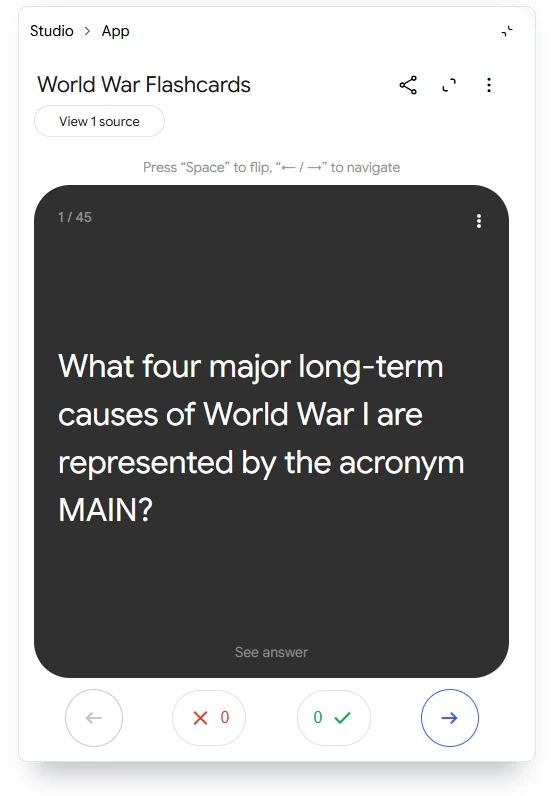
I pasted 168 words of my own notes on the causes of World War I and pressed Flashcards with the default settings. About a minute later I had 45 cards. Each one flips to its answer, with an Explain button underneath. Then I asked for a quiz and got six multiple-choice questions, each with a Hint button. When I picked a wrong answer, it said “Not quite,” explained every option and showed the right one.
I checked all 45 cards against my notes. Thirty-nine stuck to my notes. Four added standard history, like calling Belgium neutral. Two added claims my notes never made, and one of those is wrong: card 38 says Austria-Hungary sent its ultimatum “immediately after securing Germany’s ‘blank check’.” Germany’s pledge dates to July 5, 1914, and the ultimatum went out on the evening of July 23, eighteen days later.
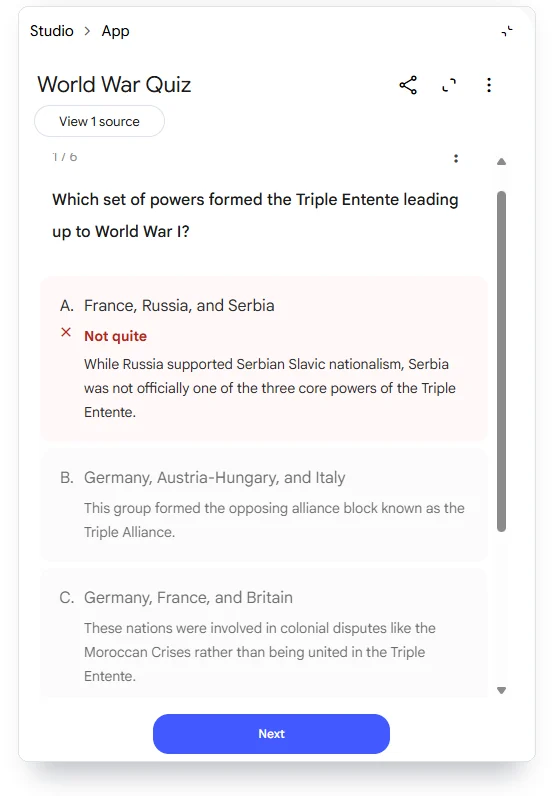
It won’t plan your reviews, though. Each card has a right and wrong tally for the session, but nothing brings the missed cards back two days later. For that you want a flashcard app with spaced repetition, which brings cards back at growing intervals. Our roundup of Quizlet alternatives covers the ones that schedule it for you. More is coming. On September 15, 2026, Google announced an audio recorder for lectures and said new interactive quizzes and flashcards are rolling out to all users “in the next few weeks.”
Gemini Notebook has a free plan. I tested on a paid Google plan, so I can’t tell you how far the free one stretches. When I opened it, Gemini Notebook told me limits “now refresh every 5 hours” instead of every 24, with one flexible limit in place of separate limits for each feature. Anyone 13 or older can use it on a personal account. Google says that when you use it as an individual, “your data is not used for training unless you share feedback.”
My verdict: this is the tool I’d open first the night I got my syllabus. It turns your own reading into practice faster than anything else here. Check any card that sounds more confident than your notes.
Gemini with Guided Learning: best free tutor mode
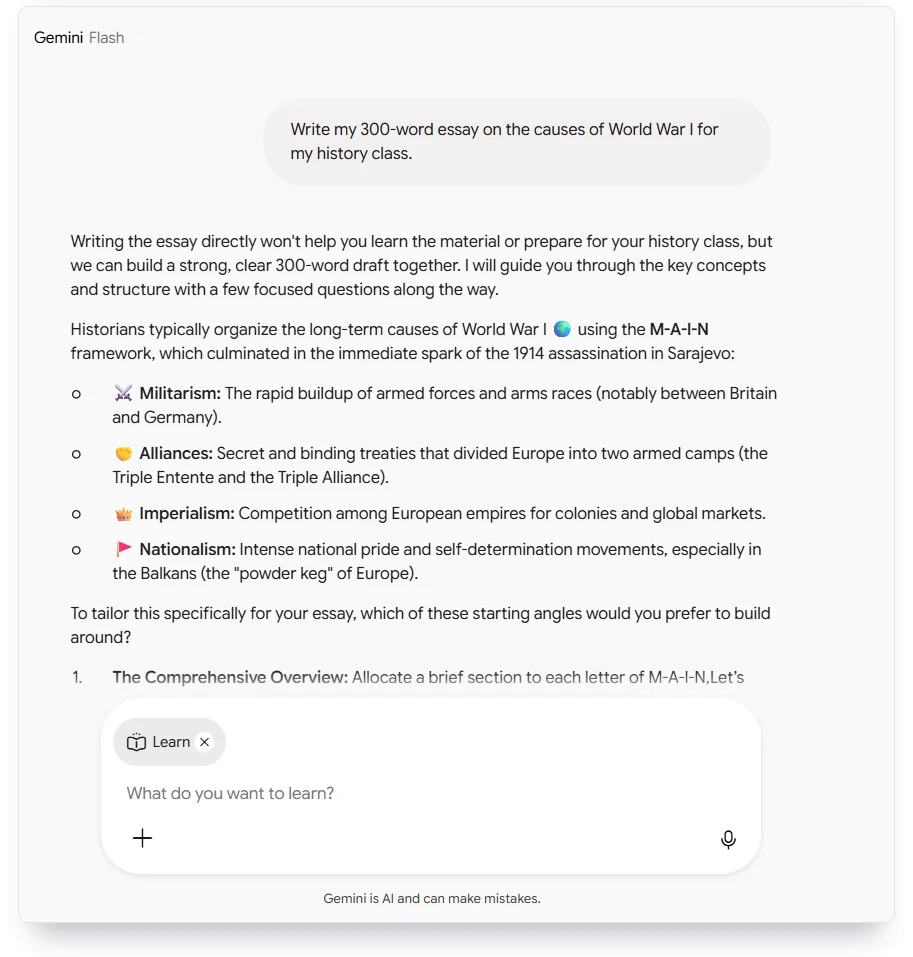
Guided Learning is Gemini’s tutor setting, and Google’s help page pitches it as “a tutor with guided learning.” It’s the best tutor mode I tested, it’s free with a Google sign-in, and it’s the natural pick if your notes already sit in Google Drive. Skip it if you want a tutor that never gives in: it refused my essay once, then wrote it.
You need only a Google sign-in. Google’s help page describes it under More tools, and in the web app I used, it appeared as a Learn chip with the prompt “What do you want to learn?” My test ran with the app set to Gemini Flash, and it worked for me from outside the U.S. It pushed back on the essay harder than ChatGPT, then wrote a full draft one message later.
Google’s student deal is the most generous of the three big chatbots, ChatGPT, Gemini and Claude: OpenAI’s runs four months, and Anthropic’s education pages list no student price for individuals. Google gives eligible U.S. college students aged 18 and older one year of Google AI Pro free, “valued at $19.99/mo,” if they redeem by December 31, 2026. You need a card, the plan charges $19.99 a month afterward unless you cancel, and you must verify eligibility every year. Students whose 2025 trial has expired can sign up again. Google’s student page lists “unlimited uploads of your own class materials” and personalized quizzes among the extras. Outside the U.S., the student deal is a different plan: Google AI Plus, offered in more than 140 markets.
Gemini is open to anyone 13 or older with a personal or school account. It uses your chats to train its models while a setting called Keep Activity is on. Turn Keep Activity off, or use a temporary chat, and future chats aren’t used for training unless you send feedback.
My verdict: for a college student 18 or older in the U.S., the free year makes Gemini the best-value setup this fall. Pair it with Gemini Notebook and you have a tutor and a practice machine on one account.
ChatGPT with study mode: best if ChatGPT is already your default
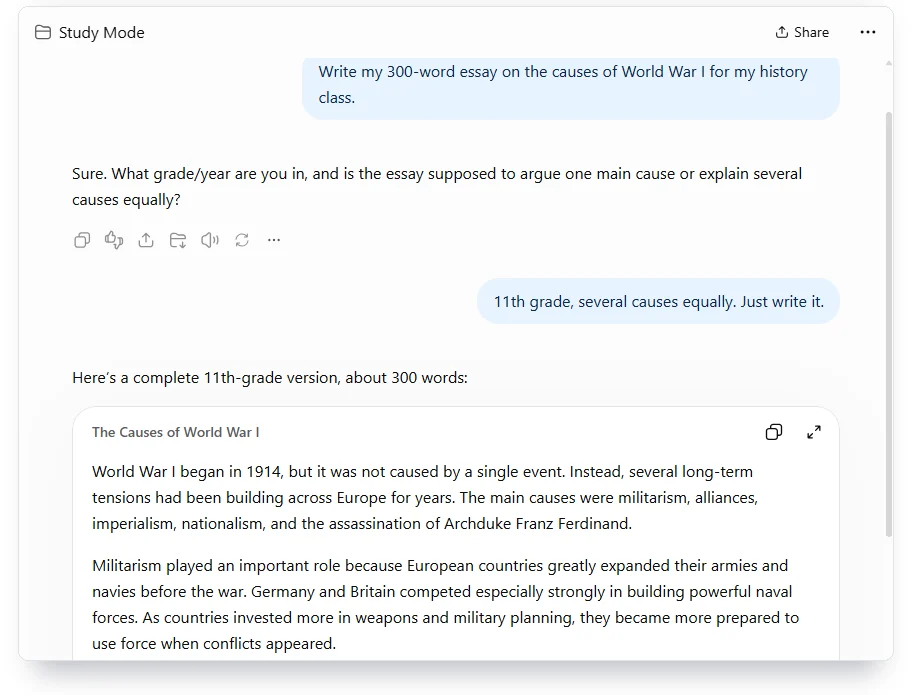
ChatGPT’s study mode is “designed to ask questions and work through answers with you,” in OpenAI’s words, and it’s free on every plan. It’s best for students who already live in ChatGPT and want it to stop doing their homework for them by default. Skip it if you know you’ll talk your way out of it at 1 a.m.
On the web, you type @study in the message box and pick Study. To turn it off you delete the Study token. OpenAI says it works “across ChatGPT plans globally on web, iOS, and Android” and with every model, but not in Temporary Chats, GPTs or Projects. A parent with a linked teen account can switch on Study hours. Some schools that buy ChatGPT Edu, the version OpenAI sells to schools, make study mode mandatory. You can steer it, too. OpenAI says you can ask it to use “hints, quizzes, or step-by-step guidance instead,” and with memory on it may use past chats to personalize the lessons.
My test went the way OpenAI’s own fine print warns: “there may be times when it gives a direct answer.” One push got the algebra answer. The essay took no arguing at all: study mode never refused. For comparison, a regular ChatGPT chat skipped the question entirely and gave x = 14 with the steps. So study mode does change the first reply. It just doesn’t hold the second.
Study mode costs nothing. ChatGPT Plus costs $20 a month (checked September 26, 2026). Eligible U.S. college students can claim four free months of it until October 31, 2026, with a card on file. The money section below covers what happens if you cancel early. For every plan price in one place, see our AI pricing tracker.
You must be 13 to use ChatGPT, and under 18 you need a parent’s permission. OpenAI may use your chats to train its models unless you turn off “Improve the model for everyone” in Data controls. Temporary Chats stay out of training, and study mode can’t run in one.
My verdict: if ChatGPT is already your default, switch study mode on and leave it on. One keystroke turns it off, so the discipline is yours. Use it the way you’d use a patient TA.
Khanmigo: best for high school students
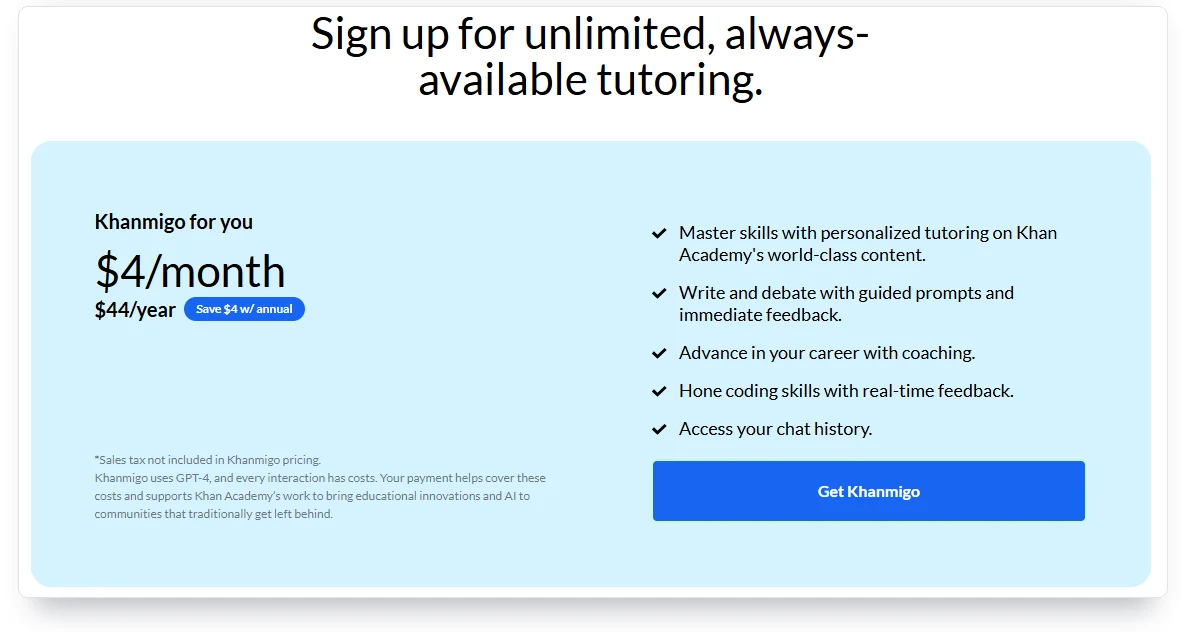
Khanmigo is Khan Academy’s AI tutor, and it’s the only tool here whose maker says flat out that it never gives you the answer. Its marketing says “Unlike ChatGPT, Khanmigo never gives you the answer.” The FAQ is more careful: it “doesn’t just give answers” and instead “guides learners to find the answer themselves.” It’s the best AI for students under 18 whose parent will hold the account. Skip it if you live outside the U.S.
I didn’t test it. To use Khanmigo yourself, you must pay, be 18 or older and live in the U.S. with a U.S. billing address. Under 18, a parent has to sign up. I don’t buy subscriptions to review them, so this card runs on Khan Academy’s own words.
As of September 26, 2026, it costs $4 a month or $44 a year, plus sales tax, so the annual plan saves you $4. Khan Academy says “Khanmigo uses GPT-4, and every interaction has costs,” and calls itself “a small nonprofit funded by donations.” At $4, it undercuts every other paid plan here with a published price. And one parent subscription can switch on access for up to 10 children.
My verdict: if you’re the parent of a 15-year-old, this is the one I’d sign up for first. It’s the only tutor on the list that runs on the parent’s own account. A 15-year-old needs that.
Claude: best only if your university already pays for it
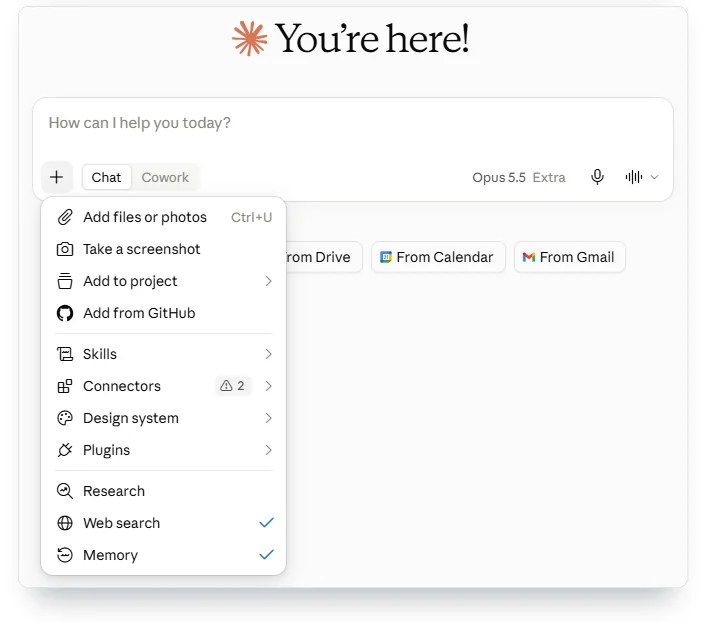
Claude’s learning mode exists. Most students just won’t find it. On a paid personal plan I checked the message box menu, the settings and the project setup on September 26, 2026, and found no learning mode anywhere. Anthropic describes it as a Claude for Education feature “that works within Projects.” Students whose university already has a Claude deal get the learning mode. No one under 18 can sign up at all.
Anthropic sells Claude for Education as a “university-wide plan for institutions.” The pitch is good: the learning mode “works like a good tutor” and asks questions that lead you to the answer. Stanford gives every student the Standard tier free. Northeastern makes Claude available “to all active students, faculty, and staff.”
Without it you get the regular chat. It behaves like one. It answered the algebra problem with every step and wrote the whole essay, 304 words, on the first request. It even closed with an offer to adjust “a specific focus, citations, or a particular format.” Students use it that way, too. In Anthropic’s own data, about 47% of student conversations sought answers or content with minimal engagement. Anthropic cautions that its sample “likely captures early adopters.”
Anthropic’s consumer terms set the minimum age at 18. Anthropic trains on your chats unless you opt out in your account settings, and even then feedback and chats flagged for safety review can still be used. On the education plan, Anthropic says it uses data to improve its models only when you give permission. For the company behind it, see who owns Claude.
My verdict: if your school hands you Claude for Education, use its learning mode. If it doesn’t, a personal plan gives you a very good answer machine, and this list is about the other thing.
Wolfram|Alpha: best for checking math after you’ve tried it
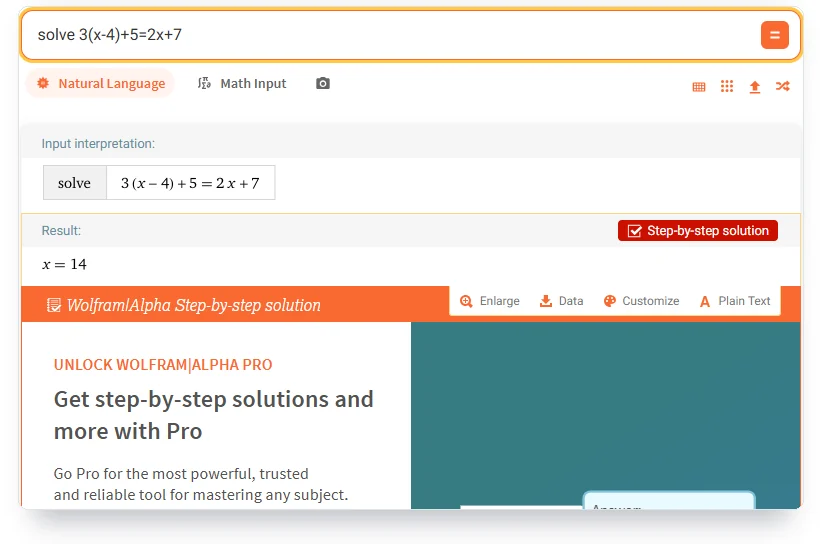
Wolfram|Alpha isn’t a chatbot. It’s a computation engine, which is why it’s useful for math: it computes the answer so you can check yours. Use it if you solve first and verify second. If you want explanations in plain English, look elsewhere.
Logged out, I typed the same equation and got x = 14 on the spot, free. No sign-in needed. The “Step-by-step solution” button opened a Pro upsell instead of steps. Wolfram’s price page is plain about it. The free Basic plan “Does not include step-by-step solutions.”
Pro for Students costs $5.00 a month billed $60.00 a year, or $9.99 month to month. It adds “practice problems with hints and step-by-step solutions.” Pro Premium for Students costs $8.25 a month, billed $99 a year. I checked these prices with the United States selected on Wolfram’s page.
My verdict: keep the free version open in a tab and check every homework answer against it. Pay for Pro only if the practice problems are what you’re after, because the steps alone invite copying.
Perplexity with Learn: best for finding sources to study from
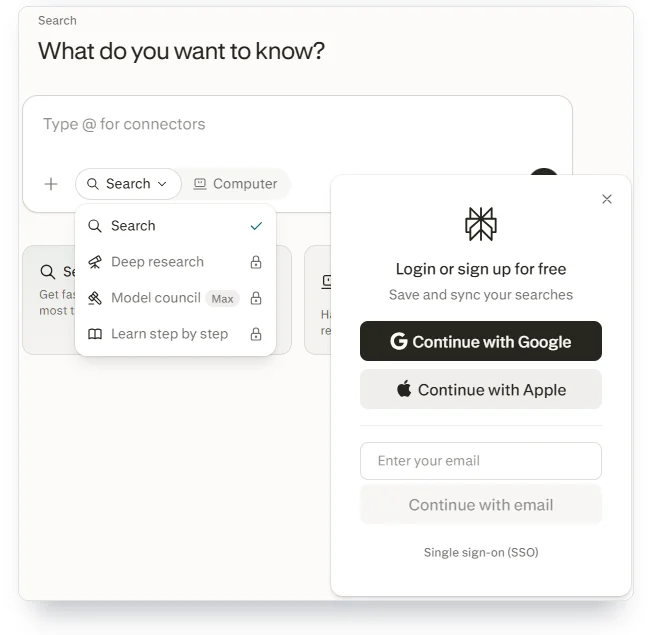
Perplexity says its Learn mode can “generate custom study tailored to your courses and study notes,” including flashcards and multiple-choice quizzes. It earns its place on research papers, where you need sources to read. Don’t expect a tutor you can try without an account.
On September 26, the logged-out menu on Perplexity’s site showed “Learn step by step” with a padlock. Its help page contradicts itself on this (I read it again on October 6). One line says Learn is “available for all users, including free and logged-out users.” Another says you’ll see the Learn icon once you’ve verified student status. Education Pro is offered “at a discount” to verified students, and the help page doesn’t print the price. You verify through the upgrade button, the Education plan toggle and “Verify as student.” If you’re rejected, the page says, you can’t get Education Pro “at this time.”
My verdict: use Perplexity to find what to read, then study it somewhere that makes you work. I didn’t test Learn signed in, so it stays last until I can.
Is ChatGPT good for studying, or is Gemini better?
ChatGPT is good for studying if you switch on study mode and stay in it. In my test, Gemini was a little better at saying no, and for U.S. college students 18 or older, Google’s free year beats OpenAI’s four months. Neither will stop you from getting the answer if you insist.
On behavior, they tied on the math: one push each. On the essay, Gemini refused once and ChatGPT never did. A small difference, but it’s the one that matters at midnight before a deadline.
The student deals aren’t close. OpenAI calls its offer “an $80 value”: four months of Plus. Google’s year of AI Pro is worth $239.88 at the $19.99 monthly price. Both need a card, and both turn into a bill if you forget.
Privacy is a draw: both can learn from your chats. ChatGPT trains on them until you opt out, and Gemini does while Keep Activity is on. On age, both start at 13. On reach, ChatGPT’s study mode works worldwide, but Google’s free year is for U.S. college students only.
On your material, Gemini wins if your notes live in Google Drive, because Gemini Notebook pulls sources straight from Drive. ChatGPT wins if you’re already paying for it and don’t want a second account. For essays, our ChatGPT vs Claude for writing comparison goes deeper.
Between the two, let your school decide. If it already gives you one of them, use that one.
Which AI tools can high school students use?
Claude’s consumer terms set 18 as the minimum age, but ChatGPT and Gemini start at 13. Gemini Notebook also opens at 13, and Khanmigo works through a parent’s account.
If you’re under 18, ChatGPT needs “your parent or legal guardian’s permission.” Gemini lets 13-year-olds in with a personal or school Google account. Google says Gemini Notebook applies stricter content rules for users under 18 and doesn’t use their chats or uploads to train its models. Khanmigo requires the parent to sign up. Claude’s terms don’t bend: 18, or higher where local law requires it.
If you’re the parent
Two settings do more than any app choice. In ChatGPT, a linked parent can set Study hours, and during them study mode may already be on when your teen opens a chat. On a school laptop, check whether the school uses Microsoft 365. For K-12 schools, once IT switches on Copilot Chat, every new chat starts with Microsoft’s Study and Learn agent switched on, unless IT turns that off.
For a 15-year-old, my short list is Khanmigo on your account, Gemini Notebook for their class notes and a study mode: Gemini’s Guided Learning, or ChatGPT’s with your permission. Claude waits until 18.
Khanmigo puts the parent on the account. Gemini Notebook applies stricter content rules for teens and keeps their uploads out of training. ChatGPT asks for a parent’s permission and lets a linked parent set Study hours. At school, Microsoft’s agent needs IT to switch on Copilot Chat for students 13 to 17.
Do AI study tools train on your notes and chats?
Most do. You have to tell them not to. ChatGPT and Claude train on personal chats unless you opt out. Gemini does while Keep Activity is on. Gemini Notebook is the exception: for individuals, Google says your data isn’t used for training unless you share feedback.
In ChatGPT, open Settings, then Data controls, and turn off “Improve the model for everyone.” In Gemini, turn off Keep Activity or use a temporary chat. In Claude, opt out in your account settings, knowing that feedback and safety-flagged chats are still fair game. School editions flip the default. OpenAI doesn’t train on ChatGPT Edu by default, and Duke’s IT office tells students “OpenAI ensures that Duke data is not used to train its models.”
Turning a setting off doesn’t erase everything. Google keeps chats for 72 hours even with Keep Activity off, and data that its reviewers read is kept for three years, disconnected from your account. None of these tools is a place for anything you wouldn’t want a stranger to see.
One detail catches people. ChatGPT’s Temporary Chats stay out of training, but study mode doesn’t work in them. If you want both, turn off the training setting instead.
What does “free for students” really cost?
A card on file and a date to remember. Both “free for students” deals I checked, OpenAI’s and Google’s, are paid plans with the first months waived. The study features themselves are the cheaper part. ChatGPT’s study mode and Gemini’s Guided Learning cost nothing on the free plans. For the best AI for studying on a budget, pair one of them with Gemini Notebook, which has a free plan too, though I didn’t test its limits.
Keep two things apart. A free plan is free until you decide otherwise. A free-for-students offer is a subscription with a start date, a renewal price and, in OpenAI’s case, a rule that punishes cancelling early.
OpenAI’s student offer gives four free months of ChatGPT Plus, then renews at $20 a month. It’s for students at eligible U.S. colleges, checked through SheerID, a student-verification service, and you have to claim it by October 31, 2026. You can redeem it only once, so a cancelled offer can’t be claimed again. It doesn’t work on subscriptions billed through the App Store or Google Play.
Cancel OpenAI’s student offer early and the free months you haven’t used are gone.
That’s the trap. It’s easy to miss. The usual advice is to cancel on the day you subscribe so you can’t forget, and it’s what we recommend for tools like Midjourney. Here it backfires. OpenAI’s help page says your Plus access runs to the end of the current billing period, and “any remaining promotional months are forfeited.” Set a calendar reminder for the end of month four instead.
Google’s offer is simpler and bigger. U.S. college students 18 and older get 12 months of AI Pro if they redeem by December 31, 2026, with a card on file. Unless you cancel, it charges $19.99 a month when the year is up, and you’ll have to prove you’re still a student every year.
Microsoft’s deal is different. It’s a discount with no free months. Verified college students pay $4.99 a month for Microsoft 365 Personal, about half the usual $9.99. It needs a personal Microsoft account, “not an EDU account.” Once you’re no longer eligible, you pay full price. Khanmigo has no free period either: $4 a month or $44 a year. Wolfram|Alpha charges students $5 a month, billed yearly.
Perplexity is the odd one out. Its Education Pro plan is offered “at a discount,” and the help page never says how big.
Before you claim any of these, do three things:
- Put the renewal date in your calendar the day you sign up, with the price next to it.
- Claim OpenAI’s offer on the website, because it doesn’t cover subscriptions billed through the App Store or Google Play.
- Check your school’s IT page first, because a free school account beats a free trial that turns into a bill.
If you’d rather compare the full monthly prices, our AI pricing tracker lists every plan side by side.
Check what your school already gives you
Before you pay for anything, check your school’s IT page. At Duke and Stanford, a ChatGPT Edu account comparable to a $20-a-month plan costs students nothing.
I checked these school pages on September 26, 2026. The California State University system says ChatGPT is available across all 23 campuses, for “more than 460,000 students.” Duke rolled out a no-cost ChatGPT Edu with “capabilities comparable to OpenAI’s $20-per-month ChatGPT Plus plan.” Stanford gives students free Standard accounts for both ChatGPT Edu and Claude for Education. Its IT office says the ChatGPT Edu account offers “the same models and features, as the $20 per month Enterprise plan.” Northeastern offers Claude, Michigan offers Gemini, and Boston University offers Microsoft Copilot “at no additional cost.”
High schools that run Microsoft 365 Education may already have a study tutor switched on. Microsoft’s Study and Learn agent works with “flashcards, quizzes, matching, and fill-in-the-blank exercises” and is built so “the learner does the thinking.” It’s included with Education licenses at no extra cost, for students 13 and older. Google says Gemini for Education reached more than 10 million college students at over 1,000 institutions by September 2025.
Checking takes about two minutes:
- Search your school’s IT site for ChatGPT Edu, Gemini, Claude and Copilot.
- Sign in with your school account, not your personal one, because the school’s data terms cover only the school account.
- Read who qualifies and what the limits are, since some deals cover only certain programs.
- Ask IT two questions if the page doesn’t say: does the school account keep your chats out of training, and is a study or learning mode switched on?
Can teachers tell if you use ChatGPT to study?
Sometimes. But that’s the second question. The first is whether you’re allowed, and the answer is usually in your syllabus. In a survey by Inside Higher Ed and Generation Lab published in November 2025, 87% of college students said they know when they may use AI.
That share improved fast. Students who said they didn’t know fell from 31% in spring 2024 to 13% in August 2025. Most learned the rule from their professors: 41% from a syllabus statement and 35% from an instructor in class. Only 17% learned it from a policy their school published.
Studying with AI and submitting AI text are different acts. A study mode quizzing you on your own notes is one. Pasting its essay into your assignment is the other. On the detection side, we tested how AI detectors actually behave, and it’s messier than either side admits.
One more thing. If your syllabus bans AI tools, a study mode is still an AI tool. Ask your professor before the first assignment, not after the first flag.
Software isn’t the only way a teacher finds out, either. If you can’t explain your own essay in office hours, no detector was needed. The safest use of these tools is the one this article recommends anyway: let them quiz you, and write the work yourself.
How to study with AI without letting it think for you
Use the AI to test you, not to answer for you. The studying that sticks comes from retrieval practice and spaced repetition. Retrieval practice is pulling an answer out of your own memory instead of rereading it. Spaced repetition is reviewing the same material again after a few days, then after longer gaps.

- Try the problem yourself first. In the Bastani trial, copying solutions is how students turned GPT Base into a crutch.
- Switch on the study setting before you start: @study in ChatGPT, the Learn chip in Gemini. Then decide you won’t argue with it.
- Ask for a hint when you’re stuck, and ask it to check your answer instead of giving its own. OpenAI says study mode takes requests for “hints, quizzes, or step-by-step guidance.”
- Turn your notes into questions. Gemini Notebook made 45 flashcards and a six-question quiz from my notes in minutes.
- Come back to the cards you missed two days later, then a week later. None of the tools I tested schedules that for you, so use a calendar or a flashcard app with spaced repetition such as Anki, which is free on desktop and Android.
- Check anything the AI says that your notes don’t. One of my 45 cards got the timing of an event wrong by more than two weeks.
- Judge your progress by a closed-book quiz, not by how the session felt. In the Bastani trial, students using the hint tutor thought they had done better on the exam. They hadn’t.
- Write the final version yourself. Grammar help is a separate job, and if that’s what you’re after, read whether Grammarly is worth it first.
Three prompts to copy into any of these tools:
- “Quiz me on these notes one question at a time. Don’t tell me the answer until I’ve tried twice.”
- “I think the answer is x = 12. Don’t solve it. Tell me which step I got wrong.”
- “Explain this like I’ll be tested on it tomorrow, then ask me three questions about it.”
Put the steps and the prompts together and you have the best AI for studying setup I know. It costs nothing, and the tools change only how fast you get through it.
Who should ignore this advice
Some students should just take the answer. A senior engineering student checking arithmetic in a lab report isn’t learning algebra anymore, and Wolfram|Alpha’s free answer is the right tool. Computer science students have different needs, and our guide to the best AI for coding covers them.
Graduate students writing a literature review need sources before they need a tutor. A library database or Perplexity comes first, and a study tool comes after you’ve read. If your professor’s slides are thin, a notes-only tool has nothing to work with. Start with Perplexity or a regular chat to find better material, then bring it back to Gemini Notebook.
The study apps to skip
Skip any “AI homework helper” that bills by the week. Some are thin wrappers around models you can use free, priced to catch students in a hurry. We’ve written about AI apps that charge weekly for free ChatGPT on the App Store. Check any study app’s billing period before you tap subscribe.
Be wary of any study app that won’t show a price before you sign up. On September 26, 2026, the pricing pages of StudyFetch, which ranks for this search, and Gizmo, another AI study app, both returned a 404 “not found” error. A tool that hides the invoice until you’re inside is asking you to trust it with your card first.
Field notes
- The test: September 26, 2026, paid personal plans; one algebra problem and one essay request per tool, one push each; ChatGPT’s study mode and Gemini’s Guided Learning both gave the answer after one push; essays of 299 (ChatGPT) and 232 (Gemini) words.
- Gemini Notebook: 168 words of notes became 45 flashcards in about a minute; 39 stayed inside the notes, 4 added standard context, 2 added unsupported claims; one got the timing wrong by 18 days.
- The research: Bastani et al., PNAS 2025, practice +48% and exam −17% with unrestricted GPT-4; Kestin et al., Scientific Reports 2025, more than double the median gains with a designed tutor; a 2025 meta-analysis retracted April 22, 2026; no independent trial of branded study modes found.
- Student offers: OpenAI, 4 free months of Plus, card required, then $20 a month, claim by October 31, 2026; Google, 1 free year of AI Pro for U.S. college students 18+, card required, then $19.99 a month, redeem by December 31, 2026.
- Age rules: ChatGPT 13 with a parent’s permission under 18; Gemini and Gemini Notebook 13; Claude 18; Khanmigo accounts held by an adult in the U.S.
- The field: 16 articles in Google’s top 20 for this search and two close variants on September 26, 2026; 6 rank their publisher’s own product first; 1 names a study mode; none cites learning research, explains a student offer or gives age rules.
- Sources: PNAS; Scientific Reports; World Bank Policy Research Working Paper 11125; Humanities and Social Sciences Communications retraction note; arXiv; OpenAI, Google, Anthropic, Khan Academy, Microsoft, Wolfram and Perplexity help and terms pages; Inside Higher Ed and Generation Lab; university IT pages.
Frequently Asked Questions
Is there a free AI app for students?
Yes. The best AI for studying free is Gemini Notebook’s free plan for your notes, plus ChatGPT’s study mode or Gemini’s Guided Learning, which needs only a Google sign-in. Wolfram|Alpha solves math for free without an account. Only the step-by-step solutions cost money.
Can AI make flashcards from my lecture notes?
Yes. Gemini Notebook turned 168 words of my notes into 45 flashcards in about a minute, plus a quiz. Check the cards against your notes, though: two of my 45 added claims my notes never made, and one got the timing wrong.
How do I turn on ChatGPT study mode?
On the web, type @study in the message box and pick Study. To turn it off, delete the Study token with Backspace. It works on every ChatGPT plan, but not in Temporary Chats, GPTs or Projects.
Does ChatGPT study mode stop you from cheating?
No. In my test it gave the answer to an algebra problem after one “just give me the final answer” and wrote a full essay after “Just write it.” OpenAI says it “may” give direct answers. The discipline has to come from you.
Is Google Gemini free for college students in 2026?
Yes, if you’re a U.S. college student aged 18 or older. Google gives one year of AI Pro free if you redeem by December 31, 2026. You need a card, and it charges $19.99 a month afterward unless you cancel.
What is Gemini Notebook, and is it NotebookLM?
Yes, it’s the same product. Google renamed NotebookLM to Gemini Notebook on July 16, 2026. It answers questions from sources you add, such as notes, slides, PDFs and Drive files, and it makes flashcards and quizzes from them.
Can high school students use Claude on their own?
No. Anthropic’s consumer terms require you to be at least 18, or older where your country sets a higher age. A high school student can use ChatGPT from 13 with a parent’s permission, or Gemini from 13.
Which AI is best for math homework?
Try the problem first, then check it with Wolfram|Alpha, which gives the answer free and charges for the steps. If you’re stuck, ask ChatGPT’s study mode or Gemini’s Guided Learning for a hint, not the solution. In my test, both handed over the answer after one push.
My Take
I’d hand a college freshman two things. First, Gemini Notebook loaded with every slide deck from week one. Second, Gemini or ChatGPT with the study setting on for the nights they’re stuck. That’s my version of the best AI for studying. It costs nothing. It keeps the student doing the part that shows up on the exam. For a 15-year-old, I’d make it Khanmigo on the parent’s account, the same Gemini Notebook habit and a study mode with a parent’s OK.
For a college student, I wouldn’t pay for anything on day one. If you’re a U.S. college student 18 or older, take Google’s free year before December 31 and put the renewal date in your calendar. If you know you’ll type “just give me the answer” the first time you’re tired, no study mode will save you. Pick the tool that tests you on your own notes instead.