

Wix vs Squarespace looks like a $17 against $12 decision if you read the two pricing pages. Three years of either one costs more than that, and the gap does not run the way the headline numbers suggest. I built the same freelancer site on both platforms in July 2026, priced them out, and counted every fee that lands after checkout.
- What Wix and Squarespace cost in 2026
- Squarespace shows two different prices on the same page
- Both builders now sell a plan called Core, and they are not the same plan
- What three years of either one costs
- Does Squarespace charge transaction fees, and what does Wix charge instead?
- I gave both AI builders the same brief
- Which editor you live with afterwards
- Does Wix or Squarespace have better templates?
- If you plan to hand this to a designer later
- Wix vs Squarespace for SEO: what you can control
- Wix vs Squarespace for ecommerce: the fees decide it
- How to try both without paying
- Who each one is for
- What it costs to leave
- Who writes the Squarespace vs Wix comparisons you find on Google
- Frequently asked questions
- Is Squarespace better than Wix?
- Is Wix or Squarespace cheaper?
- Does Squarespace have a free plan?
- Does Squarespace charge transaction fees?
- Can I move my site off Wix or Squarespace later?
- How much does a website cost per month on either platform?
- Do the AI site builders actually work?
- Squarespace vs Wix or Wix vs Squarespace: is it the same comparison?
- My Take
Wix is cheaper to start and impossible to leave with your content. Squarespace exports to a file and takes a cut of every sale on its entry plan. Neither builder put the prices I gave it on the finished page.
What Wix and Squarespace cost in 2026
Wix publishes five tiers plus a quote-only Enterprise plan. The prices below are what the plans page showed in July 2026, and they are annual prices displayed per month, which is not the same as a monthly bill.
Two things in that table matter more than the prices. Light costs $204 up front, not $17, because Wix bills the year in one charge. And Light cannot take a payment, so the cheapest plan that lets you sell anything is Core at $348 a year.
Wix prints the reason in small type under its own table: “Prices and currency vary by location. USD prices displayed for reference only. Displayed prices are for yearly subscriptions, paid in full at the time of purchase.” A vendor is telling you its own dollar figures are approximate.
Squarespace has no free tier at all. Its help center says so in one line: “Squarespace doesn’t offer a free plan, but every site starts with a free trial.” The trial runs 14 days and asks for no card.
More Read

Squarespace shows two different prices on the same page
None of the four guides I read had caught this, and it explains why each of them quotes a different number.
When I opened the Squarespace pricing page in July 2026, the visible cards offered three plans: Basic, Core and Advanced, at $12, $17 and $25 a month on annual billing. Then I read the page’s own structured data, the JSON-LD block that Google, AI Overviews and every LLM crawler consume. It lists four products in 27 currencies, and the US dollar figures are nothing like the cards.
Structured annual charges: 228, 348, 588, 1,188 USD. Visible regional Plus has no card; unavailable remains null. Basic can sell, Core has no physical-sales cut, Plus needs Squarespace Payments in the country, Advanced takes zero platform transaction fees. The source page has four products in 27 currencies and disagreed with its visible cards.
The top tier is the one to look at. The card said $25 a month. The data on the same page said $99. That is a factor of four, and the $99 figure matches what the guides I read have been publishing since last August.
The plan set moves too. Squarespace explains the rule on its blog for professionals, not on the pricing page: “As of February 2026, all countries have access to Basic, Core, and Advanced plans. If Squarespace Payments is available in your country, you will also have access to the Plus plan.” Its support pages list Squarespace Payments in 15 countries, and the United States is one of them, so an American visitor should expect a fourth plan that I never saw.
Open the pricing page yourself and screenshot it. Treat any number you read in a review as the price somebody else was shown. Including this one.
Both builders now sell a plan called Core, and they are not the same plan
Wix Core costs $29 a month on annual billing. Squarespace Core showed $17 on the cards and $29 a year per month in the page data. Same word, two products, and one of them cannot be compared to the other on price alone.
The collision happened because both companies renamed everything. Wix retired Combo, Unlimited, Business Basic, Business Unlimited and Business VIP in favor of Light, Core, Business and Business Elite. Squarespace replaced Personal, Business, Commerce Basic and Commerce Advanced with Basic, Core, Plus and Advanced. Its own help center states the swap in one sentence: “The Basic, Core, Plus, and Advanced plans have replaced the Personal, Business, Commerce Basic, and Commerce Advanced plans.”
That help page also labels the new lineup as still rolling out, and lists three generations of plans side by side: current, rolling out, and legacy. Existing subscribers stay where they are, and moving is one way only: “It’s not possible to return to a legacy plan after switching to a current plan or canceling service.”
Renaming is where the bills jumped. A Wix subscriber described the move in December 2024, before most guides had noticed the new names existed.
They just changed the name of the packages but state that I will go from Unlimited to Core, and say that these offer the same services… So I have to pay 54% more from next month for the same services.
r/WIX, December 2024
The date Wix switched its lineup has never been published, so I am not going to invent one. What the billing help center does say is that promotional pricing ends quietly: “Any paid service that was purchased with a discount (e.g. during a sale) renews at the standard rate.” Yearly plans get charged in full about three weeks before the term ends.
What three years of either one costs
None of the four guides I read does this arithmetic. That is strange, because it is the only number that matters when you are picking a platform you will still be on in 2029.
Take a service business with no online store: a homepage, a services page, an about page and a contact form. On Wix that is Light at $204 a year, because you do not need checkout. On Squarespace, using the figures its own page data publishes, that is Basic at $228 a year. Add the domain. Both platforms give you the first year free on annual billing, and both charge their standard rate after that.
Wix is specific about the limits of that gift. The voucher is “only valid with a purchase of a new domain from Wix and cannot be used to renew or extend a domain you already own.” Squarespace ties the free year to annual billing only, and shows the domain line struck through on its monthly cards. Neither company publishes a flat renewal figure, because it varies by extension, so the number to budget is whatever a .com costs you today.
Squarespace does have form on this. When it absorbed Google Domains, it kept the old prices for a year and then stopped: “Squarespace honored all existing Google Domains customers’ domain renewal prices for at least 12 months… As of September 7, 2024 all migrated domains renew at our standard rates.” Every domain that came across in that acquisition now renews at the new owner’s rate.
Three annual payments: 144/144/144, 204/204/204, 228/228/228 and 348/348/348 USD. Domain renewal in years two and three varies by extension and is unpublished as a flat fee; it is additional, not zero. Wix Light cannot take payments; Core is the cheapest Wix plan that can sell. Two Squarespace Basic totals differ by 252 USD because the cards and page data disagree.
This is also where the renewal complaints live. One Squarespace owner posted a four-year trail in July 2026, from $138 to $204, on a site that never changed.
In four years’ time, the price has more than doubled, with no changes to my page. It is a simple site, no e-commerce, not even a blog feature.
r/squarespace, July 2026
Wix threads read the same, with different numbers. A two-year renewal going from $564.48 to $752.64 in September 2025. A January 2026 thread where one owner reported $178 becoming $344 and another $648 becoming $846. If you have priced out other recurring tools, the pattern will look familiar from every social media scheduler that quietly reprices its channels.
Does Squarespace charge transaction fees, and what does Wix charge instead?
Yes, on its entry plan, and the number circulating in most guides is wrong. Squarespace takes 2% of physical product sales on Basic and nothing on Core, Plus or Advanced. The 3% figure you will read everywhere belongs to a legacy plan called Business, which is not what a new customer buys.
Digital products are the expensive category, and that ladder is steeper.
That bottom row reverses the whole Wix vs Squarespace comparison. Squarespace lets you sell on the cheapest plan it has and takes a slice. Wix takes no slice at all and locks selling behind a plan that costs $144 more a year than its own entry tier. Which one is cheaper depends entirely on how much you sell.
Wix processing does not move with your plan. The published rates go well past cards, though. American Express costs 3.7% plus $0.30, PayPal 3.49% plus $0.49, buy-now-pay-later 6% plus $0.30. Add 1.5% on cross-border transactions, 1% on currency conversion, and $15 for a chargeback. In-person is where Wix gets cheap, at 2.6% with no fixed fee. None of that is unusual for a payment processor. All of it is the kind of SaaS billing detail that only shows up on the invoice.
Sellers of digital work feel the platform cut hardest. One Squarespace member-site owner did the division out loud.
A $125 monthly membership was losing $11.25 per transaction to Squarespace, which is 9%, on top of roughly 3% to Stripe. That 9% is the rate for plan generations without the current digital tiers. Squarespace sells a separate Digital Products ladder to buy it down: 9% with no plan, 7% on Starter, 3% on Core, 0% on Pro. A second subscription that exists to shrink a fee is a business model. Find that out before you build the course, not after.
I gave both AI builders the same brief
Both companies now sell the AI builder as the reason to choose them, so I gave each one an identical job and timed it. The brief: a freelance interior designer in Austin working alone, three service packages with prices ($250, $900, $2,400), a small portfolio gallery, an about page, and a contact form asking for budget and timeline. I said twice that I wanted the package prices on the page as plain text.
Wix starts with a chat. Five questions, all free text. The second one steered straight at features that need a paid plan: “do you want clients to book consultations or pay deposits directly through your site, or is the contact form enough for now?” While I typed, it built a business profile I never asked for. It invented a company name, a tagline and a tone of voice.
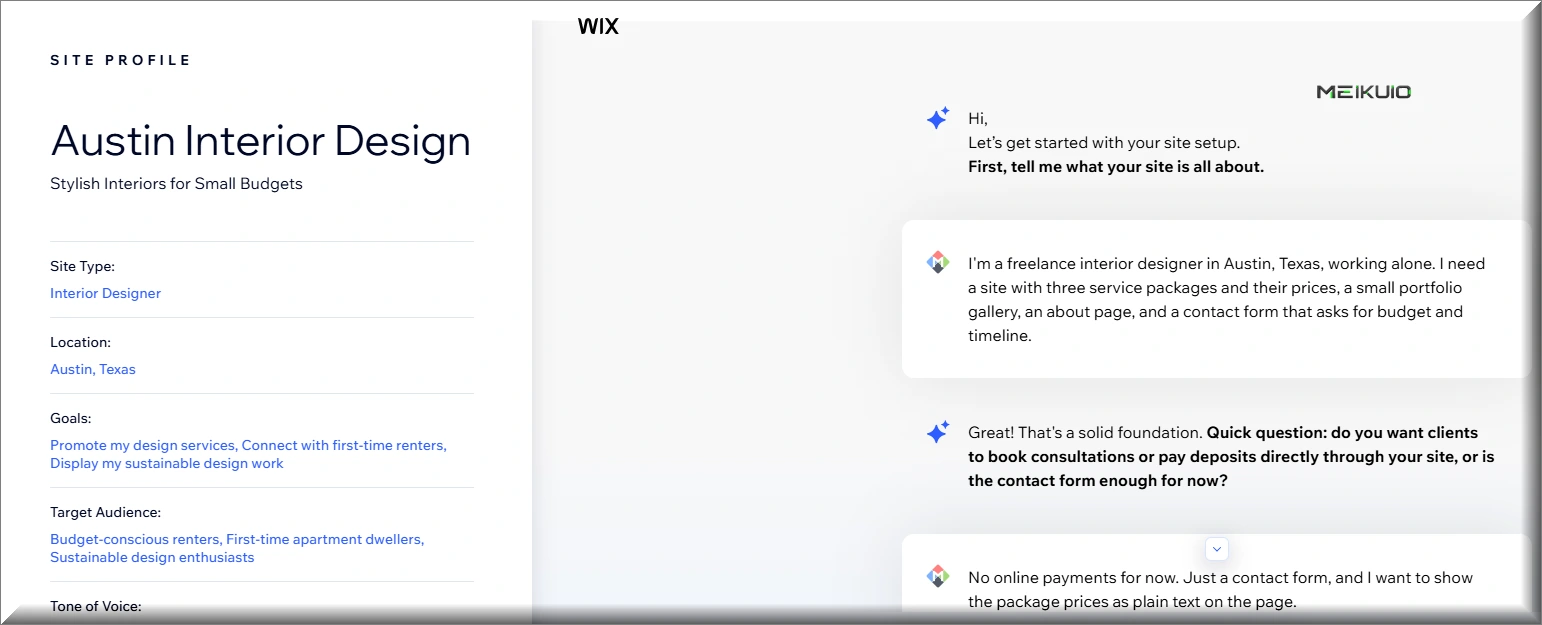
Then it handed me off to a second AI, called Aria, with a prompt it had written for me. That prompt is where my brief broke. My prices had survived into the site description, and Aria’s instructions said only “showcasing her services”. No figures. It had also given me a member of staff.
“Create a professional website for Sarah, a freelance interior designer based in Austin, Texas.” I never gave a name or a gender. The AI supplied both, then wrote the about page in her voice.
The build took over 20 minutes. Ten of those sat on one step, “Configuring your components”, while a modal told me not to leave: “It is very important that you stay on this browser tab to complete your site.” The tab stopped responding to anything else while it worked. Part of the delay was a step called Adding Authentication Pages, which installs member login screens on a one-person brochure site.
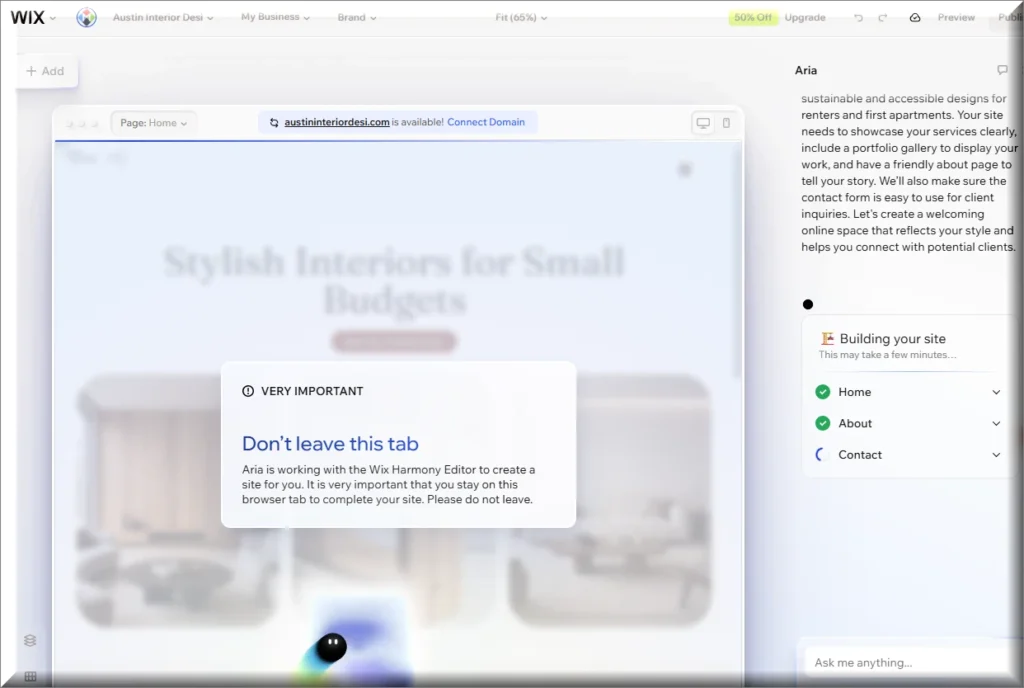
What arrived was three pages, a headline, three generated interior photos, and two problems. The prices were nowhere. And the contact section, the one functional thing I asked for, was an empty block with a note reading “Choose an existing form or create a new one.” In preview, that empty block renders as the word Lorem Ipsum stacked one letter per line. You can wire a real form in from the form settings in a couple of clicks. You just have to notice first, and the AI reported the site as finished.

Squarespace works the opposite way. No chat, no free text, and no place to describe what you sell. Its Blueprint survey runs six named steps: topic, goals, site info, pages, colors, fonts. You pick a topic from a list, type a site title, choose a brand personality from four options, tick which pages you want, then pick a palette and a font pairing. A live preview updates beside you from the second step onward.
Total time from topic to finished site: about two minutes. Four pages, not three. And a working contact form out of the box, with name, email and message fields already required.
Then I looked at the services page it built. Four services, none of them mine: Biophilic Interior Design, Home Office Design, Mid-Century Redesign, Japandi Interior Design, each with a description and a price label. It could not use my packages because it never asked for them.
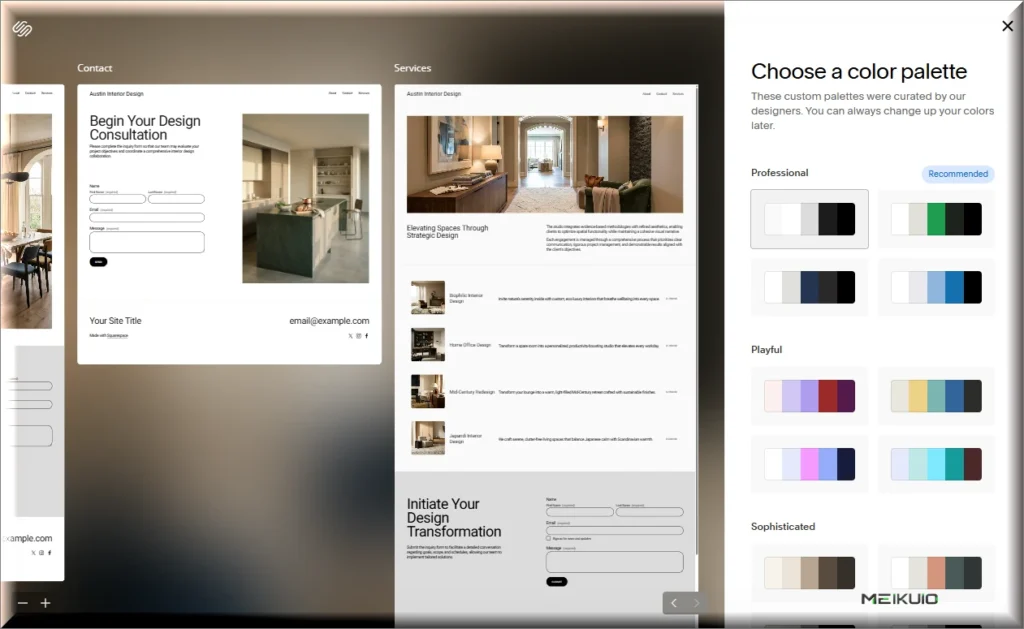
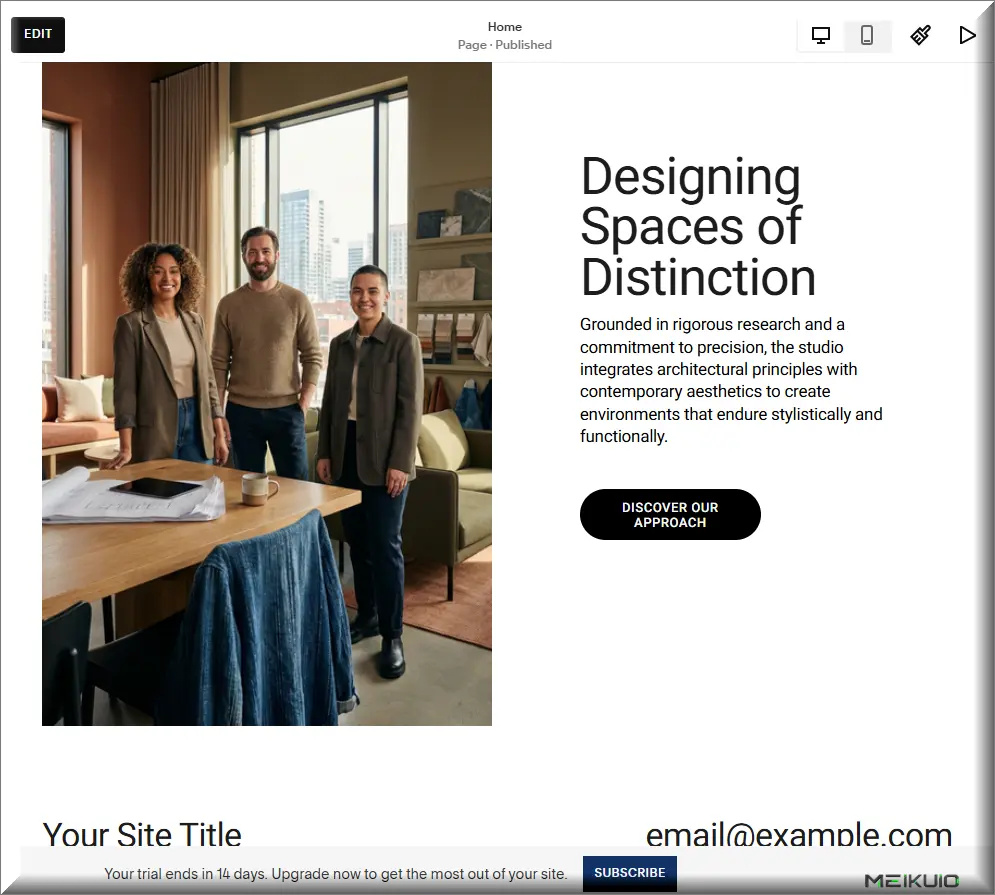
It also promoted me. The about copy opens with “the studio integrates architectural principles with contemporary aesthetics”, and the homepage carries a photo of three people standing around a desk. I never got the chance to say I work alone. The only free-text field in the whole survey was the site title, and a business name doesn’t say how many people are behind it.
Both platforms left placeholder text on the finished site, in different places. Wix left it where the form should be, in the body of the page. Squarespace left “Your Site Title” and “[email protected]” sitting in the footer of every page, even though I had typed the real title into the survey two minutes earlier.
So the scoreboard on an identical brief: one platform asked about my prices and lost them, the other never asked and invented four services instead. Wix took 20 minutes and shipped a broken form. Squarespace took two minutes and shipped a working one. Neither produced a services page I could publish.
Both vendors do describe their own limits accurately. Squarespace states that “Blueprint AI is free to use, although you need a paid Squarespace account to publish any website you create with Blueprint AI”. It names OpenAI, Anthropic and Google as the model providers behind it. Wix requires a paid plan to publish on your own domain without its advertising. Its help center also notes that the site content generator “generates text content only, and does not provide images”, with a separate tool for pictures.
Which editor you live with afterwards
Most Wix vs Squarespace arguments are really about this. The generated page is a first draft. The editor is the thing you use every week afterwards, and the two are built on opposite philosophies.
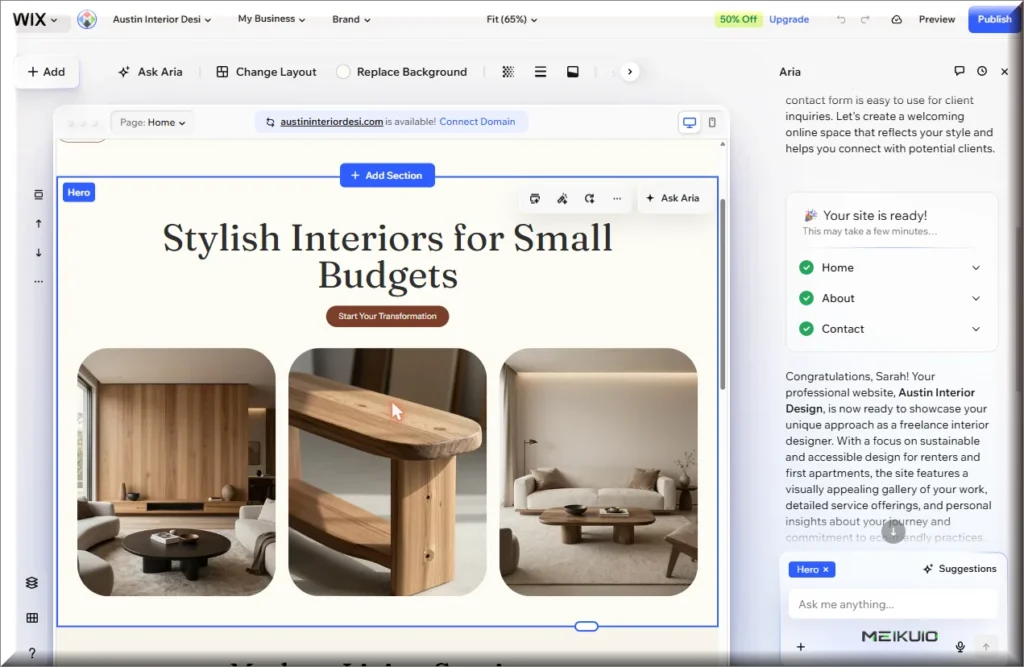
Wix gives you absolute placement. Any element can go anywhere, by the pixel, and nothing is anchored to a grid that would keep the layout honest. My generated page put a stray Inquiry button above the hero, outside the layout, and left the logo at an unreadable size. I did not test either site on a phone, so treat the mobile question as open.

Squarespace holds you inside its sections. You get fewer decisions and fewer ways to make a mess, and the pages it generated needed no alignment work at all. If your instinct is to nudge things two pixels left, you will find that limiting. If your instinct is to publish and get back to work, you will find it restful.
Both editors put an AI assistant in the sidebar and both let you regenerate a section on request, so the day-to-day difference is not the AI. It is how much rope you get. On Wix I spent my first minutes fixing things the builder had misplaced. On Squarespace I spent them rewriting copy, because the layout was already square. Neither experience is objectively better, and I would pick based on which failure annoys you more.
Does Wix or Squarespace have better templates?
Every Wix vs Squarespace comparison counts templates. I counted the counters instead. Three of the guides ranking for this question give three different numbers for Wix. They run from more than 900 to 3,100 plus. Only one matches the figure Wix prints on its own page. Squarespace prints no figure anywhere.
A blank in that table means I could not find a number on that page. It does not mean the number is missing. I checked all six pages on one day in August 2026. Wix says “Choose from 2000+ free designer-made website templates” in the description of its own templates page. Squarespace says nothing of the kind. So I counted what its templates page links to: 202 individual templates.
The count is the least useful number in this whole comparison. Here is the one that matters, and no guide I read prints it. Neither platform lets you change your template once the site exists.
Wix states it in one sentence. “While it’s not possible to switch to a different template for a site you already created, you can create as many sites as you want in your account.” The remedy is a second site. You then “import elements, pages and media from your old site, and transfer your plan and domain to it.” That is a rebuild wearing a friendlier word.
Squarespace also says no, for the opposite reason. “You won’t change templates to gain access to new features or styles. All version 7.1 sites are part of the same template family, so every site has the same features and style options.” Its help center calls the template “the design you chose as a starting point for your new Squarespace site.” No feature sits behind it. There is nothing to switch to.
Read those two answers next to each other and the menu size stops mattering. On Wix a template is a permanent decision. You make it on day one, before you know what the site needs. On Squarespace it is a starting point. The design lives in colors, fonts and section layouts, and those change on any Tuesday.
Templates are free on both, so this is not a line on the invoice today. It is a line in year three. A redesign on Squarespace costs you an afternoon of restyling. On Wix it costs you a new site. The plan and domain have to be walked across to it. That is the same shape as everything else here, and it is why I priced the full Squarespace ladder separately.
If you plan to hand this to a designer later
Plenty of people build version one themselves and pay a professional for version two. Both platforms charge for that possibility, and the gates are not obvious from the pricing cards.
The line that catches people is contributors. Squarespace Basic allows two, which is you and one other person, and that is enough for a freelancer plus a designer. Wix Light allows two as well, but Light cannot sell, so anyone with a shop is already paying more.
Wix also runs a separate platform for professionals, Wix Studio, which is where its developer tooling lives. If a designer tells you they would rather rebuild your site than work in your account, this is usually why.
There is a second cost nobody quotes for. A designer working in Squarespace can hand the finished site back to you and you keep the export route. A designer working in Wix cannot, so the work only exists inside the account that paid for it. That is the part of the Wix vs Squarespace decision that shows up two years later, when the designer has moved on and you want to take the site somewhere else.
If you already know a designer, ask them which platform they work in before you pick one. Rebuilding a site because your professional refuses to touch the platform costs more than any plan on either pricing page.
Wix vs Squarespace for SEO: what you can control
Both platforms cover the basics, and both let you edit titles, descriptions and URLs. The differences that matter are further down.
Squarespace puts custom CSS and a basic code block on every plan, then holds code injection back for Core and above. Code injection is how you add analytics, schema markup and third-party scripts, so an entry-plan Squarespace site is more locked down than it first appears. Squarespace also ships a section called SEO and AI Visibility, then rations it. The pricing table meters AI Visibility prompt runs at 10 one-off on Basic, then 20, 40 and 120 a month as you climb.
Wix removes its own branding from Light upward, which matters more than any tag you can edit. A free Wix site carries a Wix advertising banner and lives on a wixsite.com subdomain, and no amount of on-page work fixes either.
One thing neither vendor advertises: the copy both builders produced was grammatically fine and said nothing specific. That is the exact profile of content that ranks for nothing. Whatever the AI writes, you are rewriting it.
Wix vs Squarespace for ecommerce: the fees decide it
Run the numbers on a small shop and Wix vs Squarespace stops being a matter of taste. Say you sell physical products and take $2,000 a month, which is $24,000 a year.
On Squarespace Basic, the 2% platform cut costs you $480 a year on top of the subscription and card processing. Moving up to Core removes that cut entirely, so the upgrade pays for itself long before you reach $24,000. On Wix, there is no platform cut at any tier, but you cannot open a checkout below Core at $348 a year.
Under a few hundred dollars of monthly sales, Squarespace Basic plus its 2% is the cheaper way to start taking money. Once sales are real, Wix stops charging a percentage and Squarespace Core matches it at zero, and the two converge on subscription price and features.
Digital goods break the symmetry. Squarespace keeps 7% on Basic and 5% on Core, and only Advanced takes nothing. If you sell courses, memberships or downloads, price the fee before you pick the platform, or look at tools built for the job. The same logic applies to any workflow you are moving online, from e-signature tools to invoicing.
How to try both without paying
The free routes are not equivalent, and the difference takes about 15 minutes to see for yourself.
Wix has a free plan with no time limit on it. You get 500 MB of storage, a wixsite.com subdomain, a Wix advertising banner across the top, and no ability to take a payment. It works as a sandbox, and it is also a live website that tells every visitor you have not paid yet.
Squarespace gives you 14 days and asks for no card. Two details make that trial safer than it sounds: the site stays private until you publish it, and you cannot accept payments during the trial. When I finished the Blueprint survey, the dashboard labeled my site Private and started a countdown.
One catch on the Squarespace side: you cannot export a trial site. If you spend two weeks building and then decide against it, there is no file to take with you. Wix adds a 14-day money-back guarantee on paid plans, which is a refund window rather than a trial.
Both vendors were running promotions the day I looked, and one of them printed the catch itself. The Wix dashboard offered 50% off, with a line underneath: “Valid only for the initial term of yearly or multi-year subscriptions.” Generous free tiers and launch discounts have a way of tightening later, and I have watched that happen to plenty of tools, including the survey builders in my roundup of SurveyMonkey alternatives.
Who each one is for
Most Wix vs Squarespace advice stops at which one looks nicer. I built the same site on both, so here are my recommendations by situation:
- Portfolio, brochure site, service business with no shop. Squarespace Basic. Better defaults, a working form, and nothing to align.
- Anyone who wants to publish free and see what happens. Wix. It is the only one of the two with a free plan, banner and all.
- Small physical shop under a few hundred dollars a month. Squarespace Basic, and accept the 2%.
- Growing shop, bookings, scheduling, staff logins. Wix Core or Business. No platform cut, and the business tooling is deeper.
- Courses, memberships, digital downloads. Neither by default. Price the digital fee ladder first, then decide.
- You will hand it to a designer. Squarespace, unless the designer names Wix Studio without being prompted.
What it costs to leave
In a Wix vs Squarespace decision I would ask this before asking about price, and it is the clearest difference between the two platforms.
Squarespace exports. You get an .xml file in WordPress format containing pages, one blog, and your text and image blocks, with products as a separate CSV. The limits are stated plainly: “Not everything will export, as many features rely on our platform’s JavaScript and CSS.” Layouts and styling do not travel, and you cannot import that file into another Squarespace site. If that export is your route out, the Squarespace vs WordPress comparison covers what the file does and does not carry, and which WordPress you would be moving to.
Wix has no full site export. The help center only addresses the other direction: “Currently, importing a site created outside of Wix is not supported.” You can pull a blog out through its RSS feed and you can transfer your domain away. The pages themselves stay where they are, which in practice means a rebuild.
Neither platform lets you take the design. On Squarespace you leave with your words and your pictures in a file. On Wix you leave with your domain and a screenshot folder. Factor that into the monthly price, because it is the part you pay once and pay heavily.
Who writes the Squarespace vs Wix comparisons you find on Google
Search Wix vs Squarespace and a vendor sells to you before any reviewer speaks. In July 2026 the first result was wix.com, comparing itself to its competitor. I checked again in August and it had dropped out. The vendor slot had switched sides: type the names the other way round, as Squarespace vs Wix, and Squarespace’s own comparison page takes it. Six of the eight results are the same either way. That is not a scandal. It is marketing, and it is labeled. The independent results underneath are the ones I checked.
Every independent comparison I read runs on affiliate commission, and each one says so somewhere. Tooltester: “We may earn an affiliate commission when you purchase through our links.” Site Builder Report: “Our work is supported by affiliate commissions.” Website Builder Expert: “We do make some money (or ‘affiliate commission’) if you sign up to certain products after visiting our site.” Two of them hand out their own discount codes for the plans they are scoring.
The ownership is the part the disclosures leave out. Website Builder Expert and Expert Market publish separate verdicts in the same set of results, and both belong to the same company, MVF Global. They are also the two handing out discount codes. Tom’s Guide belongs to Future plc, whose stable includes TechRadar, ranking on the adjacent queries. So eight verdicts come from seven owners, and one of those owners sells the product being judged.
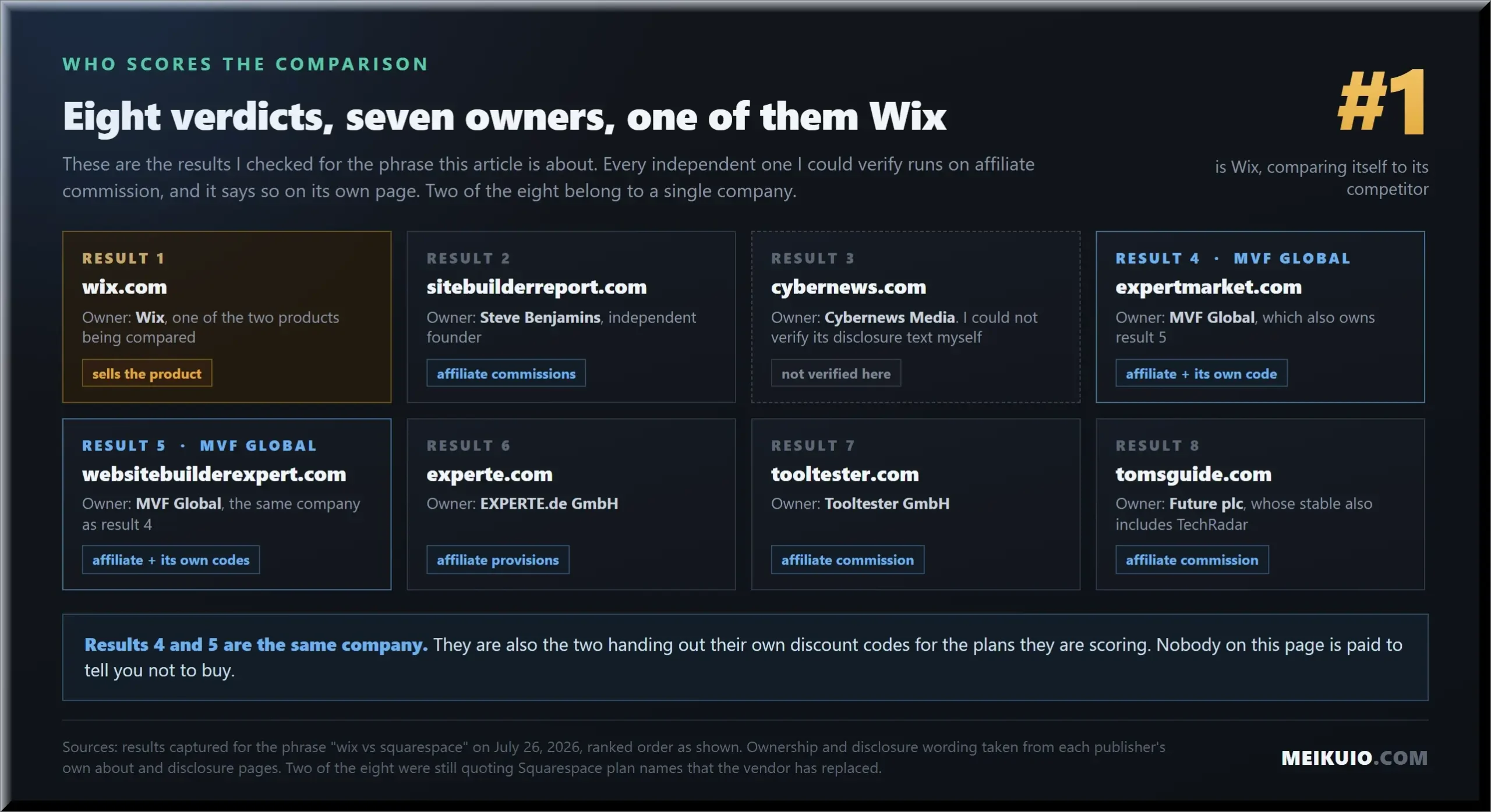
Two of those pages were also quoting Squarespace plans that no longer exist under those names, one of them updated as recently as December 2025. This is the same pattern I found in Calendly alternatives: when the vendors write the comparisons and the referees take commission, the arithmetic is the only thing left to check.
For the record, we take no commission from either company. If that changes, this line changes with it.
Some context on scale, since both companies like the word leading. In its results for 2025, Wix reported $1.993 billion of revenue, up 13%, with 6.11 million paid subscriptions at the end of December. Squarespace stopped reporting when Permira took it private in a deal that closed in October 2024 at an aggregated transaction value of about $7.2 billion, and delisted it from the New York Stock Exchange. One of these companies still has to explain its pricing to shareholders.
Frequently asked questions
Is Squarespace better than Wix?
For a portfolio or a service business, yes. Squarespace produced a cleaner site in a fraction of the time, includes a working contact form, and lets you export your content later. Wix wins on business tooling, on free access, and on taking no cut of your sales. The deciding question is whether you sell things and how much.
Is Wix or Squarespace cheaper?
Wix is cheaper to start a site you do not sell from, at $204 a year for Light against $228 for Squarespace Basic on the figures Squarespace publishes in its page data. Once you sell, it inverts: Squarespace sells on its entry plan for a 2% cut, and Wix requires Core at $348. Check both pricing pages yourself, because both geo-localize.
Does Squarespace have a free plan?
No. Squarespace states it plainly: “Squarespace doesn’t offer a free plan, but every site starts with a free trial.” The trial is 14 days, needs no credit card, keeps your site private, and does not let you accept payments or export your content. Wix does have a permanently free plan, with its advertising on your pages.
Does Squarespace charge transaction fees?
Yes, on the entry plan. Basic takes 2% of physical product sales and 7% of digital products and memberships. Core drops the physical cut to zero and digital to 5%, Plus takes 1% of digital, and Advanced takes nothing. Card processing sits on top, from 2.9% plus $0.30 down to 2.5% plus $0.30 on Advanced. The widely quoted 3% belongs to an older plan.
Can I move my site off Wix or Squarespace later?
Partly, and only from Squarespace. It exports an .xml file with pages, one blog and your text and images, plus products as a CSV, while warning that styling and platform-dependent features stay behind. Wix offers no full export and says importing a non-Wix site is not supported. Domains transfer from both.
How much does a website cost per month on either platform?
Budget $17 to $29 a month for a small business site, billed yearly, before the domain renews and before any card fees. That covers Wix Light or Core, and Squarespace Basic or Core. A shop with digital products can add several percent of revenue on top, and the advertised price is a first-term price on both platforms.
Do the AI site builders actually work?
They produce a draft, not a finished site. On an identical brief, Wix took over 20 minutes, invented a member of staff, dropped the prices I supplied twice, and left the contact form as an empty placeholder. Squarespace took two minutes, delivered a working form, and filled the services page with four services I had never heard of. Plan on rewriting everything either one hands you.
Squarespace vs Wix or Wix vs Squarespace: is it the same comparison?
Same comparison. I checked both phrasings in August 2026 and six of the eight results were the same pages. The word order changes one thing: which vendor’s own comparison page shows up. It does not change which platform costs you less over three years.
My Take
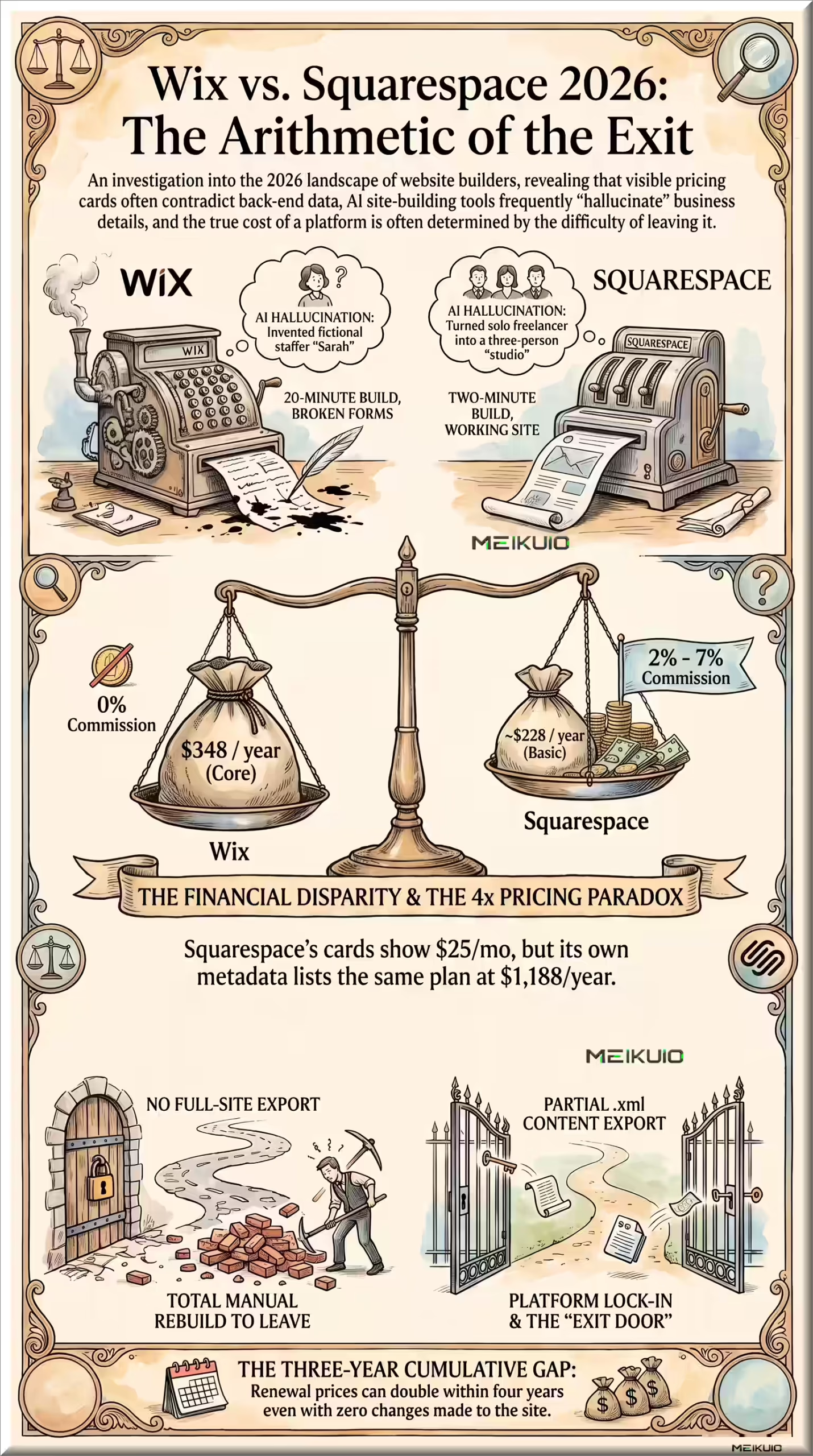
Design is the part everyone compares, and it is the part that matters least here. What decides it is arithmetic and the exit. Wix is the better business platform and the worse thing to be stuck inside. Squarespace makes prettier defaults and will hand you a file on the way out. Choosing today, I would take the exit door over the pixel control, because both prices will be higher in 2028.
Two things stuck with me. Both platforms shipped placeholder text on a page they called finished. And one of them publishes two price lists on the same URL, one for me and one for the machines. Check your own pricing page. Screenshot it. Then check it again next year, because nobody sends an email when the ladder changes.