

The best DocuSign alternatives in 2026 are Dropbox Sign for flat unlimited signing, SignWell for the cheapest paid plan, and OpenSign if you want genuinely free. Before you trust any other ranking of DocuSign alternatives, know two things: almost every list is written by an e-signature vendor ranking itself, and DocuSign now meters you twice, per seat and per envelope.
- Who writes “DocuSign alternatives” lists? The vendors themselves
- What’s the catch with DocuSign’s pricing? You’re metered twice
- The best DocuSign alternatives, ranked by what you actually get
- 1. Dropbox Sign: flat unlimited, the cleanest exit
- 2. SignWell: cheapest unlimited paid plan
- 3. OpenSign: the only truly free cloud option
- 4. DocuSeal: best self-hosted, with one asterisk
- 5. Documenso: open source with the best compliance story
- 6. PandaDoc: best for sales documents, from the vendor writing the reviews
- 7. Zoho Sign: cheap entry, but the meter followed you
- 8. Xodo Sign: flat pricing plus a DocuSign import tool
- 9. signNow: low seat price, familiar meter
- 10. Adobe Acrobat Sign: for teams already paying Adobe
- What each free plan really allows
- Are DocuSign alternatives legally binding?
- Which DocuSign alternative should you pick?
- When DocuSign is still the right call
- Frequently asked questions
- Is there a truly free DocuSign alternative?
- What is DocuSign’s envelope limit, and what happens if I exceed it?
- Are DocuSign alternatives legally binding?
- What’s the best open-source DocuSign alternative?
- What’s the cheapest DocuSign alternative for high signing volume?
- What changed with DocuSign’s pricing in 2026?
- My Take
Who writes “DocuSign alternatives” lists? The vendors themselves
Search for DocuSign alternatives and count who publishes the results. PandaDoc’s list puts PandaDoc at #1 as “the most powerful option.” Jotform’s list crowns Jotform Sign the best free pick. OneSpan promotes OneSpan Sign, BoldSign recommends BoldSign, and a UK vendor called eSign ranks eSign first. The pattern runs through nearly every page on the first screen of results.
PandaDoc runs the most complete version of this play. It publishes a “DocuSign pricing” teardown explaining why DocuSign costs too much, an “18 best DocuSign alternatives” list where it ranks itself first, and a head-to-head comparison page. All three funnel to the same checkout. The company diagnosing the disease is selling the cure, which doesn’t make the diagnosis wrong, but you should know who’s writing the prescription.
I hit the same wall researching Zendesk alternatives, where help desk vendors write the rankings, and again with Calendly alternatives, where scheduling tools grade their own homework. E-signature is the third category in a row where the “reviews” are ads. Nobody here sells a signing tool, so I’ll start with the number the vendor lists bury: what DocuSign actually charges.
What’s the catch with DocuSign’s pricing? You’re metered twice
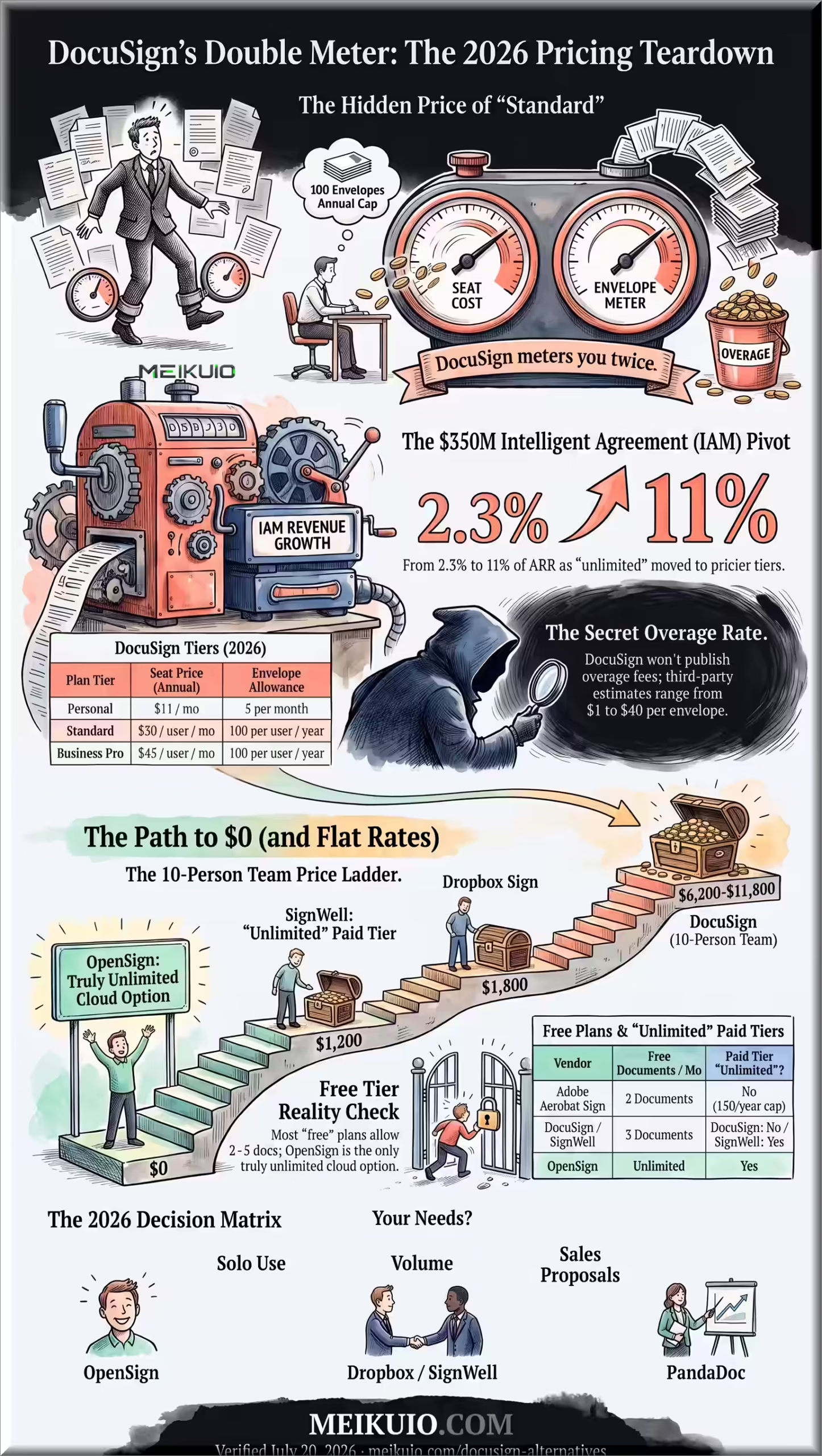
DocuSign looks like per-seat software: Personal at $11 per month, Standard at $30 per user per month, Business Pro at $45 per user per month on annual billing (checked July 20, 2026). Most competitor blogs still quote $10, $25, and $40. Those prices are stale. But the seat price is only the first meter. The second one is envelopes.
An envelope is one send for signature, no matter how many documents or signers it contains. Personal includes 5 envelopes per month. Standard and Business Pro annual plans include 100 envelopes per user per year; monthly plans get 10 per user per month. DocuSign’s own terms state an envelope counts the moment it’s sent, “whether or not the Envelope is signed or completed.” Void a contract to fix a typo and resend it, and you’ve burned two.
More Read

Run past the allowance and DocuSign keeps working; it just starts billing each extra envelope at a “Pay-As-You-Go” rate. DocuSign doesn’t publish that rate. Anywhere. The overage FAQ exists, but no public page states the number. Rival estimates from Signeasy and PandaDoc put it between $1 and $8 per envelope, and one aggregator claims up to $40, depending on plan and whether you pre-purchased packs. For scale: the included envelopes on Standard work out to $3.60 each ($360 a year for 100), and $5.40 each on Business Pro.
DocuSign is the only major e-signature vendor that won’t publish its overage rate. Third-party estimates run from $1 to $40 per extra envelope.
Then there’s the 2026 repackaging. DocuSign now sells “Intelligent Agreement Management” (IAM) tiers at $45, $50, and $80 per user per month, and the pricing page pitch is blunt: unlimited envelopes live there, not on the eSignature plans. The strategy shows in DocuSign’s own SEC filings: over 25,000 customers moved to IAM by January 31, 2026, and IAM grew from about 2.3% to roughly 11% of annual recurring revenue in 18 months, more than $350 million. The $11 plan is the on-ramp; the meter is the road. Even IAM has one: web sends are unlimited, but automated sends through API, Bulk Send, and PowerForms cap at 100 per user per year. If you’re pricing DocuSign’s AI agreement features against this, the same metering logic applies to AI tool pricing across the board: the sticker is never the bill.
Personal: one user, 5 envelopes per month, roughly 60 a year. Standard and Business Pro: up to 50 users, both allow 100 envelopes per user per year. Overage rate unpublished. Unlimited envelopes live only on IAM plans, 45–80 USD per user per month.
The math bites fast. A team where each person sends more than about 8 envelopes a month exhausts the annual 100 before the year ends, and every send after that is billed at a rate you can’t look up. That’s the moment to compare alternatives, because several charge a flat price for unlimited sends and one charges nothing at all.
The best DocuSign alternatives, ranked by what you actually get
Ranked by what the free tier really allows and whether the paid plan finally stops counting. Every price below comes from the vendor’s own pricing page, checked July 20, 2026.
1. Dropbox Sign: flat unlimited, the cleanest exit
Dropbox Sign (formerly HelloSign) is the simplest answer to DocuSign’s meter: Essentials costs $15 a month and includes unlimited signature requests. No envelope counting, no overage line on the invoice. The free plan allows 3 signature requests a month, and self-signing your own documents doesn’t count against it. The catches: development slowed after the Dropbox acquisition, team plans start at 2 seats ($25 per user), and the API is priced separately. If your team lives in Dropbox or Google Workspace, this is the default pick.
2. SignWell: cheapest unlimited paid plan
SignWell’s Light plan runs $10 a month and removes the document cap entirely, which makes it the cheapest flat-unlimited plan on this list. The free tier gives 3 documents a month with 1 template and a full audit trail, so a freelancer with occasional contracts can stay at $0. It even includes API access with free monthly API documents at every tier, something DocuSign reserves for far pricier plans. No dedicated mobile app, and the Business plan enforces 3 seats at $30 a month, but for solo operators and small agencies the value is hard to argue with.
3. OpenSign: the only truly free cloud option
OpenSign’s free cloud tier has no monthly cap. Unlimited documents, completion certificates, guest signing, all at $0. Every other tool on this list meters its free plan; OpenSign doesn’t, which makes it the honest answer to “what’s actually free.” The trade-offs: API access, public links, and embeds sit behind a paid plan (about $10 a month), the community is smaller than its open-source rivals, and it publishes no SOC 2 or ISO certification, so regulated industries should look elsewhere. For a freelancer or small team that just needs legally binding signatures at zero cost, this is the pick.
4. DocuSeal: best self-hosted, with one asterisk
DocuSeal is the most polished of the open-source signing tools, with a mobile signing flow that beats several paid products and a WYSIWYG form builder. The cloud free tier allows 10 document submissions a month, the most generous cap short of OpenSign’s uncapped plan. Self-hosting the AGPL Community Edition is free and unlimited: a Docker container on a $5 – 15 VPS replaces a DocuSign subscription entirely. The asterisk: API and embedded signing require the Pro tier ($20 per user per month), which bills $0.20 per completed API document even when self-hosted. Web-based signing stays unmetered; automated signing brings back a meter, just a much smaller one.
5. Documenso: open source with the best compliance story
Documenso is the open-source pick for teams that need paperwork to satisfy a compliance officer. It signs documents to the PAdES standard with the audit trail embedded in the PDF itself, and lists SOC 2, HIPAA, and 21 CFR Part 11 compliance today, with eIDAS advanced signatures planned for late 2026. The hosted free tier caps at 5 documents a month; paid starts at $25 a month for unlimited. Self-hosting is free and unlimited but wants real infrastructure: PostgreSQL, SMTP, S3 storage, and your own signing certificate. Pick it over DocuSeal when the compliance list matters more than setup time.
6. PandaDoc: best for sales documents, from the vendor writing the reviews
Credit where due: PandaDoc earns its place on merit, not just SEO. It’s a document builder first, with drag-and-drop proposals, pricing tables, and page-level analytics that show which section of a quote a prospect actually read. Signatures are unlimited on paid plans, starting at $19 per seat per month. The free eSign plan meters at 5 documents a month, and the entry plan caps templates at 5, which stings for a template-driven sales team. If you send proposals and quotes rather than plain contracts, it’s the strongest tool here. Just remember it wrote the alternatives list too.
7. Zoho Sign: cheap entry, but the meter followed you
Zoho Sign undercuts DocuSign at around $10 – 12 per user per month, and if your business already runs on Zoho CRM or Zoho Books, the integration is native. Read the plan table before switching, though: the Standard tier still meters you at 25 envelopes per user per month. That’s more generous than DocuSign’s effective 8 per month, but it’s the same mechanism you’re trying to escape. True unlimited starts at the Professional tier, around $16 per user per month. The free plan gives a single user 5 envelopes a month with a proper audit trail.
8. Xodo Sign: flat pricing plus a DocuSign import tool
Xodo Sign (formerly eversign) charges roughly $10 per seat for unlimited documents and owns the most practical migration feature in this list: a one-click importer that reads DocuSign template exports and rebuilds fields, signer roles, and routing automatically, flagging anything it couldn’t map. If the thing keeping you on DocuSign is fifty templates you don’t want to rebuild, this removes the excuse. Free plan is 3 documents a month; the API is a separate subscription starting at $50 a month.
9. signNow: low seat price, familiar meter
signNow sells on workflow: conditional routing, signing orders, and team features at a low per-seat price (annual plans dip near $8 per user). But its self-serve plans carry a DocuSign-style cap of 100 signature invites per user per year, with overages around $1.50 per invite. The overage is at least published and cheap, which beats DocuSign’s mystery rate, but if you’re leaving because of the meter, this is the same meter with better manners. No permanent free tier, only a trial.
10. Adobe Acrobat Sign: for teams already paying Adobe
If your organization already pays for Acrobat Pro, e-signatures are effectively bundled with the best PDF engine in the business, plus native Microsoft 365, Teams, and SharePoint integration. Two caveats. Acrobat’s free tier allows just 2 send-for-signature requests a month, the smallest allowance in this comparison. And team plans meter at roughly 150 transactions per user per year, more headroom than DocuSign’s 100 but the same concept. Buy it as an ecosystem decision, not an e-signature decision.
Worth a line each: SignRequest offers the most generous proprietary free tier at 10 documents a month with unlimited paid plans around $9. DocHub is a free PDF editor with metered signing (5 e-signatures a month free) that lives inside Google Drive. Jotform Sign makes sense if your contracts start as forms, though free caps at 10 signed documents monthly. LibreSign is a free Nextcloud app with the strongest digital-certificate story of the open-source group. And pdfFiller suits real-estate offices that need heavy PDF editing plus unlimited signing in one subscription.
Ten seats at DocuSign Business Pro cost 5,400 USD per year and include 1,000 envelopes. Another 800 use an unpublished rate; third-party estimates of 1–8 USD per envelope give 6,200–11,800 USD, not a published vendor quote. Other paid tools shown allow unlimited signatures. DocuSeal assumes an approximately 10 USD/month self-hosting server.
What each free plan really allows
The word “free” does a lot of dishonest work in this market. Just as we found when testing SurveyMonkey alternatives in 2026, entry-level limits are frequently designed to capture your workflow before springing an unexpected paywall. Here’s what the free tiers actually permit per month, from the vendors’ own pages.
OpenSign has unlimited cloud signatures. Its null means no finite cap; it is not zero and is not missing service.
Are DocuSign alternatives legally binding?
Yes. US federal law (the ESIGN Act) and state law (UETA, adopted in 49 states) are technology-neutral: a signature can’t be denied legal effect just because it’s electronic, and neither statute names any vendor. What courts care about is evidence: intent to sign, a signature tied to the document, and a tamper-evident audit trail with timestamps, IP addresses, and a document hash. Every serious tool in this list produces that certificate of completion, including the open-source ones.
Two honest caveats. Some documents are excluded from e-signature entirely regardless of vendor: wills, divorce papers, court orders, foreclosure and eviction notices. And in the EU, the eIDAS regulation defines three signature levels; the standard tier every mainstream tool produces (including DocuSign’s base plans) is the “simple” level, which covers routine business contracts. Only rare regulated documents demand a “qualified” signature, and that requires a certified provider no matter whose software you use. The brand on the signing page isn’t what makes your contract enforceable.
Which DocuSign alternative should you pick?
- Solo freelancer, a few contracts a month: OpenSign free, or SignRequest if you want a mainstream vendor. $0 either way.
- Small team sending at volume: Dropbox Sign or SignWell. Flat price, no envelope math, no surprise line items.
- Sales team sending proposals and quotes: PandaDoc. The document builder and view analytics justify the higher seat price.
- Privacy, data control, or a $0 software budget: self-host DocuSeal on a cheap VPS; pick Documenso instead when compliance certifications matter. If you run automations with AI automation tools like Make or n8n, both expose APIs your workflows can call.
- Already inside an ecosystem: Zoho Sign on Zoho (mind the 25/month meter on Standard), Acrobat Sign on Adobe or Microsoft 365. The integration is the product.
- Client-services businesses: if you run an agency and paper your clients monthly, contract volume grows with every client you add, and the agency math makes flat-rate signing the obvious pick over anything metered.
When DocuSign is still the right call
Sometimes the incumbent earns its price. DocuSign ships more than 900 native integrations, and if your workflows are wired into Salesforce, SAP, or Workday, rebuilding them on a smaller platform can cost more in engineering time than the subscription saves. Its compliance depth is unmatched at the top end: FedRAMP authorization for government work, HIPAA configurations, 21 CFR Part 11 for pharma, plus built-in notarization and biometric ID verification that alternatives gate behind third parties. DocuSign was also early to agreement AI, and its Agent Studio push is shipping product rather than vaporware, though as with most AI agents in production, the demos outrun the deployments.
There’s also a soft factor vendors won’t say out loud: the DocuSign email is familiar. Conservative counterparties sign it without calling their IT department. An unfamiliar signing link can trigger a security review that stalls a deal for days. If you send high-stakes contracts to risk-averse enterprises, that recognition has cash value. For everyone else, it’s a logo tax.
Frequently asked questions
Is there a truly free DocuSign alternative?
One: OpenSign’s cloud plan has no monthly document cap. Everything else labeled “free” meters you: Dropbox Sign and SignWell at 3 documents a month, Zoho Sign and Documenso at 5, DocuSeal and SignRequest at 10. Self-hosting DocuSeal or Documenso is also free and unlimited if you can run a Docker container.
What is DocuSign’s envelope limit, and what happens if I exceed it?
Annual Standard and Business Pro plans include 100 envelopes per user per year; monthly plans include 10 per user per month; Personal includes 5 a month. An envelope counts once it’s sent, signed or not. Exceed the allowance and service continues, but each extra envelope bills at a pay-as-you-go rate DocuSign doesn’t publish; third-party estimates range from $1 to $40.
Are DocuSign alternatives legally binding?
Yes. The ESIGN Act and UETA make electronic signatures valid regardless of which software produced them, and the EU’s eIDAS regulation works the same way at its standard tier. Legal weight comes from the audit trail (timestamps, signer identity, document hash), which every mainstream alternative provides on its certificate of completion.
What’s the best open-source DocuSign alternative?
DocuSeal for most teams: easiest setup, best signing experience, free to self-host. Documenso if you need compliance paperwork (SOC 2, HIPAA, 21 CFR Part 11) today. OpenSign if you want free cloud hosting without running servers. All three are actively maintained under AGPL licenses as of mid-2026.
What’s the cheapest DocuSign alternative for high signing volume?
Self-hosted DocuSeal or Documenso at the cost of a $5 – 15 VPS. Among hosted tools, SignWell’s $10 Light plan and Dropbox Sign’s $15 Essentials both include unlimited sends. Past roughly 8 envelopes per user per month, any of these beats DocuSign, whose allowance runs out and starts billing per envelope.
What changed with DocuSign’s pricing in 2026?
List prices rose to $11 (Personal), $30 (Standard), and $45 (Business Pro) per user per month on annual billing, while most comparison articles still show the old $10/$25/$40. DocuSign also moved its growth push to IAM plans ($45 – 80 per user per month), which carry unlimited web sends but cap automated sends at 100 per user per year. Per its SEC filings, IAM passed $350 million in annual recurring revenue within 18 months of launch.
My Take
I’ve now written three of these alternatives guides, and e-signature is the clearest case yet: a checkbox that learned to invoice. The signing technology is a solved problem, and identical cryptographic scribbles cost $0 or $45 a month depending on the logo. My actual setup would be OpenSign for the occasional contract and SignWell the day I needed templates. And if I ran a 10-person team, I’d put the $3,600 a year DocuSign wants for Standard seats into modern HR software where onboarding signatures are already bundled, because “unlimited” shouldn’t be a premium feature for putting your name on a PDF.