

The best AI for coding in 2026 depends on where you want the help: inside your editor, in your terminal, or running on its own in the cloud. Cursor and Claude Code lead with serious developers, GitHub Copilot is still the one most people pay for, and the strongest models on paper aren’t even available right now. Two of them got pulled offline this month.
- Quick verdict
- Editor-assistants vs repository agents: the split that decides everything
- The benchmark gap nobody shows you
- I tested three of these on the free tier
- Codex (GPT-5.5, free tier)
- Cursor (Hobby, free)
- Claude Code (Opus 4.8, Claude Max)
- What the three runs actually showed
- The tools, ranked by what they’re for
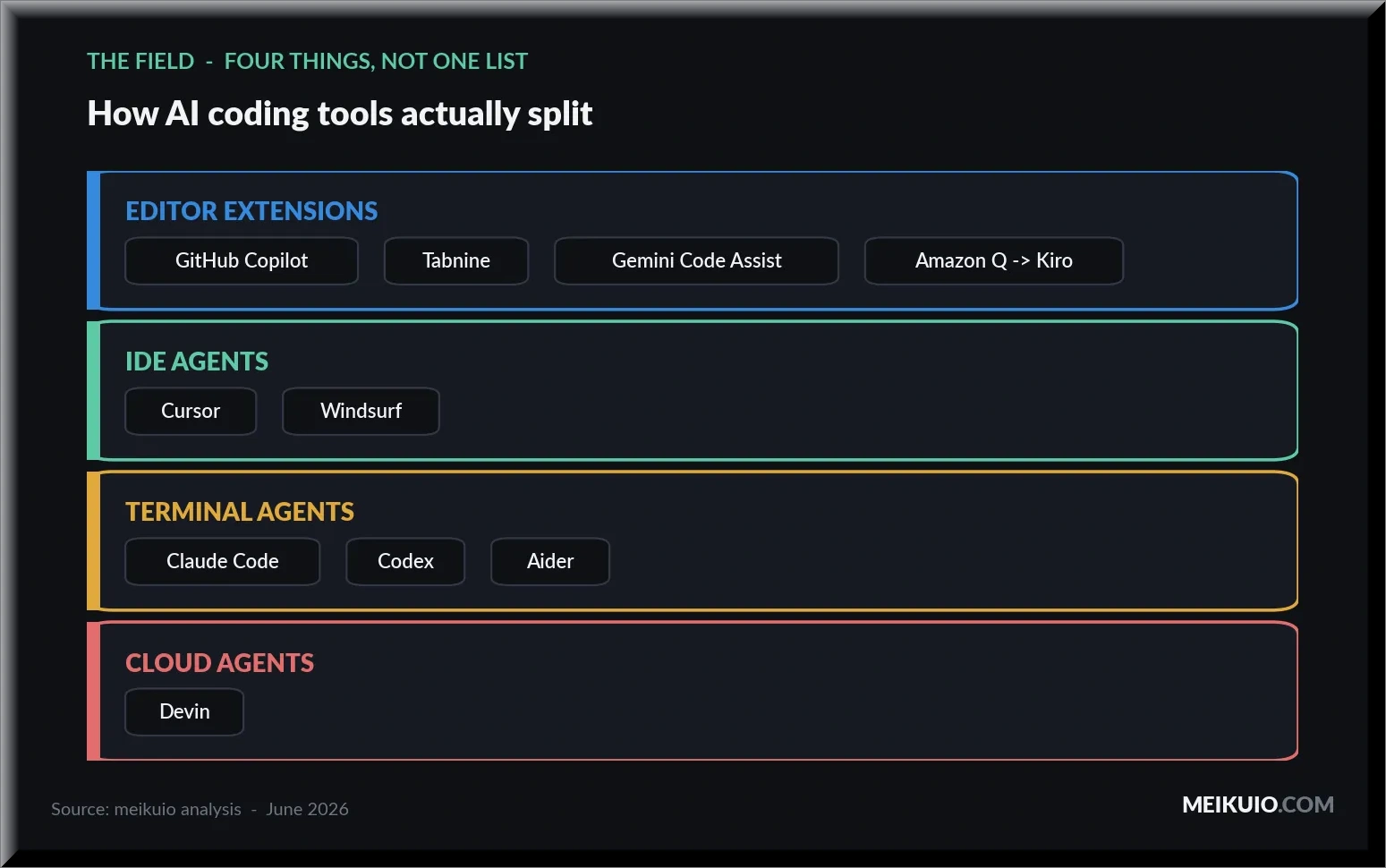
- IDE agents: Cursor and Windsurf
- Terminal agents: Claude Code, Codex, Aider
- IDE extensions: GitHub Copilot, Tabnine, Gemini Code Assist
- Cloud agents: Devin
- Changed or gone in 2026: Amazon Q
- What everything costs in 2026 (and the billing trap)
- Which one should you actually use?
- FAQ
That last part matters more than any leaderboard, so start there. On June 12, 2026, a US export-control directive forced Anthropic to suspend Claude Fable 5 and Mythos 5 for everyone, because access can’t be gated by nationality in real time. Those were the two highest-scoring coding models in the world. They’re gone until geographic verification ships, and the rest of the field is what you actually get to use. (I wrote up the full recall story here.)
So this isn’t a ranking of which model scores highest in a press release. It’s a guide to what ships working code today, what it costs after the 2026 pricing changes, and where the benchmark numbers stop matching reality.
Quick verdict
A few things this table won’t tell you, so I’ll say them plainly. I tested three of these on their free tiers (Cursor, Codex, and Claude Code) on the same task, and the gap between them is not what the benchmark charts suggest. Everything else here comes from official pricing pages, the SWE-bench leaderboards, and developers who’ve been living with these tools since the 2026 billing changes hit.
Editor-assistants vs repository agents: the split that decides everything
Almost every “best AI coding tool” list mixes two different kinds of software into one ranking, and that’s why they’re useless. The two categories solve different problems.
An editor-assistant lives inside your editor and reacts to your cursor. It autocompletes the line you’re typing, suggests the next few lines, answers a question in a side panel. GitHub Copilot, Tabnine, Gemini Code Assist, and Amazon Q started here. You stay in control; the AI fills gaps.
More Read

A repository agent works the way a junior developer does. You hand it a task (“migrate this API to the new SDK,” “fix this failing test”) and it reads the relevant files, edits across the whole project, runs the tests, and comes back with a result. Cursor’s Composer, Claude Code, OpenAI’s Codex, Aider, and Devin do this. You review the output instead of writing the code.
The line blurs in 2026 because the strong tools do both. Cursor autocompletes and runs multi-file agents. Copilot added an Agent Mode that navigates directories on its own. But the distinction still tells you what a tool is for. If you want speed while you type, you want an editor-assistant. If you want to delegate whole tickets, you want an agent. Picking the wrong category is the most common reason people think AI coding tools are overhyped.
The benchmark gap nobody shows you
Here’s the number every vendor leads with: their model scores somewhere between 80% and 95% on SWE-bench, the standard test where an AI tries to fix real GitHub issues. Anthropic reports Claude Opus in the high 80s on its own SWE-bench Verified scaffold. GPT-5.5 claims 88.7%. The marketing writes itself.
Now here’s the number they don’t put on the slide. When Scale AI runs those same models through SWE-bench Pro (a harder set of real startup codebases, with every model forced through identical scaffolding so the test measures the model and not the vendor’s custom tooling), the scores collapse. GPT-5.4 leads the standardized board at 59.1%. The best Claude run lands around 51.9%. The same models that “solve” 88% of the easy benchmark solve barely half of the hard one.
Rounded values from the graphic. Tests and scaffolds differ: these paired bars are not a controlled same-model comparison. The GPT vendor score refers to GPT-5.5, while the standardised result is GPT-5.4. Current prose retains exact scores 88.7, 59.1 and 51.9 and describes the version mismatch.
It gets worse on code the model has never seen. Scale runs a private set of proprietary commercial repositories that weren’t in any training data. On the public set, Claude Opus 4.6 scores 51.9%. On the private set, it drops to 47.1%. GPT-5.4 falls from 59.1% on public repos to 43.4% on private ones. Roughly a third of the apparent capability disappears the moment the code is something the model didn’t train on, which is to say, the moment it’s your code.
Scores rounded to integers in the source graphic; current prose retains GPT 59.1→43.4 and Opus 4.6 51.9→47.1. Private repositories test code outside the public training corpus. Model versions remain explicit.
This is the single most useful thing to understand before you pay for any of these tools. A benchmark score tells you how well a model does on curated, public, well-documented Python problems. Your actual codebase is none of those things. The tools are genuinely good, and they’ll save you real time. But the “88% of problems solved” framing sets you up to be surprised when the agent confidently breaks something on your private monorepo. Plan for the 47%, not the 88%.
I tested three of these on the free tier
Benchmarks are run by vendors with tuned setups. I wanted to know what you get when you install the free version, point it at a real project, and give it a real task, with no special configuration and no paid tier. I ran the same job through three tools: Codex (free), Cursor (free Hobby plan), and Claude Code. One IDE-style agent, two terminal agents.
A note on what “free” actually means here, because it surprised me. Codex on the free tier still routes to GPT-5.5, not a stripped-down mini model. You get the current flagship, just with lower priority and tighter limits. That’s a better deal than most of these tools advertise.
Codex (GPT-5.5, free tier)
I gave Codex a cold start: build a small Python CLI from scratch in a new folder: read a text file, count total and unique words, surface the five most common, write pytest coverage, then run it. No scaffolding, no setup, free tier.
It opened by stating a plan: stick to Python’s standard library, add focused tests, and verify the output end to end rather than just writing files and stopping. Then it worked. It asked for permission twice before touching the filesystem, which on the default setting is the behavior you want. It doesn’t go autonomous on a fresh project without a nod. A few minutes later it had created five files (the CLI, a test file with three tests, a sample text file, a requirements file, and a .gitignore), run the suite to green, and executed the tool on its own sample to confirm the numbers: 33 words, 28 unique.
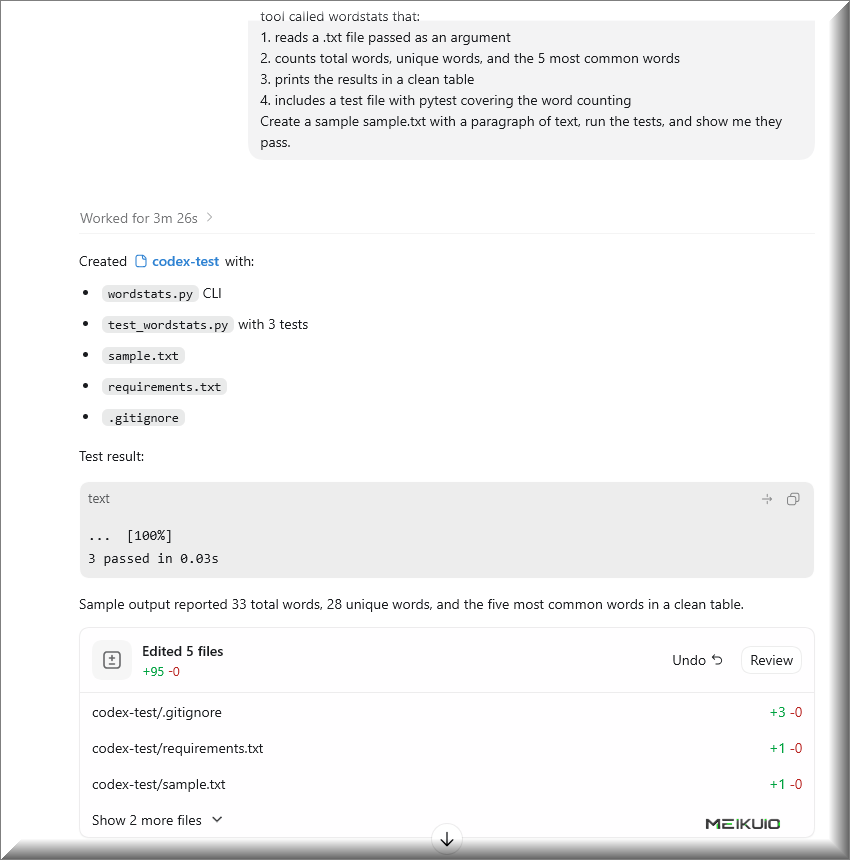
The part that stood out: it didn’t just generate code and call it done. It ran the tests and the tool, then reported actual output back. On a free tier routing to GPT-5.5, that’s a stronger out-of-the-box experience than the price suggests.
Cursor (Hobby, free)
Same task, same cold start, this time through Cursor’s agent on the free Hobby plan. The difference showed up immediately: Cursor runs in your actual environment, not a sandbox, and my machine didn’t have Python installed. So it went to install it.
This is worth sitting with, because it’s the real tradeoff of an in-editor agent nobody warns you about. You approve an agent’s actions the way you’d approve Codex creating folders: yes, yes, go ahead. I was clicking through those approvals on reflex, not reading closely, and one of them was Python installing itself onto my system. I don’t need Python on this machine. Had the agent stopped and said “this task needs Python, let me install it,” that would’ve been fine. The friction isn’t that it asked; it’s that the approval slipped by in a stream of others, and I ended up with software I didn’t want. On an editor agent that lives in your OS, read the prompts.
Once Python was in, it finished the job, and it did more than Codex did. It wrote the code, ran the tests, and the tests failed. Its word regex was stripping digits and the expected counts didn’t match. Instead of stopping, it diagnosed the problem, fixed the regex, updated the test expectations, and re-ran until everything was green. Five tests passed against the four-task spec. That self-correction loop is the thing that separates a capable agent from a code generator: it treated a failing test as a problem to solve, not an error to report.
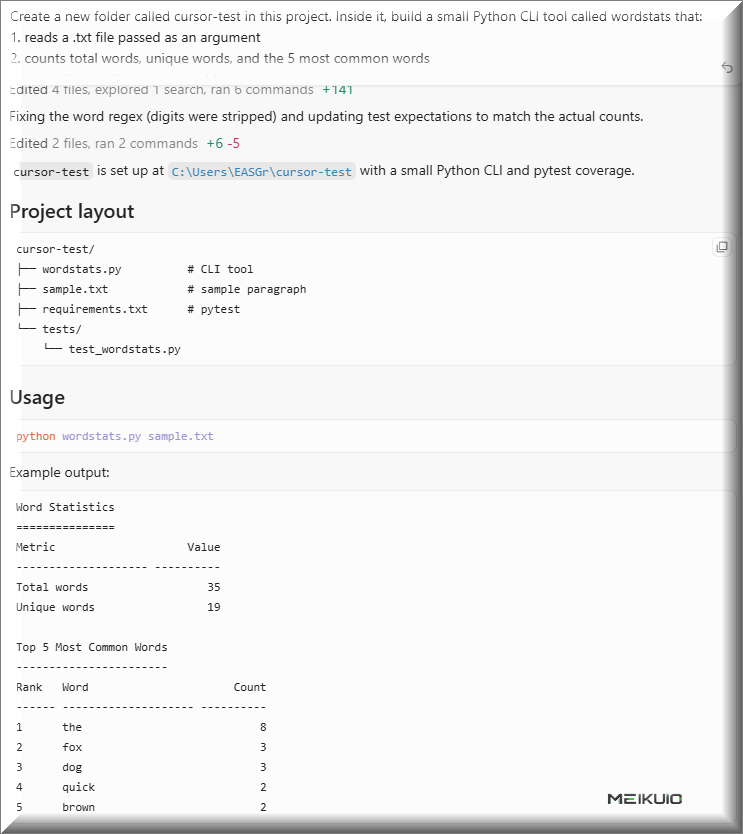
The cost: it took about six minutes against Codex’s two, and it visibly drew down the free-tier usage meter in the corner. The extra time bought a more thorough result (more tests, a real debugging pass), but if you’re rationing a free plan, a six-minute self-correcting run is a meaningful chunk of what you get.
Claude Code (Opus 4.8, Claude Max)
Same task again, this time in Claude Code running on Opus 4.8, the strongest model any of these three tests had access to, since the even higher-scoring Fable 5 and Mythos 5 are offline. (That’s not a detail you read about; the interface tells you. A banner sat at the bottom of the window the whole session: “Claude Fable 5 is currently unavailable.” The recall isn’t abstract. It’s a line of gray text where the best model used to be.)
It produced three files with eight pytest cases, the most thorough coverage of the three runs, all passing, and ran the tool to confirm: 83 words, 43 unique, “the” appearing 18 times. The code was clean: a tokenizer that strips punctuation but keeps contractions like “don’t” intact, a counter using the standard library, graceful handling of a missing file.
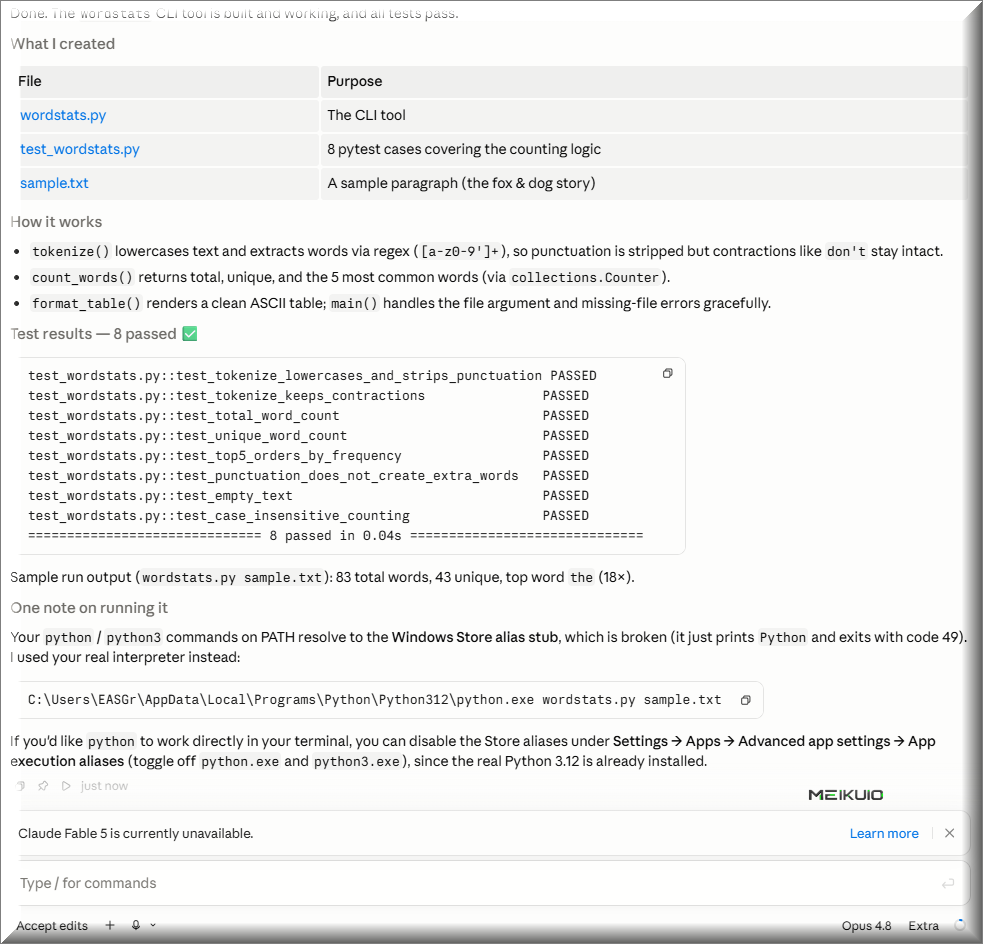
The standout moment was environment handling. My machine’s python command points at the broken Windows Store alias stub, the one that prints “Python” and exits without running anything. Cursor, faced with the same machine, just installed a fresh Python. Claude Code instead detected the broken stub, found and used the real interpreter that was already installed, finished the task, and then told me exactly how to fix the alias myself (disable the Store aliases under Settings → Apps → App execution aliases). It diagnosed the environment instead of working around it blindly.
What the three runs actually showed
All three shipped the task. None needed babysitting, and the timing was close enough not to matter, roughly two to six minutes each, which is noise, not a race. What separated them was behavior, not speed.
Codex was the most conservative: it paused for permission before touching the disk, which is the right default on a fresh project. Cursor was the most hands-on with the system. It’ll modify your actual environment to get the job done, which is powerful and also how I ended up with Python I didn’t ask for. Claude Code on Opus 4.8 was the most thorough: the most tests, the cleanest code, and the only one that diagnosed a broken setup instead of stepping around it.
The practical read for someone choosing: a terminal agent (Codex, Claude Code) keeps its work contained and explicit, while an IDE agent (Cursor) trades some of that control for staying inside your editor and reaching into your system when it decides it needs to. Neither is wrong. But if you’re going to click “approve” on an agent’s actions, a terminal makes it much clearer what you’re approving.
The tools, ranked by what they’re for
No single tool wins outright, so I’ve grouped them by the job they’re built for. Prices are entry-plan, monthly, as of June 2026.
IDE agents: Cursor and Windsurf
Cursor is a standalone editor (a fork of VS Code, so your extensions and keybindings carry over) with AI built into every keystroke and a Composer panel that runs multi-file agents. Pro is $20/month ($16 if you pay annually), which includes a $20 pool of model credits; the free Hobby tier gives you limited agent requests and 2,000 completions. Power tiers go to Pro+ at $60 and Ultra at $200. It’s the default for a lot of working developers, and the main cost is that you have to leave native VS Code to use it.
Windsurf, built by Codeium, is the other AI-native editor. Its pitch is context: instead of you @-mentioning files, it indexes the whole codebase automatically and its Cascade agent holds memory across long sessions. Pricing matches Cursor at $20/month for Pro after a March 2026 change (it used to undercut at $15), with Max at $60 and Max 200 at $200. Developers who work in JetBrains IDEs or on large monorepos tend to prefer it. The catch is hard daily and weekly quotas that can lock you out mid-sprint.
Terminal agents: Claude Code, Codex, Aider
Claude Code is Anthropic’s command-line agent. It runs in your terminal, reads your project, executes shell commands, runs your test suite, manages git commits, and edits across files, with no IDE required. It’s billed through your Claude subscription: Claude Pro at $20/month gives you the CLI with a roughly 44,000-token window per five-hour block; Max plans at $100 and $200 widen that considerably. It’s the tool serious developers reach for when they want deep, scripted, architectural work. The limit is that complex prompts burn through the standard quota fast.
OpenAI’s Codex in 2026 is not the old 2021 model. It’s a Rust-based CLI plus a synced ChatGPT app and a cloud agent, built to take a task, run it in a sandbox, and open a GitHub pull request with minimal supervision. It’s bundled into ChatGPT plans: free gets you Codex with lower priority, Go is $8, Plus is $20, and the Pro tiers run $100 and $200 for far higher limits. It’s strong for terminal pipelines and Git workflows. Its weak spot is the lack of native Model Context Protocol support that competitors are building around.
Aider is the open-source option: a command-line pair programmer that runs inside your Git repo, edits files, and auto-commits with sensible messages. The tool is free; you pay only for the model API you point it at, which runs anywhere from ~$5/month for light use to $50 – 200 if you’re hammering Opus or GPT-5 all day. It’s the pick for people who want model flexibility and tight cost control. It’s also the least autonomous. It asks for confirmation at nearly every step.
IDE extensions: GitHub Copilot, Tabnine, Gemini Code Assist
GitHub Copilot is still the most widely used of all of these, and it runs as an extension inside VS Code, Visual Studio, JetBrains, and Neovim rather than asking you to switch editors. Its 2026 Agent Mode uses MCP servers to navigate a repo and run issue-to-PR workflows on the GitHub platform. Pricing as of June 2026: free ($0, 2,000 completions), Pro at $10, Pro+ at $39, with Business and Enterprise at $19 and $39 per seat. The big 2026 change is billing, and it deserves its own section below.
Tabnine went a direction nobody else did: it dropped its free and individual tiers entirely and now sells only to enterprises, on annual contracts, starting at $39/user for the Code Assistant and $59 for the agentic platform. The reason is its whole pitch: air-gapped, on-premises, SOC 2 / HIPAA / FedRAMP-compliant deployment for finance, healthcare, and defense teams that can’t send code to anyone’s cloud. For that buyer it’s the obvious choice. For everyone else, it’s no longer an option, and its raw coding quality trails the frontier tools.
Gemini Code Assist is Google’s entry, integrated into Google Cloud and available through JetBrains and VS Code extensions, with a million-token context window aimed at large multi-cloud codebases. But there’s a hard catch as of this month: on June 18, 2026, Google shut off Gemini Code Assist (and the Gemini CLI) for all consumer, Google AI Pro, and AI Ultra accounts, pushing those users to a new product called Antigravity CLI. Only Standard ($19/user) and Enterprise ($45/user) subscriptions still work. If you were using the free individual version, it stopped working a few days ago.
Cloud agents: Devin
Devin, from Cognition AI, is the fully autonomous one. It runs entirely in the cloud (its own virtual machine with a shell, editor, and browser), so there’s nothing to install. You assign it a ticket and it researches, writes the code, runs tests, and delivers a draft pull request asynchronously, like handing work to a remote contractor. Self-serve starts free, with Pro at $20 and Max at $200, plus usage-based credits on top for enterprise. It’s built for offloading repetitive backlog work. The risk is cost: when an autonomous run fails, you’ve still paid for every token it spent getting nowhere.
Changed or gone in 2026: Amazon Q
Worth knowing if you’re an AWS shop: Amazon Q Developer is being retired. New signups closed May 15, 2026, Opus access was pulled from it on May 29, and the whole tool reaches end-of-support on April 30, 2027. AWS is moving everyone to Kiro, a new spec-driven agentic IDE that went GA in May 2026 and is the only place you’ll get the latest models like Opus 4.7. If you’re on Q today you have a migration ahead of you, not a tool to adopt.
USD/month. Zero means no subscription charge, not unlimited free API usage. Aider still needs a paid API key; free Codex and Devin have limits. Tabnine’s 39 USD tier is enterprise. The full table retains test status, architecture, and Amazon Q’s migration to Kiro.
What everything costs in 2026 (and the billing trap)
The flat-rate era is over. Through 2025 you paid a fixed monthly fee and used the tool as much as you wanted. In 2026, almost every vendor moved to usage-based billing (credit pools, token quotas, metered overages) because running these agents is expensive and unlimited plans were bleeding money. (If you want the per-plan numbers across the major AI tools in one place, I keep an AI pricing comparison here.)
GitHub Copilot is the flashpoint. On June 1, 2026, it switched to usage-based billing: autocomplete stays free and unlimited, but chat, agents, and code review now draw down “GitHub AI Credits” at roughly $0.01 each. The prices on the plans didn’t change. What changed is that a heavy agent session can now blow through your monthly allotment in a day. (I broke down exactly what changed and who got hit here.)
The developer reaction has been loud. In Visual Studio Magazine, one developer described watching “1,227 of my allotted 1,500 free monthly credits basically eaten up on day 1… If that pace continued, I was headed for a $180 bill for the month. The reality is that copilot was changed from an empowering tool to a money siphon.”
The sharper complaint I kept seeing in developer forums wasn’t the cost itself. It was the behavior change. Once there’s a meter running, you start self-censoring: you only ask Copilot for things you’re sure are “worth it” instead of using it freely the way a flat rate let you. That shift is subtle, and it’s where a lot of the productivity gains quietly leak away.
It’s not only Copilot. Developers running Claude Code heavily on pay-as-you-go API report daily costs swinging between $20 and $60. Cursor, Windsurf, Devin, and Kiro all meter overages once you pass your included pool. The practical advice: if you’re a freelancer or a small team, watch the metered tiers carefully, and treat any “autonomous” or auto-accept mode as a thing that can run up a bill while you’re not looking. The cheapest setup is often Aider with your own API key and a mid-tier model. You pay for exactly what you use and nothing more.
Which one should you actually use?
Match the tool to your situation, not to the leaderboard.
On a tight budget or just starting out: Codex free gives you GPT-5.5 in the terminal at no cost, and Aider with your own API key keeps spend to a few dollars a month. Both punch well above their price.
A solo developer who wants AI in your flow: Cursor or Windsurf at $20. Cursor if you live in VS Code, Windsurf if you’re in JetBrains or working across a big monorepo.
Deep architectural or scripted work: Claude Code, included with Claude Pro at $20. Terminal-native, reads your whole project, runs your tests, handles git.
Delegating entire tickets while you do something else: Devin or Codex’s cloud agent. You trade control and predictable cost for hands-off autonomy.
A regulated industry or a team that can’t send code to the cloud: Tabnine or Windsurf, both of which carry the compliance certifications (SOC 2, HIPAA, and in Tabnine’s case FedRAMP) that Cursor and Copilot don’t.
An AWS shop: start migrating to Kiro. Amazon Q is on its way out, and Kiro is where the current models live.
The honest answer most working developers land on: run two or three at once. Cursor for daily edits, Claude Code for the hard sessions, and a free terminal agent for quick jobs. They cost less combined than one enterprise seat, and each covers the others’ weak spots.
FAQ
What is the best AI for coding in 2026?
There’s no single winner, because the tools split by job. For most working developers, Cursor (in-editor) and Claude Code (terminal) are the strongest day-to-day picks, while GitHub Copilot remains the most widely used. The very top-scoring models, Claude Fable 5 and Mythos 5, are offline as of June 2026 due to a US export-control suspension, so the practical “best” is whatever ships working code on the models you can actually access.
Is Cursor or GitHub Copilot better?
They’re built differently. Cursor is a standalone AI editor with strong multi-file agents; Copilot is an extension that lives inside the editor you already use. Cursor tends to win for agentic, multi-file work; Copilot wins for staying in your existing setup and for tight GitHub integration. Since Copilot’s June 2026 move to usage-based billing, Cursor’s flat $20 pool is also easier to predict for heavy users.
What’s the best free AI coding tool?
Codex’s free tier is the standout: it still routes to GPT-5.5, not a cut-down model. Cursor’s free Hobby plan and Windsurf’s free tier are both usable for light work, and Aider is fully open-source (you pay only for the model API). Claude Code isn’t free, but it’s included with the $20 Claude Pro plan if you already subscribe.
Is Claude Code worth it?
If you do real engineering work and want an agent that reads your whole project, runs tests, and manages git from the terminal, yes, and at $20 through Claude Pro it’s one of the better values. The main constraint is the token window: heavy sessions on the Pro tier hit limits, and the Max plans ($100/$200) exist for that reason.
What happened to Gemini Code Assist and Amazon Q?
Both changed in 2026. Google cut off Gemini Code Assist and the Gemini CLI for all consumer and Google AI Pro/Ultra accounts on June 18, 2026, moving those users to Antigravity CLI; only Standard and Enterprise subscriptions still work. Amazon Q Developer is being retired entirely. New signups closed in May 2026, end-of-support is April 30, 2027, and AWS is moving everyone to Kiro.
Are AI coding benchmarks reliable?
Treat them as a ceiling, not a forecast. Vendor-reported SWE-bench scores of 80 – 95% come from tuned, public, Python-heavy test sets. On standardized testing (Scale AI’s SWE-bench Pro) the same models score 47 – 59%, and on private commercial codebases they drop further. The benchmark tells you how a model does on someone else’s clean code, not on yours.