

Quizlet alternatives are easy to find and hard to trust. Eight of the ten pages ranking for the phrase are published by companies selling a product inside their own list. The more useful question is what actually moves with you. Quizlet exports text, never images, and only sets you made yourself, unless you copy the others first.
- What can you actually take out of Quizlet?
- Why are people leaving Quizlet now?
- What does “Quizlet Plus” actually mean?
- How this list was put together
- What the ten pages ranking for this search have in common
- Which alternative fits your reason for leaving?
- Anki: free everywhere except one phone
- Knowt: one click, if the scraper is having a good day
- Brainscape: free forever, as long as it’s yours
- RemNote: notes and cards in one place, priced in credits
- Gizmo, StudyFetch and the make-cards-from-my-PDF tools
- Vaia, Cram and the ones that promise a path without naming it
- Which Quizlet alternatives actually import your sets?
- The apps that are not Anki
- What does each one actually meter?
- What does “free” actually buy you here?
- Anki or one of the easy ones?
- Who goes back to Quizlet, and why
- If you’re a teacher moving a class
- If you’re studying for one exam next month
- Five things to check before you sign up for any of them
- How to move your sets, step by step
- What I could not check, and why that matters
- Frequently Asked Questions
- Is Quizlet still free in 2026?
- How much does Quizlet cost?
- What happens to my sets if I stop paying for Quizlet?
- Can I export my Quizlet sets for free?
- What is the best free Quizlet alternative?
- How do I move Quizlet sets into Anki?
- Quizlet vs Anki: which one should I use?
- Is Brainscape free?
- Are all the apps called Anki in the App Store official?
- What happens to my class if I move off Quizlet?
- My Take
I read the vendor pages instead of ranking the field again. Prices, terms and store listings were checked live on 24 August 2026. If you already know why you’re leaving, skip ahead to the table that sorts tools by reason.
What can you actually take out of Quizlet?
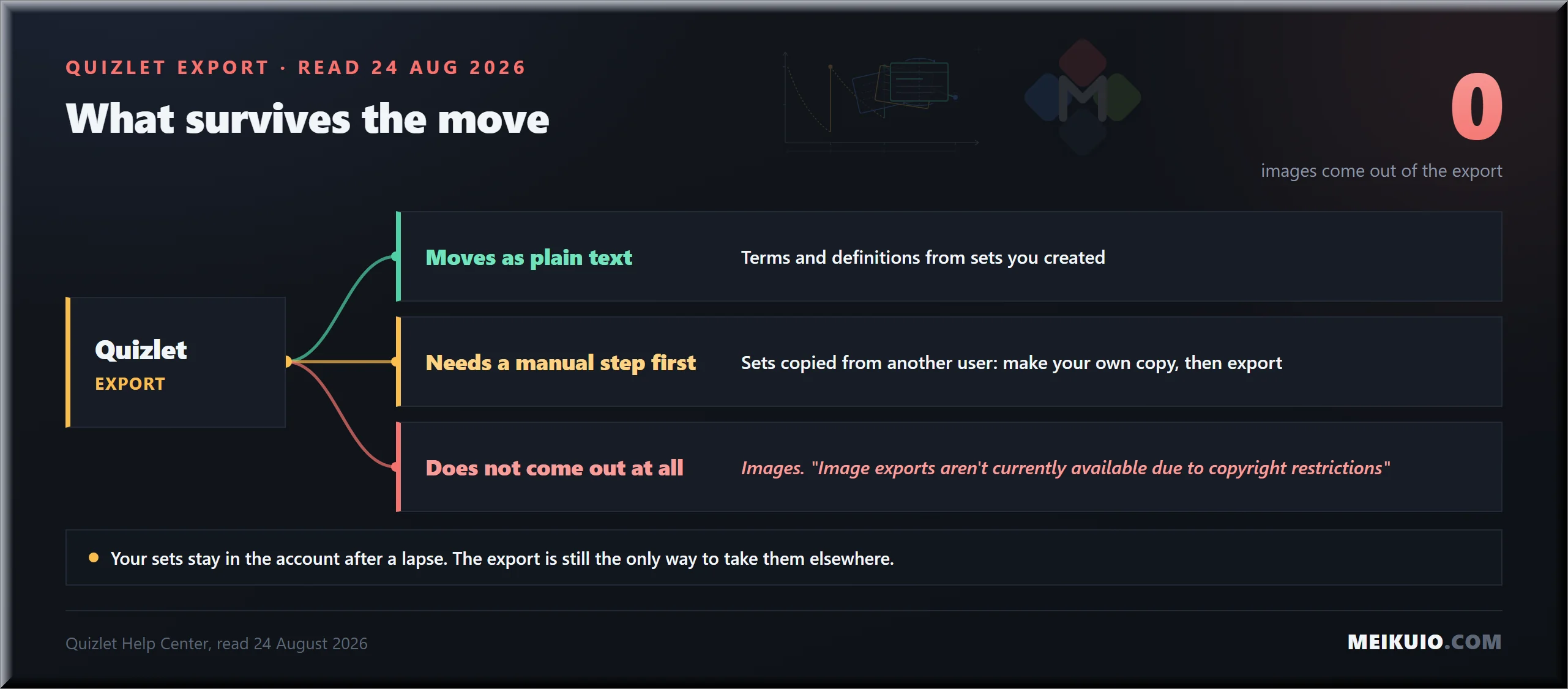
You can take the words. Nothing else. Quizlet’s own help page describes an export that copies terms and definitions as plain text, and it names two limits that decide how much work your move will be.
The first: “Image exports aren’t currently available due to copyright restrictions.” Every diagram, every photo you attached, every labelled anatomy card stays behind. The second: “If you copied a set from another user, you won’t be able to export it.” Saved sets are not yours to move.
That second limit is the one people discover late. A student with two hundred saved sets has a library that looks personal. It exports as nothing. There is a way around it, and Knowt’s support team documents it better than Quizlet does: open the set, make a copy, then export the copy. The copy belongs to you, so the export button appears.
Your text is portable. Your pictures are not.
What does not happen is the thing most people fear. Quizlet’s help centre is explicit: when a paid subscription ends, the account reverts to the free version, and “All your sets, folders, and classes will stay in your account, and you’ll always be able to see your uploaded images and listen to your recorded audio.” You lose the paid modes, not the material.
More Read

There is one catch in that same page, and it is worth knowing before you edit anything after a lapse. If you go back and modify a term or definition on a set you built while subscribed, “any premium features that you previously added will be removed from any term or definition that you modify.” Leave old sets alone and they keep what they have. Touch them on the free tier and the premium parts come off the parts you touched.
Why are people leaving Quizlet now?
Because the study modes moved, not because the price moved. Flashcards stayed free. Learn, Test, Expert Solutions and offline studying sit on the paid side, and Quizlet’s help centre lists them there in plain language.
You can see the same thing in what people type into search. Alongside “quizlet alternatives” sit “alternatives to quizlet learn” and “is quizlet not free anymore”. Nobody phrases a query that way after reading an announcement. They phrase it that way after opening the app mid-semester and finding a button asking for money.
Here is where I have to be straight with you about the record. The date usually repeated for this change is 1 August 2022. I could not find a dated announcement from Quizlet saying so. Quizlet’s blog post from that day covers a redesign and says nothing about moving Learn or Test behind a paywall. Student newspapers carried the claim; the company’s own archive, as far as I could read it, did not.
What we can and can’t date
The current state is documented: Quizlet’s help centre says the paid tier carries monthly usage limits, and lists Learn, Test and offline studying as subscriber features. The transition date is not documented by the company. We’re printing the gap rather than borrowing a date from someone who also couldn’t source it.
What does “Quizlet Plus” actually mean?
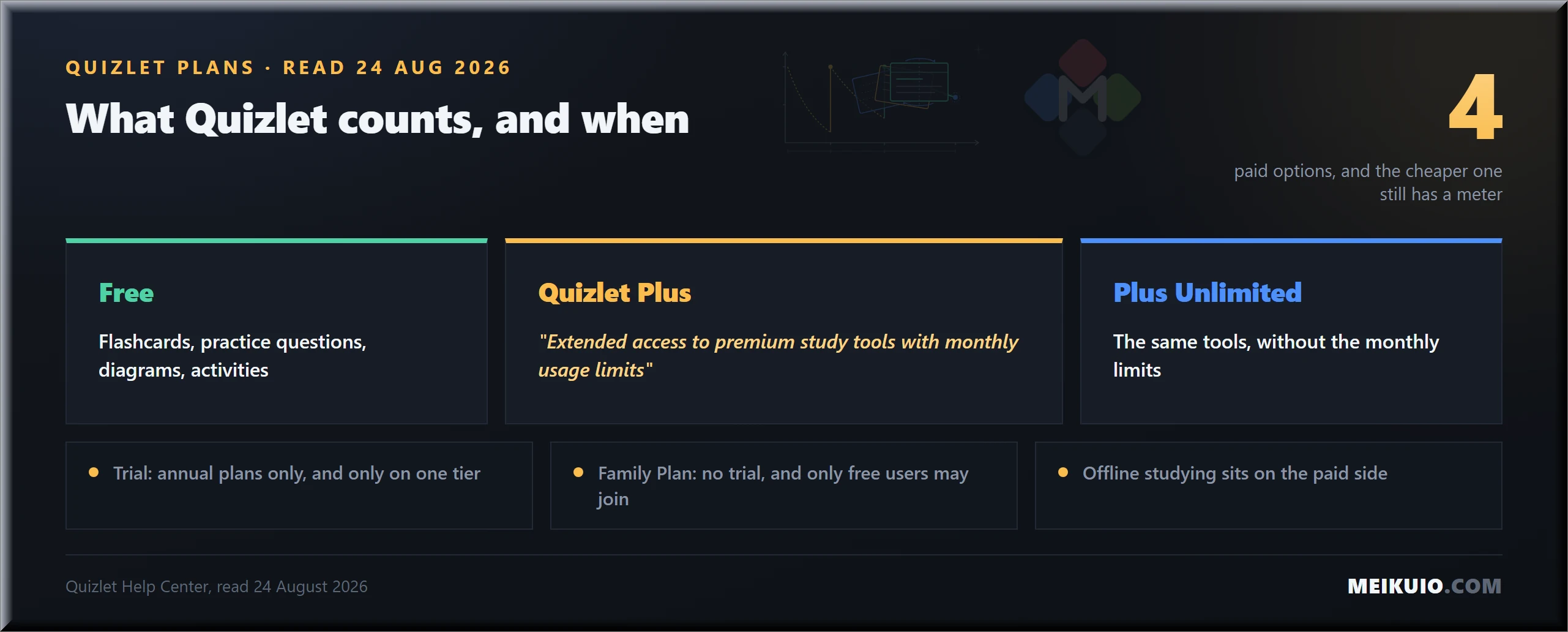
It means four different things, which is the part worth slowing down for. Quizlet sells Plus, Plus Unlimited, Plus for teachers and a Family Plan, and two of them share most of a name.
Read the help centre line for the cheaper one carefully: Quizlet Plus “provides extended access to premium study tools with monthly usage limits.” That is a paid plan with a meter on it. The unlimited version exists precisely because the paid version is capped, and both live under the word Plus.
The Family Plan rule deserves a second read. Quizlet’s help centre says Family Plans are billed annually, don’t include a free trial, and renew automatically unless cancelled, and that only free Quizlet users are eligible to purchase or join one. Pay first and the household option closes to you.
One more line, this one from the Google Play listing rather than the website: “Quizlet Plus subscriptions will be charged to your Google account. Your monthly or annual subscription automatically renews unless canceled at least 24 hours before the end of the current period.” If you subscribed on your phone, deleting the app cancels nothing. The subscription lives in the store, not in Quizlet. It’s the same trap we found in the App Store subscriptions that renew quietly, and it catches people for the same reason.
How this list was put together
I did three things, and none of them involved a press release.
- Counted the field. Ten pages rank for this phrase. Eight are published by companies that sell a study product listed on the page, and four of them put their own product first.
- Read the vendors’ own pages: pricing, terms, help centres, store listings. Where a number wasn’t published, that absence is printed here instead of a guess.
- Checked ownership in the App Store and Google Play, because in this category the name on the icon is not always the company behind it.
Worth saying plainly: meikuio doesn’t make a flashcard app, so there’s no row of ours in the table below. One of the pages competing for this search does disclose the same conflict honestly, StudyGlen writes “StudyGlen is our product” near the top, and then ranks itself first anyway. The disclosure is good practice. The ranking that follows it is the problem.
Where a claim comes from a vendor, I’ve named the vendor in the sentence. Where two vendors contradict each other, you’ll see both. That happens once here, and it’s instructive.
What the ten pages ranking for this search have in common
I counted the top ten myself, because the composition explains the gaps better than any critique could. Eight of the ten pages listing Quizlet alternatives are published by companies that sell a study product, and four of those rank their own product first. The tenth is a directory. There is no independent publisher in the top ten at all.
Then I looked at where the links go. I expected affiliate tracking. There isn’t any. Across the pages I checked, none carried links through the usual affiliate networks. One ranked page carries exactly one outbound link in the whole article, and it goes to LinkedIn, not to a single tool it recommends. On another, the link to the publisher’s own product carries a tracking parameter named after the very page you are reading it on.
That changes what these pages are. They are not review sites earning a commission when you switch. They are funnels, and the destination is the publisher. That explains the gap they share. Nobody writing a funnel has a reason to tell you how to leave properly, what your export contains, or which tool will still be free next term.
Eight of the ten pages selling you Quizlet alternatives are selling you their own product.
The AI answers built on top of that field inherit the problem. The summary shown above the results for this query, when I ran it, was assembled from two vendor pages. It reads like a recommendation and sources like an advert. We ran into the same pattern writing about tools that grade other tools, where the loudest pages had the weakest evidence behind them.
It also explains a search habit you may recognise in yourself. People append the word reddit to this query often enough that it shows up in the related searches. That is what readers do when the first page of results reads like brochures.
Which alternative fits your reason for leaving?
Pick by the thing that pushed you out. Not by a score. Quizlet alternatives cluster around four different jobs, and the reason you are leaving decides which cluster is yours.
Anki: free everywhere except one phone
Anki is the answer for people who plan to still be studying this material next year. The desktop version is free on Windows, macOS and Linux, AnkiWeb syncs between devices for free, and AnkiDroid on Android is free and, in the project’s words, “developed by contributors.”
The exception is iPhone. AnkiMobile is a one-time 24.99 USD purchase. The project explains why in one sentence: “AnkiMobile is the official iOS app and all purchases help fund Anki’s development.” One payment, no renewal, no meter. In a category where everything else bills monthly, that’s a different shape of deal.
The import path is the plainest in this list, because it matches what Quizlet hands you. Anki’s manual says any plain text file with fields separated by commas, semicolons or tabs can be imported, provided the file is saved as .txt in UTF-8. Quizlet’s export gives you text with a separator you choose. The two line up without a middleman.
What doesn’t line up is media. Images move through a separate process in Anki, and Quizlet won’t export images at all, so pictures are a manual job on both ends. Set aside an evening if your cards are visual.
The real cost of Anki isn’t money. It’s the first hour. The interface is unapologetically utilitarian, the scheduling settings are exposed rather than hidden, and nothing about it flatters you. People who stay call that honesty. People who leave call it homework.
Knowt: one click, if the scraper is having a good day
Knowt is the fastest way out of Quizlet and the one that needs the most explaining. Its landing page calls it the number one free Quizlet alternative, and it ranks second for this search on the strength of that page. The import really is a click. Install the Chrome extension, open a Quizlet set, press the button.
Two things about that button are documented on Knowt’s own help pages, and both matter more than the marketing.
First, it reads the page rather than the data. Sets over 100 terms need a manual step. Knowt tells you to scroll to the bottom of the Quizlet set and click “See more” first, so their assistant can, in their phrasing, “see all of the terms.” That’s a scraper describing itself. Second, Knowt says what happens when Quizlet notices. “If the Chrome extension is not working because Quizlet blocked us again, please scroll down to learn how to import manually.” The word doing the work there is “again.”
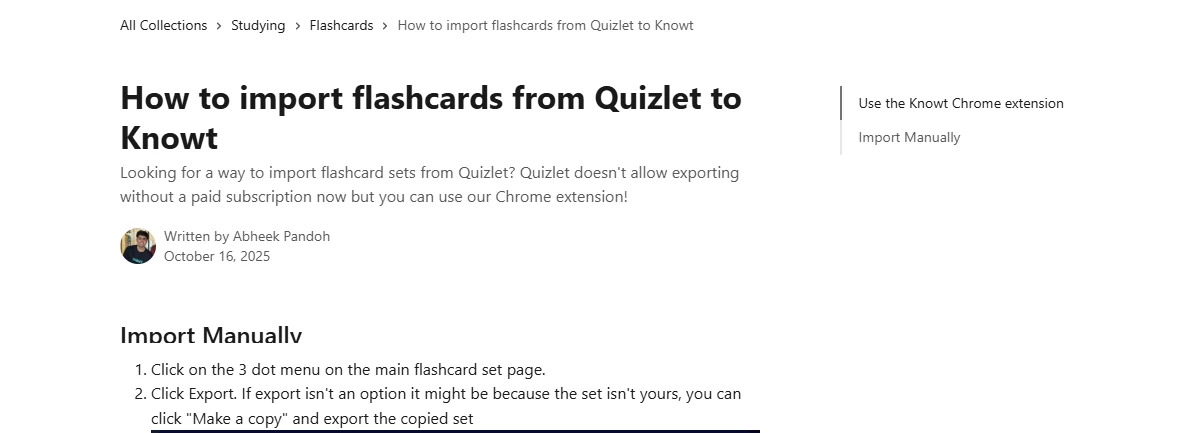
Then there’s the contradiction. The same help page opens with “Quizlet doesn’t allow exporting without a paid subscription now.” Four paragraphs later it walks you through that free export: open the three dot menu, click Export, pick your separators, copy the text. If the set isn’t yours, it says, make a copy and export the copy. That advice is correct, it matches Quizlet’s own help page, and it contradicts the sentence at the top of the page selling you the extension.
Knowt’s plans page lists a free Basic tier, an annual Ultra at 12.49 USD a month billed upfront at 149.99 USD, and a monthly Ultra at 24.99 USD. Cancelling happens in the app, under Settings and then Your Plan, which is worth knowing before you subscribe on a phone.
Brainscape: free forever, as long as it’s yours
Brainscape prints the clearest free-tier promise in this field. It sits at the top of the pricing page: “Creating, sharing, and studying your own content is always FREE.” The load-bearing words are “your own content.” What you make is free. What other people made is the upsell.
The free plan is metered in a way the page states openly: AI generation for hundreds of flashcards, and 2,500 pre-loaded cards to study. Pro removes both ceilings and adds studying content made by others, unlimited AI generation, private content, and one item that matters if you’re arriving from Quizlet: adding images and sounds to cards.
Sit with that for a second. Quizlet won’t let you export your pictures. Brainscape puts adding pictures behind Pro. A visual deck loses its images on the way out and pays to get them back on the way in.
Pro shows as 7.99 USD a month on the pricing page, and the plan selected beneath that figure is the yearly one. The page does not print the annual total next to it. That’s a small omission with a familiar shape, the same one we walked through in annual billing and renewal: a monthly-looking number attached to a yearly commitment.
RemNote: notes and cards in one place, priced in credits
RemNote is for the specific frustration of keeping notes in one app and flashcards in another. Cards are written inside the notes, so the answer you failed sits next to the paragraph that explains it.
Its free tier states its limits more precisely than anything else here, and that precision is the compliment. Unlimited notes, unlimited flashcards, unlimited synced devices, then three hard integers: 3 annotated PDFs, 5 image occlusion cards, 1 handwritten document. You know exactly where the wall is before you reach it.
Paid plans run on credits. Pro is 8 USD a month, billed at 96 USD yearly, with 1,000 AI credits. Pro with AI is 18 USD a month, billed at 216 USD yearly, with 20,000 credits. The page also publishes the exchange rate, which none of the other pricing pages I read here do: each AI run costs roughly 2 credits, and the free plan gets 50 monthly runs of each AI feature.
RemNote publishes the exchange rate between credits and actual work. In this field, that is unusual.
Gizmo, StudyFetch and the make-cards-from-my-PDF tools
This group answers a real need: you have 90 lecture slides and four days. They ingest a file and hand back cards. The trade is the meter. It moves to something you can’t see, and most of them don’t publish where it sits.
Read Gizmo’s terms before subscribing, for one clause that isn’t about price at all. Subscriptions renew automatically at the end of the term unless cancelled, which is standard. Then this: continued use of the service after a subscription fee change comes into effect constitutes your agreement to pay the modified fee. The price can move, and staying is how you accept it.
What I could not find on Gizmo’s own pages was a published trial length or a published generation quota. That absence is the finding. A tool that meters AI generation without naming the limit leaves you one way to discover it. You run out. That usually happens the week before an exam, not the week after you sign up.
Treat this whole group the way we treated the free plan that vanished: assume the generous tier is an acquisition tier, and check what happens to your material if you stop paying.
Vaia, Cram and the ones that promise a path without naming it
Vaia, formerly StudySmarter, documents a Quizlet-shaped import and lets you cancel at any time while keeping access to the end of the billing cycle. It also carries a clause I would read out loud before signing up. Clause 18.4 of its terms reserves the right “to introduce fees for additional functions or convert free services into paid services without prior notice.”
That is the exact thing that just happened to everyone reading this article, written down in advance as a right the company holds. It isn’t unusual as a contract term. It is unusual to be able to point at it.
Cram sits at the other end of the documentation problem. Its create page offers an Import option described as transferring your flashcard sets from other websites, and the interface never names Quizlet. You find out whether your sets survive by trying it with your sets. For a tool positioned as a Quizlet substitute, that’s a thin promise to move a semester on.
The pattern across this tier is consistent. The import is advertised as a feature and documented as an intention. Before you commit, open the tool’s own help pages, search for the word Quizlet, and see whether anything comes back.
Which Quizlet alternatives actually import your sets?
Every tool in this category advertises an import. Only some of them document one. The difference takes ten minutes to check and decides how much of your term survives the move. For anyone comparing Quizlet alternatives, it is the row that matters most.
Notice the shape of the two failure modes. One is technical honesty, where the vendor documents the ceiling and you can plan around it. The other is silence, where the promise is generic and the limits appear after you have moved your material.
There is also a difference between an import and an integration. A browser extension that reads a page is a scraper. It works until the other side changes its markup or blocks the traffic, and neither event will be announced to you. A text import you perform yourself has no such dependency, which is why the least automated path in the table is also the most durable. The same logic held when we compared tools that wrap someone else’s service: the further your workflow sits from a supplier’s goodwill, the longer it survives.
One practical consequence for anyone weighing Quizlet alternatives on import quality alone: do the export first, then choose. Once your sets are text files on your own disk, every tool in the table becomes an option, and none of them holds your material hostage while you decide. It is the same habit we recommend before switching anything that stores your work, from moving a site between builders to migrating workspaces in Arc Browser alternatives.
The apps that are not Anki
This is the part of the move where people actually lose money, and no page ranking for this search mentions it.
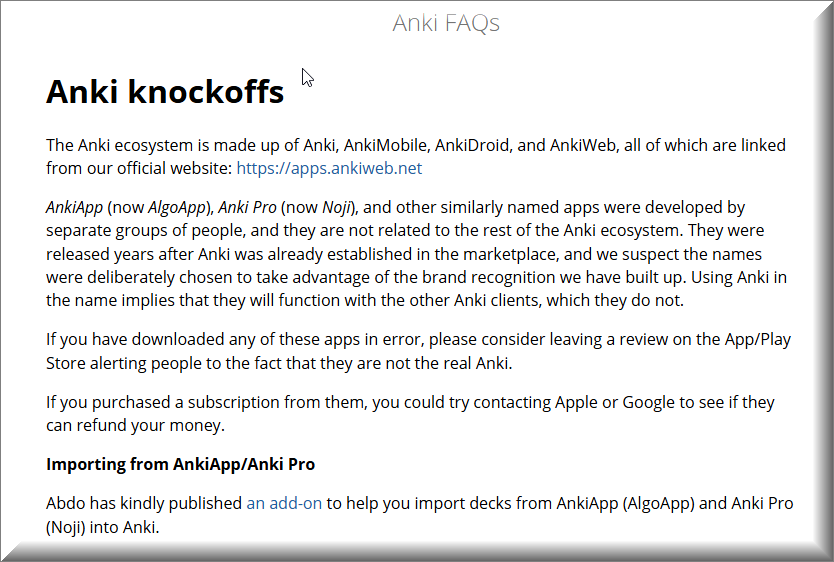
Anki is free and its official iOS app costs 24.99 USD once. Search the App Store for the word Anki and you will also find apps that carry subscriptions and carry the name. The Anki project maintains a page about them, and its language is unusually direct for documentation.
“AnkiApp (now AlgoApp), Anki Pro (now Noji), and other similarly named apps were developed by separate groups of people, and they are not related to the rest of the Anki ecosystem,” the page says. It goes further: “we suspect the names were deliberately chosen to take advantage of the brand recognition we have built up. Using Anki in the name implies that they will function with the other Anki clients, which they do not.”
The last line tells you how often this happens. “If you purchased a subscription from them, you could try contacting Apple or Google to see if they can refund your money.” Projects don’t write refund instructions for a hypothetical.
Here is what the three listings say, read in the US App Store on 24 August 2026.
Between them the two unaffiliated apps carry 34,000 ratings. That is the scale of the confusion. It also explains an odd detail. The official AnkiMobile listing opens with a warning instead of a feature: “Beware other apps using ‘Anki’ in their name that have sprung up recently – they are not compatible with the rest of the Anki ecosystem, and they offer far fewer features, despite charging expensive subscriptions.”
The store itself doesn’t help. Apple’s “You Might Also Like” rail on the Noji page lists AlgoApp and AnkiMobile. On the AlgoApp page it lists Noji and AnkiMobile. The recommendation engine treats all three as neighbours, which is how a person who wanted one ends up paying for another. Checking the seller line before you tap Get is the whole defence, and it is the same habit that protects you in working out who owns what.
Official AnkiMobile: Anki Software LLC, 24.99 USD once. AlgoApp: AlgoApp Inc, in-app purchases, 4.7 stars from 20K ratings. Noji: DELIGHTHUB PTE. LTD., in-app purchases, 4.6 stars from 14K ratings. The two non-Anki apps total 34,000 ratings. Apple’s You Might Also Like rail on each listing includes the other two. Official Anki’s unshown count is not zero.
Three listings, three different sellers, one shared recommendation rail.
What does each one actually meter?
Price comparisons in this category age badly, because the numbers move and the units don’t. The unit is the durable fact. Here is what each tool counts, from its own published pages.
Four of the seven publish the number that will eventually stop you. One has no meter to publish at all. Two publish the right to introduce one later. That split is more useful than any price table, because prices reset every spring and metering habits don’t. It’s the same lens we used on tools that bill in different units, where the unit predicted the bill better than the sticker did.
The unit outlasts whatever the price happens to be this month.
What does “free” actually buy you here?
Three different things, and the word is identical in all three cases. Sorting them takes about a minute per tool and saves the surprise later.
One kind is free forever, for your own material. Brainscape states it in capital letters: creating, sharing and studying your own content is always free. The boundary is ownership, not time. Study what you made, pay to study what others made.
The second kind runs until a counter empties. RemNote gives you 3 annotated PDFs, 5 image occlusion cards and 1 handwritten document. Knowt caps a one-click import at 100 cards unless you expand the set yourself first. These are honest ceilings, published in advance, and you can plan around them.
The third kind lasts until the vendor changes its mind. Vaia’s terms reserve the right to “introduce fees for additional functions or convert free services into paid services without prior notice.” No counter, no date, no announcement promised. This is the category Quizlet users just lived through, written into a contract before it happens.
When you compare the free tiers of Quizlet alternatives, ask which of the three you are being offered. The first is a business model. The second is a trial with the numbers shown. The third is a maybe.
Anki or one of the easy ones?
Answer honestly how long this material has to stay in your head. That single question sorts this better than any feature table.
If the answer is “until Friday”, Anki is the wrong tool and I’d say so to anyone’s face. Its scheduling is built to space reviews over months. For a quiz next week, that machinery is overhead. You pay for it and never collect. Knowt, Brainscape or the free side of Quizlet will get you reviewing in five minutes.
If the answer is “for boards”, “for the bar” or “for this language, permanently”, the trade flips. The setup evening happens once. The data is yours after that, in an open format, on your own disk. No monthly claim on it. Nobody can move your review modes behind a paywall in the middle of your semester, which is the entire reason you’re reading this article.
Who goes back to Quizlet, and why
Plenty of people leave and return, and the reason is the one thing no alternative can copy: the library. Quizlet holds an enormous stock of sets made by other students, and for a specific textbook chapter, somebody has usually already typed the cards.
Both research passes I ran independently landed on the same conclusion, against my own initial assumption: pre-made sets still drive this choice. The proof is in the competitors’ behaviour. Rival tools build one-click Quizlet importers. An importer is only worth building if the thing on the other side is worth having.
So be clear-eyed about the trade. Leaving costs you the shared library and buys you control over your own cards. If most of your studying runs on other people’s sets, you’re not really leaving a tool. You’re leaving a collection, and the alternatives will feel empty for the first week.
If you’re a teacher moving a class
Your problem is not which app scores highest. It’s that three things you built inside Quizlet don’t travel, and none of the tools I checked for this article documents a way to move them.
One piece of good news before the bad. If a teacher subscription simply lapses, Quizlet says the class material stays and “your Class Progress data will be restored when you upgrade again.” Leaving the platform is a different act from letting the plan expire, and only one of them is reversible.
- The roster. A class list is not a file you export. Wherever you go, students join again with a new link or a new code, and that means a lesson spent on setup instead of content.
- The folder structure. Years of sets organised by unit and term come out one set at a time, as text, without images. Rebuilding the shelf is the work, not moving the books.
- Progress history. Whatever the platform recorded about who struggled with what stays on the platform. Plan the move for the start of a term, not the middle of one.
Two notes before you pick a classroom tool
First, live quiz games and personal flashcard apps are different jobs. Four of the six longest lists I read mix them, which is why they read as if written for nobody in particular. A game-show tool runs a lesson. A card app runs a memory. Choose per job, not per ranking.
Second, if your institution provides a quiz module through its learning platform, check its retention policy before treating it as storage. The course owns that timeline, not you or your students, and it ends when the institution says it ends. A classroom is not a personal archive, and student-made cards should live somewhere the student keeps after graduation.
So what do you actually do? Pick the destination for the studying, not for the classroom. Move your own sets first, using the steps below, and rebuild class structure by hand in whichever tool your students can reach without paying. Then run one class through it before you move the other four. A tool that survives one period with thirty teenagers has told you more than any comparison table can.
If you’re studying for one exam next month
Do the least possible. Export the sets you actually use, which will be fewer than you think, and put them into whichever of the Quizlet alternatives runs in a browser today.
Knowt is the shortest path because the import is a click and the free tier lets you study what you brought. Brainscape works too, and its free tier explicitly covers studying your own cards. Neither requires you to learn a scheduling philosophy before the exam you’re actually preparing for.
Skip the AI generators for this one. Feeding a slide deck into a generator produces a hundred cards you didn’t write, and writing them is where a good part of the learning happens. That trade might be worth it in week three of a course. It isn’t worth it in the last week. If you still want an AI in the loop, we compared seven tools in the best AI for studying, ranked by whether they make you do the thinking.
Five things to check before you sign up for any of them
Every trap in this article is visible before you pay, on a page the vendor publishes. This is the list I ran on each of these Quizlet alternatives, and it takes about ten minutes per tool.
- Read the seller line, not the app name. On a store listing, scroll to the information block and check who is selling it. That one line separates the official Anki app from two subscription apps with similar names and 34,000 ratings between them. Get the correct seller name from the project’s own website first, because the store will not tell you which listing is official. In-app purchases are normal and prove nothing on their own.
- Find the unit, not the price. Ask what the plan counts: cards, credits, AI runs, monthly rounds, or nothing at all. If the pricing page never names a unit, the meter still exists, and you will meet it later.
- Search the help centre for the word export. Before you put a term’s work into a tool, confirm you can get it back out and in what format. A product that documents its export is telling you something about how it expects to keep you.
- Work out which kind of free you are being offered. Free for your own material, free until a published counter, or free until the terms change. All three use the same word on the pricing page.
- Note where the cancel button lives. Subscribe in an app store and you cancel in that store, not in the app. Subscribe on the web and it is usually in account settings. Write down which one you used, because the day you want out is not the day to go looking.
None of this is specific to study software. The same checklist saved money on writing tools, where the real number only appeared after we read the vendor’s own pages in what you actually pay for. It also separates genuinely free services from free-shaped ones, as in what costs nothing.
How to move your sets, step by step
This takes an evening for a semester’s worth of sets. Do it before you cancel anything. The export lives inside the account you are about to close.
- List what you actually use. Open your library and mark the sets you have studied this term. Most people move twenty and abandon two hundred.
- Fix the ownership problem first. For any set you saved from another user, open it and make a copy. The copy is yours and can be exported. The original never will be.
- Export as text. In the set, open the more menu, choose Export, pick how terms and definitions should be separated, and copy the text. Paste each set into its own plain text file.
- Save the files as UTF-8. Anki’s manual asks for plain .txt in UTF-8 with commas, semicolons or tabs as separators. Most other importers accept the same shape. Getting the encoding right now prevents mangled accents later.
- Screenshot the cards that carry images. Images never come out of the export. Capture them while you still have the account, and reattach them by hand in the new tool.
- Import one set and study it for a day. Check that special characters, blank fields and multi-line definitions survived before you move the rest.
- Cancel in the right place. Quizlet’s help centre is blunt about it: “Uninstalling the Quizlet app does not cancel subscription payments.” Paid inside the iOS app, cancel through the Apple App Store. Paid inside the Android app, cancel in Google Play. Paid on the website, cancel in your Quizlet settings. Quizlet asks for the request at least 24 hours before the renewal date, whichever route you used.
What I could not check, and why that matters
Four things stayed open after a week of reading vendor pages, and leaving them visible is more useful than filling them in.
Quizlet’s web pricing page sat behind an automated check when I tried to read it on 24 August 2026, so this article carries no dollar figures for Quizlet. Everything I say about its plans comes from the help centre and the app store listings, which were open. Prices you find quoted elsewhere may well be right. They are not mine to confirm.
The date usually attached to Quizlet’s paywall change has no company announcement behind it that I could find. Gizmo publishes neither a trial length nor a generation quota on its own pages. And several tools that market themselves as Quizlet alternatives never name Quizlet in their own import documentation, which leaves the promise untestable until your sets are already in play.
An unanswered question is a finding in a category like this one. Where a vendor publishes its limits, you can plan. Where the page goes quiet, that silence is the product decision, and it will show up on a card statement rather than in a changelog. The pattern is familiar from every subscription review we have run, including what the plan really costs.
Field notes
- The field: ten pages rank for this phrase; eight are published by companies selling a study product inside their own list; four of those place their own product first; zero independent publishers appear in the top ten.
- Export ceiling: Quizlet exports terms and definitions as text; image exports are unavailable; sets copied from another user cannot be exported until you make your own copy.
- Paid and still metered: Quizlet Plus is described by Quizlet as extended access with monthly usage limits; Plus Unlimited removes them; the Family Plan has no trial and is open only to users who are not already paying.
- Free ceilings elsewhere: RemNote free covers 3 annotated PDFs, 5 image occlusion cards, 1 handwritten document; Brainscape free covers 2,500 pre-loaded cards and hundreds of AI-made ones; Knowt imports 100 cards at a time unless the set is expanded first.
- Name collisions: the official iOS Anki app is sold by Anki Software LLC for 24.99 USD once; AlgoApp Inc and DELIGHTHUB PTE. LTD. sell similarly named subscription apps carrying 20K and 14K ratings; the Anki project publishes refund guidance for buyers who paid the wrong one.
- Undated claim: the widely repeated date for Quizlet moving Learn and Test behind a paywall could not be matched to any dated Quizlet announcement, so this article does not assert it.
- Sources: Quizlet Help Center, Anki FAQs and manual, US App Store and Google Play listings, Knowt Help Center, Brainscape pricing, RemNote pricing, Gizmo terms, Vaia terms. All read on 24 August 2026.
Frequently Asked Questions
Is Quizlet still free in 2026?
Partly. A free account covers flashcards, practice questions, diagrams and activities. Learn, Test, Expert Solutions and offline studying are listed by Quizlet as subscriber features, which is why people who used those modes daily are the ones searching for a replacement.
How much does Quizlet cost?
Quizlet sells four paid options: Plus, Plus Unlimited, Plus for teachers and an annual Family Plan. I am not printing dollar figures here. The pricing page sat behind an automated bot check when I read the site on 24 August 2026, and I only publish prices I have seen on the live page myself. The structure matters more anyway: the cheaper paid tier still carries monthly usage limits, and the free trial applies to annual plans on one tier only.
What happens to my sets if I stop paying for Quizlet?
They stay. Quizlet’s help centre says the account reverts to the free version and that all your sets, folders and classes remain in it, with uploaded images and recorded audio still viewable. What you lose is access to the paid study modes. One caveat from the same page: if you later edit a term or definition on a set you built while subscribed, the premium features you had added are removed from whatever you modify.
Can I export my Quizlet sets for free?
Yes, if the set is yours. Quizlet’s help page describes exporting terms and definitions as copyable text from the set’s more menu. Two limits apply: images are not exported, and a set you copied from another user cannot be exported until you make your own copy of it first.
What is the best free Quizlet alternative?
Of the free Quizlet alternatives, Brainscape makes the plainest promise: its pricing page says creating, sharing and studying your own content is always free. For getting out of Quizlet in one click today, Knowt. For free on every platform except iPhone, Anki, where the desktop, web sync and Android apps cost nothing.
How do I move Quizlet sets into Anki?
Export each set as text from Quizlet, save it as a plain .txt file in UTF-8, then import it in Anki. Anki’s manual accepts fields separated by commas, semicolons or tabs and guesses the separator, which you can correct during import. Images are the exception and have to be added by hand.
Quizlet vs Anki: which one should I use?
Use Quizlet if you rely on sets other students made and you are studying for something a few weeks away. Use Anki if the material has to survive months. Same answer if you want your data in an open format on your own machine, or if you are tired of study modes moving behind a paywall. The cost of Anki is the first hour, not the subscription.
Is Brainscape free?
Free for your own material. The pricing page promises free creating, sharing and studying of content you make, and lists 2,500 pre-loaded cards on the free plan. Studying unlimited content made by others, unlimited AI generation, and adding images and sounds to cards sit on the paid Pro plan.
Are all the apps called Anki in the App Store official?
No. The Anki project states that AnkiApp, now AlgoApp, and Anki Pro, now Noji, were developed by separate groups and are not related to the rest of the Anki ecosystem. The official iOS app is AnkiMobile, sold by Anki Software LLC as a one-time purchase. Check the seller line on the listing before you install anything.
What happens to my class if I move off Quizlet?
Your sets move as text, one at a time. Your roster, your folder structure and your students’ progress history do not. None of the tools I checked documents a way to carry a class list across. Plan the switch for the start of a term, and expect to spend one lesson getting students onto the new tool.
My Take
If a friend asked me tonight, I’d tell them to spend one evening with Anki and never think about this again. One payment on iPhone, nothing anywhere else, files that stay on their disk, and no company able to move their study modes behind a paywall halfway through a term. The interface is plain. The deal is the cleanest of the Quizlet alternatives I read this week, and after twenty vendor pages, that counts for more than polish.
I wouldn’t say that to everyone. If you’re three weeks from one exam, or if most of your studying runs on sets other students wrote, Anki is the wrong answer and Knowt or Brainscape will serve you better. And if you take one thing from this article, make it the boring one. Export your sets while you still have the account. Check the seller name before you install anything with Anki in the title.