



The best Have I Been Pwned alternative depends on what you are actually trying to replace. If you want to check your own email address, you do not need one, because that check costs nothing. If you need a phone number, a name, or an API, three specific tools do things Have I Been Pwned does not. Here is what each one runs on.
- What are you actually looking for when you search for a Have I Been Pwned alternative?
- What does Have I Been Pwned cost, and who is it charging?
- Where does each tool’s breach data actually come from?
- Which alternatives are Have I Been Pwned with a different logo?
- Which free breach checkers are actually worth using?
- DataBreach.com, if you need to search a name or a phone number
- XposedOrNot, if you want an open source second opinion
- Cybernews leak checker, if you want to check a phone number quickly
- DeHashed and LeakCheck, and why “free” needs a footnote
- Have you tried the breach check you already own?
- What about the free monitoring attached to your credit card?
- Does dark web monitoring work, or is it theatre?
- Which tools on these lists are not sold to you?
- Which recommendations in the search results are out of date?
- What can none of these tools see?
- Why do you keep seeing “billions of passwords leaked”?
- Who keeps Have I Been Pwned running?
- How do you check whether your data has leaked?
- So which Have I Been Pwned alternative should you use?
- Frequently asked questions
- Is Have I Been Pwned free?
- Is there a better alternative to Have I Been Pwned?
- Does dark web monitoring work?
- How do I check if my SSN is on the dark web or is being used?
- Was my data leaked, and how would I find out?
- What is the best free dark web scan?
- Can I check a phone number for breaches?
- Is Have I Been Pwned safe to use?
- Why do some breaches not show up in a search?
- What should I do if my email shows up in a breach?
- My Take
I spent a day reading the documentation behind the tools on the current lists, instead of their marketing. Prices came off the vendors’ own pricing pages. Provenance came out of their own documentation, and where a company does not say where its data comes from, I wrote that down too. Two of the tools that search engines still recommend are dead. One of the most-recommended alternatives is the same database with a different logo, and I can show you that rather than assert it.
What are you actually looking for when you search for a Have I Been Pwned alternative?
Three different people type this phrase, and they need three different answers. The first wants to check an email address and believes the check costs money. The second wants something the service does not do at all, like searching a phone number or a Social Security number. The third is a developer or an administrator who hit the API price and wants a cheaper way to query at volume. Only the second and third have a real problem.
That first group is looking for an alternative to something that is already free for them. That is not their fault. The paid plans are advertised on the same site as the free search, the pricing page is long, and the top of it runs to five figures a year. If you glance at that page you would reasonably conclude the whole thing is a subscription product.
It is not. A basic email lookup needs no login, and the vendor lists what costs nothing in plain language on its own subscription page. I will quote that list in a moment, because it settles the misconception this whole search is built on.
Most people searching for an alternative are trying to replace something that is already free for them.
The second group has a gap nothing else fills. Have I Been Pwned indexes email addresses, and after the leaks of the last two years a lot of people want to search a name or a phone number instead. One free tool does that, and it holds a completely different set of records. I come to it below, with the count printed on its own front page.
More Read

The third group is being priced by design. Read the plan descriptions and the intended customer is named outright: organisations, managed service providers, enterprises. Nobody at the company is pretending the paid tiers are for individuals.
What does Have I Been Pwned cost, and who is it charging?
Checking your own email address costs nothing. The subscription page prints its free tier as a list, and that list reads: browser email search, email notifications, Pwned Passwords, breach monitoring, and monitoring domains with up to 10 breached addresses. Everything a person doing a personal check needs is inside that sentence. I read the page on 2 August 2026.
What you pay for is volume and machinery. The paid ladder is priced by requests per minute, by how many breached addresses a domain can hold, and by how many domains you watch. Here is what the vendor prints, in its own words and figures.
Read the right-hand column again. Organisations, managed service providers, enterprises, throughput. Not one of the three paid families is described as a consumer product, and the description is the vendor’s, not mine. The pricing page is a business page that happens to sit next to a free tool.
Two features decide it if you are the third kind of searcher. Anonymised email search, the kind that never sends the full address, is a Pro-exclusive feature. Stealer log data sits on Pro and High RPM and, in the vendor’s own words, is not available on Core plans. If those are what you came for, the entry tier will not give them to you at any price.
Plan names changed recently, which is why some guides quote prices that no longer exist. The support page says it plainly: in late March 2026 the original Pwned 1 to 5 and Pwned Ultra plans were replaced by Core, Pro and High RPM, and old plans are no longer available for new purchases. Existing subscriptions, the same page says, “will continue to function as usual until August 2, 2026, when they’ll rollover to a corresponding new plan at the next renewal after that date.”
For scale, the entry tier was 10 requests per minute for $3.50 a month when this pricing model was introduced in November 2022. It is $4.39 now. The top of the ladder is close to $70,000 a year.
Where does each tool’s breach data actually come from?
Every list I measured skips this question, and it decides whether a tool is an alternative at all. A breach checker is a search box on top of a corpus. That is all it is. If two search boxes query the same corpus, switching between them changes the interface and nothing else. So I went through the documentation of every tool on the current lists and sorted them by where the records come from. None of the lists does this. It takes an afternoon.
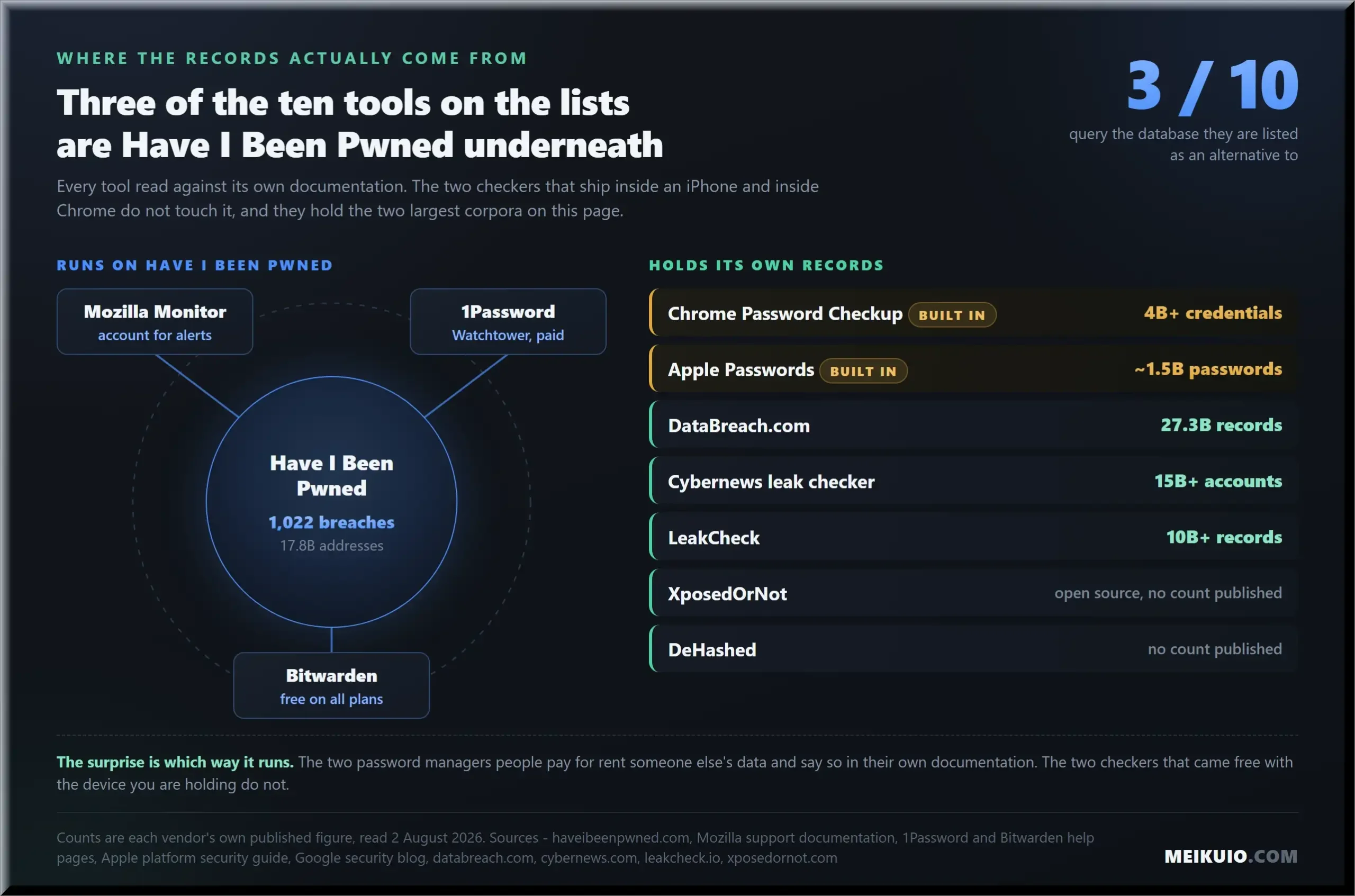
The pattern in that table is not the one I expected before I started reading. The two checkers that ship inside an iPhone and inside Chrome, already installed on devices most people are holding, do not use Have I Been Pwned at all. Apple compares your saved passwords against its own curated set, described in Apple’s security documentation as approximately 1.5 billion passwords. Google warns you when a saved login appears among what its own security blog calls over 4 billion credentials that Google knows to be unsafe. Two separate corpora, neither of them the one everybody argues about.
Meanwhile the two password managers people pay for do run on Have I Been Pwned, and both say so in their own documentation. 1Password’s privacy page describes creating a 40 character hash of each password and sending “only the first five characters of each hash to the Pwned Passwords service provided by haveibeenpwned.com”. Bitwarden’s help pages say its report identifies compromised data in known breaches “using a service called Have I Been Pwned (HIBP)”. Bitwarden’s version is available on every plan including the free one, which makes it the cheapest way to get that check attached to an actual vault.
So the honest summary of the category is short. Free browser and phone checkers run their own data. Paid password managers rent someone else’s. And one very popular free website is a front end for the exact database it is listed as an alternative to.
Which alternatives are Have I Been Pwned with a different logo?
Mozilla Monitor is the first name on almost every list of alternatives, and Mozilla does not hide what it is. Its support FAQ answers the question in one sentence: “Mozilla Monitor gets its data breach information from a publicly searchable source, Have I Been Pwned.” The same page says elsewhere that a breach may be missing from Monitor because “Have I Been Pwned, our breach source, hasn’t been granted access” to it. That disqualifies the tool as an alternative in any meaningful sense. It is a different front door to the same building.
I wanted to see that rather than take anyone’s word for it, so I opened both breach databases on the same afternoon and counted. Have I Been Pwned prints its own totals on its breach list page: 1,022 total breaches and 17.8 billion pwned addresses. Mozilla Monitor’s breach database page held 1,023 individual records. The five most recent entries were identical on both sites, in the same order, with the same dates added: SplitVPN on 1 August 2026, Houston City College on 28 July, Suno and Paidwork on 20 July, Fluke on 15 July.
The one-record gap comes from two counting methods, not evidence of independent data. All five names, order and addition dates matched.
One record apart, and that gap is inside the margin between two ways of counting, so I am not going to build anything on it. The point is the five names. Same breaches, same order, same day they were added.
None of this makes Mozilla Monitor bad. It is free, it sends alerts, and after the paid tier closed Mozilla expanded free monitoring to cover up to 20 email addresses per user, which is more addresses than most people have. Use it if you like the interface. Just do not switch to it believing you are checking a second database, because you are not.
Same five newest breaches, same order, same dates added, on both sites, on the same afternoon.
Look further down the lists and it repeats. One of the highest ranking guides for this exact search puts its own product at number one and then describes it, in the same article, as a tool that “uses verified breach intelligence (including Have I Been Pwned)”. The same article calls Mozilla’s product a “free breach checker built on top of Have I Been Pwned”. Two of its five recommendations are the thing it is recommending alternatives to, and the article says so itself.
Which free breach checkers are actually worth using?
Three tools hold their own records, cost nothing, and answer a question Have I Been Pwned does not. Those are the ones that earn the phrase Have I Been Pwned alternative, and they come first below. Two more appear on the same lists and are free only in a narrow sense, so they get their own heading at the end rather than a recommendation. I have noted what each one asks for before it tells you anything.
DataBreach.com, if you need to search a name or a phone number
This is the one that fills the gap. Have I Been Pwned indexes email addresses. DataBreach.com, built by Atlas Privacy, takes an email, a name or a phone number, and its front page prints the size of what it is searching: 27,367,392,050 leaked records. The page also carries the line “Anonymous search, we do not store any search data” directly under the box.
Its records are different, and that is checkable in about a minute. On the afternoon I looked, its five newest entries were Novum Energy at 227,000 rows, Campbell University at 1.1 million, Quest Health Solutions at 2.1 million, Live Casino at 1.8 million, and Bank of Baroda at 39 million. Those were added on 31, 30, 29, 28 and 27 July 2026. Not one of them appears among the newest entries on Have I Been Pwned. Two corpora, no overlap at the recent end.
One correction while you are here. Coverage from late 2024 described this service as holding 17.5 billion records, and that figure still circulates. The number on the live page is 27.3 billion. Check the front page rather than the article about it.
XposedOrNot, if you want an open source second opinion
XposedOrNot holds its own aggregated corpus and publishes its code. Email and password checks are free, no account is needed for an email lookup, and the project states that its API “will continue to remain completely free of charge” with the application and related files open source on GitHub. Domain queries are the exception and need an API key issued only to a verified domain owner.
It is the closest thing in this category to an independent second opinion, because you can read how it works rather than trust a claim about it. The interface is plainer than the commercial tools. That is the trade.
Cybernews leak checker, if you want to check a phone number quickly
Run by a security publication rather than a security vendor, and it takes an email or a phone number with no account required. Its own FAQ describes a database of more than 15 billion compromised accounts, containing “nothing more than the email address and the source of the leak”, stored hashed with bcrypt. That narrowness is a feature. There is very little for anyone to lose if the checker itself is ever breached.
Before you type your address into anything
Every tool on this page asks you to hand over the identifier you are worried about. That is unavoidable for a lookup, but it is not free of cost, so notice which ones make you create an account first. The ones that do not, on my reading, are DataBreach.com, Cybernews, XposedOrNot, and the basic email search on Have I Been Pwned itself. Mozilla sits in between: its own FAQ says you may search an address without signing up, and the account is what you need for ongoing alerts. Several commercial checkers require an account and a payment method before showing you anything at all.
DeHashed and LeakCheck, and why “free” needs a footnote
Both appear on consumer lists as free tools. Both are free in a specific and limited way. LeakCheck’s public API returns “only the list of breach sources and the categories of exposed data, never the data itself”, and the actual records need a paid plan. DeHashed lets you run a search without paying, then requires a subscription to view what the search found. That is a demo, not a free tier.
Neither is built for you. DeHashed searches by IP address, phone, VIN and more, and its own description names security analysts, journalists and investigators. They are good tools aimed at somebody else.
Have you tried the breach check you already own?
There is a breach checker inside your phone, your browser and your password manager. They run automatically, they check the passwords you actually use rather than an address you type from memory, and you have already paid for them or they came free with the device. Not one of the lists I read mentions them. They should.
On an iPhone or a Mac, saved passwords are compared against Apple’s own set of leaked passwords using what Apple’s security documentation calls a form of cryptographic private set intersection, with only a 15 bit prefix of a hash leaving the device. In Chrome, Password Checkup warns you when a saved login is among the credentials Google knows to be unsafe, using a mix of anonymised lookup and private set intersection. In both cases the comparison is done in a way that does not hand your password to anyone, and in both cases the corpus belongs to the platform. Neither asks Have I Been Pwned anything.
1Password and Bitwarden do the same job against Have I Been Pwned data. Bitwarden’s is the one to know about if you are not paying for anything, because the breach report is available on all Bitwarden plans, including the free one. That is the cheapest check on this page that does anything.
The advantage here is not the size of the database. It is that these tools know which passwords you use and where, so the answer arrives as a list of accounts to fix rather than a list of company names you half remember signing up to. That is the difference between being informed and being able to act. It costs nothing and you own it already. Whatever else you do, do this one.
What about the free monitoring attached to your credit card?
Several US card issuers include dark web and identity monitoring at no cost, and two of them do not require you to be a customer at all. That covers different ground from a breach checker, because it watches a Social Security number and a credit file rather than a list of hacked websites. I have written about which issuers give what, and how the free tools compare on score type and bureau, in the piece on best credit monitoring service, and about whether any of it justifies a paid subscription in is identity theft protection worth it. If you have a card in your wallet, start there before you buy anything.
One question about it goes unanswered everywhere, and it is the same question this article asks of everything else: whose records are those issuer alerts actually searching? A bank does not build a breach corpus. It licenses one. None of the issuers I looked at names the supplier, and that silence tells you how much they expect you to ask.
Does dark web monitoring work, or is it theatre?
It tells you something has already happened. That is the whole of it. A monitoring service cannot remove your data from anywhere, cannot stop a record being resold, and cannot undo a leak. It can shorten the gap between the leak and your knowing about it, which is worth something, and it is a smaller something than the advertising implies.
Somebody has measured how badly that is understood. The Consumer Federation of America found that 36 percent of consumers who have seen ads for dark web monitoring believe identity theft services can remove their personal information from the dark web, and a further 37 percent believe those services can stop purchased data from being used. Susan Grant, the federation’s director of consumer protection and privacy, put the limit in one line: monitoring may be able to alert consumers, but it “can’t put the genie back in the bottle”.
Now the part that surprised me. No US regulator has published guidance on how this category advertises itself. I looked for an enforcement action, a consent order, a marketing guide, a state attorney general settlement, anything. The FTC’s only consumer-facing piece on the subject is an advice alert warning that emails claiming your data is for sale may themselves be phishing. The substantive criticism of the advertising comes from a nonprofit, not from anybody with the power to stop it.
Whether the paid version of this is worth buying is a longer argument, and I made it separately in is identity theft protection worth it. The short version for this page: the alert is the product, and the alert arrives after the fact.
Which tools on these lists are not sold to you?
Open almost any list of Have I Been Pwned alternatives and you will find Flare, Breachsense, Intelligence X or SpyCloud in it. None of those companies is selling to you. They sell to security teams, and their pricing, their onboarding and their dashboards all assume there is a team on the other end.
You can tell from how they describe themselves. Breachsense positions itself as built “for the security-team use case that HIBP was never designed for”, monitoring continuously and integrating with a stack. Flare talks about tracking exposure across clear web and underground sources rather than a point-in-time check. Intelligence X describes itself as a search engine and data archive covering Tor, I2P and data leaks. Those are procurement pitches.
There is nothing wrong with any of them. They are simply in the wrong list. A person who typed a worried question into a search box does not need a threat exposure management platform, and putting one in front of them is how a list gets to twelve entries when the honest number is four.
The other way lists get padded is by counting annual subscriptions as a Have I Been Pwned alternative. One roundup of twelve puts nine paid identity suites on it, which is a different product answering a different question. If that is what you are shopping for, read the individual reviews instead of a list that treats a free lookup and an annual subscription as substitutes. I have taken two of them apart at length, the Identity Guard review and LifeLock’s dark web monitoring in particular.
The same padding shows up elsewhere. One page ranking on the first screen for this search lists its top alternatives to a breach checker as an email deliverability tool, an anti-detect browser and a file sync utility. None of the three checks a breach. That list was assembled by software, not by a person.
Which recommendations in the search results are out of date?
Two products that these lists still recommend no longer exist. Google’s dark web report is gone. Mozilla’s paid Monitor Plus tier is gone. Both closed inside the last eight months, and current articles have not caught up.
Google’s own support page gives the dates without ambiguity: “January 15, 2026: The scans for new dark web breaches stop” and “February 16, 2026: The dark web report is no longer available.” On that second date, Google says, all data related to the report was deleted. The reason it gives is unusually frank for a shutdown notice: “While the report offered general information, feedback showed that it didn’t provide helpful next steps.”
Now look at what is still on the internet telling you to use it. Gen Digital, the company that owns Norton and LifeLock, publishes a consumer guide to finding out whether your information is on the dark web. It carries a section headed “Google’s free dark web checker” and tells the reader: “You can set up dark web monitoring via your Google account for free on the Google Dark Web Report page. To qualify for dark web scanning, you must have a regular consumer Google account.” That page is stamped Published: January 07, 2026, which is three weeks after Google announced the closure and eight days before the scanning stopped. It still said it when I read it on 2 August 2026.
Note
To be precise about what that is and is not: this is Norton’s own guide, not a page ranking in the top ten for the searches this article targets. I checked. The point is not where it ranks, it is that a security company with a research budget has been recommending a deleted product for seven months.
The smaller version of the same problem is a name. Mozilla renamed its product from Firefox Monitor to Mozilla Monitor, and articles written after the rename still use the old one. A widely read roundup dated 29 December 2025 gives “Firefox Monitor” a section, a feature list and a pricing block, and never uses the current name once. A guide dated 28 January 2026 does the same. A large crowd-sourced alternatives page, last touched on 31 October 2025 and still ranking, contains the words discontinued, shut down and no longer exactly zero times, while listing entries whose own dates go back to 2018.
Every Have I Been Pwned alternative list I measured carried at least one of these faults: a dead product, a retired product name, a page that never mentions whether anything on it still runs, or entries from a different software category altogether. Check the date on any list you read. Then check whether the thing it recommends still answers when you knock.
What can none of these tools see?
There are two kinds of stolen credential, and most free checkers only hold one of them. The first is the classic breach: a company’s database is taken and published, and your address appears in it. The second is the infostealer log, which comes off an infected computer rather than out of a company, and it is now the bigger source.
Have I Been Pwned describes the second kind precisely: stealer logs “are the result of malicious software running on infected machines that collect email addresses, passwords and the website they’re entered into at login”. That last clause is the difference that matters. A breach dump tells you a company lost your address. A stealer log tells someone your password and the exact page you typed it into, plus, often, a live session cookie that skips the password entirely.
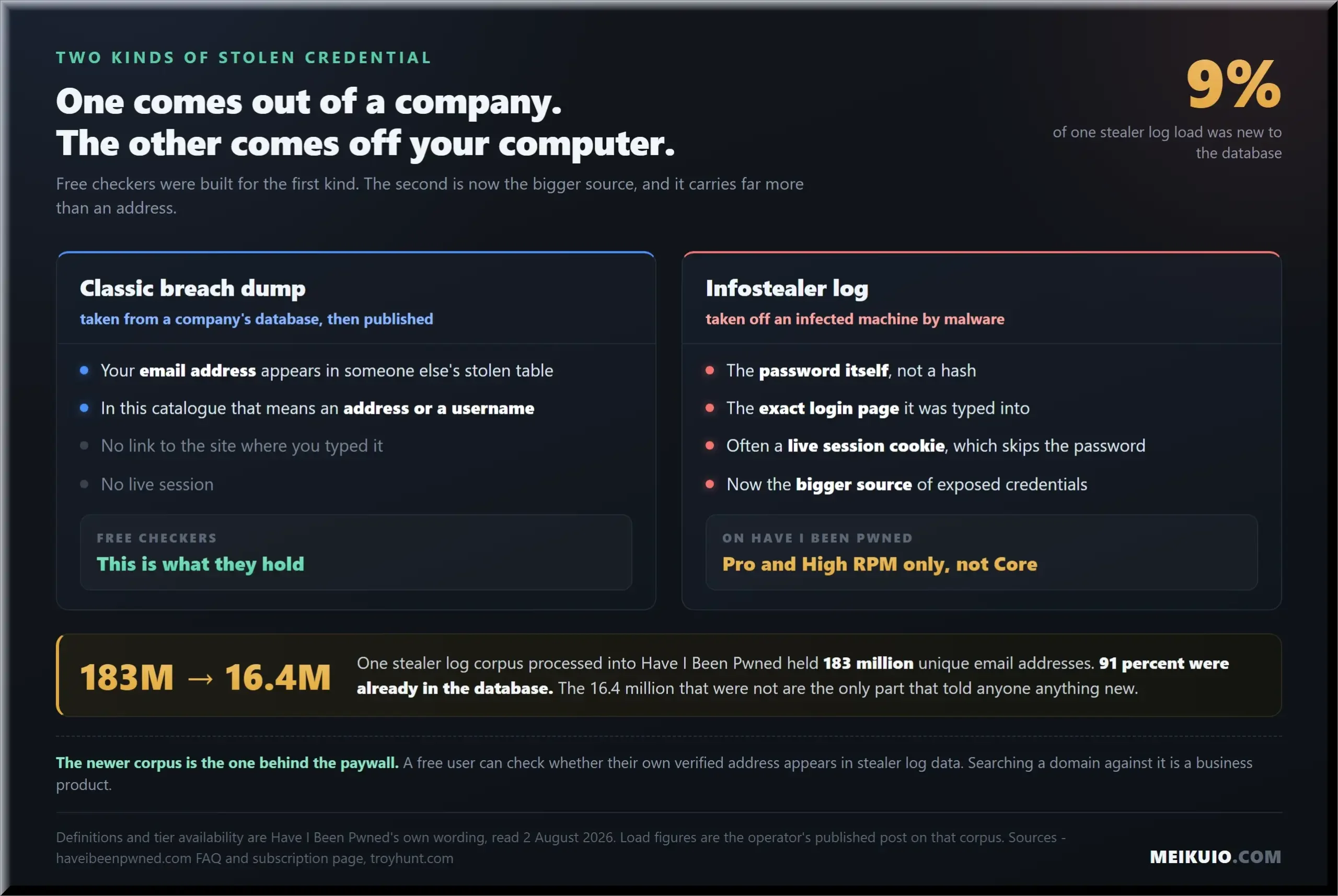
The scale is not small. When one stealer log corpus was processed into Have I Been Pwned it contained 183 million unique email addresses, of which 91 percent were already known and 16.4 million had never been seen before. That leaves 9 percent of an enormous load as material nobody had on file. A separate credential stuffing corpus loaded soon after held 1,957,476,021 unique email addresses. It also held 1.3 billion unique passwords, and 625 million of those passwords were new to the service. Those are the operator’s own published figures.
Here is the catch for anyone shopping on price. On Have I Been Pwned, stealer log data sits on the Pro and High RPM plans and, in the vendor’s own wording, is not available on Core plans. A free user can check whether their own verified address appears. Searching a domain against that corpus is a business product.
One more thing nobody can tell you, and I want to be straight about it because it limits this article too. Nobody has ever independently measured which of these corpora is most complete. I looked for a vendor-neutral study and there is not one. The only comparison I could find was written by a vendor, and even that one concedes that “no company has complete coverage of every breach or dataset posted on the internet”. So when I show you that two databases hold the same records and two others do not overlap, that is a finding about provenance. It is not a ranking of coverage, and anyone who gives you one is guessing.
Why do you keep seeing “billions of passwords leaked”?
Because the same old data keeps being counted again. The number grows. The data mostly does not. Most of the enormous figures in the headlines of the last two years describe compilations, not fresh break-ins, and the researchers who published them usually say so in the body of the report the headline came from.
Take the 16 billion credentials story from June 2025. The original research described records “scattered across 30 different databases” and noted that the raw count “includes duplicates, as is common in these types of compilations”. Other outlets corrected the framing quickly, one stating flatly that “this is not a new data breach, or a breach at all”. RockYou2024 was a file of just under 10 billion plaintext passwords assembled from earlier leaks. The 26 billion record collection from January 2024 was described by its own discoverers as records from thousands of compiled and reindexed leaks.
This matters when you are choosing a tool, because a checker that ingests every compilation will show you more hits without telling you anything more. The stealer log load described earlier shows the arithmetic: nine records in ten were already known, and the tenth was the only one that told anyone anything.
There is also a reason a free corpus of leaked passwords exists at all, and it is not charity. The US federal standard for password verifiers requires it. NIST’s guidance states that when a password is set or changed, verifiers “SHALL compare the prospective secret against a blocklist that contains known commonly used, expected, or compromised passwords”, and lists “passwords obtained from previous breach corpuses” as an example of what belongs on that list. Somebody had to build and give away that list for every login form in the country to comply. That is why Pwned Passwords is free, unauthenticated and served through a content network rather than sold. It is infrastructure. Nobody was ever going to charge you for it. It is also why modern standards are moving away from shared secrets: our guide explains what is a passkey, how device-bound keys prevent credential theft, and what happens when you lose a phone.
Who keeps Have I Been Pwned running?
One person, essentially, and that is the strongest argument for having a second tool bookmarked. The service was put up for sale in 2019. The sale collapsed, and the announcement in March 2020 was blunt: “Have I Been Pwned is no longer being sold and I will continue running it independently.” I could not find a published succession plan or continuity arrangement anywhere. That absence is not an accusation, it is just a fact you should hold when you decide how much of your security routine to hang on one site.
There is a detail in the breach list that says more about how the thing is run than any policy page would. In March 2025 a phishing attack got into the operator’s own Mailchimp account and exported his blog newsletter list. The breach page reads: “The exported list contained 16k email addresses and other data automatically collected by Mailchimp including IP address and a derived latitude, longitude and time zone.” It is filed under 16.6 thousand affected addresses, and it was added to the database on 25 March 2025.
He put his own breach in his own catalogue inside a month, with the same fields and the same treatment as everyone else’s. That is not nothing. It is also not a succession plan. Keep a second tool bookmarked.
How do you check whether your data has leaked?
Five steps, and every one of them is free. Doing them out of order is how people end up paying for something they already had.
- Search your email address on Have I Been Pwned. No account, no payment. This is the check most people are looking for an alternative to, and it costs nothing.
- Search the same address, plus your name and phone number, on DataBreach.com. Different corpus, different fields, and this is where you find things the first search structurally cannot see.
- Open the password checker you already own. Passwords on an iPhone or Mac, Password Checkup in Chrome, Watchtower in 1Password, or the data breach report in Bitwarden. This is the step that turns a list of company names into a list of accounts to fix.
- Turn on alerts, once. Notification on Have I Been Pwned or a Mozilla Monitor account will email you when a new breach lands. Both draw on the same data, so pick one, not both.
- Fix by severity, not by date. Anything that exposed a password you reused goes first. Anything that exposed only an address can wait, and mostly needs nothing but a sharper eye for phishing.
If a Social Security number is the thing worrying you, none of these checkers is built for that. A freeze at Equifax, Experian and TransUnion is free, and it stops a new account being opened rather than telling you afterwards that one was.
So which Have I Been Pwned alternative should you use?
By situation, because there is no single winner and anyone crowning one is selling something.
Domain search is a business feature, excluded because it was not tested. A missing field can reflect what the database indexes, rather than a missing product feature.
- You want to check an email address. Use Have I Been Pwned. You do not need an alternative, and it costs nothing.
- You need to search a name or a phone number. DataBreach.com, free, no account, and a separate set of records.
- You want an open source second opinion. XposedOrNot.
- You want the check attached to your actual passwords. Bitwarden’s breach report on any plan including free, or whatever is already built into your phone and browser.
- You want alerts and nothing else. Mozilla Monitor, up to 20 addresses, with the understanding that it is the same database underneath.
- You are a developer who hit the API price. Nothing here replaces it cheaply for domain monitoring at scale. XposedOrNot’s free API is the closest, and it is not the same product.
- You are protecting a company. You are the customer the paid tiers were written for, and the enterprise platforms named above are built for exactly that.
If you are here because a company just emailed you about a breach, do not start with a checker at all. Secure the email account first, then change the password on the breached service and anywhere you reused it. The checkers tell you what else is exposed, which is the second job, not the first. For what one of these incidents looks like from the inside, including how quickly the records reached a public catalogue, I went through a recent one in the Aura review.
Frequently asked questions
Is Have I Been Pwned free?
Yes for the thing most people want. The subscription page lists browser email search, email notifications, Pwned Passwords, breach monitoring and monitoring domains with up to 10 breached addresses as costing nothing. Paid plans start at $4.39 a month billed as $52.68 a year, and the vendor describes them as products for organisations, managed service providers and high-volume API users.
Is there a better alternative to Have I Been Pwned?
Not for email searches, where it is the most established public option and no one has ever measured whether anything holds more. For searching a name or phone number, DataBreach.com does something it does not do, with 27.3 billion records of its own. The catch with the rest is that several tools sold as a Have I Been Pwned alternative, Mozilla Monitor among them, query Have I Been Pwned data, so switching to them changes the interface rather than the answer.
Does dark web monitoring work?
It detects, it does not protect. Monitoring can tell you your details have appeared somewhere, and it cannot remove them or stop their use. Consumer Federation of America research found 36 percent of people who had seen ads for these services believed they could remove personal information from the dark web. They cannot, and no US regulator has published guidance on how the category advertises that.
How do I check if my SSN is on the dark web or is being used?
Breach checkers are the wrong instrument for this, and I want to be blunt about it because the search results are not. Have I Been Pwned indexes email addresses, not Social Security numbers. DataBreach.com widens the search to a name and a phone number, which is closer but still not the same thing. Several US card issuers include free SSN monitoring, and I compared those in the piece on best credit monitoring service. The action that actually blocks misuse is a credit freeze at Equifax, Experian and TransUnion, which is free by federal law and stops a new account being opened rather than reporting it after the fact.
Was my data leaked, and how would I find out?
Search your address on Have I Been Pwned, then search your address, name and phone on DataBreach.com. Between them you cover two separate corpora. Then open the password checker in your browser or password manager, which compares the credentials you actually use rather than the ones you remember having.
What is the best free dark web scan?
Three of them cover the ground: Have I Been Pwned for email, DataBreach.com for other identifiers, and XposedOrNot for an independent second look. Watch the word free on commercial tools. DeHashed lets you search without paying and then requires a subscription to see results, and LeakCheck’s free tier returns the names of breaches but not the data inside them.
Can I check a phone number for breaches?
Yes, on two of the tools here. DataBreach.com takes a phone number alongside email and name, and the Cybernews leak checker accepts a phone number with no account. Have I Been Pwned does not, because it indexes email addresses and usernames.
Is Have I Been Pwned safe to use?
Its password checking is built so the service never receives your password. Pwned Passwords hashes locally and sends only the first five characters of the hash, and it is free and requires no login. The honest caveat has nothing to do with security: it is run independently by one person, the 2019 sale process ended with no buyer, and no succession plan has been published.
Why do some breaches not show up in a search?
Three reasons. Some breaches are marked sensitive and can only be seen by the verified owner of the address, which currently covers 85 of them. Two have been retired from the service entirely. And no corpus holds everything, which is why searching a second, independently collected database is worth the extra minute.
What should I do if my email shows up in a breach?
Start with your email account, because whoever controls it can reset everything else: change that password and switch on two factor authentication there. Then change the breached account’s password, then every other place you reused it. If the breach exposed only an address, expect more phishing and change nothing. If it exposed a password you used elsewhere, treat every one of those accounts as compromised until you have changed it.
My Take
I went looking for a Have I Been Pwned alternative and found that most of them are the same database in different clothes, and that the two checkers already sitting in Apple’s and Google’s password managers are the ones nobody counts as alternatives at all. The category is smaller than the lists suggest. Three free tools do separate work, and one of them exists because Have I Been Pwned deliberately does not index the fields people are most frightened about.
What I would do, and did: search the email address on Have I Been Pwned, search the name and phone on DataBreach.com, then open the password checker already sitting in the browser and fix what it flags. That takes ten minutes and costs nothing. I would not buy a subscription off the back of a breach alert, and I would not switch to a tool that queries the same records I just searched. If a Social Security number is the worry, stop reading lists and freeze your credit files instead.