

Buffer alternatives get compared on the headline price. That number is on the card. The rate that decides your bill is not: Buffer publishes a second price list written for machines, and it holds a bracket table the cards never show. I opened it on 11 August 2026, then checked fourteen competitors for the same file. Exactly one of them had anything comparable.
- What Buffer charges for, and the three numbers that are not on the card
- The price list Buffer wrote for machines
- What “unlimited” means once you find the cap
- We checked fifteen Buffer alternatives for a machine-readable price. Two had one
- Why multiplying the rate by your channel count gives the wrong answer
- What disappears the day you disconnect a channel
- Which posts go out on their own, and which need your phone
- The alternatives, grouped by what they actually are
- SmarterQueue
- MeetEdgar
- RecurPost
- SocialBee and Publer
- HeyOrca
- Sendible, Agorapulse, Vista Social and SocialPilot
- Metricool
- Later and Loomly
- Mixpost and Postiz
- Ayrshare
- Hootsuite
- Which of these actually refill the queue
- What each Buffer alternative actually bills for
- The same eight accounts, counted ten different ways
- If you run other people’s accounts
- Do you need a scheduler at all?
- What is not on this list, and why
- How we checked
- Frequently Asked Questions
- Is Buffer still free in 2026?
- What are Buffer’s free plan limits?
- How do I cancel a Buffer subscription, and what happens to my scheduled posts?
- What is the cheapest Buffer alternative?
- Is Buffer or Hootsuite better value?
- Does Buffer charge per channel or per user?
- Can I take my scheduled posts and analytics out of Buffer?
- Which Buffer alternative works best for an agency with client approval?
- Is there an open-source Buffer alternative?
- My Take
What Buffer charges for, and the three numbers that are not on the card
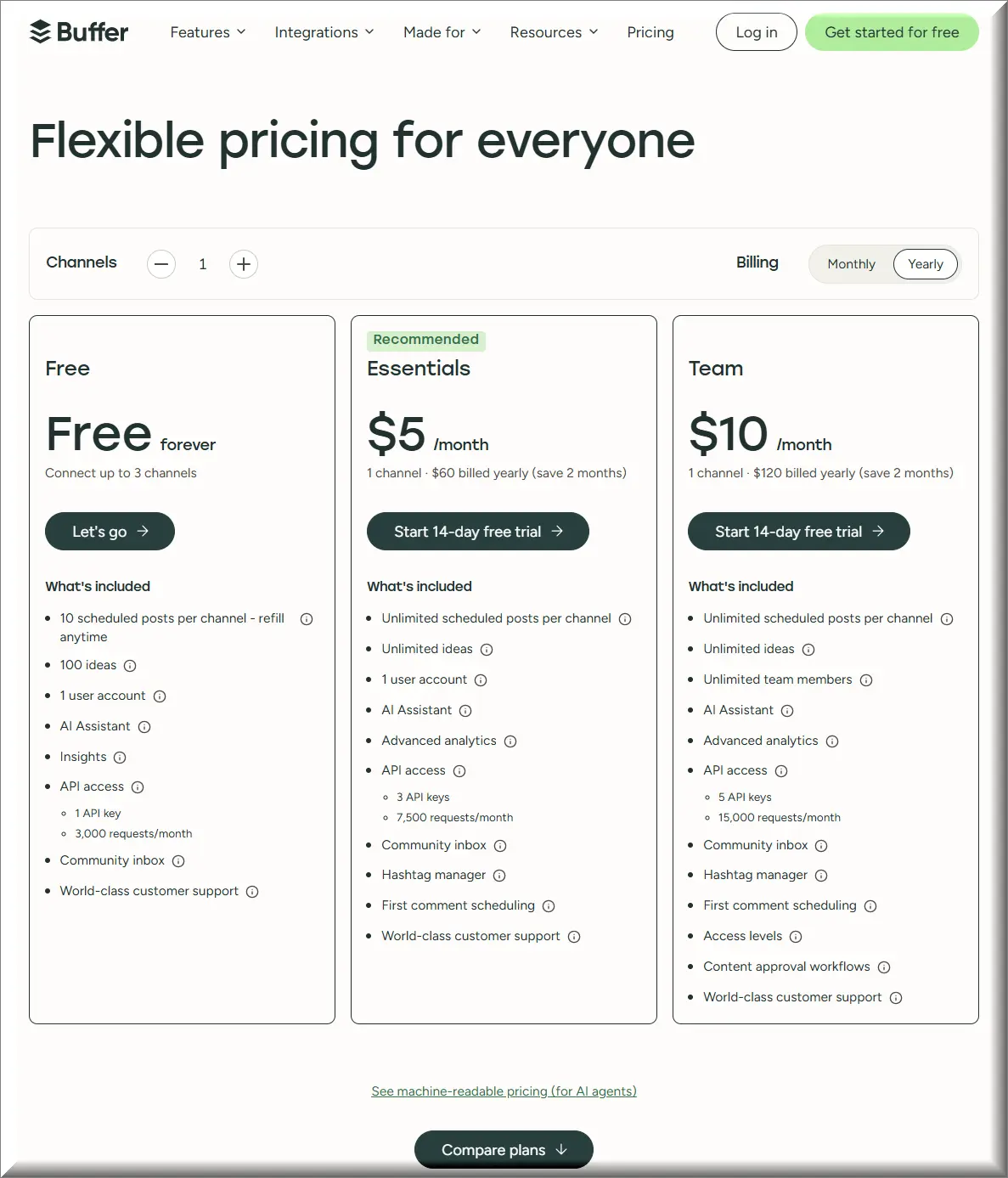
Buffer bills per channel. A channel is one connected social account, so an Instagram profile and a Facebook page are two channels, not one. The free plan holds three of them. Essentials starts at 6 dollars per channel per month, Team at 12, and both drop to 5 and 10 if you pay for the year.
That much is on the pricing page. Three things that change the total are not.
The first is the bracket. Above ten channels the rate steps down, and the steps are missing from the plan cards entirely. The second is the cap behind the word unlimited, which sits in a collapsed answer at the bottom of the page. The third is what happens to the three free channels when you upgrade. Buffer answers that one plainly: you pay for each channel, including any channels you had while on the Free plan.
None of this is hidden in a legal document. It’s all on Buffer’s own surfaces. It’s just spread across three of them, and the one most buyers read is the shortest.
That matters before you shop at all. You cannot compare Buffer alternatives on price until you know which of these three numbers you are comparing against. Most guides compare the first one, because it’s the only one printed on the card.
Note
Every price and limit in this article was read from the vendor’s own live pages between 10 and 11 August 2026. Prices in this category move. Buffer states its own pricing was last updated in November 2025, which tells you how long a number here can be expected to hold.
The price list Buffer wrote for machines
Under the plan cards on buffer.com/pricing there is a small link. It reads: See machine-readable pricing (for AI agents). It goes to buffer.com/pricing.md, a plain markdown file about 13,000 characters long. Same vendor, same day, second pricing document. It says more than the first one.
Three things sit in the machine file and not on the cards. A volume table with the per-channel rate at every band. A worked example of the monthly cost at six channel counts. And the sentence that defines what unlimited means on a paid plan. None of the three is on the page you were shown.
One thing sits on the cards and not in the machine file: the channel calculator. So the human page is not simply a shorter version of the machine one. They were written for different readers, and the reader with the calculator is the one who never sees the bracket table.
More Read

There is a third gap, and it’s the strangest. Both documents describe the annual discount, and they don’t agree with each other. The card says the yearly plan saves two months. The answer further down the same page says annual billing gets you a 20 percent discount. Two months off twelve is 16.7 percent. Both sentences are Buffer’s, both were live on 11 August 2026, and they describe the same discount.
This is not a scandal. It’s a symptom. Keep two descriptions of one price and they drift. Nobody owns the difference.
What “unlimited” means once you find the cap
Unlimited on a Buffer paid plan means 5,000 posts per channel. The vendor says so directly, and then says why it still uses the word: it describes the allowance as unlimited because no one has ever exceeded the cap. That is an honest sentence. It is also invisible on the page unless you expand a collapsed answer at the very bottom.
Buffer never attaches a period to that number. Not a month, not a year, not at once. There is no counter either. No warning, and nowhere to see how close you are. If the cap matters to your volume, plan around the silence.
I counted how the two words sit on that page. Unlimited appears fifteen times in the text you can read without clicking anything. The number 5,000 appears zero times. So does the phrase fair use. Both are in the page source, folded away.
Fifteen mentions of unlimited on the page you read, and zero mentions of the number that limits it.
Buffer is not alone here, which is the point worth carrying to the alternatives. Metricool’s pricing page uses the word unlimited 52 times. It qualifies all of them with a single asterisked line saying unlimited scheduling may be limited by its fair use policy.
The number lives in the legal terms instead. Metricool sets a base activity threshold of 600 posts per brand per month, says it will check manually if you pass it, and reserves the right to suspend posting for the current month. Same shape as Buffer, different document, and one more click away.
So the useful question is not whether a plan says unlimited. It’s where the number lives. And how many clicks away.
Run that test across the Buffer alternatives below and a pattern shows up fast. The vendors that name a number tend to name it once, in a document you have to go and find. The vendors that never name one are not necessarily more generous. They just haven’t told you where the ceiling is.
We checked fifteen Buffer alternatives for a machine-readable price. Two had one
Of fifteen social media scheduling vendors checked on 11 August 2026, two publish a machine-readable pricing document: Buffer and Ayrshare. Only one of the two, Buffer, puts actual numbers in it. Six publish an llms.txt, a plain text file whose only purpose is to describe the company to software. Eight publish neither. Across all six llms.txt files, the dollar sign appears zero times, and so do the phrases per channel, per seat, per user, per profile and per brand.
That last count is the finding. Six companies built a document addressed to machines, and not one of them put the price, or even the unit of the price, inside it. The word pricing appears in all six, every time as a link back to the page a human has to open.
Six publish llms documents, none with a price or billing unit inside that file. Two publish machine price lists; only one includes numeric prices. HTTP status alone misclassifies Vista Social and Publer.
Two entries in that table need a caveat, because they are the kind of thing an automated check gets wrong. Vista Social answers the machine-price address with a status code that means success, then serves a 640 kilobyte web page instead of a document. Publer redirects the same address to its homepage. A script that trusted the status code alone would report both as publishers of a machine-readable price. Neither is.
SocialBee is the honest gap in the row. It refused two of the four addresses outright, so those two are unchecked rather than absent, and the table says so.
One more thing this table is not. Publishing a file for machines does not make a vendor easier to find, and there is no evidence it earns citations in AI answers. Google has said as much about llms.txt specifically. The reason the column matters is narrower and more useful: it shows where a company is willing to write its terms down in a form it cannot dress up.
So what is in those six files?
I read all six. They are not short. Vista Social’s runs to 671 lines. Hootsuite’s is around 21,000 characters. Ayrshare publishes a second, larger file that comes in at roughly two megabytes.
What fills them is links. Hootsuite’s file is an index of its marketing tools: caption generators, bio generators, hashtag generators, one line each. Metricool’s opens by describing itself as a social media management and analytics platform. Every one of the six mentions pricing, and every mention is a link pointing back at the page a person would have to open anyway.
Which is the finding, stated plainly. These companies wrote a document for software, then filled it with the same material they show people, minus the numbers. The one thing a machine could genuinely use, a stated price and a stated unit, is the one thing left out five times out of six.
Ayrshare is the exception that makes the shape clear. It publishes both kinds of file, and its price document opens by stating the unit in a sentence: it bills by social profile, meaning one customer, brand or location connected to any number of networks. That is a definition a machine can act on. It took one line.
Why multiplying the rate by your channel count gives the wrong answer
Buffer’s per-channel rate falls as you add channels, and it falls in brackets rather than all at once. On Essentials the first ten channels cost 6 dollars each, channels eleven to twenty-five cost 4, twenty-six to fifty cost 3, and anything above fifty costs 1. Each band applies only to the channels inside it, the way tax brackets work.
Read the table as flat rates and the arithmetic breaks. Twenty-five channels at 4 dollars looks like 100 dollars a month. Buffer’s own worked example says 120. Fifty channels at 3 dollars looks like 150. The worked example says 195.
So the real bill lands 20 percent above that estimate at twenty-five channels, and 30 percent above it at fifty. The mechanism is explained in words, but the sentence explaining it sits roughly three thousand characters below the table it explains.
Rates apply only inside each band: channels 1–10 at 6 USD; 11–25 at 4; 26–50 at 3; above 50 at 1. Flat readings understate the bill by zero, 20% and 30%. Annual billing differs.
There is a second number in that table worth pulling out, because it decides whether the upgrade is worth taking. Team costs more than Essentials only inside the first bracket. From the eleventh channel to the fiftieth, the two plans charge exactly the same rate per channel. Above fifty they diverge again.
Sixty dollars a month, whether you run ten channels or fifty. If you were holding off on approval workflows because they looked like a percentage of a growing bill, they aren’t. They’re a fixed line item that stops growing at your tenth channel.
Two caveats before you take that to a spreadsheet. These figures are monthly rates read on 11 August 2026, and the yearly path prices differently. And the flat 60 dollar gap holds from ten channels to fifty; past fifty the two plans separate again.
Do this arithmetic before you shortlist Buffer alternatives, not after. A tool that looks cheaper on the headline can lose that lead once both sides are converted to the same unit. The conversion is the part nobody does for you.
What disappears the day you disconnect a channel
Disconnecting a channel from Buffer removes every post, comment, analytic and piece of data attached to it, and Buffer states plainly that these cannot be recovered. That is the single most useful sentence in this whole comparison, and I could not find it stated on any of the ten ranking pages I read.
It matters because disconnecting is exactly what leaving looks like. You don’t cancel an account in this category so much as unplug it channel by channel, and the deletion follows the unplugging.
Downgrading is gentler and better documented. Queued posts keep publishing unless the account is locked. Saved ideas stay visible up to the free plan’s hundred, and the history window drops to thirty days.
Published posts are safe either way. They live on the network, not in the scheduler.
Export is where the category thins out. Buffer’s own feature list describes reports that export your data as CSV, PDF or markdown to use anywhere, and names one of those destinations as an AI tool. Reports are a paid feature, which puts the export behind the same door you are trying to walk out of.
That sentence is worth one more note, because it belongs to the theme of this article. The export description sits on Buffer’s human page. It is not in the machine-readable price list at all. So the two documents differ in both directions: the machine file carries the bracket table the humans don’t get, and the human page carries the export promise the machines don’t get.
The right column is not an accusation. It’s a count. Five questions any leaver asks, ten pages that rank for the query, and no answers between them.
Among the vendors themselves the documentation is patchy rather than absent. Publer advertises an eternal post history with autosync on its plan comparison. Buffer documents the most of anyone here. For most of the rest I could not find the answer written down, and I looked on the pages where it would live.
Before you disconnect anything
Pull your analytics out first, while the channel is still connected and still on a paid plan. The reporting export is a paid feature in most of this category, which means the moment you downgrade to save money is also the moment you lose the ability to take the numbers with you. Order matters more than speed here.
One more thing to check before you move, if you have been paying for a while. Buffer runs a legacy cohort, and the door only swings one way: once you move to a new plan, Buffer says it cannot switch you back to the legacy plan or its pricing. Six channel types, among them TikTok, YouTube Shorts, Threads, Bluesky, Mastodon and Instagram personal profiles, connect only on the newer plans.
Which posts go out on their own, and which need your phone
Two of the eighteen channel types Buffer lists cannot be published to automatically at all: Facebook groups and Instagram personal profiles. Both cost the same as a channel that can. That is the first thing a per-channel meter hides, and no ranking page I read mentions it.
The mechanism has a name. Buffer calls it notification publishing: you build the post in Buffer, your phone buzzes when it’s time, you tap and finish the post by hand in the network’s own app. Buffer documents where it applies. Instagram in all three account types, TikTok, YouTube and Facebook groups. It documents where it does not: Facebook pages, X, LinkedIn, Mastodon, Bluesky, Google Business Profiles, Pinterest, Start Pages and Threads.
Then comes the part that decides whether any of this matters to you. Buffer says the reason to use notifications is that some features are not supported through the network’s API, and it gives two examples: posting to a Facebook group, and adding music to Instagram Reels or TikTok posts.
If your Reels carry music, no scheduler is posting them for you. You are getting a notification and finishing by hand.
This is not a Buffer failing. It’s a platform rule that every tool in this comparison inherits, and it’s the reason a feature checklist misleads: two tools can both claim TikTok support while one of them means a phone alert.
What I could not establish is Stories. The word does not appear in Buffer’s notification documentation at all, and its channel table does not break Stories out as a row. So if Stories are your format, that is a question to put to the vendor directly, and the honest answer here is that I don’t know.
Ask this before you sign anything
Take your three most common post types, then ask the vendor which of them publish without a human, on your networks, on your plan. Not whether the network is supported. Whether that post type goes out on its own. The answer is rarely on the pricing page, and it is the difference between a scheduler and a reminder app.
The alternatives, grouped by what they actually are
Most Buffer alternatives lists rank by preference. This one groups by architecture. Architecture decides whether a tool can do your job at all. Four groups: tools built around a recycling queue, tools for running other people’s accounts, tools that lead with measurement, and tools you host or call yourself.
Every billing unit below was read from the vendor’s own live page on 11 August 2026. Where I could not confirm something, the card says so. I have not run paid trials of these products. Nothing here claims hands-on performance. What it claims is what each company puts in writing.
SmarterQueue
SmarterQueue charges per user and gives you unlimited workspaces for clients and brands. It is the clearest recycling engine in the group. The vendor’s own line is that it automatically recycles your posts so more of your audience sees them, which no native publisher can do, and the queue view shows scheduled and evergreen items side by side.
Content Categories are the mechanism. You file posts by theme, set a weekly pattern, and the queue refills itself from the library instead of emptying.
Best for: one operator, many brands, and a library worth reposting. If you’re the only person logging in, unlimited workspaces is the cheapest way to hold ten clients.
It gets pricier as the team grows. Each extra person is billed separately, the exact opposite of Buffer.
MeetEdgar
MeetEdgar bundles social accounts into the plan and charges for extras on top: its plan page lists five accounts included and 4.99 USD for each additional one. Scheduled posts are listed as unlimited, team members as twenty, content categories as four and weekly automations as ten.
Those last two numbers are the recycling machinery, and they are also the ceiling on it. Four categories is a small library.
Best for: a solo operator with a stable set of five accounts who wants the queue to refill without being managed.
Growth shows up as a line item here. The per-account add-on behaves exactly like Buffer’s channels.
RecurPost
RecurPost positions itself in one sentence on its own homepage: social media management for people who manage many accounts, not one. Then its pricing page states the meter just as plainly. RecurPost bills per social account, not per user seat.
Read those two sentences together and something odd falls out. The tool built for people with many accounts charges for the thing they have many of. Its published plans hold 2, 5 and 20 accounts before the custom tier, and the users that come with them run 1, 1 and 3. So the account count is the number that moves the bill. A five-person team lands on the 20-account plan and is still two seats over its allowance.
Evergreen recycling is a named feature here, alongside workspaces, client approvals and a shared inbox. On the recycling axis it belongs with SmarterQueue.
Best for: a freelancer with a wide roster who works alone. The seat allowance suits one person, and the recycling does the work of a second.
If you left Buffer over per-account pricing, this does not fix it. Same meter, different label.
SocialBee and Publer
Publer meters two things at once, and says so with an example: two Facebook pages and two Instagram accounts count as four social accounts. Members are metered separately, with the plan owner not counting toward the limit. Both meters carry the same mechanic, stated the same way on both: for every nine you buy, the tenth is free.
Which means buying exactly nine, or exactly nineteen, is the one thing you should not do.
That is a third shape, and it’s the fairest of the three if your growth is lumpy. You pay for accounts and for people, but neither curve is linear forever.
SocialBee I can say less about, and the gap is worth stating. Its operating company is SC SocialBee Labs SRL in Cluj-Napoca, described on its own site as part of the WebPros group. Publer’s terms name Kalemi Code and place disputes in Tirana. Ownership is not a defect. It matters for one practical reason. If a tool closes or changes hands, your published posts are safe because they live on the networks, while your queue, your drafts and your analytics history live in the tool. That is the part you would lose, and it is the same part nobody here promises to hand back.
Best for: Publer, an operator whose account list and team both grow in steps rather than smoothly. SocialBee, a single brand that wants categories without an agency contract.
What I could not confirm: SocialBee’s billing unit, and two of the four machine-readable addresses, which it refused with a block rather than a not-found. Those stay unchecked rather than assumed empty.
HeyOrca
HeyOrca bills per calendar per month, and a calendar is a client. Every paid plan includes unlimited users, unlimited posts and approvals, and unlimited media storage. There is also a free tier, which its own page describes as one calendar for one person with light posting needs. It is a starter plan, not a way to run many clients for nothing.
Read that against SmarterQueue and the two invert each other exactly. HeyOrca gives you unlimited people and charges for clients. SmarterQueue gives you unlimited clients and charges for people. Same segment, opposite meters, and the right answer depends entirely on which of those two numbers is bigger in your business.
One agency tool charges you for clients and gives away seats. The other charges for seats and gives away clients.
Best for: an agency where more people touch the work than there are clients to serve, and where the client needs to approve without an account.
Consolidating earns you nothing. Every new logo is a new calendar, and the bill tracks logos rather than effort.
Sendible, Agorapulse, Vista Social and SocialPilot
These four are the mainstream agency shelf, and they behave alike on the axis this article cares about: none publishes a machine-readable price, and only Vista Social and SocialPilot publish anything machine-addressed at all.
Vista Social is worth one extra line, because it produced the single most misleading result in my whole check. Ask it for a machine-readable price and it answers with a success code and a 640 kilobyte web page. It also names itself two different ways in its own documents: a New York limited liability company in the terms, and an incorporated entity in the API terms. Both are Vista Social’s own pages.
Sendible’s operating company is Sendible Limited, registered in England and Wales with a company number on the page. Agorapulse describes itself in its privacy policy as a European company based in Paris. SocialPilot’s terms point at the courts of Gujarat.
Best for: agencies that want the established option with a support contract and can price it by talking to a salesperson.
You cannot model the bill before the call. That is the trade.
Metricool
Metricool leads with measurement and schedules alongside it, which makes it the natural move for someone leaving Buffer because the reporting was thin. It meters brands rather than channels, and the free tier is genuinely usable.
Two things to price in before you switch. The word unlimited appears 52 times on its pricing page and is qualified once, by a fair use policy whose threshold sits in the legal terms at 600 posts per brand per month. And scheduling to X requires a paid add-on, contracted separately for each X account, which its own terms state directly.
That second one is not a Metricool problem so much as an industry one. The economics of posting to X changed for every tool in this category at once, and we priced what that did to the whole field in our guide to what the major schedulers actually cost.
Best for: one brand, or a handful, where the reporting matters more than the queue.
X is not on the base plan. Budget the add-on per account, or accept the gap.
Later and Loomly
Later invented its own unit and it’s the most interesting one in this comparison. You buy a social set, and a social set is eight profiles, one of each network. Its entry plan is one social set and one user, and extra sets are not available on it at all.
So the same eight accounts that Buffer counts as eight channels, Later counts as one thing. Whether that’s cheap or expensive depends entirely on whether your eight accounts are one of each network or four Instagram profiles, because the second shape does not fit a set.
Later is also the usual recommendation for Instagram-led brands. If that’s your centre of gravity, the thing worth reading first is not a feature list but how the network itself decides reach, which we covered in our breakdown of Instagram’s algorithm in 2026.
Loomly bundles both numbers instead of picking one. Its entry plan lists twelve social accounts, three users and unlimited calendars, and the ladder runs up to sixty-one accounts and beyond. Yearly billing carries a stated 25 percent discount and, in its own answer, a twelve-month commitment.
Loomly is also the one with a parent company worth naming. Its privacy policy names Bending Spoons as the data controller and describes it as the parent company of Loomly LLC. Loomly’s own document says it, and no list I read mentions it.
Neither publishes anything machine-addressed. Both answered all four addresses I checked with a not-found.
Best for: Later, a brand with one profile per network and a visual calendar habit. Loomly, a team of three or so that wants approvals and unlimited calendars in one bundle.
Bundles don’t flex. Both of these have an opinion about your shape, and it may not be yours.
Mixpost and Postiz
Mixpost describes itself in its own page title as open source and self-hosted social media management. It is operated by INOVECTOR DIGITAL S.R.L., registered in Moldova. You run it on your own server, which removes the per-channel meter entirely and replaces it with hosting you maintain.
Postiz calls itself an agentic scheduling tool, and its channel list is the reason to look at it. Alongside the usual networks it lists Reddit, Telegram, Discord, Slack, Mastodon, Nostr, Lemmy, Warpcast, Twitch, Kick, WordPress, Medium, Hashnode and Dev.to. No mainstream scheduler in this comparison touches half of those.
Best for: a developer, or a team with one, that would rather own the thing than rent a seat in it.
Neither is free. Self-hosting moves the cost from a subscription line to your own hours, and that only pays off if your hours are cheaper than a seat.
Ayrshare
Ayrshare is not a scheduler you log into. It’s an API you post through, and it is the second of the two vendors in this comparison that publishes a machine-readable price.
Its unit is the one to understand, because it inverts Buffer’s completely. Ayrshare bills by social profile, which it defines as one customer, brand or location connected to any number of social networks. One corporate account posting from a central brand counts as one profile, however many networks hang off it.
Buffer would count those networks one by one. That single difference in definition can move a bill by an order of magnitude, and it is invisible if you compare headline numbers.
Worth noting against the pattern in this article: Ayrshare’s machine file is the thinner of the two. The bracket labels are there without the numbers, while its human page carries a slider that shows them. So the machine document is not automatically the fuller one. It depends on the vendor.
Best for: anyone building posting into a product rather than doing it by hand.
Hootsuite
Hootsuite is the name most people compare Buffer against, so it gets a line of its own. It publishes an llms.txt, which puts it in the minority of six. Read the file and it turns out to be an index of links to marketing tools: caption generators, bio generators, hashtag generators. The billing unit is not stated anywhere in it.
That is the most honest summary of the buffer vs hootsuite question I can give from documents alone. One of them wrote its prices down for machines. The other wrote its marketing down for machines.
Best for: organisations that need social listening and approvals in one contract and have someone to run it.
What it won’t do: be simpler than Buffer. Nobody leaves Buffer for Hootsuite to reduce the number of moving parts. If reach is what you’re chasing, the tool matters less than what each network rewards, which we mapped for LinkedIn’s algorithm in 2026.
Which of these actually refill the queue
Buffer’s queue empties. You load posts, they publish, the slot is free again. That is a scheduler working exactly as designed, and it is also the reason people go looking for Buffer alternatives in the first place: the loading never stops.
Three tools in this comparison refill it for you, and they do it the same way. You file posts into categories, set a weekly pattern, and the queue draws from the library instead of running dry.
SmarterQueue states the mechanism most plainly: it recycles posts automatically so more of your audience sees them, which it points out no native publisher can do. RecurPost lists evergreen recycling as a named feature beside workspaces and approvals. MeetEdgar exposes the machinery as numbers on its plan page, four content categories and ten weekly automations, which tells you the size of the library it expects.
Whether recycling helps depends on the network, and this is where the advice usually goes wrong. Reposting works where the feed is discovery-led and the same post can find a new audience weeks later. It works badly where the feed is recency-led and your own audience sees the repeat. We mapped which side each network sits on in our breakdowns of Facebook’s algorithm in 2026 and the TikTok algorithm.
Recycling is a content decision, not a tool decision
If you have fewer than thirty posts worth repeating, a recycling engine will cycle the same handful past the same people and call it consistency. The tools are cheap. The library is the expensive part, and no plan page will tell you that. Build the library first, then buy the engine.
Long-form is the exception worth naming. A video keeps earning for months, so scheduling it once is usually enough, and the thing that decides its reach is not cadence but what the platform rewards, which we covered for YouTube’s algorithm in 2026.
What each Buffer alternative actually bills for
Here is the comparison that decides the bill. Not features. Units.
I read ten of these off the vendor’s own live page on 11 August 2026. Ten vendors, ten different definitions of the thing you pay for. The table carries a column most comparison tables leave out: where I read it.
Look down the third column and the switching question answers itself. If your business grows by adding accounts, a per-account meter punishes you. If it grows by adding people, a per-seat meter does. Most Buffer alternatives lists compare the first column and skip the third.
Not stated does not mean paid. Mixpost and Postiz are excluded from this commercial map because self-hosted they meter nothing per channel.
The same eight accounts, counted ten different ways
Take one brand with eight accounts: an Instagram, a Facebook page, a LinkedIn page, an X profile, a TikTok, a YouTube channel, a Pinterest account and a Threads profile. One of each. This is an ordinary small business, not an edge case.
Now run it through ten pricing pages. Buffer sees eight billable things. Later sees one. Ayrshare sees one. Nobody is being dishonest. They simply are not counting the same object.
One brand, eight accounts, and the answer to how many things you are buying ranges from zero extra to eight.
This is why Buffer alternatives comparisons built on headline prices fall apart. The headline number is a rate. The rate applies to a unit. The unit is defined by the vendor, and no two of these vendors define it the same way.
There is a practical instruction in that table. Before you compare a single price, write down your own numbers: how many networks, how many brands, how many people. Then read each pricing page looking only for which of those three it charges for. That takes about ten minutes and it will change your shortlist more than any feature list will.
Two cautions on that table. It counts billable units, not money, because the rates move and the definitions are the durable part. And Later’s set only works if your accounts really are one of each network. Four Instagram profiles are not a set.
If you run other people’s accounts
Agencies are the worst served readers in this category, and I can put a number on that. I scored ten ranking pages against three buyers. An agency running thirty client channels scored 33 out of 100. A solo creator scored 48. A single-brand small business scored 63.
The gap is not tone. It’s two specific questions nobody answers, and both of them decide the bill more than any feature on any of the Buffer alternatives above.
The first is the seat a client occupies. When your client logs in to approve a post, are you paying for that login? Zero of the ten pages I read mention the question. HeyOrca answers it by not charging for users at all. SmarterQueue answers it the other way, by charging for each one. Everyone else, you have to ask.
The second is what your bill does at scale, and Buffer’s own numbers answer it better than any list. Ten channels, twenty-five, fifty: the Team upgrade costs 60 dollars a month at every one of those points. It stops growing at your tenth channel.
The number to run before you move
Count two things: how many accounts you post to, and how many people touch the work. If accounts outnumber people, you want a per-seat tool with unlimited workspaces. If people outnumber accounts, you want a per-client tool with unlimited users. Run that comparison before you compare a single feature, because no feature moves the bill as much as picking the wrong side of it.
One thing the listicles are right about: agencies do leave over price. The clearest public account I found is an agency running thirty-five accounts that moved off Buffer and named two reasons together, the cost at that scale and a product they felt had gone quiet. Price triggered the audit. The audit is what decided it.
Inbound work changes the shortlist again. The same reasoning we used for SurveyMonkey alternatives applies here. The tool that owns the workflow beats the tool that owns the feature.
Do you need a scheduler at all?
If you post to one network, probably not. The big networks have their own scheduling built in and charge nothing for it, though what each one covers varies by post type and I did not test that here. One of the ten ranking pages I read mentions the native route as an option at all. The other nine sell you a subscription.
The honest test is the number of networks, not the number of posts. At one network, native scheduling wins on price and on reliability, because there is no access token to expire between you and the post. At two, it’s a wash. At three or more, the tab-switching starts to cost more than the tool.
This is the question every list of Buffer alternatives skips, and skipping it is not an accident. A free answer earns nobody a commission. It also happens to be the right answer for a large share of the people asking.
Native tools have a real ceiling and it’s worth naming: no shared queue, no cross-network calendar, no client approvals, and analytics that stop at the edge of each platform. We counted exactly what each native window gives you and where it stops in our guide to what each scheduler can actually auto-publish.
There’s a second free route people forget. Buffer’s own free plan holds three channels and ten scheduled posts per channel, and the slot frees up as each post publishes. For a lot of solo accounts that is the whole job. The upgrade question only starts at the fourth channel.
What is not on this list, and why
Four kinds of product show up in Buffer alternatives lists and do not belong there. Each one can do a piece of the job, which is what makes the confusion easy, and none of them can hold the job.
Design tools. Canva and Adobe Express export to a network. Exporting is not a queue, and neither holds a cross-network calendar you can approve against.
Writing tools. A generator that produces captions has replaced nothing about publishing them. If the tool cannot hold a schedule, it is upstream of this decision, not a substitute for it.
Automation platforms. Zapier and Make can push a post to a network, and people do wire them up this way. What they cannot give you is a calendar, a preview, or a place for a client to say no. That was the same line we drew when we ranked Calendly alternatives by what is actually free: a tool that can perform the action is not automatically a tool that can run the job.
Enterprise listening suites. Sprinklr and its neighbours do publish, but they are bought through a sales process and priced for a department. Putting them beside a 6 dollar channel is a category error, not a comparison. We made the same distinction sorting Zendesk alternatives, where the enterprise tier answers a different question entirely.
How we checked
Everything here came from pages I opened myself between 10 and 11 August 2026. No vendor was contacted. No plan was purchased. Nothing here claims a hands-on trial.
One deliberate absence. This article prints Buffer’s rates and almost nobody else’s. Prices in this category change often enough that a figure read once and repeated for a year does more harm than good, and I only publish numbers I captured myself. What I can give you instead is the unit each vendor charges for, which changes far more slowly than the rate and decides more of your bill. Take that to their pricing page and the number will be waiting.
For the machine-readable check I requested four addresses on each of fifteen vendor domains and recorded the status code, the content type and the first bytes of the body. The four were /pricing.md, /llms.txt, /llms-full.txt and /docs.md, so you can repeat the check on any vendor I did not cover.
Checking the status code alone is not enough, and two vendors prove it. One answers with a success code and serves a web page. Another redirects to its homepage. Both would register as publishers of a machine-readable price in any check that trusted the number and stopped there.
For the audit of ranking pages I collected the field through two independent searches rather than one, then opened each result and counted seven specific things in the text. Thirteen pages went into the check. Ten opened on the pass that produced the counts, so every count below reads out of ten. An eleventh opened later and was used only to confirm the page type. Two never opened, and they are excluded rather than assumed empty.
Here are all seven counts. Says what the tool bills for: eight of ten. Mentions any machine-readable document: one of ten. Says what happens to your queue when you cancel: none. Mentions that a client reviewer may occupy a paid seat: none. Mentions that some channels publish only by notification: none. Offers any free, native or open-source route: one of ten. Discloses a commercial relationship anywhere on the page: five of ten.
The first of those is worth sitting with, because it cuts against the easy criticism. This field is not hiding what it charges for. Eight pages out of ten say it plainly. What none of them says is what that unit buys you, or what it stops buying the day you leave.
Where a vendor blocked a request, the cell says blocked. Where one vendor document contradicts another, both are quoted and neither is resolved. Where I could not confirm a claim first hand, it is marked, not dropped.
One consequence worth stating. This article names fewer Buffer alternatives than most lists of Buffer alternatives do, and it says less about several of them. That’s the trade for only printing what I could open. A shorter list you can verify beats a longer one you have to take on trust, and you can check every claim above by opening the same pages I did.
Thirteen pages entered the check; ten opened in the pass producing these counts. Refused pages excluded, not scored as empty. Three questions answered by none; eight pages do disclose what they meter.
The same method applies to what we did not publish. Two claims reached us through research and failed the check. One was a data-retention figure sourced to a page that does not contain it. The other was a fair use number attributed to a document that had moved.
The first was dropped. The second was found on the vendor’s real page and kept.
A comparison you can check beats one you have to believe. That is the whole reason we priced DocuSign alternatives the same way.
Field notes
- Machine surfaces: two of fifteen vendors publish a machine-readable price list; six publish an llms.txt, and none of the six states a price or a billing unit inside it.
- Caps behind unlimited: Buffer, 5,000 posts per channel with no period stated; Metricool, 600 posts per brand per month, held in its legal terms.
- Bracket arithmetic: reading Buffer’s rate table as flat puts the real bill 20 percent above the estimate at 25 channels and 30 percent above it at 50; the Team upgrade costs a flat 60 USD a month from 10 channels to 50.
- What the field answers: eight of ten ranking pages say what the tool bills for; none of the ten says what happens to your queue, your drafts or your analytics when you cancel.
- Dated: every price and limit here was read between 10 and 11 August 2026; Buffer states its own pricing was last updated in November 2025.
- Sources: vendor pricing pages, help articles and legal terms read first hand; four machine-readable paths requested on fifteen domains; ten ranking pages opened and counted by script.
Frequently Asked Questions
Is Buffer still free in 2026?
Yes. The free plan connects up to three channels and holds ten scheduled posts per channel, and the slot frees up each time a post publishes. It also includes the AI assistant, the community inbox and thirty days of insights history.
What are Buffer’s free plan limits?
Three channels, ten scheduled posts per channel, one hundred saved ideas, one user account and thirty days of analytics history. Advanced analytics, hashtag manager, first comment scheduling and approval workflows are not included.
How do I cancel a Buffer subscription, and what happens to my scheduled posts?
Downgrading is the gentle path: posts already queued keep publishing unless the account is locked, and locking happens if you exceed the free plan’s three channels. Disconnecting a channel is the destructive one. Buffer states that it removes every post, comment, analytic and piece of data on that channel, and that they cannot be recovered. Export your reports before you touch either.
What is the cheapest Buffer alternative?
The native scheduler inside each network, which costs nothing. Among paid Buffer alternatives the answer depends on your unit: per-brand pricing beats per-channel pricing once one brand runs several networks, and self-hosted removes the meter entirely at the cost of maintaining a server. There is no single cheapest tool, only a cheapest shape for your account list. Work out your shape first, and the shortlist gets very short very fast.
Is Buffer or Hootsuite better value?
Buffer is easier to price, and that is measurable rather than a matter of taste. Buffer publishes a machine-readable price list with its billing unit stated in it. Hootsuite publishes a machine-readable file that indexes its marketing tools and states no billing unit at all. For a small team the simpler meter usually wins; for social listening and enterprise approvals, Hootsuite is answering a different question.
Does Buffer charge per channel or per user?
Per channel. A channel is one connected social account, so five brands with an Instagram and a Facebook page each is ten channels. Team members are not billed separately on the Team plan, which is why Buffer suits businesses with many people and few accounts, and punishes agencies with the reverse shape.
Can I take my scheduled posts and analytics out of Buffer?
Analytics, yes. Your queue, no. Buffer’s reports export as CSV, PDF or markdown, and reporting is a paid feature, so downgrading first can cost you the export before you use it. Scheduled posts are a different matter: Buffer documents no way to take an unpublished queue with you, and I found no tool in this comparison that advertises importing one from Buffer. Assume you rebuild the queue by hand. Published posts stay on the networks regardless, because they live there and not in the scheduler.
Which Buffer alternative works best for an agency with client approval?
Ask what each one meters before you ask what it does. HeyOrca bills per client calendar and includes unlimited users, so people are free and logos cost money. SmarterQueue bills per user and includes unlimited client workspaces, so the arithmetic reverses. Count your clients and your people, then pick the tool that gives away whichever number is larger.
Is there an open-source Buffer alternative?
Yes, two worth knowing. Mixpost describes itself as open source and self-hosted and is operated by a company registered in Moldova. Postiz publishes to a much wider set of channels than any hosted tool here, including Reddit, Telegram, Discord, Mastodon and several developer platforms. Both trade a subscription for server maintenance, so they are cheaper only if your time is.
My Take
I’d hand Buffer to a small business with three or four accounts and more than one person posting, and I’d tell them to stay on the free plan until the fourth channel forces the question. The meter suits that shape. Nobody gets billed for showing up, the queue is simple enough that it gets used, and the machine-readable price list means you can check what you’re paying for without a call.
I would not hand it to an agency. Past ten client channels the per-channel meter works against the exact thing you’re trying to grow, and the fix is not a discount, it’s a different unit. If your account list is longer than your staff list, look at per-client pricing with unlimited users or per-user pricing with unlimited clients, and pick whichever gives away the bigger of your two numbers. And whatever you choose, pull your analytics out before you disconnect anything. That part is not reversible.