

Is Windows Defender enough? For most home PCs running Windows 11 on default settings, yes. In every lab report from the past year that I read, from AV-TEST, AV-Comparatives and SE Labs, Microsoft Defender Antivirus stopped threats about as well as Norton, McAfee and Bitdefender. It falls behind in three measured places: offline detection, speed, and false alarms in one September test.
- The short answer: who Defender is enough for, and who it isn’t
- How good is Windows Defender? A year of lab results
- How to read a lab score
- AV-TEST: 6 out of 6 for protection, 12 rounds in a row
- AV-Comparatives: top group on real attacks, zero false alarms
- SE Labs: 100%, then 98% with a top award
- Where Defender still trails: offline detection and speed
- Without the internet, Defender catches fewer threats
- Speed: middle of the pack
- False alarms: mostly low, with one bad round
- Is Windows Defender enough on Windows 10?
- What happens to Defender when you install, or remove, another antivirus
- Windows Defender vs Norton, McAfee, Bitdefender, Avast and Malwarebytes
- Windows Defender vs Norton
- Windows Defender vs McAfee
- Windows Defender vs Bitdefender
- Windows Defender vs Avast
- Windows Defender vs Malwarebytes
- What about TotalAV, ESET and Kaspersky?
- What a paid antivirus suite adds that Windows doesn’t
- Five settings to check in Windows Security today
- If you think Defender missed something
- What “Windows Defender” actually is, and three other things with the same name
- What no antivirus stops
- Who writes the “is Windows Defender enough” pages
- Frequently Asked Questions
- Do I need McAfee if I have Windows Defender?
- Do I need AVG if I have Windows Defender?
- Is Windows Defender enough for Windows 10?
- Does Windows Defender slow down your PC?
- Can I use Windows Defender with another antivirus?
- Is Windows Defender good at detecting malware offline?
- Is the Microsoft Defender app the same as Windows Defender?
- Does Windows 11 need a separate antivirus?
- Can Windows Defender remove malware it finds?
- My Take
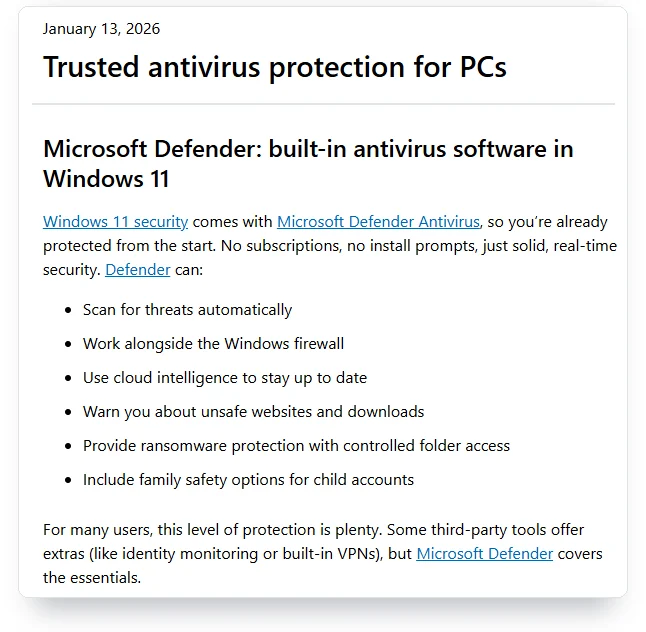
Microsoft says much the same on its own Windows Learning Center page, dated January 13, 2026: “For many users, this level of protection is plenty.” Notice the word many. Microsoft didn’t write all, and the same page lists the attacks no antivirus covers. The renewal email from your paid suite won’t mention any of this.
I didn’t buy anything for this piece. I read what the labs published between October 2025 and October 2026: six AV-TEST rounds, AV-Comparatives’ Real-World Protection Test for February to May 2026, its March and September 2026 Malware Protection Tests and its 2025 Summary Report, and SE Labs’ home reports for January to March and April to June 2026. I set those next to Microsoft’s own documentation and next to the 11 editorial pages that ranked in US Google for this question and four close variants on October 12, 2026.
The short answer: who Defender is enough for, and who it isn’t
Defender is enough for a home PC that runs a supported version of Windows, keeps updates on, stays online most of the time, and is used by someone who doesn’t click “Allow” on pop-ups from strangers. That describes most laptops in most homes. On the lab tests that measure blocking real attacks, Defender sits in the top group alongside the paid products.
It’s a weaker fit in four situations:
- The PC spends long stretches offline. In AV-Comparatives’ September 2026 test, Defender caught 82.2% of malware samples with no internet connection, down from 89.2% in March, against 97.3% for the best product.
- The PC still runs Windows 10 without Extended Security Updates. Defender keeps getting malware signatures, but Windows itself stopped getting security fixes on October 14, 2025, and no antivirus patches Windows.
- Someone in the house falls for fake virus warnings or “support” phone calls. That’s a scam problem, and no antivirus in any lab test fixes it.
- You want a VPN, identity monitoring or parental reports in the same app. Those are extra services you’d be buying. They don’t add antivirus protection.
If none of those four describes you, a paid suite adds extras on top of protection you already have. Decide whether you want the extras.
How good is Windows Defender? A year of lab results
Three independent labs published home-user Windows results with Microsoft Defender in them over the past 12 months. They test differently, so their numbers don’t line up one to one, but they agree on the main point. On protection, Defender is in the top group in all three.
How to read a lab score
Three terms do most of the work in these reports. Protection, or blocking, is what happened when the lab ran the attack: did the product stop it at the link, the download or the moment the file tried to run. Detection is narrower: did the scanner recognize a file as malware when it looked at it. A product can miss a file on a scan and still block it when it runs, which is why protection rates sit higher than detection rates.
More Read

A false alarm, or false positive, is the reverse mistake: a safe program or site blocked as dangerous. The labs count these because a scanner that blocks everything would score perfectly on protection and be useless to live with. AV-Comparatives sorts products with similar results into groups it calls clusters, so 99.0% and 99.3% can land in the same group. Treat a few tenths of a percent as a tie. Treat a different group as a real gap.
AV-TEST: 6 out of 6 for protection, 12 rounds in a row
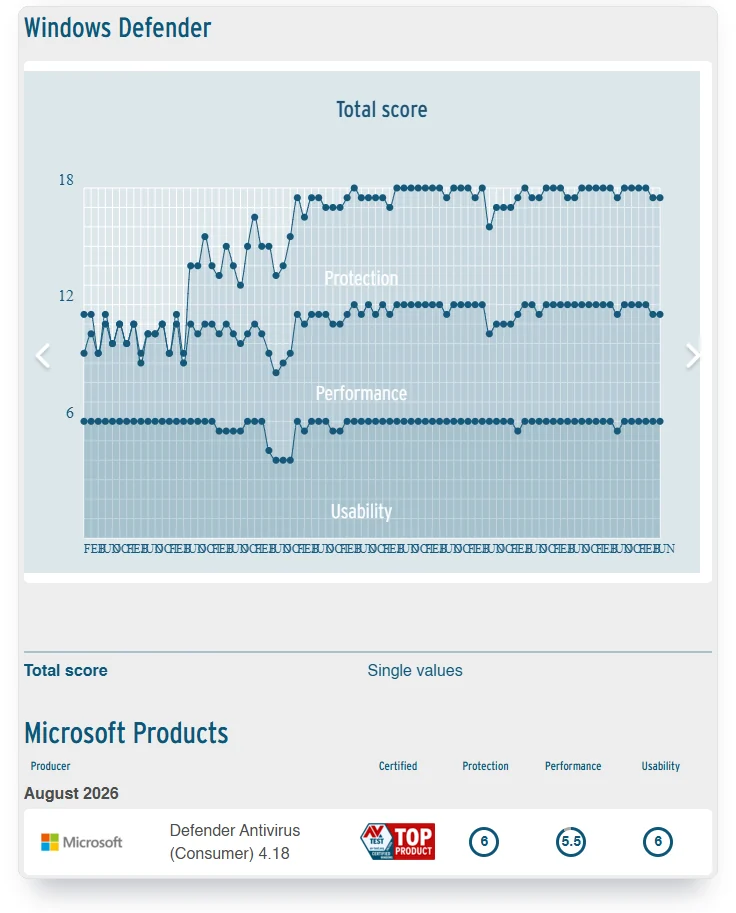
AV-TEST, a German lab, scores home antivirus products every two months on protection, performance and usability, up to 6 points each. Its August 2026 page describes the method: “we continuously evaluated 15 home user security products using their default settings… They were allowed to update themselves at any time and query their in-the-cloud services.” A product with 17.5 of 18 points gets the lab’s “TOP PRODUCT” award.
Microsoft Defender Antivirus (Consumer) 4.18 scored 6 for protection in every round from October 2025 to August 2026. Go back further and it’s 12 of 12 rounds since October 2024. Usability, which counts false alarms, was 6 every time. Performance was the only score that moved. It dropped to 5.5 in the June and August 2026 rounds, and in August only Defender and TotalAV scored 5.5 among the 15 products. Every other product got 6.
The history explains why the “Defender is weak” reputation lasts. On the same AV-TEST page, Microsoft’s product scored between 0 and 1 for protection in every round from April 2013 to June 2015. Its first full 6 came in December 2017. People who judged Defender a decade ago judged a product that really was weak. That product is gone.
AV-Comparatives: top group on real attacks, zero false alarms
AV-Comparatives, an Austrian lab, says it has tested Microsoft Defender in its consumer series since 2007. Its Real-World Protection Test for February to May 2026 threw live web attacks at each product. Defender blocked 99.0% of them and landed in the lab’s top group. Every other product in the table below made that group too, except ESET and McAfee, which landed one lower. That’s the lab’s latest full report. A short factsheet for July and August 2026 is out, but the full reports come, in the lab’s words, “in June and November.”
On false alarms, Defender beat everyone in that test: zero, against a field average of eight. It wasn’t a one-off. In the lab’s two Real-World tests of 2025 it had two and three false alarms, blocked 99.1% both times, and made the top group again. The lab marked down six products, Malwarebytes and Trend Micro among them, for above-average false alarms.
The lab’s 2025 Summary Report is less flattering. “Microsoft received three Advanced+ Awards, two Advanced Awards, and one Standard Award in this year’s tests.” Under the lab’s points rule that adds up to 70, short of the 90 needed for its Top-Rated award, which went to Avast, AVG, Bitdefender, ESET, G Data, Kaspersky and Norton. That annual rating adds up every test the lab ran in 2025, speed and offline detection included. Good on protection, then, but not top of the year.
SE Labs: 100%, then 98% with a top award
SE Labs, a British lab, tests home antivirus every quarter. In its January to March 2026 report, Microsoft Defender Antivirus (consumer) scored 100% total, the same as Kaspersky, Norton and McAfee. In the April to June report, written July 27, 2026, it scored 98% total: 95% for protection and 100% for legitimate files, which means no false alarms. That still earned the lab’s top AAA award. Kaspersky scored 100%, McAfee and Norton 99%, Avast 98%, Malwarebytes Premium 94% and TotalAV Premium 91%. The lab’s verdict on the quarter was that “targeted attacks caused problems for most of the products.” Only Kaspersky and Malwarebytes stopped all of them. Bitdefender, AVG and ESET weren’t in either report.
Defender matched the paid suites on protection in AV-TEST, AV-Comparatives and SE Labs between October 2025 and August 2026. The rest of this piece builds on that finding. The question is what’s left once protection is equal.
Where Defender still trails: offline detection and speed
Two of Defender’s measured weak spots sit here. The bigger one comes from its design. It leans on Microsoft’s cloud to judge files it hasn’t seen before. When the PC is online, that works. When it isn’t, Defender knows less.

Without the internet, Defender catches fewer threats
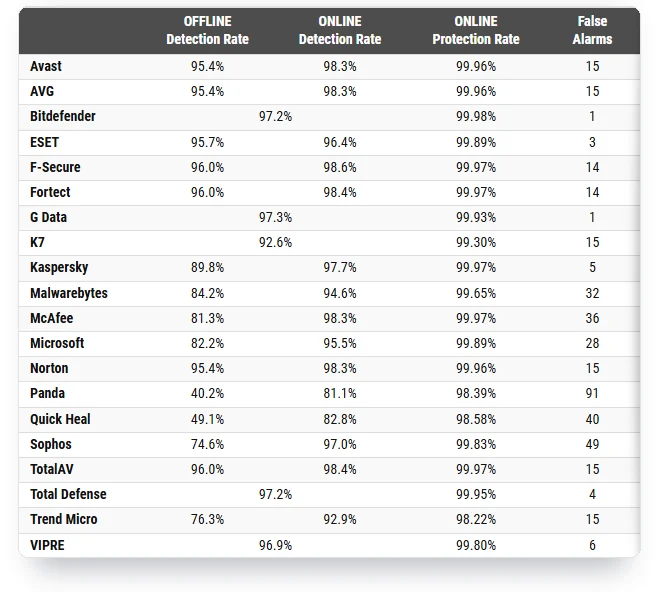
AV-Comparatives ran its Malware Protection Test in March and again in September 2026, and each time it scanned every sample twice per product, once with the internet cut and once with it connected. In September, with 10,000 samples, Defender detected 82.2% offline and 95.5% online. In March, with 10,030 samples, it had 89.2% and 98.1%. The lab doesn’t publish an offline protection rate. With the internet on and every protection layer working, Defender stopped 99.89% in September, still in the lab’s top group. Offline in September, G Data detected 97.3%, Bitdefender 97.2%, TotalAV and F-Secure 96.0%, and Norton, Avast and AVG 95.4%. McAfee, at 81.3%, did slightly worse offline than Defender.
The lab’s warning is direct: “vendors of highly cloud-dependent products should warn users appropriately in the event that the connectivity to the cloud is lost, as this may considerably affect the protection provided.” In a May 2026 post on its blog, AV-Comparatives called Defender’s gap “a design choice rather than a flaw.” Both can be true. That gap shows on a laptop stuck behind a hotel Wi-Fi login page, or on a PC that gets a USB stick before it connects.
Speed: middle of the pack
AV-TEST cut Defender’s performance score from 6 to 5.5 in June and August 2026. AV-Comparatives says Defender “ranks in the mid-range of the field” in its April 2026 Performance Test, with an Advanced award rather than the top Advanced+. On an older or slower laptop, that’s the difference you might feel during a big download or an install. On a new machine you probably won’t.
Defender isn’t alone in those dips. Across AV-TEST’s last five rounds, AVG, ESET and TotalAV also scored 5.5 at least once, and Avira fell to 4.5 twice. Norton, Bitdefender, McAfee, Avast and Kaspersky held 6 every time.
False alarms: mostly low, with one bad round
If you’ve heard that Defender flags too many safe programs, most of this year’s lab data says the opposite. Zero false alarms in AV-Comparatives’ Real-World test and a perfect usability score in every AV-TEST round. The exception is the lab’s Malware Protection Test, where the malware arrives as files rather than through live websites. Defender had three false alarms there in March and 28 in September, more than 14 of the other 19 products. That cost it a grade: with 21 to 40 false alarms, a product in the lab’s top protection group gets only the STANDARD award, the one McAfee got too. The labs test the software most people install, so Defender can still flag an unusual tool or game mod.
In AV-Comparatives’ spring 2026 test, Defender wrongly blocked nothing at all. The field averaged eight false alarms.
Is Windows Defender enough on Windows 10?
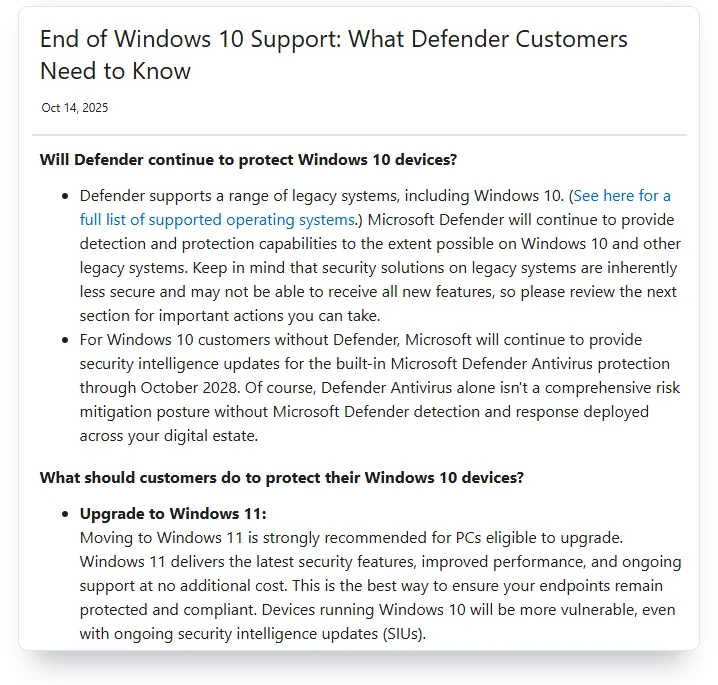
Not on its own, and Microsoft says so. Windows 10 reached end of support on October 14, 2025. Microsoft will keep sending Defender malware signatures to Windows 10 until October 2028, but signatures don’t fix holes in Windows itself. Without Extended Security Updates, those holes stay open.
The wording comes from Microsoft’s Defender blog post of October 14, 2025: “Microsoft will continue to provide security intelligence updates for the built-in Microsoft Defender Antivirus protection through October 2028.” The same post adds: “Devices running Windows 10 will be more vulnerable, even with ongoing security intelligence updates (SIUs).” In plain terms, Defender still learns about new malware, but Microsoft stops repairing the operating system it guards.
The fix for the operating system is Microsoft’s Extended Security Updates program for Windows 10, which now runs “through October 12, 2027” for home users. It covers Windows 10 version 22H2 and, in Microsoft’s words, gives “access to critical and important security updates as defined by the Microsoft Security Response Center.” No new features and no technical support. Microsoft’s ESU page lists three ways in: free if, in Microsoft’s words, “you are syncing your PC Settings,” by redeeming 1,000 Microsoft Rewards points, or as a one-time purchase of $30 plus tax.
If your PC can’t run Windows 11
Enroll in Extended Security Updates first, then decide about antivirus. A paid antivirus on an unpatched Windows 10 PC is still a paid antivirus on an unpatched PC. The patches matter more than the brand on the scanner.
If you’re on Windows 11 and asking whether you need antivirus at all, you already have one running. Windows Security includes Microsoft Defender Antivirus, and it’s on unless another antivirus has taken over. You already have antivirus. The only open question is whether to pay for a second brand.
What happens to Defender when you install, or remove, another antivirus
It steps aside, then comes back. Microsoft’s support page for the Windows Security app says: “If you have another antivirus app installed and turned on, Microsoft Defender Antivirus turns off automatically. If you uninstall the other app, Microsoft Defender Antivirus turns back on automatically.” Microsoft’s technical documentation calls the first state “Disabled mode (happens automatically)” and describes it bluntly: “Files aren’t scanned and threats aren’t remediated.”

Two details matter. Once another antivirus takes over, Windows Security shows a setting for “limited periodic scanning,” which lets Defender run occasional scans alongside the other product. And on Windows 11 with Smart App Control turned on, Microsoft notes that Defender “goes into passive mode instead of remaining in disabled mode.” Neither turns Defender back into your main antivirus. Only removing the other product does that.
That’s why a free trial that came with your laptop deserves a decision, not a shrug. The UK’s National Cyber Security Centre warns that new computers “often come with a trial version of a separate antivirus product installed (such as McAfee, Norton and Avast),” and that “when the trial version expires, you’ll have to pay (or register) to continue using it.” While the trial is installed, it’s your antivirus and Defender stays off. If you’d rather use Defender, uninstall the trial. Don’t just let it expire.
After uninstalling, open Windows Security and look at Virus & threat protection. It should show Microsoft Defender Antivirus as active with real-time protection on. Microsoft’s documentation says that if you switch real-time protection off by hand, “it will automatically turn back on after a short delay.” If it stays off after you removed the other product, Windows still thinks the old antivirus is installed. Check the antivirus maker’s support site for its removal tool, run it, and restart.
Windows Defender vs Norton, McAfee, Bitdefender, Avast and Malwarebytes
On this year’s lab numbers, none of these five protects clearly better than Defender. Bitdefender and Norton close most of its offline gap, and that’s the main difference. Here’s how each did in the same reports. One fact first: Norton and Avast belong to the same company, Gen Digital, whose site lists “Norton, Avast, LifeLock, and MoneyLion” as its brands. AV-Comparatives notes that “AVG and Norton use the Avast engine.” Three of these “competitors” share one owner and one scanning engine. What Avast did with its users’ browsing data is a separate question, covered in our look at whether Avast is safe.
Windows Defender vs Norton
Norton 360 scored 6, 6 and 6 in the August 2026 AV-TEST round, half a point ahead of Defender on performance. In AV-Comparatives’ Real-World test it blocked 99.3% against Defender’s 99.0%, with five false alarms to Defender’s zero. Offline in September it detected 95.4% against Defender’s 82.2%. SE Labs gave both 100% for January to March, then Norton 99% and Defender 98% for April to June. AV-Comparatives made Norton a 2025 Top-Rated product and gave it Gold for real-world protection. The gap is a few tenths, and in the Real-World test the lab put both in the same group. Before you renew, read what our LifeLock review found about how Norton prices its bundles in year two.
Windows Defender vs McAfee
McAfee Total Protection scored 6, 6 and 6 in AV-TEST’s August 2026 round. In AV-Comparatives’ Real-World test it blocked 98.5%, a group below Defender, with four false alarms. Offline in September it detected 81.3%, just below Defender’s 82.2%, though online it reached 98.3%, and it had 36 false alarms to Defender’s 28. SE Labs gave it 100% for January to March, the same as Defender, and 99% for April to June against Defender’s 98%. On the published numbers, McAfee doesn’t beat Defender at blocking malware. What it sells on top is a different list.
Windows Defender vs Bitdefender
Bitdefender Total Security scored 6, 6 and 6 in AV-TEST’s August 2026 round and blocked 99.5% in AV-Comparatives’ Real-World test, second only to Kaspersky, with five false alarms. Offline it detected 97.2% in September, the same as online, which means it relies on the cloud least of the five, and it had one false alarm, tied for the fewest. It made AV-Comparatives’ 2025 Top-Rated list. It wasn’t in either of SE Labs’ 2026 home reports. Of the five, Bitdefender is the one that measurably closes Defender’s offline gap. Some identity plans bundle it, as our Allstate Identity Protection review found on Allstate’s top tier.
Windows Defender vs Avast
Avast Free Antivirus is the only one of these five that the labs tested in a free version. It scored 6, 6 and 6 in AV-TEST’s August 2026 round, blocked 99.3% in AV-Comparatives’ Real-World test with five false alarms, detected 95.4% offline in September, and scored 100%, then 98%, total with SE Labs. It made the 2025 Top-Rated list. The catch isn’t in the lab data. In February 2024 the FTC ordered Avast to pay $16.5 million and banned it from selling browsing data for advertising, after finding it had sold that data “to more than 100 third parties through its subsidiary, Jumpshot.” If you swap Defender for a free antivirus, read its privacy policy first.
Windows Defender vs Malwarebytes
Malwarebytes is two products under one name, and its own page says so: it “offers both a free scanner and a premium subscription.” The free scanner checks your PC when you run it and doesn’t replace Defender. Malwarebytes Premium does replace it. In the labs, Premium had the weakest record of the five: 39 false alarms and a downgrade in AV-Comparatives’ Real-World test, 84.2% offline detection and a second-group protection score in September’s Malware Protection Test, a 5.5 protection score in AV-TEST’s April 2026 round, and 97%, then 94%, total with SE Labs. Use the free scanner as a second opinion if you like. On this year’s numbers, the paid version doesn’t out-protect Defender.
What about TotalAV, ESET and Kaspersky?
Three more names turn up in these reports often enough to cover briefly. TotalAV matched Defender’s 99.0% in AV-Comparatives’ Real-World test and detected 96.0% offline in September, level with F-Secure and well ahead of Defender’s 82.2%. The lab notes that TotalAV uses the Avira engine. AV-TEST gave it the same 5.5 for performance in August 2026 that it gave Defender. SE Labs scored it 91% for April to June, one award grade below Defender.
ESET blocked 98.5% in the Real-World test, a group below Defender, with only two false alarms, and it made AV-Comparatives’ 2025 Top-Rated list. Kaspersky had the top Real-World score, 99.8%, and SE Labs gave it 100% in both 2026 reports. For a US reader, that score is moot. The US Commerce Department’s ruling barred Kaspersky from entering new agreements with US persons from July 20, 2024, and from “Providing any anti-virus signature updates” from September 29, 2024. You’ll keep seeing it at the top of lab tables. You can’t use it here.
What a paid antivirus suite adds that Windows doesn’t
If protection is equal, the money buys extras. Microsoft’s own page names them: “Some third-party tools offer extras (like identity monitoring or built-in VPNs), but Microsoft Defender covers the essentials.” The question for each extra is whether you’d pay for it as a separate product.
Windows 11 already has a fair amount of this, by Microsoft’s own description. Defender scans automatically, works alongside the Windows Firewall, warns you about unsafe websites and downloads through Microsoft Defender SmartScreen, offers ransomware protection through controlled folder access, and includes family safety options for child accounts. All of it is free.
Then there’s a product most people confuse with all of that. Microsoft also sells an app called Microsoft Defender as part of Microsoft 365 Personal and Family. Its page advertises identity theft monitoring, credit monitoring with alerts, and identity insurance for restoration costs. That’s an identity protection service, the same kind we rate in our guide to whether identity theft protection is worth it. It isn’t a second antivirus.
So the extras sort into three piles. Protection Windows already gives you: real-time scanning, firewall, web warnings, ransomware folder protection. Services that aren’t antivirus at all: VPNs, password managers, dark web alerts and credit monitoring. And conveniences: one dashboard for the whole family, phone support, a PC tune-up tool. The first pile you already own. The second you can buy on its own and often cheaper, as our credit monitoring comparison shows. The third is a matter of taste.
Aura and Norton with LifeLock price their bundles on the identity side, not the antivirus side. If identity is what you’re paying for, compare the bundle against LifeLock alternatives rather than against Defender.
Five settings to check in Windows Security today
You can confirm Defender is doing its job in about two minutes. Open the Windows Security app from the Start menu. Most of these sit under Virus & threat protection settings, behind Manage settings. You want each one on.
- Real-time protection is on, under Virus & threat protection settings. Microsoft says it turns itself back on “after a short delay” if switched off. If it’s off and stays off, another antivirus is registered.
- Cloud-delivered protection is on, in the same place. Microsoft’s documentation says “Cloud protection is enabled by default” and “We recommend keeping cloud protection turned on.” This is the setting behind Defender’s online scores.
- Tamper Protection is on, also in the same settings. It stops other programs from switching Defender’s protections off behind your back.
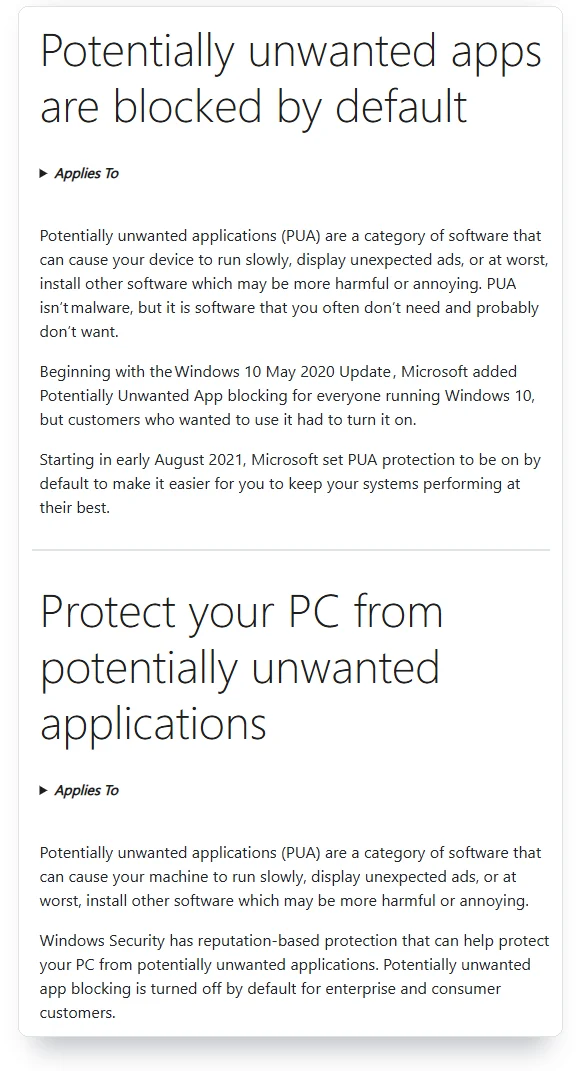
- Potentially unwanted app blocking is on, under App & browser control, then Reputation-based protection. It stops bundled junk such as toolbars and fake cleaners. Turn it on yourself, because Microsoft’s own help pages disagree about whether it starts on.
- Ransomware protection is set up, under Virus & threat protection, then Manage ransomware protection. Turn on controlled folder access, which Microsoft lists as Defender’s ransomware protection, and link OneDrive under Ransomware data recovery. If a trusted app then gets blocked, you can allow it there.
The disagreement in item four is on Microsoft’s support site. One page, titled “Potentially unwanted apps are blocked by default,” says: “Starting in early August 2021, Microsoft set PUA protection to be on by default.” Another page says: “Potentially unwanted app blocking is turned off by default for enterprise and consumer customers.” The same page adds that blocking downloads of such apps “only works with the Microsoft Edge browser.” Two pages, one company, opposite answers. Check your own screen.
If you think Defender missed something
Slow PC, strange browser home page, programs you didn’t install. You don’t need to buy a suite to get a second look. Microsoft gives you two free tools for exactly this, and neither one replaces Defender.
- Run a full scan first. In Windows Security, open Virus & threat protection, then Scan options, and pick Full scan. It’s slower than the quick scan and checks every file.
- Then run Microsoft Defender Offline. Microsoft describes it as a tool that lets you “boot and run a scan from a trusted environment,” outside the normal Windows kernel, and says it “focuses on firmware and rootkits.” Your PC restarts to do it, so save your work.
- For a third opinion, download Microsoft Safety Scanner. Microsoft calls it “a scan tool designed to find and remove malware from Windows computers.” It “only scans when manually triggered” and “expires 10 days after being downloaded,” so you download a fresh copy each time.
- Malwarebytes’ free scanner does the same job from another company. It runs when you start it and doesn’t take over from Defender, which is how a second opinion should work.
If all of that comes back clean and the PC still misbehaves, the problem is often an unwanted program you agreed to install, a browser extension, or a slow disk. None of those needs a new antivirus. If something does turn up, change the passwords you used on that PC from a different, clean device.
What “Windows Defender” actually is, and three other things with the same name
Microsoft Defender Antivirus is the antivirus built into Windows 10 and Windows 11. Microsoft’s Windows 11 security book calls it “a next-generation protection solution included in all versions of Windows 11 and Windows 10 devices enrolled in Extended Security Updates (ESU) after End of Support.” Windows 10 PCs outside ESU still get its malware signatures until October 2028, as covered above. Microsoft used to call it Windows Defender, the name most people still search for. That’s the product the labs test.
Three other things carry almost the same name, and mixing them up causes most of the confusion in this search:
- Windows Security is the app you open to manage Defender, the firewall and the rest. Microsoft’s support page says the app “includes features such as Microsoft Defender Antivirus, Windows Firewall, and Smart App Control.” It’s the dashboard, and Defender Antivirus is the engine inside it.
- Microsoft Defender, the app, comes with Microsoft 365 Personal and Family subscriptions. Its product page leads with identity theft monitoring and credit monitoring. You don’t need it to have Defender Antivirus on Windows.
- Microsoft Defender for Endpoint and Defender for Business are paid products for companies with IT teams. Their documentation is where a lot of the “passive mode” talk comes from. They aren’t for a home PC.
Some reviews in the search results blur these. One says you can get Microsoft Defender “only by purchasing a Microsoft 365 Personal or a Microsoft 365 Family package.” That’s true of the app and false of the antivirus, which is free in every copy of Windows 11.
What no antivirus stops
Microsoft’s own Learning Center page lists where antivirus “meets its limits”: social engineering scams that convince you to reveal information, brand-new ransomware that hasn’t yet been identified, zero-day vulnerabilities found before patches exist, and risky habits like downloading unverified apps or bypassing browser warnings. That list holds for every antivirus in this article, paid or free. Read it twice. It’s the honest part of the page.
The attacks that get through at home usually get through a person, not a scanner. A browser pop-up says your PC is infected and gives a number to call. An email says your antivirus renewed for hundreds of dollars and gives a number to cancel. A caller says they’re from Microsoft. In each case the scam works by getting you to let someone in, and antivirus allows what you approve. Our guide to spotting AI voice scams covers the phone version, and our breach-check guide covers the stolen-password version.
How to tell a real Defender warning from a fake one
Microsoft’s own support page on tech support scams gives the clearest rule anywhere in this search: “Microsoft error and warning messages never include phone numbers.” A fake warning lives inside your browser and wants you to pick up the phone. Scammers, Microsoft adds, “may also put your browser in full screen mode and display pop-up messages that won’t go away.” Real error messages in Windows, in Microsoft’s words, “never ask you to call a tech support number.”
Two more lines from that page are worth printing for anyone less technical at home. “If you didn’t ask us to, we won’t call you to offer support.” And: “Microsoft will never ask that you pay for support in the form of cryptocurrency like Bitcoin, or gift cards.” If a pop-up locks your browser, close the browser from Task Manager. Don’t click inside the page and don’t call the number. If you already called and let someone connect to your PC, disconnect it from the internet, run the scans in the section above, and change your passwords from a different device.
For a shared family PC, the settings that help most live outside the antivirus. Give each person a standard account instead of an administrator account, so a bad click can’t install software silently. Keep Windows Update on. Turn on the OneDrive recovery option under Ransomware protection. And give the least technical person in the house Microsoft’s own rule: “If you receive an unsolicited call from someone claiming to be from Microsoft Support, hang up.”
Who writes the “is Windows Defender enough” pages
Before you take advice on this question, check who’s giving it. I looked at the pages that ranked in US Google for “is windows defender enough” on October 12, 2026. At least four of the editorial pages earn money when you buy antivirus, or belong to a company that sells it.
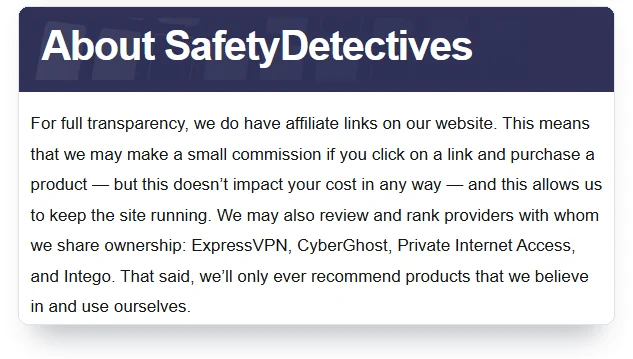
All About Cookies’ page recommends a “best” alternative through affiliate links. Malwarebytes’ page sits in its “Why Us” section and is headed “When Defender is not enough: Malwarebytes Premium Security.” SafetyDetectives’ About Us page says: “For full transparency, we do have affiliate links on our website” and “We may also review and rank providers with whom we share ownership: ExpressVPN, CyberGhost, Private Internet Access, and Intego.” Intego sells antivirus. PCMag’s opinion piece is titled “I’ve Tested Every Major Antivirus. Please Don’t Rely on Just Microsoft Defender.” PCMag’s owner, Ziff Davis, says in its 2025 annual report that its “Cybersecurity & Martech business operates as the VIPRE Security Group,” and VIPRE sells antivirus.
None of this makes those pages wrong. It does explain a pattern. SafetyDetectives’ 6,903-word page lists ten paid alternatives and names no independent lab. The independent government page in the same results, from the UK’s National Cyber Security Centre, says the built-in antivirus is a fine start: “If you make sure that this built-in antivirus is switched on, you’ll instantly be safer.” Weigh advice by whether it shows you the lab report, not by how sure it sounds.
Field notes
- AV-TEST: Defender scored 6 of 6 for protection in all 12 rounds since October 2024; performance fell to 5.5 in June and August 2026.
- AV-Comparatives Real-World, February to May 2026: Defender blocked 99.0% of attacks with 0 false alarms; the field averaged 8.
- AV-Comparatives Malware Protection, September 2026: 82.2% detected offline, 95.5% online, 28 false alarms; the best product reached 97.3% offline.
- SE Labs, April to June 2026: 98% total accuracy and the top AAA award, after 100% in January to March.
- Windows 10: Defender signatures continue through October 2028; Extended Security Updates run through October 12, 2027.
- Ownership: Norton and Avast belong to Gen Digital; PCMag’s owner Ziff Davis runs the VIPRE Security Group.
- Sources: AV-TEST, AV-Comparatives and SE Labs reports; Microsoft Learn, Support, Tech Community and Learning Center pages; FTC; UK NCSC; Ziff Davis 2025 Form 10-K. Checked October 12, 2026.
Frequently Asked Questions
Do I need McAfee if I have Windows Defender?
Not for malware protection. In AV-Comparatives’ February to May 2026 test, McAfee blocked 98.5% of attacks and Defender 99.0%, and SE Labs rated McAfee 99% and Defender 98% for April to June. McAfee’s paid plans add identity and privacy services, so decide whether you want those. If you do, my McAfee vs Norton comparison sets out what each one costs from year two.
Do I need AVG if I have Windows Defender?
Not for protection. AVG blocked 99.3% of attacks in AV-Comparatives’ February to May 2026 test, against Defender’s 99.0%, and the lab notes that AVG uses the Avast engine. Installing AVG mostly swaps Defender’s engine for Avast’s, which tested about the same.
Is Windows Defender enough for Windows 10?
Only with Extended Security Updates. Microsoft sends Defender signatures to Windows 10 through October 2028, but says those devices “will be more vulnerable” without OS patches. Home users can get updates through October 12, 2027 by enrolling in Microsoft’s ESU program.
Does Windows Defender slow down your PC?
Slightly more than most rivals. AV-TEST gave Defender 5.5 of 6 for performance in June and August 2026, while most products scored 6. AV-Comparatives placed it mid-range in its April 2026 Performance Test. On newer PCs the difference is small.
Can I use Windows Defender with another antivirus?
Not as two full antiviruses. When another antivirus is installed and on, Microsoft says Defender “turns off automatically” and turns back on when you uninstall the other one. Windows Security can then offer limited periodic scanning, which runs occasional Defender scans alongside it.
Is Windows Defender good at detecting malware offline?
It’s weaker offline than online. In AV-Comparatives’ September 2026 test Defender detected 82.2% of samples without internet and 95.5% with it. The best product reached 97.3% offline. Keep cloud-delivered protection on, and be careful with USB drives on unconnected PCs.
Is the Microsoft Defender app the same as Windows Defender?
No. Microsoft Defender Antivirus is built into Windows and free. The Microsoft Defender app comes with Microsoft 365 Personal and Family, and its page leads with identity theft and credit monitoring. You don’t need the app for antivirus protection on Windows.
Does Windows 11 need a separate antivirus?
Not for most home users. Windows 11 includes Microsoft Defender Antivirus, which matched paid suites on protection in AV-TEST, AV-Comparatives and SE Labs over the past year. Microsoft itself says it’s “plenty” for many users, not for all of them.
Can Windows Defender remove malware it finds?
Yes, it quarantines or removes what it detects. Microsoft also offers Microsoft Defender Offline, which runs a scan “from a trusted environment” outside normal Windows, and Microsoft Safety Scanner, a free tool that “only scans when manually triggered.”
My Take
Defender is enough for most people, and the lab reports back that up. Three labs, a year of tests, top-group protection and the cleanest false-alarm record in AV-Comparatives’ spring test. Its weak spots are real and narrow: offline detection, a half-point on speed, and one bad round of false alarms in September. Neither is what a renewal email is selling you.
If I were holding a renewal notice for a Windows 11 PC, I’d uninstall the paid suite, confirm Defender came back on, and check the five settings above. I’d buy nothing. If the PC were on Windows 10, I’d enroll in Extended Security Updates before I spent a cent on antivirus. And if identity monitoring were the real reason for the subscription, I’d price that service on its own.