


This TotalAV review starts with a price list TotalAV publishes itself. On its Subscription Pricing Matrix, the Plus plan renews at $99 a year. The deal page I reached through a reviewer’s link sold that same plan for $19. TotalAV is legitimate antivirus software with strong lab scores. The money, the fine print and most of the complaints sit in year two.
- Is TotalAV legit? The short answer
- What TotalAV costs in year one and year two
- How TotalAV’s auto-renewal works
- How to cancel TotalAV and get a refund
- Why is TotalAV charging me?
- Is the TotalAV free version really free?
- How well TotalAV protects: a year of lab results
- What you get beyond antivirus
- Who is behind TotalAV
- TotalAV complaints, ratings and the court record
- Who writes the TotalAV reviews you are reading
- Who should buy TotalAV, and who should skip it
- Frequently Asked Questions
- Does TotalAV renew at a higher price after the first year?
- Can I get a refund after TotalAV renews my subscription?
- Is TotalAV owned by Norton or Gen Digital?
- Who owns TotalAV and where is the company based?
- Does TotalAV slow down a Windows PC?
- Is TotalAV better than the free Windows Defender?
- Why is someone calling me and claiming to be TotalAV?
- Does the free version of TotalAV have real-time protection?
- My Take
I didn’t buy a plan for this TotalAV review. I read the documents a buyer agrees to and the ones the company files. On October 15, 2026, I opened TotalAV’s price list, its deal page, its Terms of Service and its help pages on refunds and cancelling. I read the 2025 accounts its UK company filed at Companies House, the UK’s company register, the court papers from a California class action, and the past year’s lab results for TotalAV from AV-Comparatives, AV-TEST and SE Labs. That’s what this review stands on.
Is TotalAV legit? The short answer
Yes, TotalAV is legitimate. It’s real antivirus software sold by Total Security Limited, a UK company registered as 10161957, and the independent labs rate its malware protection near the top of the field. AV-Comparatives gave it ADVANCED+ in its Real-World Protection Test for February to May 2026. In July and August 2026, AV-TEST scored it 17.5 out of 18 and gave it a Top Product award, which the lab reserves for products at 17.5 points or higher.
The company is also easy to identify, which matters when you’re trying to tell a real charge from a fake one. Google Play lists TotalAV’s apps under the developer name Total Security Limited, the same name in the Terms of Service and in the footer of every totalav.com page I opened. Nothing about the product is fake.
What people call a scam is the way it’s sold. The first year is cheap. The renewal is automatic and, at the prices I saw, costs 2.2 to 5.2 times the first year, depending on the plan. And the refund window is 30 days at most, so a charge you spot late on a card statement can be past it.
That model has been tested in court. In a California class action over automatic renewals, a San Diego judge in November 2024 preliminarily approved a $2.5 million settlement covering TotalAV and six related products from the same companies. The claim window has closed, and the companies denied wrongdoing. The software works. Read the renewal terms before you pay. The same goes for any device sold with a plan, like a GPS tracker.
What TotalAV costs in year one and year two
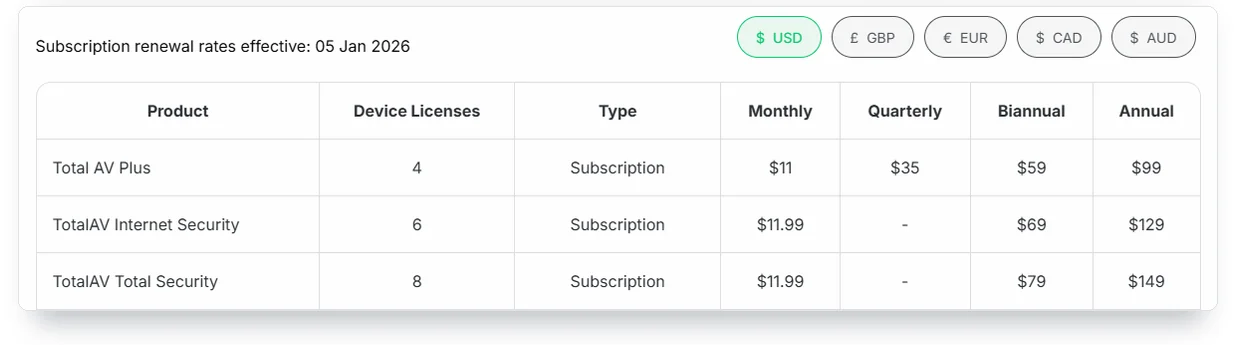
TotalAV’s own price list says the Plus plan renews at $99 a year after a $19 first year. That list is a page on totalav.com called the Subscription Pricing Matrix, and it states the renewal rates “effective: 05 Jan 2026” for each plan and each billing period. I opened it on October 15, 2026, with US dollars selected.
The first-year price is a different number on a different page. I followed Security.org’s “Get TotalAV” button and landed on totalav.com/deal. It offered Plus for “$19 first year” and the two bigger plans at the prices in the chart below. The footnote under the plans reads: “The promotional prices displayed are an introductory discount for your first term only. All services automatically renew at the regular rate shown, using the payment method provided on your account.”
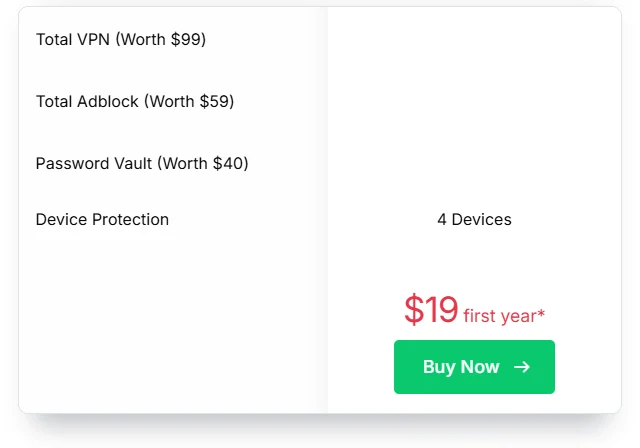
Put the two pages side by side and the jump is plain, as the chart above shows for all three plans. The Terms of Service say the same thing in legal words: a discounted first term renews “at the then current non-discounted, standard price.”
The first-year price depends on where and when you click. Security.org’s review, last updated February 25, 2026, printed $29, $39 and $49. Comparitech’s review, updated March 10, 2025, printed $29.99, $39.99 and $49.99. The renewal prices don’t move with the link. They come from the matrix.
On the deal page I opened, the discount was the same $80 on every plan, which is why the banner says “Save $80 Today.” Over three years, at those prices, Plus costs $217, Internet Security $307 and Total Security $367. That’s what a customer who never cancels pays. The cheap year is one of three.
Monthly billing costs more and comes with less warning. The matrix prices Plus at $11 a month, which is $132 over twelve months against $99 billed yearly. Under the Terms, monthly plans get no renewal notice. TotalAV’s help center says “You can view your renewal cost anytime in your account and make changes before the renewal date if you wish.” Check that number. It’s the one TotalAV will charge.
At the deal-page prices I saw in October 2026, every TotalAV plan renews for $80 more than its first year.
Three more lines on the same price list matter more than the headline numbers.
More Read

First, every add-on is a separate subscription with its own renewal. Total VPN, Total Password and Identity Theft Protection each renew at $99 a year, the price of Plus itself, and the table below lists the rest. “Cancelling one service will not affect the others,” the page says. Cancel the antivirus and forget the VPN, and the VPN renews.
Second, if you bought TotalAV years ago, you may be on a plan TotalAV no longer sells, and such plans renew at their old prices. The matrix lists Antivirus Pro (2019 – 2024) at $159 a year for three devices, while today’s Plus is $99 for four. The old Total Security shows the same $60 gap against the current one, with two fewer devices. Long-time customers pay more for less. The plans on sale now are Total AV Plus, Internet Security and Total Security. Any other name on your account, or one of those three with years in brackets, is an older plan with its own renewal price. Ask support whether it can move you to a current plan.
Third, a card that expired or got blocked may not stop the renewal. The page says: “If your payment method has expired or is declined, we may use secure tokenization or account updater tools from your card issuer to help complete the renewal.” If you assumed a new card number would end the subscription, that sentence says it may not.
How TotalAV’s auto-renewal works
Every TotalAV plan renews automatically, and its own pages disagree on how much warning you get. I found three different promises across four pages. The Terms of Service, last updated March 11, 2026, say TotalAV will email a renewal notice “up to thirty (30) days prior to your renewal date.” The help page on auto-renewal also says “up to 30 days.” A footnote on TotalAV’s product page says notice comes “at least 30 days before renewal for annual plans.” The deal page says: “You will be notified at least 15 days prior to any renewal taking place.”
TotalAV’s own pages promise renewal notice up to 30 days, at least 30 days or at least 15 days ahead. Plan as if you’ll get the shortest, or none.
“Up to” is a ceiling, not a promise. Under the Terms, an email one day before renewal would still count as “up to thirty (30) days prior to your renewal date.” The Terms also say monthly plans get no notice at all: “Renewal Notices will not be provided to users who are enrolled in a monthly Subscription plan.” The help page adds that in some regions customers get annual reminder emails “regardless of subscription length, to comply with local” rules. Don’t count on it.
Timing matters on your side too. The Terms let you cancel “any time during your Subscription Term, provided your cancellation request or election is made at least one (1) day before the end of your then-current Billing Cycle.” Cancel on the renewal date and you’ve paid for another billing cycle: a year on an annual plan, a month on a monthly one. The refund window below is then your only way back.
The Terms keep one more door open. TotalAV may decide it’s “operationally necessary” to “update or amend your renewal term (e.g. from annual to monthly),” and then charge a pro-rated amount for the new term. It’s an easy clause to miss. Now you’ve seen it.
One more clause changes the usual advice. The Terms describe a “Continuous Protection Service” that comes as a feature or add-on with “certain of our services”: extras such as an additional TotalAV license or an extra Total Adblock profile, “depending on your Subscription tier.” The Terms say that if you cancel the plan or switch off its auto-renewal, “access to the Continuous Protection Service will be suspended within forty-eight (48) hours.” A Reddit user who switched off renewal in September 2024 posted the email they got: “in 48 hours you will also lose access to the great additional services we gave you free of charge as part of our fantastic continuous protection package.”
The trade-off before you switch off renewal
Turning auto-renewal off on day one protects you from the big charge. If your plan includes Continuous Protection extras, it also costs you those within 48 hours. If you can’t tell whether yours does, ask TotalAV support before you switch renewal off. To keep them, put your own reminder in the calendar six weeks before the renewal date instead. Don’t wait for TotalAV’s email.
How to cancel TotalAV and get a refund
Cancelling TotalAV and getting money back are two separate steps. Turning off TotalAV’s auto-renewal stops the next charge but doesn’t refund the one already taken. For a refund, you have to end the plan completely inside the refund window, 30 days on annual plans and 14 on monthly plans and add-ons, and your protection stops the moment the refund goes through. Where you bought it decides how you cancel.
If you bought on totalav.com with a card or PayPal, the help page lays it out like this:
- Log in to the TotalAV Online Portal at dashboard.totalav.com.
- Open “My Subscriptions” on the dashboard.
- Click “Cancel Subscription” next to the plan. This switches off auto-renewal, and the plan stays active until the end of the period you paid for, except any Continuous Protection extras, which go within 48 hours. Add-ons have their own line, so repeat it for each one.
- Enter the verification code TotalAV emails to the address on the account.
If you bought through the App Store or Google Play, you cancel in the store, not at TotalAV. On an iPhone, open Settings, tap your name at the top, then Subscriptions. On Android, open the Play Store, tap your profile icon, then Payments & subscriptions. The refund also goes through the store: “refund requests must be made directly through that store, following their policies,” TotalAV’s refund page says. So the store’s refund rules apply, not TotalAV’s 30 and 14 days. If you paid with PayPal, you can also stop the billing agreement from PayPal’s side. A Reddit user described it in March 2025: in the PayPal app, open Bills, choose Total AV and find the cancel option at the bottom.
Expect TotalAV to offer you a discount on the way out. The Reddit user who cancelled in September 2024 counted two: 50% off on the first screen and 80% off after they confirmed. They clicked past both. I can’t tell from TotalAV’s pages whether those discounts carry into the next renewal.
Now the refund. TotalAV’s product page FAQ is blunt: “Cancelling your subscription (i.e., turning off auto-renewal) will not end your access or automatically trigger a refund.” Annual and biannual (six-month) plans get 30 days. Monthly and quarterly plans and add-ons get 14, and the help center applies the 14 days to add-ons “even if billed annually.” “Refunds require full termination of your plan, and access will end immediately once processed,” the refund page adds. To ask for one, log in to the Online Portal, which shows your plan type, purchase date and billing history. Then open the support ticket link on the help center page “Refunds & Money-Back Guarantee” and send your account email, purchase date and invoice number. TotalAV’s team will “review your request and guide you through the next steps.” TotalAV says it processes most refunds within 24 to 48 hours of approval and that some take up to 10 working days.
The pages disagree on one thing that matters after a renewal. The product page FAQ counts the window from “starting” a plan. The help center’s refund page says “within 30 days of the initial purchase or renewal date.” That second reading gives you 30 days after a surprise annual renewal and 14 after a monthly one, so by the help center’s count a renewal 10 days ago is inside the window on either plan type. If you’re asking for money back after one, ask in writing, cite the refund page by its title, and keep the reply. I can’t tell you how TotalAV applies its own policy case by case. Nobody outside the company can.
Two things don’t count as cancelling. Deleting the app from your computer leaves the subscription running, because the billing sits in your account, not on the device. Ignoring the renewal email stops nothing either. If TotalAV refuses a refund and you believe it didn’t show you the renewal terms, your card issuer’s dispute process is the next door. Keep every email for it.

If you’re also leaving a separate identity-theft service, such as one of Norton’s LifeLock plans, cancelling there can change more than billing. Read what cancelling does to your cover first.
Why is TotalAV charging me?
If a TotalAV charge surprised you, my first guess is a renewal. Check four causes, all of them written into TotalAV’s own pages. The plan renewed at the regular rate after a cheap first year. An add-on, such as the VPN or Total Adblock, renewed on its own date. TotalAV may have kept billing a replaced or blocked card through your card issuer’s account updater, a service that passes a replacement card’s details to merchants. Or the purchase went through Apple or Google, so the charge shows the store’s name and you handle it there.
Log in to the Online Portal and open My Subscriptions before you do anything else. My Subscriptions lists every active plan and add-on with its renewal date. If the amount and date match a plan or add-on there, it’s a TotalAV renewal, and the cancel and refund rules above apply. If nothing there matches, call your card issuer. A $99 charge alone doesn’t tell you which item renewed: the matrix prices Plus, Total VPN, Total Password, Identity Theft Protection and Unlimited Protection at $99 a year each, and two retired add-ons renew at $99 too. If you can’t log in, write to [email protected], the billing address on TotalAV’s deal page.
Then there’s the other kind of “TotalAV” contact, the one that isn’t TotalAV. In a Reddit thread from 2024, a user described a robocall: “my phone rang and it was total av warning me that someone is trying hack my phone.” The top reply was right: an antivirus company doesn’t phone you to say you’re hacked. On October 15, 2026, the Google results I pulled for TotalAV searches also included pages on stackblitz.com, a site that hosts user-made projects, advertising TotalAV support phone numbers. They are not TotalAV. I’m not reprinting the numbers.
Real TotalAV help runs through the Online Portal, the help center at help.totalav.com, the app stores for app purchases, and, for billing questions, the address TotalAV prints on its own deal page: [email protected]. Anyone who calls first and asks you to install something or read out a code is running the same play as the fake support calls I’ve written about before. Hang up.
Is the TotalAV free version really free?
The download is free, and what it does depends on who you ask. TotalAV’s free antivirus page lists “Real-Time Protection” among its features and says its software can “find and remove malware.” PCMag’s review, updated December 24, 2024, says the opposite about real-time scanning: “TotalAV Antivirus Pro includes the real-time protection component missing from its free edition.” PCMag adds that free users “will always see an orange status indicator because real-time protection features aren’t (and can’t be) enabled.”
I didn’t install it, so I won’t settle that from my desk. The safe reading is the stricter one. Treat TotalAV Free as an on-demand scanner. After you install it, open Windows Security, go to Virus and threat protection, and check which product Windows says is protecting the PC and whether real-time protection is on. If it isn’t, make sure Microsoft’s built-in antivirus is. That costs nothing.
If a free scan finds trouble and then offers an upgrade, that’s the moment to remember the renewal price. The $19 covers one year. The renewal terms cover every year after it.
How well TotalAV protects: a year of lab results
On protection, TotalAV holds up. In September 2026, AV-Comparatives measured TotalAV’s offline detection at 96.0%, against 82.2% for Microsoft Defender, the antivirus built into Windows. That Malware Protection Test, released on October 15, 2026, ran 20 products against malware files with and without an internet connection. TotalAV detected 96.0% offline and 98.4% online and protected against 99.97% of samples overall, enough for the top of the lab’s four protection groups. Defender reached 95.5% online and 99.89% overall, also in the top group, but its false alarms pulled its award down, as the grid below shows.
Three terms carry these reports. Offline detection is the share of malware files a scanner catches with the internet cut, using only what’s installed on the PC. Online detection adds the vendor’s cloud lookups. A false alarm is a clean file the scanner wrongly flags. High protection with many false alarms means the scanner quarantines more good files by mistake. AV-Comparatives’ awards run ADVANCED+, ADVANCED, STANDARD and TESTED, and its grid drops a product one level for 11 to 20 false alarms and up to two levels for 21 to 40.
False alarms are where TotalAV trails the best scanners. It flagged 15 clean files in September, fewer than Defender’s 28, while Bitdefender and G Data flagged one each. Those 15 cost TotalAV the top award: it got ADVANCED, one level below ADVANCED+. In AV-Comparatives’ March 2026 test it flagged 19, and the lab printed it as “TotalAV*” with a footnote: “these products got lower awards due to false alarms.” The March award was also ADVANCED. TotalAV’s deal page shows a badge reading “2* Malware Protection” with the date March 2026, without the footnote.
The rest of the year looks good. AV-Comparatives’ Real-World Protection Test for February to May 2026, which sends each product to live malicious web addresses, put TotalAV at 99.0% with five false positives and an ADVANCED+ award. AV-TEST’s July and August 2026 round gave it 6 of 6 for protection, 5.5 of 6 for performance and 6 of 6 for usability. The half point on speed shows up in AV-TEST’s own table.
On a standard PC, installing common applications ran 36% slower with TotalAV, against an industry average of 15%. Copying files ran 18% slower against an average of 3%, and opening popular websites 17% slower against 12%. TotalAV launched standard programs with less slowdown than average, 7% against 11%. On AV-TEST’s high-end PC the gaps narrowed. You’ll feel it most when you install software or copy big folders.
SE Labs is the third lab. It didn’t test TotalAV from January to March 2026, but it tested Scanguard, a sister brand from the same company, and gave it AAA. From April to June it tested TotalAV Premium, a 2025 to 2026 plan name on TotalAV’s price list, which scored 86% for protection accuracy, 94% for legitimate accuracy and 91% in total, for an AA rating. SE Labs also named Protected.net winner of its 2026 New Home-Anti-Malware Award. That’s the name TotalAV’s UK company used until July 2023, and SE Labs still uses it.
The year-long view agrees. AV-TEST certified TotalAV for Windows in all six of its home-user rounds from October 2025 to August 2026, and TotalAV holds 2026 AV-TEST certificates for Mac and Android. AV-Comparatives’ summary of 2025 gave TotalAV an “Approved Security Product Award” and said it “reached the highest Advanced+ level in two of the tests and the Advanced level in another.” Consistent. Not flawless.
Windows Defender, the name many people still use for Microsoft’s built-in antivirus, scored lower than TotalAV offline in September and drew a STANDARD award for its 28 false alarms. In the spring Real-World test it matched TotalAV’s 99.0% with zero false alarms, and both earned ADVANCED+. For one Windows PC, that tells me Defender covers the basics, which is why my buyer list below says skip TotalAV there.
Whose scanning engine TotalAV uses
TotalAV scans files with Avira’s engine, and Avira has belonged to Norton’s parent company since January 2021. AV-Comparatives prints the first part on its test pages: “F-Secure, Fortect and TotalAV use the Avira engine.” The second part is in a NortonLifeLock earnings release: it “closed the acquisition of Avira in January 2021.” NortonLifeLock is now Gen Digital, the owner of Norton, Avast, AVG and Avira. For what that ownership has meant for Avast users’ data, see whether Avast is safe.

Licensing an engine is normal in this business. AV-Comparatives lists G Data, Total Defense and VIPRE on Bitdefender’s engine in the same footnote. It doesn’t mean Norton runs TotalAV or sees its customers. It likely explains why all three Avira-engine products, F-Secure, Fortect and TotalAV, posted the same 98.6% offline and 99.1% online in March. What TotalAV adds is everything around the engine: the app, the web shield, the extras, and the billing.
What you get beyond antivirus
Each step up the TotalAV plan ladder adds extras, and the cheapest plan leaves the headline ones out. On the deal page, Plus covers four devices and includes real-time protection, phishing and ransomware protection, “iOS & Android Protection,” the WebShield browser extension and the tune-up tools. The rows for Total VPN, Total Adblock and the Password Vault are empty for Plus. Plus is the bare plan. Internet Security adds the VPN, but not Total Adblock or the Password Vault, and covers six devices. Total Security covers eight, is the only plan with all three extras, and is the one TotalAV calls “100% complete online protection.”
One add-on name is easy to misread. Every plan on the deal page includes “Zero-Day Cloud Scanning,” and the matrix separately sells “Advanced Cloud Scanning” for $45 a year. Read the add-on list before you tick boxes at checkout. Each box is a renewal.
Everything else is an add-on with its own renewal date. Add Total VPN and Identity Theft Protection to Plus and the renewal comes to $297 a year at matrix prices. That’s my arithmetic, not a TotalAV bill. Before you add identity monitoring to an antivirus plan, read whether identity theft protection is worth it at all. And if you add a password manager, the bigger upgrade for your accounts is passkeys, which your phone already supports for free.

Who is behind TotalAV
TotalAV is sold by Total Security Limited, a company registered in England in May 2016 under the number 10161957. Companies House lists its earlier names: SS Protect Limited until November 2018, then Protected.net Group Limited until July 2023. The US arm is Total Security US LLC in Boston. TotalAV’s Terms of Service say both companies “are a part of Point Wild,” and its privacy policy adds “formerly known as Pango.”
The register shows how control moved. Just Develop It Limited held 25% to 50% from 2016 until January 2022. A company named System1 SS Protect Holdings held a majority stake from 2018 to 2020, and between November 2020 and January 2022 the register lists no majority holder. System1 itself, now a listed US company, took more than 75% in January 2022. System1 reported selling the business on November 30, 2023, to buyers its filing calls the “Purchasing Parties.” The price was $240 million in cash before adjustments, plus about 29.1 million System1 shares that people and companies tied to the buyers handed back to System1. The filing doesn’t name the buyers. The register then lists Total Security Holdings Sub II Limited as controlling shareholder from February 2024 and Saint Holdco Limited from December 10, 2024, and the 2025 accounts name Point Wild Holdings, Inc., a US company, as Saint Holdco’s ultimate parent.
Those accounts show the business model. Total Security Limited reported $386.7 million in turnover for 2025, up 40% from $276.2 million in 2024, and $105.9 million in operating profit. Its cost of sales was $258.2 million, or 66.8% of revenue by my arithmetic. The directors explain that line in one sentence: it is “predominantly due to marketing spend related to the acquisition of new customers.”
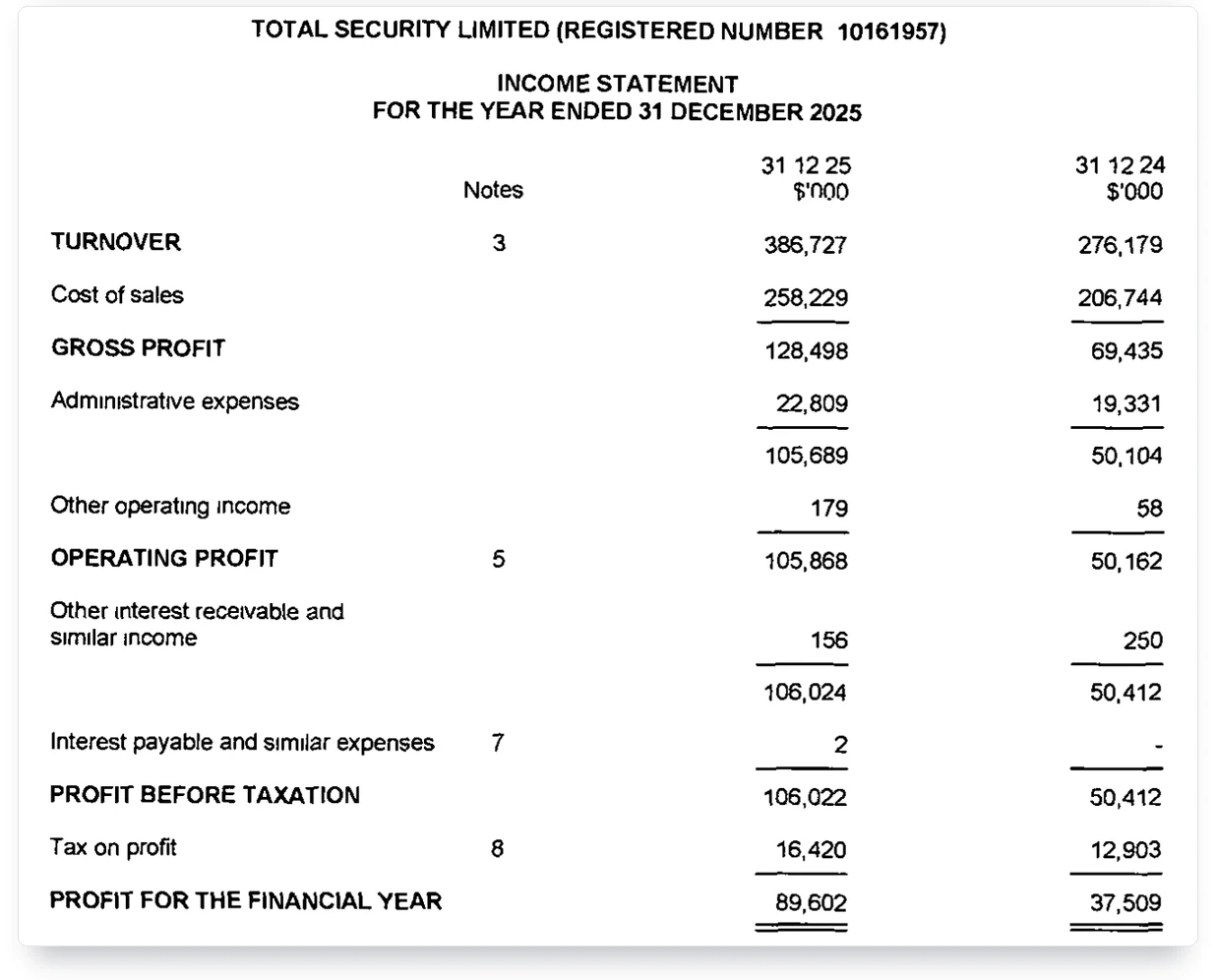
TotalAV’s seller reported $386.7 million in 2025 revenue and tied most of its costs to marketing for new customers.
That is the economics behind the $19 first year. Winning a customer is expensive, so the money has to come back at renewal. The same report lists “customer retention and lifetime value” among the measures the directors want to improve in 2026. Retention, for a subscription, means renewals.
One page on totalav.com confuses people searching for problems: the one titled Data Breach. It isn’t a disclosure of a breach at TotalAV. It sells a monitoring feature that checks your email against “publicly available breach databases.” You can run that check yourself, free, with the tools in my guide to checking whether your email was in a breach.
TotalAV complaints, ratings and the court record
The public record on TotalAV pulls two ways. Review platforms rate it high. The angry TotalAV reviews I read on Reddit, and the court case, are about billing. Both sides are real. They’re about different things.
What Trustpilot shows
On October 15, 2026, Trustpilot showed TotalAV at 4.5 out of 5 from 139,945 reviews. Eighty-five percent were five stars and 4% were one star, with 9,095 reviews posted in the previous 12 months. That’s Trustpilot’s score, not mine, and I can’t check individual reviews. Read Trustpilot’s own labels next to that number. It says TotalAV “invites their customers to review, whether positive or negative,” marks the profile “Paid Trustpilot subscription,” and adds “May use AI-assist with replies.” Trustpilot also says it doesn’t fact-check reviews. Its AI summary of recent reviews puts the tension in one line: customers “find price to be a source of mixed experiences.”
The California auto-renewal settlement
A California court preliminarily approved a $2.5 million settlement over TotalAV’s auto-renewal disclosures in November 2024. The case is Nelson v. System1, Inc., No. 37-2023-00045878-CU-BT-CTL in San Diego Superior Court. The defendants were System1, Protected.net LLC and Total Security Limited. The class notice describes the claim: customers were charged for automatic renewals “without first presenting the consumer with all of the automatic renewal offer terms in a clear and conspicuous manner as required by law.”
Judge Matthew C. Braner’s order, filed November 8, 2024, covers California residents charged for an automatic renewal between October 20, 2019 and June 30, 2024 for TotalAV, Scanguard, PC Protect, Total Adblock, Total Password, Total VPN or Total WebShield. The settlement agreement sets the amount at $2,500,000. “Defendants deny any and all allegations of liability, fault, or wrongdoing,” it says. Preliminary approval let the class be notified; final approval was the next step, and the order set that hearing for March 7, 2025. I couldn’t confirm the result of that hearing from a court record, so I’m not stating it.
The settlement’s reach is narrow. It covers California residents and charges up to June 30, 2024. If you live elsewhere or your renewal came later, it doesn’t apply to you. Even if you qualify, it’s too late to file: the order required notice within 28 days, and the agreement closed claims 60 days after notice, so the window shut by early February 2025. Payment wasn’t automatic either. “In order to receive a share of the Settlement Amount,” the order says, class members had to file a timely claim. It does tell every buyer that a court case challenged how the companies disclosed these renewals, and they agreed to pay $2.5 million to settle.
DeleteMe, which sells a privacy service and publishes scam checks on other companies, reached a verdict I agree with on the narrow question: “No, TotalAV is not a scam. It’s legitimate AV software.” My DeleteMe review covers what that company sells.
Who writes the TotalAV reviews you are reading
Some of the reviews ranking next to this one have a stake in what they say. Comparitech’s TotalAV review carries this note at the top: “Editor’s note: TotalAV has merged with Comparitech’s parent company, Point Wild.” The same page offers “$10 off with our exclusive link.” PCMag belongs to Ziff Davis, which also runs the VIPRE Security Group, an antivirus business. SafetyDetectives says it shares ownership with ExpressVPN, CyberGhost, Private Internet Access and Intego. All About Cookies is owned by the marketing company Launch Potato. Security.org’s “Get TotalAV” button sent me to the same totalav.com deal page I quoted above.
None of that makes those reviews wrong. Several are thorough. Before you trust any TotalAV review, including this one, check who owns the site and where its buttons go. That’s why I built this review on TotalAV’s own pages, its filings and the labs, and named the reviewer every time I used one. Documents don’t earn commission.
Who should buy TotalAV, and who should skip it
TotalAV makes sense for a narrow buyer and costs too much for most others. Here’s where this TotalAV review lands, buyer by buyer.
- Buy Internet Security if you want one subscription for your computers and phones, you’ll use its VPN, and you’ve priced the renewal at $129 rather than $49.
- Buy the first year only if you’ll put the renewal date in your calendar today and decide then, with the regular price in front of you.
- Skip it if you have a single Windows 11 PC. Windows Defender is already running and free. It trails TotalAV offline but matched it in the spring Real-World test.
- Pay yearly if you keep it. Plus costs $99 a year billed yearly, against $132 over twelve months billed monthly.
- Skip the add-ons until you’ve checked what each one renews at. Four of them cost $99 a year, as much as Plus itself.
- Check your plan name if you’ve had TotalAV for more than a year. Older plans renew at $119.95 to $209 a year.
The cheap-first-year model isn’t unique to TotalAV. I found the same shape in what Aura costs in year two, in Identity Guard’s renewal pricing, in the renewal trap on Norton’s LifeLock bundles and in what McAfee and Norton antivirus plans renew at. The protection differs between these products. The arithmetic doesn’t.
Field notes
- Renewal prices: TotalAV’s Subscription Pricing Matrix, effective January 5, 2026, lists Plus at $99 a year, Internet Security at $129 and Total Security at $149.
- First year: TotalAV’s deal page offered $19, $49 and $69 on October 15, 2026, “for your first term only.”
- Notice and refunds: TotalAV’s pages promise renewal notice “up to” 30, “at least” 30 or “at least” 15 days ahead; refunds run 30 days for annual plans and 14 for monthly plans and add-ons, and need full termination.
- Lab results: AV-Comparatives, September 2026: 96.0% offline detection, 15 false alarms, ADVANCED. AV-TEST, July and August 2026: 17.5 of 18 points and a Top Product award.
- Company: Total Security Limited (UK, 10161957) reported $386.7 million in 2025 turnover and $105.9 million in operating profit; its ultimate parent is Point Wild Holdings, Inc.
- Court: Nelson v. System1, San Diego Superior Court, $2.5 million settlement preliminarily approved November 8, 2024; defendants denied wrongdoing.
- Sources: TotalAV Subscription Pricing Matrix and Terms of Service; Companies House filings for 10161957; Nelson v. System1 preliminary approval order and settlement agreement; AV-Comparatives, AV-TEST and SE Labs test reports, 2025 to 2026.
Frequently Asked Questions
Does TotalAV renew at a higher price after the first year?
Yes. TotalAV’s own Subscription Pricing Matrix lists renewals at $99 a year for Plus, $129 for Internet Security and $149 for Total Security. Its deal page sold the first year for $19, $49 and $69, and its Terms say discounted terms renew at the standard price.
Can I get a refund after TotalAV renews my subscription?
Possibly. TotalAV’s help center allows refunds “within 30 days of the initial purchase or renewal date” for annual plans, and 14 days for monthly and quarterly plans and add-ons. You must fully terminate the plan, and access ends once the refund is processed.
Is TotalAV owned by Norton or Gen Digital?
No. TotalAV is sold by Total Security Limited, part of Point Wild. It does use Avira’s scanning engine, and Avira has belonged to Gen Digital, Norton’s parent company, since January 2021. Using the engine doesn’t make Gen Digital its owner.
Who owns TotalAV and where is the company based?
Total Security Limited, registered in England as company 10161957, sells TotalAV and has a US arm in Boston. Companies House shows Saint Holdco Limited as controlling shareholder since December 2024, and Total Security Limited’s accounts name Point Wild Holdings, Inc. as the ultimate parent.
Does TotalAV slow down a Windows PC?
Somewhat, on a standard PC. In AV-TEST’s July and August 2026 round, installing common apps ran 36% slower with TotalAV against a 15% industry average, and copying files 18% slower against 3%. On a high-end PC the gaps were smaller.
Is TotalAV better than the free Windows Defender?
Offline, yes: AV-Comparatives measured 96.0% against Defender’s 82.2% in September 2026. Online the gap narrowed to 98.4% against 95.5%, and Defender matched TotalAV’s 99.0% with zero false alarms in the spring Real-World test. For one Windows PC, Defender alone covers most people.
Why is someone calling me and claiming to be TotalAV?
It’s almost certainly a scam. Antivirus companies don’t phone you to say you’re hacked, and fake “TotalAV support” numbers circulate on user-made web pages. Use the Online Portal, help.totalav.com or the app store you bought from instead.
Does the free version of TotalAV have real-time protection?
The sources disagree. TotalAV’s free page lists real-time protection, but PCMag’s December 2024 review says real-time protection is missing from the free edition. After installing, check Windows Security to see whether real-time protection is actually on.
My Take
My TotalAV review comes down to this: it’s good antivirus sold on a hard bargain. The labs back the protection, though false alarms cost it the top award twice this year. The renewal terms are the product you’re really agreeing to: a first year priced to win you, a standard price after it, notice promises that change from page to page, and a refund window that closes fast. A California class action challenged how those renewals were disclosed, and the companies agreed to pay $2.5 million to settle without admitting wrongdoing. The 2025 accounts say where the money goes.
If I were buying today, I’d take Internet Security only if I wanted the VPN, and I’d put the renewal date in my calendar before closing the checkout tab. Six weeks before it, I’d decide with the $129 price in front of me. On a single Windows 11 PC, I’d buy nothing and keep Defender.