

The best AI automation tools in 2026 are Zapier if you want it to just work, Make if you want it cheap, and n8n if you’re technical and running volume. The part no ranking mentions: four of the six major platforms rewrote how they bill you within fifteen months. Every price below comes from the company’s own page, checked this month.
- The short version
- Every list of the best AI automation tools is written by one of them
- What each tool actually bills you for
- Zapier: bills every step
- Make: cheapest, and it changed the unit on everyone
- n8n: bills the run, not the step
- Lindy: prebuilt agents, undisclosed meter
- Voiceflow: the price is gone
- Gumloop: strong free tier, honest page
- Run the numbers before you commit
- The metric nobody puts in the comparison table
- The free tiers, ranked honestly
- Key facts: AI automation tools in 2026
- Which one should you actually pick?
- Frequently asked questions
- What are AI automation tools?
- What’s the difference between Zapier and Make?
- Is n8n better than Zapier?
- Which AI automation tool is cheapest?
- Do AI automation tools replace developers?
- Why did my automation bill suddenly go up?
- Are these prices current?
- My Take
The short version
Zapier 19.99 USD is an annual-billing monthly equivalent and covers 100 tasks; 2,000 tasks cost 49 USD. n8n 20 USD is annual billing. Make Core includes 10,000 credits; Gumloop includes 20,000+ credits. Lindy has no free plan. Voiceflow’s price is unpublished, not zero.
Prices checked against each company’s own pricing page on 15 July 2026. That date matters more than usual here, and the rest of this article explains why.
Every list of the best AI automation tools is written by one of them
Search for this and look at who published the results.
Zapier publishes a list of the eight best AI automation tools. Zapier comes first. The article closes with a section called “Turn AI automation into orchestration with Zapier.” Lindy publishes “I Tested 8+ Automation Software Tools. Here Are the Best in 2026.” Lindy comes first, and gets called “the best automation software of 2026” in its own conclusion. n8n publishes a list of top workflow automation tools. n8n does well. So does Gumloop, on Gumloop’s blog.
None of this is a scandal. Companies market themselves, and some of these articles are genuinely useful. But watch how each one handles the conflict, because it tells you something about the company.
More Read

Zapier says the quiet part out loud. Partway through ranking itself first, the article stops and admits: “You’re on the Zapier blog, though, so I don’t blame you if you’d rather hear a second opinion.” That’s an honest sentence, and it costs them something to write it.
Lindy’s article runs roughly 9,000 words, claims “I tested the most talked-about automation platforms of 2026,” walks through evaluation criteria like reliability and error handling, and concludes that Lindy wins. Nowhere does it mention that Lindy published it. The page is also formatted as agent-optimised markdown, built to be quoted by AI assistants rather than read by people. So when you ask ChatGPT which automation tool is best, this is some of what it’s reading.
This matters more than it used to. The tools people reach for now are chat assistants, and those assistants get trained and grounded on exactly this kind of page. A vendor that writes a 9,000-word “independent” review of its own market isn’t only trying to rank on Google. It’s trying to be the answer your AI gives back. That’s a good reason to read at least one source that isn’t selling you a seat (we broke down the same vendor incentives in our guide to Zendesk alternatives in 2026). We ran the same audit on scheduling software and found the same trick: every “Calendly alternatives” list ranks the vendor who wrote it.
Note
We don’t sell an automation platform, take affiliate money from these companies, or run an agency built on them. That’s the entire reason this article exists. If you want the other side of the same market, we looked at what it takes to start an AI automation agency and where that math breaks.
What each tool actually bills you for
Skip the feature grids. Every one of these AI automation tools connects to the apps you use and can call a language model. The thing that decides your bill is the unit they count, and the units are not comparable. Here’s the same ten-step workflow, run once, counted three different ways.
Zapier: bills every step
Zapier counts tasks, and its documentation is clear about what that means: every step in a Zap and every external connector call uses a task. A workflow with ten steps burns ten tasks each time it runs. Their own utilities (Tables, Forms, Filter, Formatter) don’t count, which softens it a little, but the shape of the pricing rewards short workflows and punishes long ones.
Free gives you 100 tasks a month and two-step workflows, which is enough to prove a concept and nothing more. Professional advertises $19.99 a month billed annually. That price buys features: multi-step workflows, webhooks, premium apps. It does not buy volume. At $19.99 you still get 100 tasks, the same as free. Volume is a separate dial on the pricing page, and moving it to 2,000 tasks takes Professional to $49. Team starts at $69 a month for 25 users.
Tasks per month. Professional prices are monthly equivalents billed annually. The 19.99 USD price unlocks features, not more task volume.
That chart is the whole trap in one picture. People sign up at $19.99 believing they’ve bought room to grow, then hit the task ceiling in week three and watch the bill climb. Zapier is the one that works on the first try, connects to almost everything, and costs the most as you scale. For a lot of people that trade is correct. Just know which half of it you’re buying.
Make: cheapest, and it changed the unit on everyone
Make is the cheapest serious option. Core is $9 a month for 10,000 credits, Pro is $16, Teams is $29, all at the same 10,000-credit base. Free gives you 1,000 credits with no time limit. Annual billing knocks off 15% or more.
Make used to bill “operations.” It now bills “credits,” and the pricing page states the switch plainly: as of August 27, credits are the billing unit in Make. One module action is typically one credit, though features using Make’s AI provider can eat more than one, which is the part that surprises people. If you built your cost model before that date, you rebuilt it after.
The visual editor is more powerful than Zapier’s and less forgiving. Scenarios branch, loop, and handle errors in ways Zapier makes awkward, and the price of that power is a steeper first week. You’ll spend the money you saved on the hours you lose learning it. For anyone planning to run automations for clients rather than themselves, that trade usually pays off. If you’re weighing a paid course to get there, we checked whether AI automation agency courses are worth it.
n8n: bills the run, not the step
This is the difference that matters most in the whole comparison. n8n bills per workflow execution, and its documentation spells it out: an execution is a single run of your entire workflow, and it doesn’t matter how many steps are in it.
Run a ten-step workflow on Zapier and you’ve spent ten tasks. Run the same thing on n8n and you’ve spent one execution. On simple two-step automations the difference is noise. On anything complex it’s the whole bill, and it only widens as your workflows grow, because Zapier’s meter grows with step count and n8n’s doesn’t.
Starter is $20 a month billed annually for 2,500 executions, Pro is $50 for 10,000, and Business is $800 for 40,000. Pay monthly instead and those become $24, $60 and $960, so the annual discount is real money. All paid plans include unlimited users and unlimited workflows, and concurrency climbs with the tier: 5 concurrent executions on Starter, 20 on Pro, 200-plus at the top. The self-hosted Community Edition is free, and the project sits at roughly 196,000 GitHub stars.
The catch is the one operators keep repeating: n8n handles linear automations beautifully and gets painful once you need real branching, error handling, and state. That’s the ceiling of no-code generally, and n8n hits it later than most. It also assumes more technical comfort than Zapier, especially if you self-host, where you own the updates and the uptime.
Lindy: prebuilt agents, undisclosed meter
Lindy is a different kind of product. Where Zapier and Make hand you a canvas, Lindy hands you ready-made agents that handle email, meetings, CRM updates and follow-ups (if you’re looking for an autonomous calendar that dynamically reshuffles your schedule, see our Motion app review), and for that job it’s genuinely quick to set up. There’s no free plan anymore, just a trial. Those inbox-and meeting bots are among the most common AI agent examples actually running today. Plus is $49.99 a month, Pro is $99.99, Max is $199.99.
Here’s what its pricing page doesn’t say. It doesn’t name the billing unit. It describes Pro as “3× more than Plus” and Max as “7× more than Plus” without ever stating more of what. It says nothing about overages: no rate, no policy, no mention. Operators report overages billed at double rate, though the company doesn’t publish that, so treat it as a warning rather than a fact.
Lindy’s Trustpilot score sits at 1.7 out of 5 as of July 2026, and the complaints cluster around bills people didn’t expect. Read those three facts in order, a meter with no name, an overage policy that isn’t printed, and a review page full of billing surprises, and the reviews stop being mysterious. Lindy might still be the right pick if you want an agent running tomorrow and you’re the kind of person who checks usage dashboards. It’s the wrong pick if you set it and forget it.
Voiceflow: the price is gone
Voiceflow builds chat and voice agents specifically, and it switched to credits in April 2025. What it no longer does is tell you the price. Its pricing page carries no numbers at all: two doors, one marked “Start building for clients”, one marked “Book a demo”. The agency door lists what you get, and the second item on that list is “Transparent, usage-based billing.” On a page with no figures on it. Read that twice.
A public price is a form of accountability. It lets you plan, compare, and hold a vendor to what they quoted. When a company moves from a published price to “book a demo,” the usual reason is that pricing has become something they’d rather negotiate per customer than commit to in writing. For a platform you’d build a client business on, that’s a real variable, not a footnote.
Gumloop: strong free tier, honest page
Gumloop is node-based and good at scraping and enrichment. Free gives you 5,000 credits a month, which is the most generous free tier in this whole list, Pro is $37 for 20,000 credits and up, and after that it’s Enterprise and a sales call. Three tiers, all of them on the page, with the numbers right there.
Treat any Gumloop price you read elsewhere with suspicion. Third-party pages routinely list tiers at $97, $197 and $497 that exist nowhere on the company’s own page. That gap tells you something bigger than one wrong number: a lot of the writing about these tools is stale, copied, and maintained by nobody. It’s the same reason the prices at the top of this article carry a date. If a comparison you’re reading doesn’t tell you when it last checked, assume it didn’t.
Run the numbers before you commit
The billing unit stops being abstract the moment you put real volume through an AI automation tool. Take one realistic case: a single automation that runs eight steps, fired 1,000 times a month. A lead comes in, gets enriched, scored, routed, logged, and answered.
On Zapier, eight steps times 1,000 runs is 8,000 tasks a month, which pushes you past the entry tiers and into a plan sized for that volume. On n8n, the same thing is 1,000 executions, comfortably inside the $20 Starter allowance of 2,500. On Make, eight module actions times 1,000 is roughly 8,000 credits, inside the $9 Core allowance of 10,000. Same automation, same work, and the meter alone moves you between roughly $9 and something several times that.
Three rules fall out of that math. Count your steps before you pick a platform, because per-step billing turns a long workflow into a big number fast. Estimate your monthly runs honestly, including the ones that fire on a schedule while you sleep. And separate the price of features from the price of volume, because Zapier’s entry tier sells you the first and quietly charges for the second. The tool that’s cheapest at 100 runs a month is often the wrong tool at 100,000.
The metric nobody puts in the comparison table
Every comparison of AI automation tools lines up integrations, ease of use, and price. Here’s the column they all leave out: how recently did this company change the deal?
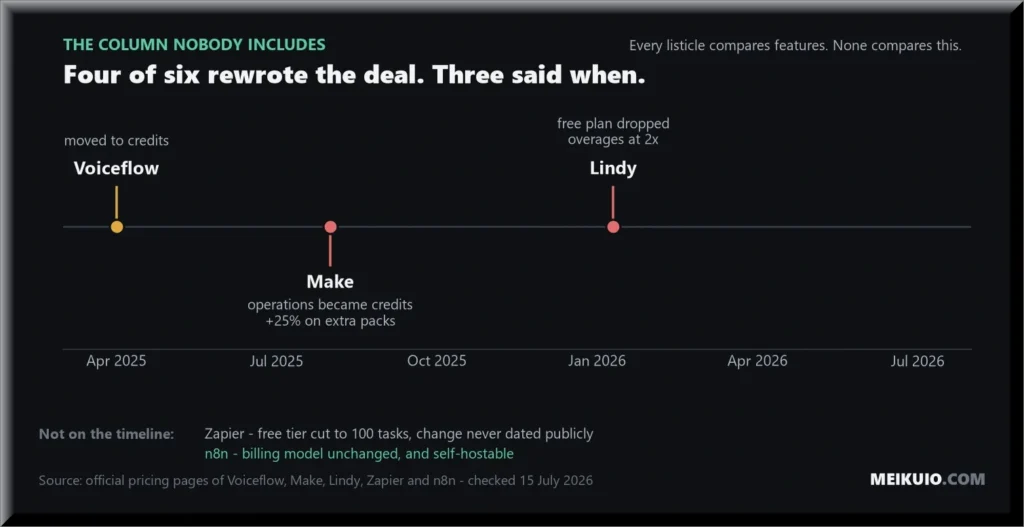
Voiceflow went to credits in April 2025, and has since stopped publishing prices altogether. Make changed its billing unit in August 2025 and put roughly a 25% markup on extra packs. Lindy removed its free plan in early 2026. Zapier’s free tier is now 100 tasks, which is a demo, not a tier.
Only n8n has left its model alone, and that’s partly structural. You can self-host it, so there’s a version of n8n nobody can reprice on you. Every other tool here is a meter that somebody else controls, and the last fifteen months are a record of them reaching for the dial.
If you’re building a business on top of one of these platforms, the billing unit is a bet on somebody else’s roadmap. Four of the six changed that unit or that tier within fifteen months.
None of this argues against using them. It argues for knowing which one you picked and why, and for pricing your own work so that a vendor’s pricing page can’t wipe out your margin overnight. The same logic applies to the model underneath, which is why we track what AI models cost separately.
The free tiers, ranked honestly
Most free plans on AI automation tools are demos designed to run out before you’ve built anything real. Two are genuinely useful, and one platform gives you the most generous free allowance of the lot.
- Gumloop leads with 5,000 credits a month, enough to run real scraping and enrichment jobs before you decide.
- n8n self-hosted is unlimited, if you can run it yourself, which is a different kind of free: you trade money for maintenance.
- Make gives 1,000 credits with no time limit, which covers a small personal automation indefinitely.
- Zapier caps free at 100 tasks and two-step workflows, which is a test drive, not a tier.
- Lindy has no free plan at all, only a trial.
- Voiceflow mentions a free trial, but with no published price you can’t tell what happens after it.
Key facts: AI automation tools in 2026
- Cheapest real tier: Make Core, $9/month for 10,000 credits
- Cheapest at volume: n8n, self-hosted Community Edition, free
- Zapier entry price is about features, not volume: $19.99/month still buys 100 tasks; 2,000 tasks costs $49
- Bills per step: Zapier (task)
- Bills per whole run: n8n (execution)
- Bills per credit: Make, Voiceflow, Gumloop
- Doesn’t say what it bills: Lindy
- Doesn’t publish a price at all: Voiceflow (pricing page is two demo buttons)
- Best free tiers: Gumloop (5,000 credits), Make (1,000 credits, no time limit), n8n self-hosted (unlimited)
- Changed billing model since April 2025: Voiceflow, Make, Lindy, Zapier (free tier)
- Only one you can self-host: n8n (Community Edition, free)
Which one should you actually pick?
Pick Zapier if your automations are short, your time costs more than your subscription, and you want it working this afternoon. The per-step billing only hurts once workflows get long.
Pick Make if you’re price-sensitive and willing to learn a harder editor. At $9 a month it’s the best value here, as long as you re-read the credit rules after any announcement.
Pick n8n if you’re technical or running real volume. Per-run billing is the right shape for complex workflows, and self-hosting means nobody can reprice you or move your data without asking.
Pick Lindy if you want an agent handling your inbox tomorrow and you’re willing to watch the bill. Set a calendar reminder to check your usage in week two.
Pick Gumloop if scraping and enrichment are the job, and use that 5,000-credit free tier to prove it before you pay. Leave Voiceflow for last until it decides to publish a price you can plan around. And whichever of these AI automation tools you land on, screenshot its pricing page the day you sign up. You now know why.
One more thing: the gap between these tools and just writing the automation yourself has narrowed a lot. Coding assistants got good enough that a competent generalist can ship a script that does the same job with no monthly meter attached, which is why we keep testing AI coding tools against real work. For a scheduled job that moves data between two APIs, that’s often the cheaper answer.
Frequently asked questions
What are AI automation tools?
AI automation tools are platforms that connect your apps and run multi-step workflows between them, with language model steps handling the parts that need judgement: classifying an email, drafting a reply, pulling fields out of a document. Zapier, Make, and n8n are the general-purpose ones. Lindy and Voiceflow build agents for narrower jobs. When automating internal operations like employee onboarding, companies typically pipe those triggers directly into specialized HR software rather than building record retention from scratch.
What’s the difference between Zapier and Make?
Price and difficulty. Make starts at $9 a month for 10,000 credits. Zapier’s $19.99 entry price buys features rather than volume: it still covers only 100 tasks, and 2,000 tasks costs $49. Make’s visual editor handles branching and complex logic better. Zapier connects to more apps, is far easier to learn, and works on the first attempt more often. Zapier bills every step as a task; Make bills credits per module action.
Is n8n better than Zapier?
For volume and complexity, yes, because n8n bills one execution per workflow run no matter how many steps it contains, while Zapier charges for each step. For speed of setup and breadth of integrations, no. n8n also requires more technical comfort, especially self-hosted.
Which AI automation tool is cheapest?
Self-hosted n8n Community Edition is free if you can run it yourself. Among hosted plans, Make Core at $9 a month for 10,000 credits is the cheapest real tier. For free allowances, Gumloop’s 5,000 credits a month is the most generous. The free plans at Zapier and Lindy are demos: Zapier gives 100 tasks, and Lindy no longer offers one.
Do AI automation tools replace developers?
No. They replace the first 80% of a developer’s automation work, and the last 20% is where projects fail. Operators consistently report that no-code platforms handle linear flows well and struggle with branching, error handling, and state. Knowing which process is worth automating stays a human job.
Why did my automation bill suddenly go up?
Usually because the platform changed its billing unit or its tier, not because you did anything different. Make switched from operations to credits in August 2025. Voiceflow moved to credits in April 2025. Lindy dropped its free plan in early 2026. Check the pricing page of whatever you’re running before you go looking through your own workflows.
Are these prices current?
Every price here was checked against the company’s own pricing page on 15 July 2026. AI automation tools change tiers and billing units often, so confirm on the official page before you commit real money. If another comparison doesn’t tell you the date it checked, assume the numbers are stale.
My Take
I went into this expecting the answer to be a tool, and came out thinking the answer is a unit. Pick the meter you understand, because that’s the number that shows up on your card, and the feature grid never mentions it. What stuck with me was the pattern across two pricing pages. Lindy tells you Pro gives “3× more than Plus” without ever saying more of what. Voiceflow promises “transparent, usage-based billing” on a page that prints no prices. Both wrote those words on purpose. Meanwhile Zapier ranks itself first in its own listicle and just tells you it’s their blog. That sentence cost Zapier something to write, and it bought them the only thing that’s actually scarce here.