


DataForSEO charged me sixteen cents for a full article’s worth of keyword research, the kind that used to burn a day of my $24-a-month subscription. It is a pay-as-you-go data API, not an app: you deposit money, every request bills in fractions of a cent, and the balance never expires. Getting that balance back out is a different story, and this review covers both halves.
- What DataForSEO actually is
- Is DataForSEO good?
- How much does DataForSEO cost?
- They dropped the monthly minimum and raised prices the same day
- What happens to money you deposit and don’t spend
- What data can you get from DataForSEO?
- I connected it to Claude. Here is every step
- What broke, and how I fixed it
- What I actually spent in my first day
- The $50 free trial that does not exist
- Where you're not allowed to use it
- What are DataForSEO's competitors?
- Is OpenSEO a free alternative to DataForSEO?
- DataForSEO vs Semrush: different products on the same shelf
- What switching from a subscription actually took
- How to make an AI agent do the setup for you
- Who this actually works for
- Frequently Asked Questions
- How much does DataForSEO cost per month?
- Do unused DataForSEO funds expire?
- Can I get a refund from DataForSEO?
- Do I need to know how to code to use DataForSEO?
- What is the DataForSEO MCP server?
- Is there a free trial?
- How is DataForSEO different from Semrush or Ahrefs?
- Is it safe to put my API password in a config file?
- Can I use DataForSEO without an AI assistant?
- Does DataForSEO work for rank tracking?
- My Take
What DataForSEO actually is
DataForSEO is a data vendor. It sells raw SEO data over an API: search results, keyword volumes, difficulty scores, backlinks, page audits, and AI-search visibility, all returned as JSON. The company behind it is DataForSEO OU, registered in Estonia, and its homepage claims more than 750 SEO software companies as customers. The dollar-metered model isn’t new, either. The company says it discarded credit packs for plain US dollar pricing with its version 3 release back in February 2020, so the billing you’re evaluating has six years of history behind it.
Here is what that means in practice. There’s no dashboard for the data. No saved projects, no charts, no browser tab where rankings live. You, or more likely a tool acting for you, send a request and get numbers back. The account panel exists for billing, spending limits, and keys, and that’s it.
Until recently that made it a developers-only product. What changed is the AI assistant layer. DataForSEO ships an official MCP server, and MCP is simply the standard that lets an AI assistant call outside services, so an agent can pull this data mid-conversation instead of you fetching it. I tested exactly that setup, and it moves this product from “for programmers” to “for anyone who works next to an AI agent.”
Which assistants qualify matters more than anything else here, so: the vendor documents Claude Desktop, Claude Code, Cursor, and Gemini CLI, and its own quickstart walks through the first two. The plain ChatGPT web app is not on that list and cannot connect this way. If ChatGPT is your only assistant, the no-code connectors covered later, Google Sheets, Make, Zapier, and n8n, are your route in. Everything below assumes an assistant that speaks MCP.
Is DataForSEO good?
DataForSEO is good at exactly one thing, and it’s the thing that matters: accurate data at a per-request price no subscription can touch. Its keyword volumes come from the same source as Google Keyword Planner, its difficulty and intent scores arrive free inside the same response, and my 230-keyword test run cost sixteen cents. Reviewers back this up. It holds 4.4 on Trustpilot across 41 reviews and 4.2 on G2 across 13, with data accuracy and support speed the two most repeated compliments. What it is not good at is holding your hand. There’s no interface for the data, the documentation assumes you know what an endpoint is, and three separate things broke during my first hour. Good product, prickly first day.
More Read

One G2 reviewer, comparing it against Ubersuggest, Ahrefs, and Semrush, wrote that its keyword data “feels much closer to Google Ads, while many other tools seem to overestimate commercial search volumes.” That matches what I saw. Planner numbers are the ones advertisers spend real money against, and every subscription tool estimates its way toward them. I ran the same worth-it math we apply to writing tools, and the data side clears the bar without effort.
The sample sizes deserve one honest note. TrustRadius shows a perfect 10 out of 10, from five reviews. Five. The 41 on Trustpilot tell you more, and even there the one-star entries cluster around a single theme we’ll get to: money that went in and didn’t come back out.
Reliability is the other half of “good,” and the honest answer splits in two. The FAQ advertises 99.95 percent uptime, which works out to under five hours of downtime a year, and in my day of testing nothing so much as hiccuped. The terms of service, meanwhile, decline liability for downtime and offer no service credits if the number slips. Both statements are the vendor’s own; one is marketing and one is the contract, and only one of them would matter in a dispute.

How much does DataForSEO cost?
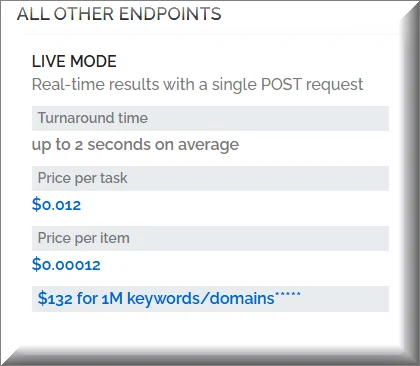
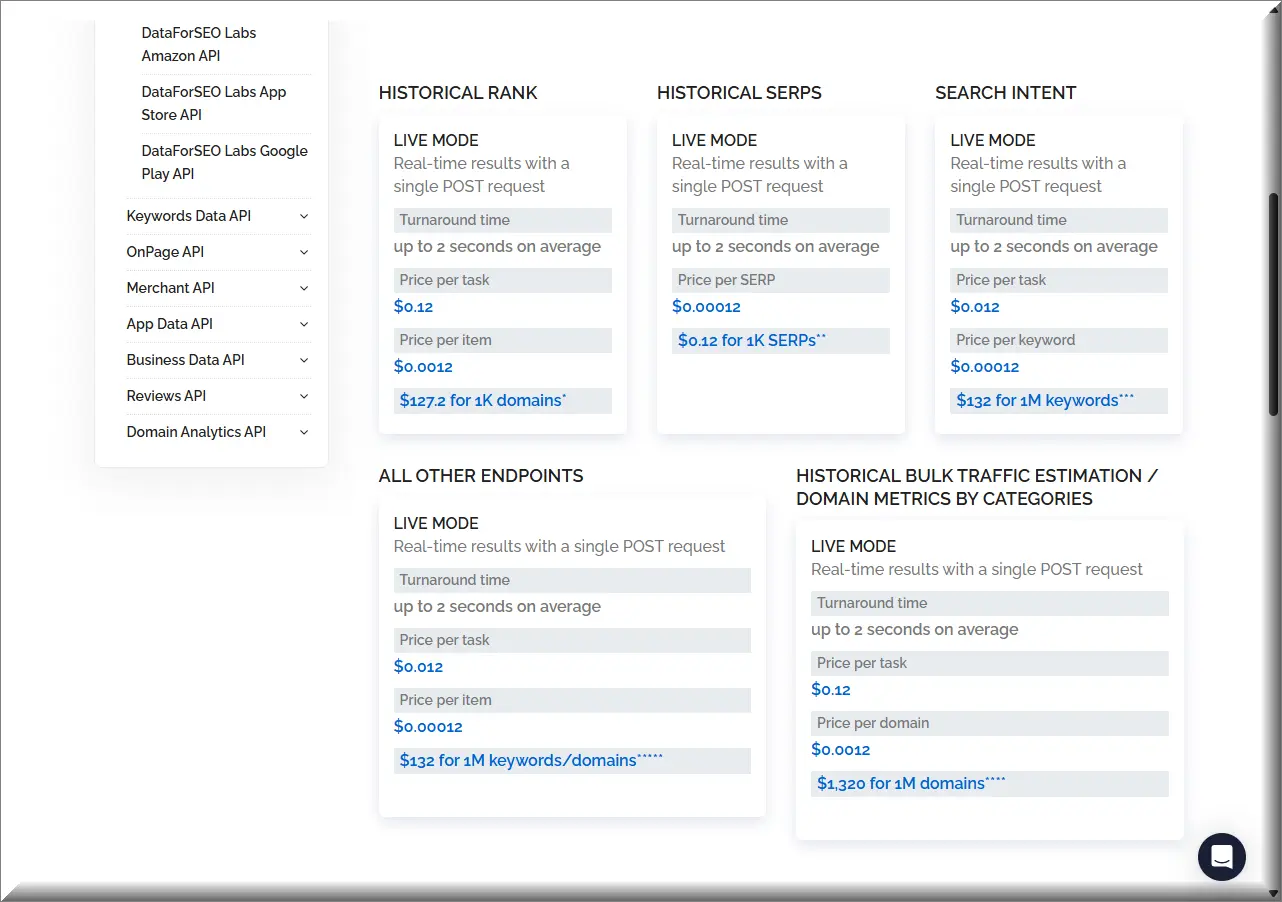
DataForSEO costs whatever you use, on top of a $50 minimum deposit. There’s no monthly fee. Billing works in two parts: a small fee for each request you send, plus a tiny fee for each result it returns. Keyword suggestions cost $0.012 per request plus $0.00012 per keyword, so one request returning 1,000 keywords lands at about 13 cents. Search volume is cheaper still, since it charges only for the request: one covers up to 1,000 keywords for $0.06 on the queue, or $0.09 if you want the answer in seconds. A new account starts with a $1 trial balance, no card required, and mine lasted the entire first day.
Those are the two endpoints a site owner actually lives on, and the rest of the research price list stays in the same range. Historical rank data costs $0.12 per task plus $0.0012 per item, which sounds steep until you notice each item is a full month of history. Historical SERP snapshots bill $0.00012 each, so a year of monthly snapshots for one keyword costs a seventh of a cent. Search intent classification runs $0.012 per task plus $0.00012 per keyword. The fine print under the main card does the big math for you: a million keywords, $132.
Search results are priced by the page rather than the task, and this is where bills surprise people. One SERP means ten results, so asking for the top 20 bills twice, the top 100 bills ten times. Live mode runs $0.002 per SERP, the priority queue $0.0012, the standard queue $0.0006. Same data, three speeds, and a three-fold price spread between the fastest and the slowest.
Three multipliers can inflate a bill quietly, so learn them now. Search operators multiply the cost of that request by five, each: one site: or intitle: or filetype: makes the request five times more expensive, and two of them stack to twenty-five times. Clickstream enrichment doubles any research request. And choosing live mode over the queue costs 3.3 times more on search results, or half again as much on volumes. All you give up in the queue is a few minutes of waiting for data you were going to read tomorrow anyway.
Put together, a full article’s worth of research costs me about 28 cents. That’s 13 for the suggestion wave, 6 for volumes on the shortlist, a fifth of a cent for a live results page, and the rest as slack for mistakes. That number is why this review exists.
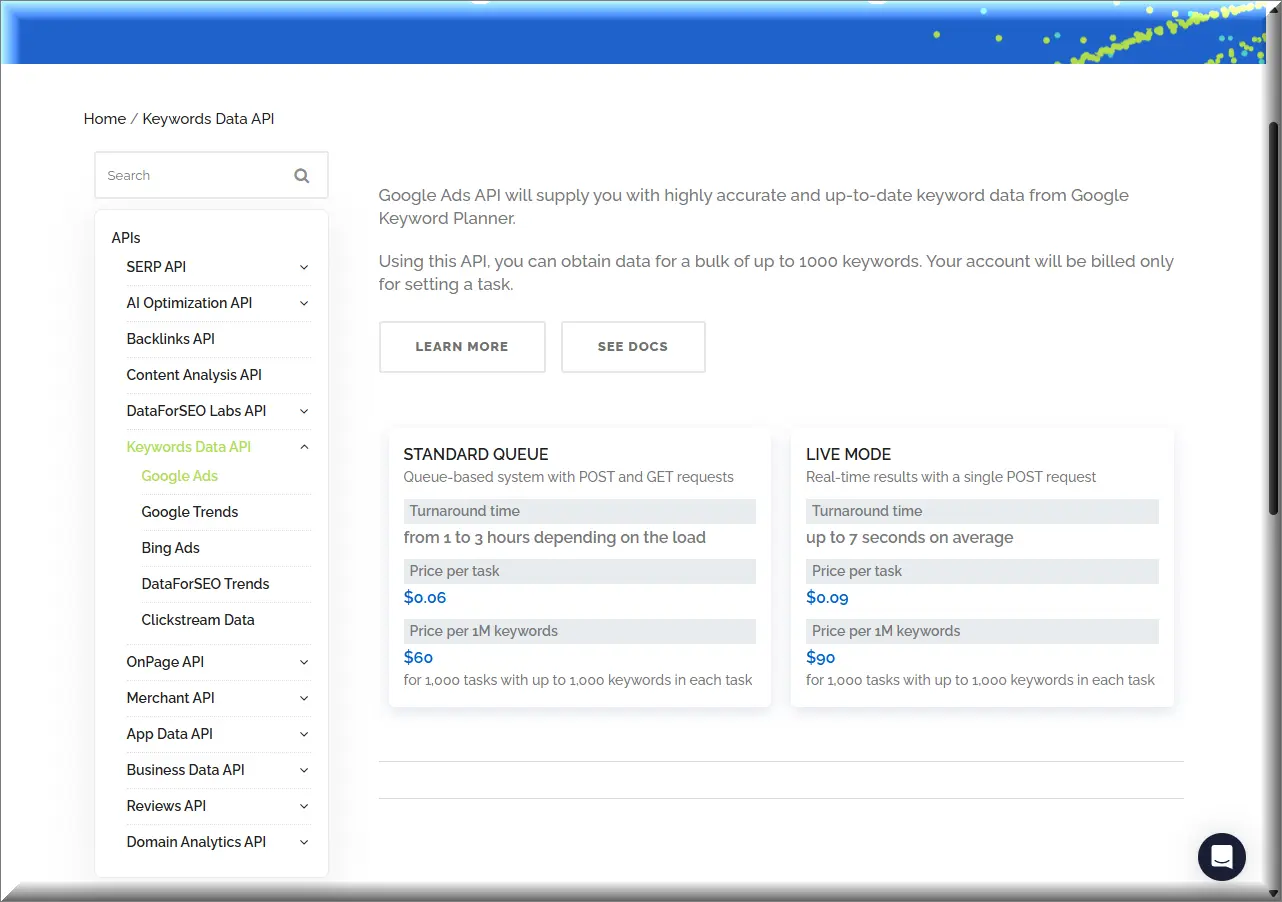
To make that concrete: the plan ladders at subscription tools charge for capacity whether you touch it or not, which is the same trap we mapped in Jasper’s pricing. Here the meter only runs when you do. My own first day, covering setup tests, one wasted call, eleven keyword batches, a difficulty check, and a live search snapshot, closed at 29 cents. AI tool prices move fast enough that we keep a live tracker for model prices; API data pricing turns out to move too, which is the next section.
Sixteen search-volume requests support up to 1,000 keywords each: 16,000 keywords. Keyword suggestions are a distinct endpoint and output. A full article’s keyword research cost 0.16 USD.
Purchasing power of a 1.00 USD prepaid balance. Page counts are separate from requests and keyword counts; this graph preserves the original whole-page quantities.
Before you put in the $50
There are two free steps before any deposit. The sandbox at sandbox.dataforseo.com answers every endpoint at zero cost with dummy data, which is enough to test your setup. The $1 trial balance then covers a real test on your own keywords; mine ran a full working day on 29 cents of it. Only after both should the $50 go in.
They dropped the monthly minimum and raised prices the same day
On July 1, 2026, DataForSEO published a pricing update that reads friendly in the headline and expensive in the bullet points. The headline move: the $100 monthly commitment that gated the Backlinks and LLM Mentions APIs is gone, and every endpoint now runs pay-as-you-go. That part is real and it lowers the door. I walked through that door for a dollar.
The same announcement, a paragraph lower, raises rates across eight APIs. The standard bump is about 20 percent. Google Trends went up 22 percent. Amazon product and seller lookups went up 50 percent. The company’s stated reason is rising infrastructure cost after years of stable prices, which is fair as far as it goes. The pairing is what deserves your attention: the cost of starting fell on the exact day the cost of using rose. In my numbers, the thousand-keyword wave that bills 13 cents today would have billed about 11 before the change. Small money, but the direction is the story.
The entry fee dropped on July 1, 2026. The price of every call rose the same day.
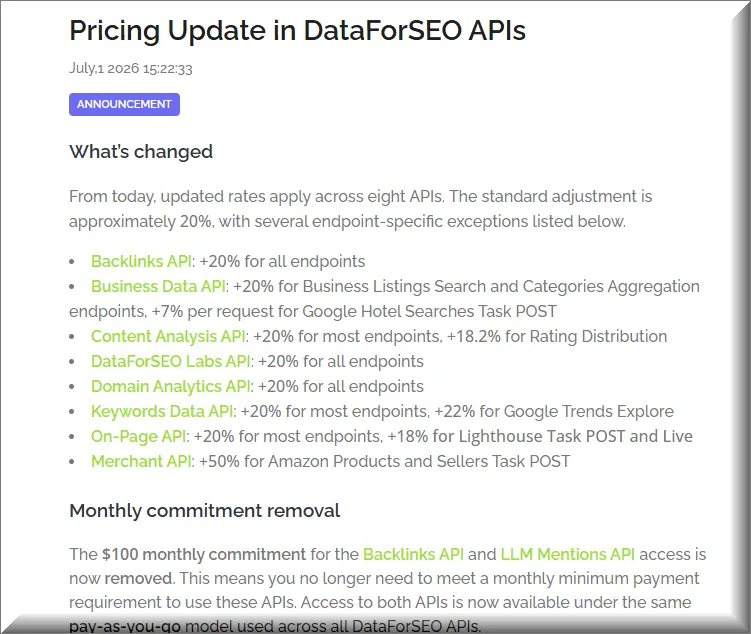
Every price in this review is a post-increase number, read on September 1. That matters because this date quietly invalidates most of what you’ll read elsewhere: any cost table published before July 1 undercounts today’s rates by roughly a fifth. The top Reddit thread on this product is eleven months old. The most-cited video is older still. The one editorial review in the search results was updated in late August and still footnotes its rates as checked in the first quarter. Subscriptions have their own version of this problem, where the tier you bought stops matching the work you do, something we’ve measured on social schedulers priced by unused capacity. The meter model just moves the surprise from the tier to the rate card.
The same announcement removed the 100 USD monthly commitment. The 20% figure was the standard increase, not an identical increase for all eight APIs.

What happens to money you deposit and don’t spend
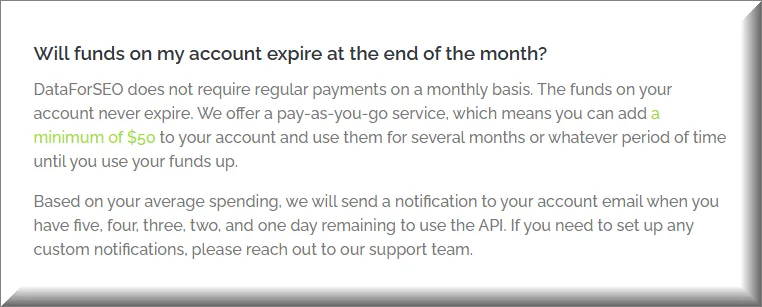
The help center says it plainly: the funds on your account never expire. That’s the honest upside of this whole model. Deposit $50, use it across six months or sixteen, nothing drains while you sleep, no renewal date resets your allowance to zero. For anyone who pulls keywords in bursts, a few days a month, this is the single best line in the product.
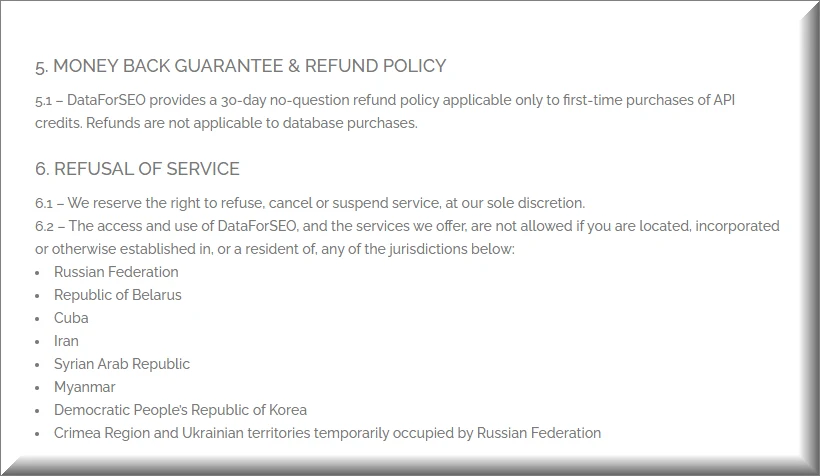
Now the other direction. The terms, updated June 12, 2026, offer a refund once: a 30-day window that applies only to your first purchase. After that, money moves one way. Two things the terms do not say, and I could not find answered anywhere on the site: whether that first refund returns the whole deposit or only the part you haven’t spent, and what the procedure for claiming it is. There’s no refund form and no self-serve button documented; support contact is the only route named. If you plan to lean on that window, ask support in writing what it covers before you deposit, not after. A Trustpilot user who built up a balance over time asked for part of it back. The company’s public reply: credit balances are non-refundable, applied, in its words, consistently to all users. The same terms also reserve the right to refuse or suspend service at the company’s sole discretion, and state that no exceptions will be made on refunds for unused time.
Your balance never expires. After day 30, it also never comes back.
Here’s the detail that took me longest to pin down. The never-expires promise lives in the help center and FAQ. The contract itself never mentions a standing prepaid balance at all; its billing section is written in subscription language, partial months and renewal cycles, and the word credits appears once, in the clause about your first purchase. So the strongest promise a buyer gets sits on a support page, and the binding document is silent. We watched Copy.ai retire a plan people were standing on, so the difference between a page and a contract isn’t academic to me.
Auto-recharge deserves its own warning label. Switch it on and the system charges your card immediately to verify it, then recharges every time the balance crosses your threshold. The emails you get are runway warnings days in advance, not a heads-up before each charge. And the help pages document how to turn it on, while the off switch is only described inside the Paddle billing portal that serves US and most EU customers. If your account routes through FastSpring, the gateway for everyone else, I couldn’t find a self-serve cancel path documented anywhere. My advice is unchanged from what I did: leave auto-recharge off, watch what your card is actually charged rather than what the pricing page implies, and treat the deposit as spent the moment it goes in.
The vendor’s own help page names the mechanism honestly, calling auto-recharge an on-demand subscription. The contract completes the picture. Subscriptions renew until you cancel, and, in its own words, “You will not receive further notice of auto-renewal.” The product markets itself as the escape from subscriptions. Read that clause twice before the toggle goes on.
What data can you get from DataForSEO?
DataForSEO covers eleven API families. The core four are search results, keyword volumes from the Google Ads pipeline, a research layer with suggestions and difficulty, and backlinks. Around them sit on-page crawling with Lighthouse, content analysis, app stores, Amazon and Google Shopping, business listings with reviews, domain technology lookups, and an AI Optimization family that scrapes what ChatGPT, Claude, and Gemini actually answer. One research response carries more than subscription tools show on screen: volume, cost per click, competition, difficulty, intent, a twelve-month history, and the average backlink profile of the current top ten. Same reply, one price.
The AI Optimization family deserves a special flag because nothing in the subscription world quite matches it. It returns the live answers ChatGPT, Claude, and Gemini give to a prompt, and tracks which brands the models mention, which is the raw material for the whole AI-visibility category. If your traffic strategy includes being cited by chatbots, and ours does, this is the least replaceable part of the catalog.
To make “more data per response” concrete, here is my 13-cent suggestions call. Every keyword came back with seven fields attached: volume, cost per click, competition, difficulty, intent, the month-by-month series for a year, and the backlink averages of the pages ranking for it. In my old tool, half of those were separate lookups against a daily quota. Here they arrive together, priced as one item.
Two honest limits. The backlink index is the one area where reviewers consistently rank it behind the dedicated incumbents, so if link analysis is your main job, this is a supplement, not a replacement. And difficulty scores use their own methodology; I compared 60 keywords against my old tool’s scores and the two scales disagreed by up to 40 points in both directions. Neither is wrong. They measure differently, which means you should re-baseline your take-it-or-skip-it thresholds instead of carrying old numbers over.
One more thing my test surfaced that no spec sheet mentions: difficulty comes back blank or zero for some keywords. Ten of my sixty calibration terms returned a zero, including phrases with visibly crowded results pages. A zero there means no data, not an easy win. If a difficulty score looks too good to be true, it isn’t a score at all.

I connected it to Claude. Here is every step
This is the part no current guide gets right, because the official MCP server changed shape this year and most tutorials describe the old one. What follows is the setup I ran on September 1, 2026, on Windows, with Claude as the client. Total time, including the failure you’ll hit at step four: about twenty minutes.
One shortcut first, because the vendor buries it. If your assistant is a command-line tool like Claude Code or Gemini CLI, you can skip the server entirely: download the SKILL.md file from the official repository, drop it in your agent’s skills folder, set two environment variables, and the agent reads its own instructions for talking to the API. No config file, no npm, no restart. The route below is the one you need for desktop apps, and it’s the one worth knowing anyway, since it’s what actually breaks.
- Create the account at app.dataforseo.com. A personal email works but asks for phone verification; a business-domain email skips it. Either way you land with a $1 trial balance.
- Open the API Access page in the dashboard. Your API login is your email; the API password is a separate, auto-generated string. It stays visible for the first 24 hours and is hidden permanently after that, so copy it now; if you lose it, you regenerate rather than recover it. It is not your account password, and mixing the two is the single most common login complaint I found. The page also shows a combined Base64 string for testing tools; that’s encoding, not encryption, so treat it with the same care as the password itself.
- Install the package first, before touching any config: run npm install -g dataforseo-mcp-server. The vendor’s own examples use npx instead, which downloads the package on first launch. That took 27 seconds on my machine against a 30-second client timeout, so my first connection died before it started. Installing up front skips that entirely.
- Add the server to your client config. In Claude Desktop the file is reachable through Settings, then Developer, then Edit Config; Claude Code keeps it in .claude.json in your user folder. This is the version that works on Windows, using the installed binary rather than npx:
{
  "mcpServers": {
    "dataforseo": {
      "type": "stdio",
      "command": "cmd",
      "args": ["/c", "dataforseo-mcp-server.cmd"],
      "env": {
        "DATAFORSEO_USERNAME": "your_api_login",
        "DATAFORSEO_PASSWORD": "your_api_password"
      }
    }
  }
}
On macOS and Linux, drop the cmd wrapper: set command to dataforseo-mcp-server and leave args empty.
- Paste your two credentials into that config yourself and save. Node 18 or higher must already be installed for any of this to run.
- Restart the client and ask your agent for a free proof of life: a GET request to the user data endpoint returns your balance and rate limits and bills nothing.
- Learn the four tools. Version 3 exposes docs_index, docs_list_sections, docs_search, and one generic api_request. The vendor’s own quickstart says the old approach, a list of more than 80 endpoint-named tools, is gone; the agent now reads the docs and builds requests itself. Any tutorial that mentions tools like serp_google_organic_live predates this and will not work.
- Run your first paid request, a keyword_suggestions call on one seed term. One rule the docs bury: live endpoints accept exactly one task per request and silently ignore extras. I sent five and got one back before learning this.
- Set a daily spending cap in the dashboard before you do anything clever. Requests past the cap return an error instead of billing, which turns a runaway loop from a financial problem into a log line.
Two details that saved me time. The free verification call in step five returns more than a heartbeat: your exact balance, your daily and per-minute rate limits, and your account timezone, which is worth reading once so you know what ceiling you’re working under. And when you want to rehearse something expensive, switch the host from api.dataforseo.com to sandbox.dataforseo.com; every endpoint answers there for free with dummy data, so your agent can practice the request shape without touching the balance.
Plan for updates, because this server moves. The npm listing showed one patch version while my fresh install reported a newer one in the same week, and the jump from version 2 to 3 rewrote the whole tool surface. With a global install, staying current is one command, npm update -g dataforseo-mcp-server, and it’s worth running whenever the vendor announces changes. The four-tool architecture has been stable across the 3.x line, so updates within it haven’t broken configs; the lesson from the 2-to-3 break is to skim the release notes before assuming.
On the password question: the server itself prefers OAuth tokens over the HTTP transport, with the environment-variable login as fallback. For a solo setup on your own machine, the env route is fine. Treat the API password like any key, keep it out of anything shared, and regenerate it from the dashboard if it ever leaks. There’s no scoped-key option; one pair opens every API. If you’re new to agent setups in general, our ChatGPT versus Claude comparison covers picking the assistant side of this pairing.
What broke, and how I fixed it
Everything below happened to me in one afternoon. None of it is in the marketing, and only some of it is in the docs.
- The 30-second wall. First connection died with a timeout because npx was still downloading the package. Global install fixed it permanently. If your client shows the server as failed on day one, this is almost certainly why.
- The silent task drop. Live endpoints take one task per request. My five-seed batch returned results for the first seed and a one-line warning about the rest. Nothing errored. If your agent seems to ignore most of a list, split the calls.
- The wrong-endpoint trap. keyword_ideas expands by category and handed me Korean celebrity names for an English SEO seed. keyword_suggestions matches the phrase and returned exactly what I wanted. Two cents of tuition, but confusing until you know the split.
- The response flood. The unfiltered user data endpoint returned about 445 kilobytes of JSON. The MCP server trims responses for AI clients by default; leave that on unless you enjoy scrolling.
Worth knowing alongside the breakage: the billing rules for failure lean buyer-friendly. The pricing FAQ states failed requests are refunded to your balance. The documented exceptions are searches that processed but found nothing, and requests you duplicated yourself, both billed because the machines did the work. Fair rule. Just know it exists before you retry something in a loop.
Four error codes cover most of what you’ll ever see, so here’s the decoder. A 40200 means payment required, in plain terms your balance hit zero. A 40203 means you crossed your own daily spending cap, and it blocks instead of billing, which is why you set the cap. A 40101 means the search engine side failed after your request was processed, and you pay for it. A 40102 means the search ran and found nothing, and you pay for that too. The first two protect you. The last two are the cost of asking questions with no answers. One habit closes the loop on all four: every response carries a cost field, so make your agent print it after each call. Sixteen cents is easy to track when the meter is in the room.
What I actually spent in my first day
Numbers from my own ledger, September 1, 2026, all on the trial dollar. The balance started at $1.00 and ended at $0.708.
Price, then what you get, then the per-unit math. The subscription this replaced ran $24 a month with a 200-lookup daily cap, and one 200-keyword wave used most of a day's quota. Here a wave that size costs about 3 cents, and the eleven waves that made up my whole 230-keyword research run came to 16. The gap between those two numbers is the billing model: you pay a small fee per request plus a tiny fee per result, so one big pull is cheaper than eleven small ones. A single 1,000-keyword request lands at 13 cents.
To reach my old monthly bill I would need to pull about 180,000 keywords in a month. My biggest single wave ever was 200.
Rates change, so I check DataForSEO's current pricing before planning a run this size.
230 keywords for 16 cents, on the free trial dollar.
Exact sum: 0.294 USD, rounded to 0.29 USD in the static headline. Measured against a 1 USD trial balance. The former subscription benchmark was 24 USD per month for the same daily workload; its 83× scale break was visual context, not a sixth ledger charge. The article estimates about 180,000 monthly keywords to reach that old bill.
The $50 free trial that does not exist
The only editorial review ranking for this product, updated in late August 2026, tells readers to start with the $50 free trial, no card required. I checked my own account panel twice after reading that. There is no $50 trial. The trial is $1. The $50 is the minimum deposit, real money, refundable exactly once within 30 days of your first purchase and never again after that.
The same review carries a footnote admitting its rates were checked in the first quarter of 2026. That's before the July 1 increase. It also advises that the platform uses basic authentication rather than OAuth, which reversed with the version 3 server. I don't think any of this is malice. It's what happens when the product moves faster than the reviews of it: in one week of my own testing, the published package version and my installed one already differed. It's why every number in this article carries the date I read it. If a guide quotes you a trial larger than a dollar, check the date before the deposit.
Where you're not allowed to use it
Buried in section six of the terms is a list I haven't seen mentioned in a single review. Access is not allowed for anyone located, incorporated, or resident in eight jurisdictions: the Russian Federation, Belarus, Cuba, Iran, Syria, Myanmar, North Korea, and Crimea with the occupied Ukrainian territories. The clause directly above it reserves the right to refuse or suspend service at the company's sole discretion.
Read those next to the refund rule and the shape gets sharp. Deposits are non-refundable after the first 30 days. Service can end at their discretion. And a defined group of people is barred outright. If there's any chance your residency or incorporation touches that list, read the terms before paying. That's not paranoia, it's arithmetic. The $50 floor is exactly the amount you'd have no path to recover.
What are DataForSEO's competitors?
DataForSEO's competitors depend entirely on which of four jobs you're hiring it for. For keyword research it competes with subscription tools like Keysearch, Ubersuggest, and Google's own Keyword Planner. For raw search results at scale it competes with SERP APIs like SerpApi, Bright Data, and Apify. For backlinks it competes with the big index owners, Ahrefs, Majestic, and Moz, and mostly loses on index depth. And for AI-search visibility it competes with trackers like SE Ranking, Profound, and Rankscale. No single rival covers all four, which is both its pitch and the reason comparing it to any one tool understates or overstates it.
One pattern to carry into any comparison shopping here: nearly every ranking page for this product is published by someone selling against it or earning from it. In the top results I audited, competing API vendors, review marketplaces, and affiliate sites filled every editorial slot. DataForSEO itself runs an affiliate program paying 25 percent of a referred user's first payment, which explains some of the enthusiasm you'll read and is exactly why this review prices everything from its own ledger. That's not unique to this niche, alternatives lists that rank their own publisher are an industry habit, but it does mean the fine print is on you.
Is OpenSEO a free alternative to DataForSEO?
No, and the confusion is worth clearing up because it's spreading. OpenSEO is a popular open-source project, nearly 16,000 GitHub stars, pitched as the free answer to Semrush and Ahrefs. The software is genuinely free: MIT license, self-hosted with Docker, a real interface with dashboards and rank tracking. But it produces no data of its own. Its setup docs require a DataForSEO API key before anything works, and the same docs state the $50 minimum top-up. OpenSEO is a free steering wheel; the engine still bills by the mile.
There's a quieter detail in those docs: the signup links to DataForSEO carry an affiliate tag. The free-tool guide earns a commission when you fund the account it requires. I don't hold that against a free project, but it belongs in the open when a YouTube video asks why anyone pays for SEO tools when open source exists. Somebody pays. It's you, at the API layer. If you want dashboards on top of your own key, OpenSEO is a reasonable way to get them. I skipped it, because an AI assistant already puts the same data into my working chat without a second interface to host and maintain.
If you do self-host it, two lines from its own docs to act on before anything else. The Docker mode runs with authentication switched off by design, a local admin with no password, so it must never face the open internet without your own login layer in front. And it phones home with anonymized usage telemetry by default, which a single environment variable disables. Neither is hidden, both are the kind of thing people discover after deployment instead of before.

DataForSEO vs Semrush: different products on the same shelf
Google suggests this comparison itself, so here's the honest version. Semrush sells a finished application: dashboards, saved projects, reports your client can look at, a three-digit monthly price for the privilege. DataForSEO sells the raw material underneath that kind of product. Comparing them on price alone flatters the API and misleads you about the work: with Semrush the interface is the product, and here the interface is your problem, solved by an AI agent, a spreadsheet connector, or code.
The migration stories are real, though. One Trustpilot reviewer describes leaving Semrush over climbing costs after a friend built an MCP setup that covered the same jobs. That story would have sounded absurd two years ago and now describes my own desk. The catch to carry from the reviews: difficulty scores across tools aren't interchangeable, so the switch costs you your old thresholds. And products moving this fast can change under you. We documented exactly that when Writesonic turned into a different product mid-subscription.
What switching from a subscription actually took
I looked for a published before-and-after ledger from someone who made this exact switch and found none, so here's mine. The subscription I dropped was a $24-a-month keyword tool with a 200-lookup daily cap. The replacement was this API plus the assistant I already used. The switch took one afternoon, including every failure documented above, and 29 cents of the trial dollar.
What each piece of the old tool became: the keyword research moved to the API and got cheaper by a factor I stopped calculating past a hundred. The interface became the assistant, which honestly beats a browser tab because the data lands inside the work instead of next to it. And position tracking for my own site didn't move here at all; Google Search Console already reports real rankings for free, and no paid tracker estimates its way past the source.
Two things did not transfer, and you should handle both before cancelling anything. Export your saved keyword lists first; mine lived in the old tool's interface and would have vanished with the login. And throw away your difficulty thresholds. The scales disagree by up to 40 points in both directions on the same keywords, so a number you've treated as "safe to write" for years means something different here. Re-baseline on a handful of keywords whose real-world competitiveness you already know, then trust the new scale on its own terms.
How to make an AI agent do the setup for you
If reading step-by-step configs isn't your idea of an afternoon, delegate the whole thing. These are the prompts I'd hand an assistant, tuned to dodge the traps from my own run. They work in Claude, and with minor wording changes in any agent that can edit files and call MCP servers, the pairing we cover in our automation tools guide.
Install the official DataForSEO MCP server for me. Install the npm package
dataforseo-mcp-server globally first, so the client does not time out
downloading it on first launch. Then add it to my MCP config using the
installed binary, with DATAFORSEO_USERNAME and DATAFORSEO_PASSWORD as
placeholders. I will paste the real values into the config file myself.
Then tell me to restart the client, and verify the connection with a free
call to /v3/appendix/user_data.
Pull keyword ideas for the seed "[YOUR TOPIC]" from DataForSEO. Use the
keyword_suggestions endpoint, not keyword_ideas. Send one task per request,
US location, English. Filter to search volume above 50, return keyword,
volume, difficulty, intent, and the 12-month trend as a table, and tell me
the exact cost from the response metadata before running anything else.Set up a monthly keyword refresh for my niche. Take my existing keyword
list, batch it through search volume at up to 1,000 keywords per task on
the standard queue, flag anything whose volume moved more than 30 percent,
and stop and warn me if the projected spend for the run exceeds one dollar.The one-dollar guard in the last prompt isn't decoration. This is a metered product with no vendor-side ceiling except the daily cap you set yourself, and an agent in a retry loop is exactly how metered products surprise people. Cap first, automate second.
Who this actually works for
Same test I run on every tool, most recently on Motion: not is it good, but whose specific week does it improve.
- Get it if you already work next to an AI assistant and pull keywords in waves. This is the strongest fit there is. Your research cost drops from a subscription to pocket change, and the assistant absorbs the missing interface entirely.
- Get it if you build tools, dashboards, or automations and want one vendor for search, keyword, and AI-visibility data with per-request billing.
- Think twice if your usage is steady and heavy every single day. The meter model rewards bursts; at constant volume the math against a flat subscription narrows, and you should run your own numbers before switching.
- Skip it if you need dashboards on day one and nobody around you writes prompts or code. Buy the interface, or bolt OpenSEO on top of your own key and accept the hosting chores.
- Skip it as a primary backlink tool. The reviewers are consistent on this and my reading matches: the index is the supplement, not the main course.
To put a monthly number on the strongest case: a publisher researching four articles a week, my own workload, spends about 28 cents of API data per article the way I run it. Call it five dollars a month, against subscriptions that start around twenty-five and climb past a hundred. At that ratio the deposit lasts most of a year. Say that plainly, because it cuts both ways: spending five dollars a month means roughly ten months of your fifty sitting on their servers, unspent and unrecoverable. The decision stops being about price and becomes about whether you can live without a dashboard, and whether you're comfortable parking that float.
And whoever you are: deposit the minimum. Fifty dollars in, auto-recharge off, daily cap on. The product earns trust per request; there's no reason to extend it a lump sum the contract doesn't promise to return.
Field notes
- The test: account created and MCP server connected September 1, 2026; 230 keywords across eleven batches, one live SERP snapshot, and a 60-keyword difficulty check ran on the $1 trial for 29 cents total.
- Prices as read September 1, 2026: keyword suggestions 0.012 USD per task plus 0.00012 USD per keyword; search volume 0.06 USD per 1,000-keyword task on the standard queue, 0.09 USD live; minimum deposit 50 USD; trial balance 1 USD.
- The July 1, 2026 change: the 100 USD monthly commitment was removed while rates rose about 20 percent across eight APIs, 22 percent on Google Trends, and 50 percent on Amazon product lookups; any review dated earlier undercounts today's prices.
- The money door: account funds never expire per the help center, refunds apply only to the first purchase within 30 days per the terms updated June 12, 2026, and the company's public Trustpilot reply confirms standing balances are not refunded.
- The restriction list: terms section six bars use from eight jurisdictions including Russia, Belarus, Iran, and North Korea, alongside a clause allowing service refusal at the company's sole discretion.
- The MCP change: the version 3 server exposes four generic tools in place of more than 80 named ones, which silently broke every setup guide written before 2026.
- Sources: DataForSEO pricing pages, help center, and July 1 announcement; DataForSEO Terms of Service updated June 12, 2026; the official mcp-server-typescript repository and quickstart; Trustpilot, G2, and TrustRadius review pages; my own account ledger.
Frequently Asked Questions
How much does DataForSEO cost per month?
Whatever you use, and nothing when idle. There is no monthly fee; you prepay a minimum of 50 USD and each request bills fractions of a cent against it. My full research day cost 29 cents. Light users can expect single-digit dollars per month, and the balance carries over indefinitely.
Do unused DataForSEO funds expire?
No. The help center states account funds never expire, and there is no monthly reset. The flip side: they are also non-refundable after the 30-day window on your first purchase, so deposit only what you expect to spend.
Can I get a refund from DataForSEO?
Yes, once: the terms give a 30-day no-questions refund on your first purchase of API credits only. Balances built up after that are not refunded, which the company has confirmed publicly in its Trustpilot replies. Failed API requests are generally credited back automatically, with documented exceptions for empty search results and duplicated tasks.
Do I need to know how to code to use DataForSEO?
You don't need to write code, but you do need to do a setup: one npm install, one JSON config file edited by hand, and your credentials pasted in. After that an AI assistant handles the requests for you. If editing a config file is past your line, use the Google Sheets add-on or an n8n, Make, or Zapier connector instead; those need no files at all.
What is the DataForSEO MCP server?
It's the official bridge that lets AI agents like Claude or Cursor call DataForSEO mid-conversation. Version 3 ships four tools, three for reading the API docs and one generic request tool, replacing the 80-plus named tools of the old server. Guides written against the old tool names no longer work.
Is there a free trial?
Yes, two layers of one. Every new account gets a 1 USD trial balance that bills like real money, and the sandbox environment answers any endpoint free with dummy data for testing setups. Claims of a 50 USD free trial circulating in some reviews are wrong; 50 USD is the minimum paid deposit.
How is DataForSEO different from Semrush or Ahrefs?
They sell finished applications with dashboards; DataForSEO sells the raw data those kinds of products are built on. You bring the interface, whether that's an AI agent, a spreadsheet connector, or your own code. It wins on per-request price and flexibility, and loses on out-of-the-box convenience and backlink index depth.
Is it safe to put my API password in a config file?
Acceptable for a solo machine, with care. The API password is separate from your account password, is only displayed for the first 24 hours, and can be regenerated from the dashboard anytime, so rotate it if it ever leaks. There are no scoped keys, one pair opens every API, and the server itself prefers OAuth tokens for hosted setups.
Can I use DataForSEO without an AI assistant?
Yes, through connectors instead of code: an official Google Sheets add-on, native nodes for n8n and Make, a Zapier app, and open-source dashboards like OpenSEO. All of them run on your own API credentials and the same per-request billing; the assistant route is simply the one with the least assembly.
Does DataForSEO work for rank tracking?
Yes for competitors, unnecessary for yourself. The SERP API on the standard queue makes scheduled position checks cheap, and that's how the wrapper tools build their trackers. For your own site, Google Search Console reports real positions for free, so spend the API budget watching pages you don't own.
My Take
I'd hand DataForSEO to anyone who already works next to an AI assistant and pulls keywords in bursts. That person gets my old subscription's job done for cents, with better volume data and difficulty and intent thrown in free, and the assistant papers over the missing interface completely. My whole first day, setup mistakes included, cost 29 cents of a free dollar. The economics are not a close call.
I wouldn't hand it to anyone who needs charts on a screen this afternoon, or anyone for whom losing $50 would sting, because $50 is the floor and the door behind it swings one way. The help pages promise your money never expires; the contract promises you a refund once, in your first month, and nothing after. So take the exact deal on the table: sandbox first, then the free dollar, then the minimum deposit with auto-recharge off and a daily cap on. On those terms it's the best per-dollar research tool I've tested this year.