
Squarespace vs WordPress is the wrong question until you answer a smaller one: which WordPress? Of the ten pages Google returns for this search, only two compare Squarespace to the product you are choosing between. I priced both live on 11 September 2026, read the vendors’ own plugin rules, and found the field running on a restriction lifted in April.
- The three things called “WordPress”
- Match your situation to a platform
- Eight questions that decide it
- What Squarespace costs now
- What WordPress.com costs, and what it renews at
- How the field gets the price comparison wrong
- The self-hosted bill: one site, many invoices
- The plugin rule nearly every guide still gets wrong
- Design: the ceiling and the trap
- When it breaks, who do you call
- Leaving: what the export actually contains
- Which one should you pick
- Frequently Asked Questions
- Is Squarespace better than WordPress for a small business site?
- Is WordPress really free to use for a website?
- Can WordPress.com install plugins on cheap plans?
- Which is cheaper over three years, Squarespace or WordPress?
- Can you switch from Squarespace to WordPress?
- Do I need to know code to use either platform?
- Which is better for SEO, Squarespace or WordPress?
- What happens to my site if I stop paying?
- How many plans does Squarespace have in 2026?
- My Take
The three things called “WordPress”
Squarespace is one product. You pay one company, they run everything, you never see a server. There is nothing to disambiguate.
“WordPress” is three things wearing one name, and the price you have been quoted depends entirely on which one the writer meant. Most of the confusion in any Squarespace or WordPress comparison comes down to WordPress.com vs WordPress.org, and that difference is the whole decision.
The software, WordPress.org. Free, open source, downloadable. It is not a service. On its own it does nothing. It needs a server, a domain, and someone to keep it patched. When a comparison says “WordPress is free,” this is what it means, and the sentence is true in the same way that a free engine is not a free car.
The hosted subscription, WordPress.com. Run by Automattic, the company that also employs many of the people who build the free software. Plans, a card on file, hosting and security included, support staff who answer you. Architecturally this is the same shape as Squarespace: one company, one bill, one place to complain. This is the product a Squarespace shopper is actually weighing, and it is the one most comparisons leave out.
The self-hosted build. That same WordPress.org software, installed on hosting you rent yourself, with themes and plugins you choose and maintain. Maximum control, and you are the systems administrator whether or not you wanted the job.
The naming is not an accident of marketing. The WordPress Foundation holds the trademarks; Automattic, the company behind the hosted subscription, holds the exclusive commercial licence to them. One name, two organisations, three products.
Six of the ten pages Google shows for this search compare Squarespace to a free download, two blur the line, and only two compare it to the hosted subscription.
Six of the ten compare a paid subscription to a free download you install yourself, then bolt on hosting estimates to make the numbers meet. Two blur the difference so thoroughly that you cannot tell which one they priced. Three of those six say so in plain sight. Website Builder Expert opens with a flag: “We’re talking about WordPress.org here – not WordPress.com.” Cybernews states “we’ll be talking about WordPress.org.” WPBeginner notes the comparison is with self-hosted WordPress, not the hosted service. None of them is hiding anything. They have simply decided, on your behalf, that the subscription version is not the interesting comparison, and then priced the free software against a subscription anyway.
Hosted: PCMag and Forbes Advisor. Self-hosted only: Website Builder Expert, Cybernews, Site Builder Report, WPBeginner, Style Factory, Snazzy.solutions. Blurred: TechRadar and Squarespace’s vendor page. Counts form the ten-page whole: 20%, 60%, 20%.
The census behind this chart is in the field notes near the end: ten pages, read on 22 August 2026, each classified by which WordPress it puts on the other side of the table.
Match your situation to a platform
Six situations that cover most people searching Squarespace vs WordPress. Every row is unpacked further down, and the full reasoning behind each pick is in the closing section.
Eight questions that decide it
Feature lists are useless here because the platforms do not differ on features, they differ on who carries the consequences. These are the eight questions that actually decide Squarespace vs WordPress, answered for all three products.
Read the fifth row twice. It is the one that costs people money years later, and it is the row every comparison skips.
What Squarespace costs now
Four self-serve plans on the US pricing page, rechecked from a US connection on 24 October 2026: Basic, Core, Plus and Advanced. An earlier version of this article said Plus had gone. It had not: we first read the page from outside the US, where Squarespace serves a regional version with three plans and lower prices. The figures below are the US ones.
In annual terms that is $144, $204 and $300 a year, billed as one payment up front. Two things about the table are worth more than the numbers in it.
First, the annual and monthly columns are the same product at different prices: Basic is $19 a month on annual billing and $25 billed monthly, and which column a writer quotes tells you what they are arguing. Squarespace’s own comparison page against WordPress says “Plans starting at $19/mo,” the annual figure, the lowest number available. In September, WordPress.com’s comparison page told readers any Squarespace site “requires a paid plan at $12 a month, minimum”; that page has since been redesigned and no longer prints a Squarespace price.
Second, the transaction fees come from Squarespace’s US pricing page and its plan guide, last updated on 9 October 2026, and the two agree on four plans, with Plus taking 1% on digital content. Squarespace ties Plus to Squarespace Payments being available in your country, so a reader outside the US can see a different lineup and different prices from the ones in this table.
The banner across the top of that page on the day I checked offered 20% off any new website plan with a code at checkout, which means the $19 annual price is not the floor either.
The fourteen-day trial needs no card. That is unusual enough to be worth saying plainly: you can build the entire site and see it before anyone asks for payment details. I have covered what the checkout actually charges, the fees nobody lists, and what happens in year two in a dedicated full Squarespace pricing breakdown. This section is the short version.
What WordPress.com costs, and what it renews at
Here the pricing card prints two numbers, and only one of them is the price you will pay for most of the time you own the site.
The renewal line is printed on the card itself, in the vendor’s own words: “Auto-renews at $28 per month. Billed every 12 months.” Nobody is hiding it. In annual terms Personal costs $48 in year one and $60 from year two, and Business costs $300 then $336. But notice the shape of the step-up, because it runs the wrong way for anyone on a budget.
The cheapest plan takes the largest increase: Personal rises 25% at renewal and Commerce rises 11%. The less you spend, the bigger the percentage you absorb.
Longer commitments lower both numbers. Business runs $40 a month billed monthly, $25 for the first year on annual billing renewing at $28, $20 renewing at $21 on two years, and $17.50 renewing at $19 on three. That last pair is the honest one: pay for three years up front and the advertised price and the renewal price nearly converge. The shorter your commitment, the wider the gap between the number that sold you and the number that bills you.
More Read

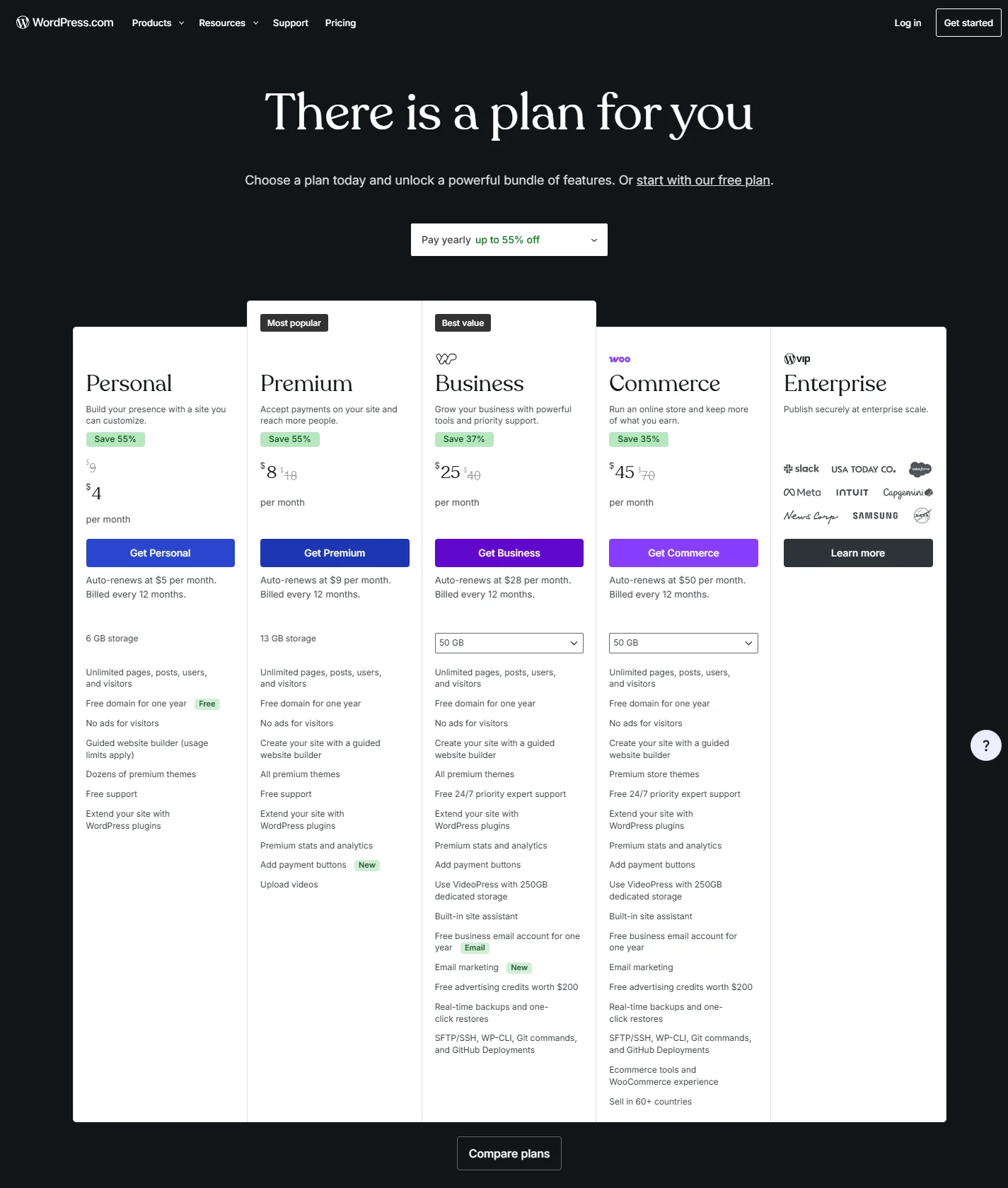
Worth noting where the vendor’s own numbers disagree with each other: the landing page advertises paid plans “starting at just $4 per month,” while the pricing FAQ leads with $2.75 a month billed every three years. Same company, same week, two starting prices.
One more line that matters if you plan to sell anything. WordPress.com charges its own transaction fee on standard payments that falls as you climb: its plan comparison table lists 10% on the free plan, 8% on Personal and 4% on Premium, and the April announcement puts Commerce at 0%. Squarespace charges 2% on Basic and 0% from Core upward on physical goods, though digital content is billed separately at 7% on Basic, 5% on Core and 1% on Plus, reaching 0% only on Advanced. On the cheap tiers, the platform that markets itself as the open one takes the larger cut.
How the field gets the price comparison wrong
There is a specific arithmetic mistake that runs through almost every Squarespace vs WordPress cost comparison, and once you see it you cannot unsee it.
The standard move is to price three years of each. For WordPress the writer takes a budget host’s advertised rate, the introductory one, often under $4 a month, and multiplies by thirty-six. For Squarespace the writer takes the monthly price and multiplies by thirty-six. Then the two totals are placed side by side and WordPress wins by a factor of four.
Both halves of that sum are wrong in the same direction.
The hosting figure is an introductory rate that applies to the first term only; budget hosts are explicit that renewals cost more, and WordPress.com itself warns shoppers about exactly this practice: many hosts show a low sale price whose fine print reveals it covers one billing cycle. Meanwhile the Squarespace figure is the monthly rate, which nobody committing for three years would pay. On annual billing Basic is $19 rather than $25. Over thirty-six months that single choice moves the Squarespace column by $216.
The typical three-year comparison prices one platform at its promotional floor and the other at its retail ceiling, then reports the gap as a finding.
Do it consistently and the picture changes shape. Compare annual billing to annual billing, count renewal years at renewal prices, and add the recurring items a real site needs on each side. WordPress is still usually cheaper in cash. It stops being cheaper by a factor of four, and it stops being cheaper at all the moment you pay anyone for an hour of their time.
There is a second distortion worth knowing about, this one on the Squarespace side. Through late 2025 and 2026 the company has been moving long-standing subscribers off grandfathered rates onto current pricing, and owners have described renewal invoices jumping by double digits in percentage terms in a single cycle. One portfolio-site owner traced a plan that had run $96 a year in the late 2010s to $204 at its 2026 renewal. Those are individual reports rather than a published policy, and I could not find a vendor statement setting out how existing subscribers are transitioned. But if you have held a Squarespace plan for years at a price you liked, the fifteen-day renewal reminder is a notice worth opening rather than filing.
The self-hosted bill: one site, many invoices
This is where “WordPress is free” stops being a useful sentence. The software costs nothing. Running it costs a stack of separate subscriptions with separate renewal dates, and the comparisons that price this route almost always price it at its cheapest possible moment.
Here is the shape of the stack a non-developer actually ends up paying for. I am naming categories rather than quoting prices for each, because every one of these is a moving target and the point is the count, not the cent.
- Hosting. Budget shared hosting or managed WordPress hosting, a difference of roughly ten times in price and an enormous difference in how much maintenance lands on you.
- Domain registration. Separate renewal, separate company, easy to forget until the site goes dark.
- A premium theme or framework licence, usually annual.
- A visual page builder licence, because the default editor is rarely what non-developers end up building with.
- Forms. The free tiers run out at exactly the point a business needs conditional logic or payments.
- Backups that live somewhere other than the server being backed up.
- Security and malware scanning.
- An SEO plugin, free until you want the parts that matter.
- Caching and image optimisation, because managed performance is not included at the budget end.
Nine renewal dates, nine support queues, nine companies with independent opinions about whose fault the outage is. Against Squarespace’s one line on one card, or WordPress.com’s one line plus whatever plugins you chose to pay for.
Now the layer no comparison in the top ten prices at all: the labour.
Where the maintenance numbers come from
The figures in the next paragraph are not vendor prices. They come from maintenance agencies’ published rates and from site owners describing what they paid, gathered in August 2026. I am reporting them as owner reports and agency list prices, not as a survey. They vary enormously by site complexity, and the range itself is the finding: there is a real recurring cost here that every comparison treats as zero.
Maintenance retainers for a small self-hosted site sit in the region of $95 to $395 a month depending on how much hands-on time is bundled. US agency hourly rates run roughly $125 to $250 when you call someone for a one-off emergency. A malware cleanup after a compromise is commonly quoted at $100 to $500 or more per incident. The triggers are predictable and boring: a host forces a PHP version change, a plugin update breaks the contact form or the checkout, a theme update rearranges a layout.
You do not have to buy any of that. Plenty of people run self-hosted sites happily and never pay a developer a cent. But a comparison that puts $3.99 hosting against a $19 subscription and declares WordPress cheaper has quietly assumed you will do all of that work yourself, for free, forever, and then billed your Saturday at zero.
USD per month. These owner-reported and agency-list rates are not a universal quote. Typical three-year comparisons budget maintenance labour at zero.
USD per hour; separate from monthly maintenance and per-incident cleanup.
Reported range is 100 to 500+ USD per incident. The upper end is open: 500 is not a ceiling. Comparing 3.99 USD hosting to a 19 USD subscription without maintenance prices the owner’s work at zero.
The bottom row is the one worth staring at: it is what the field budgets for all of this, and it is zero.
The plugin rule nearly every guide still gets wrong
For years, the strongest argument against the hosted subscription was a single restriction: you could not install third-party plugins unless you paid for the Business tier. That restriction was real, it was documented, and it was the reason a generation of guides told readers to skip WordPress.com and go self-hosted instead.
It ended in April 2026. Here is the paper trail, in the vendor’s own posts, in order.
Read the middle row again. In August 2025 this was a two-week promotion: a taste, with the access due to expire. Eight months later it became permanent, and the April post closes the loop for people who were already paying: “If you’re on a current paid WordPress.com plan, there’s nothing to activate or upgrade.”
So the cheapest paid plan on the hosted subscription now installs plugins from the directory. That single change removes the main reason most guides give for choosing self-hosted, and it removes it for the exact reader those guides are written for: the one who wants a booking form or an SEO plugin and does not want a server.
The field has not caught up. Of the ten pages Google returns, two state the current rule correctly. Forbes Advisor puts it plainly: “Every plan includes the ability to install plugins and allows access to the full library.” PCMag, updated in mid-August 2026, compares the hosted subscription directly and notes that the freedom to install what you like “now applies to WordPress.com users.” Everyone else either compares the wrong product or repeats the old gate.
One of the pages still publishing the old restriction is Squarespace’s own comparison page, which tells readers that on WordPress, ecommerce is available with plugins only on higher-priced plans.
That is a vendor describing a competitor’s product using a rule the competitor retired four months earlier. It is not necessarily dishonest, since comparison pages age like everything else, but it is a good reason not to take either company’s word about the other.
The staleness is not confined to review sites. Gravity Forms, one of the most widely used commercial form plugins in the WordPress ecosystem, still tells buyers on its own pricing page that a WordPress.com-hosted site needs the Business plan before the plugin can be installed. That is a third-party vendor writing purchase requirements against a rule its partner retired. If the companies inside the ecosystem have not updated, expecting a comparison blog to have done so is optimistic.
There is also a smaller discrepancy that says something about how carefully any of this is maintained. WordPress.com’s plan cards advertise access to “over 60,000 plugins.” Its pricing FAQ, its support documentation and its own April announcement all say 50,000-plus. Same company, same website, same week, a ten-thousand-plugin spread. It changes nothing about the decision. It is a useful reminder that the numbers on a marketing page are written by marketing.
Three things the change does not give you
Plugins on the cheap plan is not the same as a self-hosted site. File access is still gated: SFTP, SSH, WP-CLI and GitHub deployment remain on the Business and Commerce tiers, along with staging and automated backups. A short list of plugins is blocked outright for stability reasons. And if your dashboard still shows an upgrade prompt where the plugin browser should be, the interface is behind the documentation. Some users on older accounts reported exactly that through early 2026, and it is a support ticket rather than a plan upgrade.
Design: the ceiling and the trap
Every Squarespace vs WordPress comparison frames this as “Squarespace is prettier, WordPress is more flexible,” which is true and useless. The real difference is what each platform lets you break.
Squarespace has a ceiling. The template system holds spacing, typography and mobile behaviour together, and at some point you will want to move something two centimetres and discover you cannot without writing CSS. That is the cost. The benefit is that the site looks composed on a phone without you doing anything, because the grid will not let you overlap text or blow out a viewport.
WordPress in either form has no ceiling, which is a different problem. The failure mode is not “I cannot do this,” it is a site that looks fine on the desktop where it was built and falls apart on a phone, with three fonts that were never chosen and a heading that is bold because someone bolded it rather than because it is a heading. Unlimited freedom in the hands of someone who does not design for a living produces a specific and recognisable kind of mess.
Since April 2026 the hosted subscription also includes global styles, font uploads and custom CSS on every paid plan, which narrows this gap considerably. The design controls that used to be a Business-tier feature now start at Personal alongside the plugins.
Pick by which failure you would rather have. A site you cannot fully customise, or a site you can customise into something worse.
When it breaks, who do you call
This is the axis that decides how you feel about your website in year three, and it barely appears in comparisons because it does not fit in a feature table.
On Squarespace, one company owns the entire stack. The contact form, the hosting, the SSL certificate, the checkout and the template are all theirs. When something is wrong there is exactly one place to report it and nobody to blame but them.
On WordPress.com the platform is theirs and your plugins are not. That is a much smaller seam than self-hosting, but it is a seam.
On a self-hosted site the seam is everywhere. The classic failure is not a crash, it is a dispute: the host says it is the plugin, the plugin author says it is the theme, the theme author says it is the server configuration, and the person in the middle holding a broken checkout on a Friday afternoon is you. Site owners who move from self-hosted WordPress to a hosted platform overwhelmingly describe this, not design and not features, as the reason. One put it as bluntly as anyone could: WordPress and its plugins were “an endless nightmare” of updates that broke each other.
That is one person’s experience and not a statistic. But it is the recurring shape of the complaint, and the direction of travel it describes is worth knowing before you choose.
Leaving: what the export actually contains
Both hosted platforms let you export, and neither lets you leave with your design. Both say so in their own documentation, and almost nobody quotes it. Self-hosted is the exception, and the reason why is worth understanding before you commit either way.
Squarespace, from support documentation last updated 12 February 2026. What exports: layout pages, one blog page with its posts and up to 1,000 comments per post, text blocks, image blocks, gallery pages. What does not export: other page types entirely (albums, covers, index pages, info pages, calendars, portfolios and store pages), along with page-specific headers and footers, additional blog pages, dropdowns, audio blocks, product blocks, video blocks, drafts, style settings and custom CSS.
WordPress.com, from support documentation last reviewed 11 August 2026: the export file “will include your posts, pages, and comments but will not include your theme design, customizations, or plugins.” Media is referenced rather than included: the file contains “links to your media files (not the actual files).”
So the symmetry is real: text and structure travel, design does not. But the asymmetry underneath it matters more. Squarespace’s export drops whole page types. If your site is a store or a portfolio, the pages that make it a store or a portfolio are the ones that will not come. And there is a sentence in that documentation which deserves to be read twice.
Squarespace states that it is not possible to export content from one Squarespace site and import it into another. You can leave for WordPress. You cannot move house within Squarespace.
The self-hosted route is the only one of the three where the whole site (files, database, theme, plugins) moves to a new host intact. That is the genuine, concrete meaning of “you own it,” and it is worth something. It is just worth something to a smaller group of people than the guides suggest.
Owners who have done the Squarespace-to-WordPress move describe the pattern consistently: the automated part of the migration takes an hour or three, and reaching visual parity again is where the time goes: up to dozens of hours of manual rebuilding, or an agency invoice in the four figures. That is not a reason to stay. It is a reason to know the number before you need it.
Which one should you pick
Pick Squarespace if the site is a portfolio, a brochure, or a service business, if design consistency matters more than extensibility, and if you want the number of companies you deal with to stay at one. The fourteen-day trial takes no card, so this is a decision you can test rather than model.
Pick WordPress.com if you want plugins and the WordPress editor without owning a server. This is the option the field keeps skipping, and since April 2026 it is a materially different product from the one those guides described. Personal now installs plugins and takes custom CSS. If you will need file access, staging or real backups, budget for Business rather than starting at Personal and discovering the ceiling.
Pick self-hosted WordPress if you have a specific requirement the hosted platforms cannot meet (custom code, a plugin that needs file access, full data ownership), or if you genuinely enjoy this work. Do it with your eyes open about the nine invoices and the Saturday afternoons. Choosing it to save money only works if your own time is free.
Pick none of them if you are selling physical products at any volume. Both platforms charge a percentage on the cheap tiers and both sell you the removal of their own fee. That is a different comparison, and it needs its own article.
If you are still weighing the all-in-one platforms against each other rather than against WordPress, the closer fight is Wix vs Squarespace, where I built the same site twice and priced three years of both. And if the question underneath all of this is simply whether Squarespace earns its price at all, that deserves its own answer.
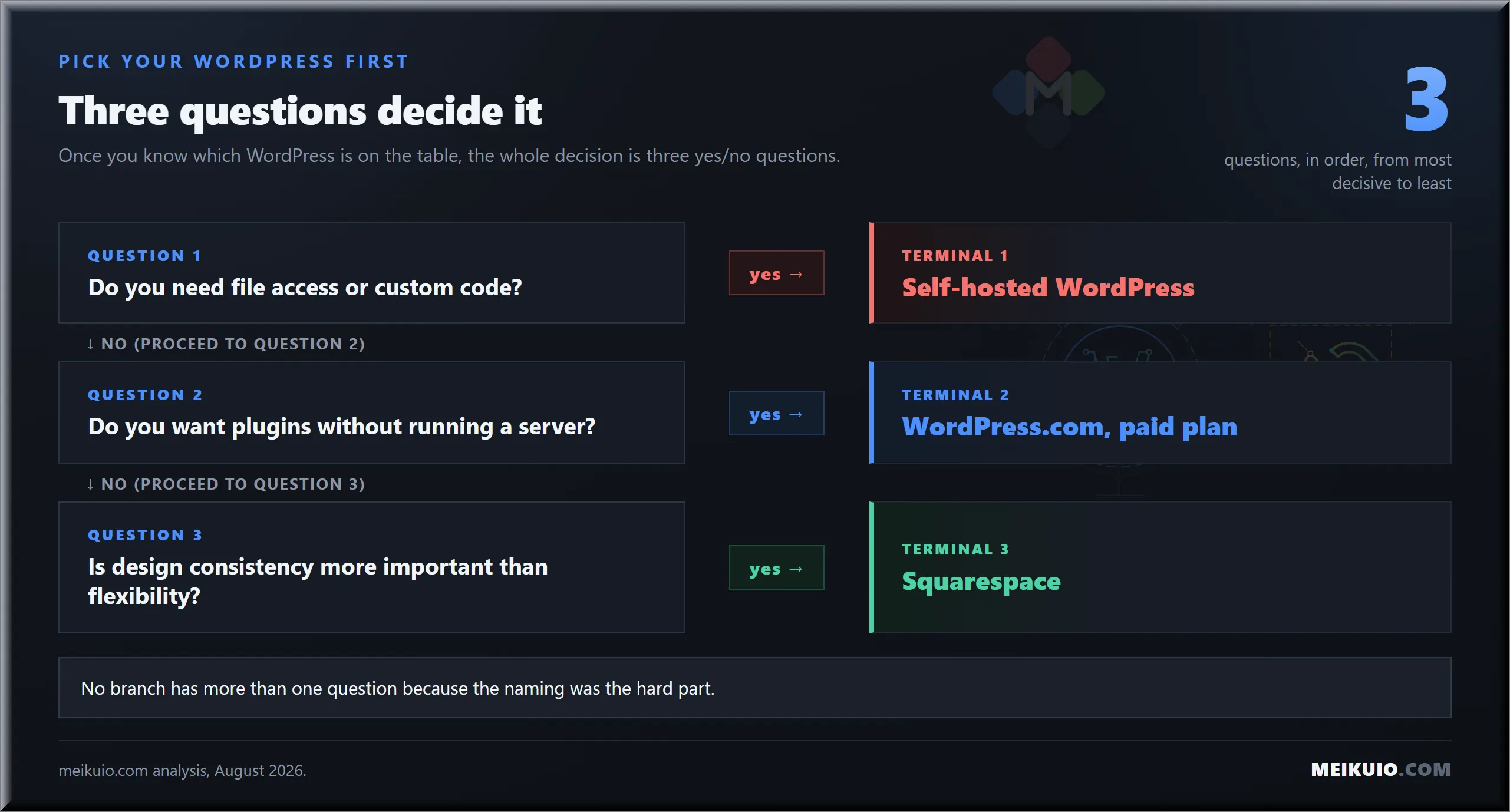
The tree only has three questions because three questions is all it takes once you know which WordPress is on the table.
Field notes
- The field: ten pages ranking for Squarespace vs WordPress, read on 22 August 2026; two compare Squarespace to the hosted WordPress subscription.
- The plugin change: restricted to Business and eCommerce in January 2022; opened for a two-week promotion in August 2025; made permanent on all paid plans on 2 April 2026; confirmed in support documentation reviewed 11 August 2026.
- Squarespace, US pricing page checked 24 October 2026: Basic $19/mo annual or $25/mo monthly; Core $29 or $39; Plus $49 or $65; Advanced $99 or $139; 14-day trial with no card required.
- WordPress.com, checked 11 September 2026 (first-year price on annual billing, then renewal): Personal $4/mo renewing at $5; Premium $8 renewing at $9; Business $25 renewing at $28; Commerce $45 renewing at $50. The cheapest plan carries the steepest renewal step-up.
- Transaction fees: Squarespace takes 2% on Basic and 0% from Core up on physical goods, but 7% on Basic, 5% on Core, 1% on Plus and 0% on Advanced for digital content; WordPress.com lists 10% on the free plan, 8% on Personal and 4% on Premium, with Commerce at 0%.
- Vendor disagreements: Squarespace serves a three-plan regional pricing page outside the US and four plans in the US; WordPress.com advertises “$4 per month” on one page and “$2.75/month billed every 3 years” on another.
- Sources: squarespace.com pricing and support documentation; wordpress.com pricing, support documentation and company blog posts dated January 2022, August 2025 and April 2026; live search results read on 22 August 2026; maintenance costs from published agency rates and site-owner reports.
Frequently Asked Questions
Is Squarespace better than WordPress for a small business site?
Neither wins in general; the real question is which WordPress. Against self-hosted, Squarespace is easier and less flexible. Against the WordPress.com subscription, the two are close: both hosted, both billed once, and cheaper WordPress.com plans now install plugins. Pick Squarespace for design consistency, WordPress for extensibility.
Is WordPress really free to use for a website?
The software is free to download; running a site on it is not. You pay for hosting and a domain at minimum, and most non-developers also pay for a theme, forms, backups and security. WordPress.com’s paid plans start at $4 a month on annual billing, checked 11 September 2026.
Can WordPress.com install plugins on cheap plans?
Yes, since 2 April 2026. WordPress.com’s announcement states plugins are “now available on all paid WordPress.com plans, starting with Personal,” and support documentation reviewed 11 August 2026 confirms it. File-level access such as SFTP, SSH and staging still requires Business or Commerce, and a short list of plugins is blocked.
Which is cheaper over three years, Squarespace or WordPress?
On paper WordPress.com Personal is cheaper than Squarespace Basic, $4 against $19 a month on annual billing (Squarespace’s US page checked 24 October 2026, WordPress.com on 11 September 2026), but it renews at $5. Self-hosted looks cheapest and usually is not once hosting renewals, licences and paid help are counted. Compare annual against annual and second-year against second-year.
Can you switch from Squarespace to WordPress?
Yes, and Squarespace documents the export for this purpose. Text and images travel: layout pages, one blog with its posts, text, image and gallery blocks. Design does not, since style settings and custom CSS are excluded, along with store, portfolio, calendar and album pages. Expect to rebuild the presentation layer.
Do I need to know code to use either platform?
No, for Squarespace and for WordPress.com: both are visual editors and neither requires touching a server. Self-hosted WordPress does not require code either, but it requires operational judgement, such as deciding whether an update is safe or restoring a backup. That is what sends non-developers looking for a maintenance retainer.
Which is better for SEO, Squarespace or WordPress?
Both can rank. Squarespace covers the fundamentals, including titles, descriptions, sitemaps and URLs, with no add-ons. WordPress gives finer control through plugins, and self-hosted lets you change anything including permalink structure, which Squarespace fixes for some content types. The difference matters most when migrating a site whose URLs must survive.
What happens to my site if I stop paying?
On Squarespace and WordPress.com the site goes offline when the subscription lapses; on WordPress.com a lapsed paid plan drops back to the free tier. On self-hosted WordPress an unpaid hosting bill takes it down too, but you hold a copy and can put it up elsewhere. Export before you cancel.
How many plans does Squarespace have in 2026?
Four on the US pricing page, checked 24 October 2026: Basic, Core, Plus and Advanced. Plus is offered where Squarespace Payments is available, so the pricing page you see from outside the US can list three plans at different prices.
My Take
I went into this expecting to write about price and came out writing about naming. The pricing differences here are real but modest: a few dollars a month between hosted options, and a self-hosted bill that depends entirely on how much of your own time you are willing to donate.
The thing that actually costs readers money is that six of the ten pages answering Squarespace vs WordPress compare a subscription to a free download, and two more blur the two beyond recognition. If you take one thing from this: decide which WordPress you mean before you compare anything, and check the renewal price rather than the one on the card. Both vendors print it. Neither makes it the big number.