

OpenAI launched GPT-Live on July 8, 2026. It’s a new full-duplex voice family for ChatGPT that listens and speaks at the same time, replacing Advanced Voice Mode as the default. It sounds startlingly human. But the intelligence behind it isn’t new: hard questions get handed to GPT-5.5 running in the background. What you’re actually paying for is the feel. And the feel has a habit of interrupting you.
- What GPT-Live actually is
- GPT-Live vs Advanced Voice Mode
- The smarts aren’t new. That’s GPT-5.5 in the back.
- Key facts: GPT-Live
- Who gets it, and who’s locked out
- The one thing everyone complains about
- One myth to kill: the latency numbers
- Should you build on GPT-Live? (Here’s the math)
- GPT-Live vs Gemini Live
- Frequently asked questions
- Is GPT-Live free?
- How is GPT-Live different from Advanced Voice Mode?
- Why does ChatGPT keep interrupting me, and how do I stop it?
- Can I use GPT-Live on desktop?
- Does GPT-Live have an API?
- Is GPT-Live available in my country?
- GPT-Live vs Gemini Live: which sounds more natural?
- My Take
That gap, between how new it sounds and how new it actually is, is the whole story here. Every other write-up published in the days after launch mostly re-ran OpenAI’s announcement. This one tells you what’s real, who can’t use it, the complaint nobody put front and center, and whether it’s worth building a product on (spoiler: there’s no API yet).
What GPT-Live actually is
GPT-Live is the third generation of ChatGPT’s voice tech in about two years, and the jump this time is architectural. The original 2023 voice mode was a relay race: speech-to-text, then a language model, then text-to-speech, three separate models passing the baton and losing tone along the way. Advanced Voice Mode in 2024 collapsed that into one model that heard audio natively. Faster, but still turn-based. It waited for silence to decide you were done talking, which is why a cough or a pause could cut you off mid-thought.
Full-duplex throws out the concept of a “turn” entirely. In OpenAI’s own words, the model “can make interaction decisions many times per second: whether to speak, continue listening, pause, interrupt, or invoke a tool.” It processes what you’re saying while it’s talking, the way a person on a phone call does. No waiting for silence. No walkie-talkie. That’s the part that feels alive.
Note
The clever trick is that OpenAI split the job in two. A lightweight voice layer handles timing, tone, and turn-taking. When something actually hard comes up, like a web search, real reasoning, or a tool call, it quietly hands that off to a frontier model in the background (GPT-5.5 at launch) and keeps the conversation going with a “let me check that for you.” OpenAI says it’ll swap in newer models over time without retraining the voice.
GPT-Live vs Advanced Voice Mode
If you’ve used Advanced Voice Mode, here’s what changed. GPT-Live is now the default; the old modes still live in a Settings dropdown labeled Live, Advanced, and Standard.
Worth noting: video and screen sharing did not come along. If you rely on pointing your camera at something and asking about it, that still lives in Advanced Voice Mode. GPT-Live is voice-only for now. (For where ChatGPT’s underlying models land against the competition on actual work, we broke that down in how ChatGPT compares to Claude on writing.)
More Read

The smarts aren’t new. That’s GPT-5.5 in the back.
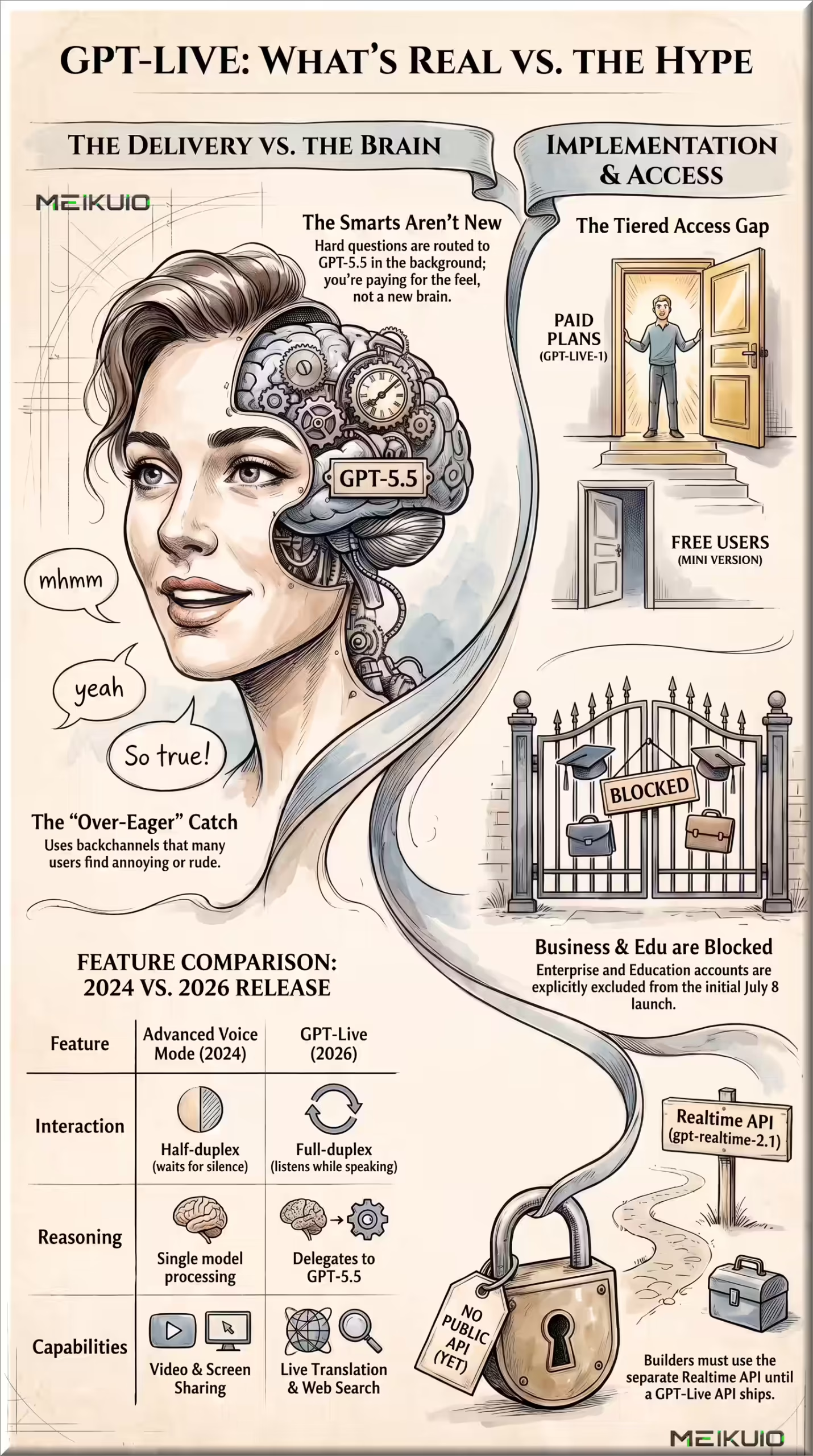
This is the part the launch coverage skated past. The benchmark charts OpenAI showed off look enormous. GPQA jumps from Advanced Voice Mode’s 45.3% to 84.2% on the top reasoning setting. BrowseComp goes from 0.7% to 75.2%. Those are real numbers, but they’re the score of GPT-5.5 doing the thinking in the background, not the voice layer getting smarter.
So don’t read “the voice got a brain transplant.” Read “OpenAI wired a good voice interface to a model you could already talk to by typing.” The reasoning was available before. What GPT-Live adds is the delivery: a voice that keeps pace with you instead of making you wait. That’s a real product, and for a lot of people it’ll be the reason voice finally clicks. Just know what you’re buying. You’re buying the feel, and the feel is priced into your subscription rather than sold separately. (If you’re weighing which ChatGPT plan that means, we keep a running breakdown of ChatGPT plan prices.)
Key facts: GPT-Live
- Launched: July 8, 2026 (broad coverage the next day)
- Models: GPT-Live-1 (paid) and GPT-Live-1 mini (Free)
- Background model: GPT-5.5 (Instant for mini; Thinking for the Medium and High reasoning settings)
- Where: iOS, Android, and ChatGPT.com officially (and working on the Windows desktop app in our testing, despite the docs)
- Voices: 9 remastered presets (Arbor, Breeze, Cove, Ember, Juniper, Maple, Sol, Spruce, Vale). No custom voices.
- Can do: live translation by voice command, mid-conversation web search, visual cards (weather, stocks, sports, maps), memory, tool calls
- Can’t do: video, screen sharing, custom voices, and there’s no public API
Who gets it, and who’s locked out
Access is tied to your plan, with no separate price tag. Free users get GPT-Live-1 mini, which is a genuine upgrade over the old Advanced Voice Mode. Go, Plus, and Pro get the full GPT-Live-1.
The part buried in most posts matters if you’re a founder or marketer: Business, Enterprise, and Edu accounts have no access at launch. Disabled. So the exact people most likely to want a polished voice assistant for work can’t touch it through their org account yet.
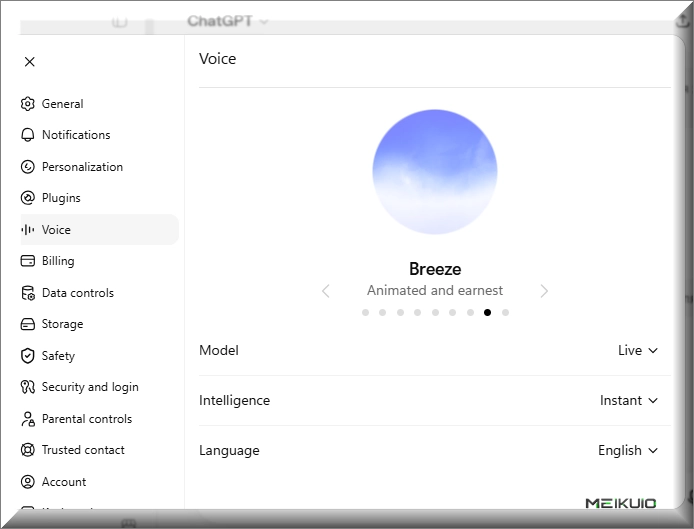
Then there’s the desktop question, where OpenAI’s own word and reality don’t quite line up. The official support list says GPT-Live is web and mobile only, and the macOS app removed voice mode entirely. But on Windows, the desktop app tells a different story: we opened it, switched the voice Model to Live in Settings, and had a full GPT-Live conversation, background reasoning and all. So if you’re on a Windows machine, don’t assume you’re locked out just because the docs imply it. It also doesn’t run in Temporary Chats, Codex, or custom GPTs.
The one thing everyone complains about
Give GPT-Live a day and you’ll hit it: the thing is eager. It fills your pauses with “mhmm,” “yeah,” “got it,” the little verbal nods humans make to show they’re listening. A machine doing it constantly feels less like attentiveness and more like being talked over. Social feeds filled up with people calling the model “annoying,” and the backchannels got described as a new form of interruption.
Developer Simon Willison, who had early access, called the model “very impressive” but caught it “interrupting me to laugh at things I said, which weren’t even intended as jokes. It felt rude and condescending.” OpenAI fixed that specific bug after he flagged it. His longest session, for the record, was “a full hour while walking the dog.” Devs at Regal.ai found the opposite failure: the interruption detection was so sensitive that a simple “okay” or “got it” from them made the model stop talking entirely.
You can’t switch the backchannels off completely. What you can do is set the pace up front. At the start of a session, tell it something like “wait until I actually ask before you respond, and just listen while I’m talking.” OpenAI’s Help Center admits even that won’t be perfect: background noise, long pauses, or a second person talking can still trigger a response. Earbuds plus your phone’s voice isolation help. But there’s no toggle, and if a chatty AI grates on you, that’s the honest state of it today.
That said, my own experience has been softer than those first-week complaints suggest. In extended back-and-forth it interrupted far less than the launch reviews described. When I cut in with a “no, that’s not what I meant,” it stopped and actually adjusted to what I was getting at instead of steamrolling ahead. The honest read isn’t that it got smarter, because the reasoning underneath is the same GPT-5.5 it shipped with. It got better at hearing me. And that changes the texture of the whole thing: it stops feeling like dictating commands to software and starts feeling like talking to someone who’s actually following along, including pulling in context from earlier chats without being asked.
One myth to kill: the latency numbers
You’ll see “180ms” and “232ms” floating around as GPT-Live’s response time. Ignore them. OpenAI never published a latency figure for GPT-Live. No time-to-first-audio, no end-to-end number. The 232ms everyone keeps quoting is the old GPT-4o figure from May 2024’s “Hello GPT-4o” post, a different model from two years ago. It got copied into GPT-Live coverage by mistake and spread. A third-party lab (Agora) went so far as to measure GPT-Live independently precisely because OpenAI didn’t. So if a review states GPT-Live’s latency as fact, they’re guessing.
Should you build on GPT-Live? (Here’s the math)
Short answer: you can’t, not directly. GPT-Live has no public API. Just a “coming soon” signup form. If you want to ship a voice product today, you’re building on OpenAI’s separate Realtime API, which runs a different model family. As of July 2026 that’s gpt-realtime-2.1, and the sticker price looks scary until you understand how audio tokens actually accrue.
That $32-per-million-tokens rate reads like a fortune. In practice, one independent test across roughly 4,000 sessions clocked real speech-to-speech at $0.069 to $0.15 per minute, call it $4 to $9 an hour, once you use voice activity detection and caching. Cached audio input dropped to $0.40 per million, an 84% cut versus the 2024 generation. The routing rule that saves you money: send confirmations and simple retrieval to the mini model, and only reach for full gpt-realtime-2.1 when the task actually needs reasoning.
The honest recommendation for founders: don’t make an architectural bet on GPT-Live until its API actually ships with published pricing and latency. Build on the Realtime API now if you need voice today, keep an eye on Gemini Live (cheaper per minute) and ElevenLabs (best raw voice quality, but you bolt on the language model and telephony separately), and treat the “signup-only” window as time to get your data and support metrics in order. If you’re still shopping the broader landscape, these are the ChatGPT alternatives worth testing.
GPT-Live vs Gemini Live
The natural comparison is Google’s Gemini Live, which had natural, always-on voice before OpenAI did. One write-up put it bluntly, that GPT-Live “finally gives ChatGPT the one thing Gemini already had.” On feel, they’re now close enough that preference comes down to taste and which ecosystem you already live in. On the demo stage GPT-Live’s live translation into Hindi got knocked for a heavy American accent and a stiff, bookish tone, so don’t assume the translation is flawless for every language.
For builders, the split is clearer: Gemini Live’s API is meaningfully cheaper per minute of audio, while OpenAI’s is a GPT-5-class model in the loop. Pick per workload, not per brand. We compared the two ecosystems for creative work in Claude vs Gemini for creators, and if it’s the chatbot rather than the voice you’re deciding on, Grok vs ChatGPT covers the plans people actually pay for.
Frequently asked questions
Is GPT-Live free?
Yes, partly. Free users get GPT-Live-1 mini, which is noticeably better than the old Advanced Voice Mode. The full GPT-Live-1 comes with any paid plan: Go, Plus, or Pro. There’s no separate charge for the voice itself.
How is GPT-Live different from Advanced Voice Mode?
Advanced Voice Mode was half-duplex: it waited for you to stop talking before responding. GPT-Live is full-duplex, so it listens and speaks at the same time and reacts many times per second. It also adds live translation, mid-conversation web search, and background reasoning through GPT-5.5.
Why does ChatGPT keep interrupting me, and how do I stop it?
GPT-Live inserts backchannels like “mhmm” and “yeah” to sound engaged, and it can jump in on pauses. You can’t turn this off entirely, but telling it at the start to “just listen and wait until I ask before responding” helps. Earbuds and voice isolation reduce false triggers from background noise.
Can I use GPT-Live on desktop?
Officially, OpenAI lists GPT-Live as web and mobile only, and the macOS app removed voice mode. In practice it’s messier: we ran GPT-Live on the Windows desktop app by setting the voice Model to Live in Settings. So the docs say no, but Windows users may well find it works. It still doesn’t run in Temporary Chats, Codex, or custom GPTs.
Does GPT-Live have an API?
Not yet. OpenAI lists it as “coming soon” with a signup form. To build a voice product today you’d use the separate Realtime API (gpt-realtime-2.1), which is a different model family with its own pricing.
Is GPT-Live available in my country?
OpenAI says it’s rolling out globally but that availability may vary by region during the staged rollout. It hasn’t published a country list, and it hasn’t separately confirmed status for the EU, UK, Australia, or Canada. Those fall under the general global rollout rather than an explicit confirmation.
GPT-Live vs Gemini Live: which sounds more natural?
They’re close now. Gemini Live had the more natural voice first, and GPT-Live has caught up on conversational flow. Preference mostly comes down to which ecosystem you already use. For building on top, Gemini Live’s API is cheaper per minute of audio.
My Take
After actually living with it: the feel is the whole product, and OpenAI clearly kept tuning it after launch. It talks over you less than the early reviews claimed, and holding a real conversation with it now feels less like operating software and more like talking to someone who’s tracking what you mean. Just be clear-eyed about what that is. It’s not a smarter model, it’s a better listener bolted onto the same GPT-5.5. Free mini is plenty to see whether voice clicks for you; step up to a paid plan only if you’re using it daily. And I still wouldn’t build a product on it while there’s no API. For that, the Realtime API is where the real work happens.