



The Canva Pro price is not one number. It changes with the country Canva thinks you are in, and the plan card sells the AI by a multiple instead of an amount: “10x more AI than Canva Free.” The real figure sits three clicks away, and the contract says it is not a promise at all.
- What Canva Pro costs right now
- Why every page you read gives a different price
- The number on the plan card is a multiplier, not an amount
- Where the real numbers live
- Where paid Standard leaves the shared AI pool
- What happens when the allowance runs out
- Premium is the default; paid Standard follows a different rule
- What Standard AI does not cover
- What the contract calls the allowance
- The one price Canva fixes in dollars for the whole planet
- The page that sells it has no price on it
- AI top-ups: Business only, thirty days, then gone
- Where you bought decides what you can buy next
- The other things that move the bill
- Refunds, in Canva’s own words
- What “up to” is supposed to mean
- What ten pages ranking for this query say, and don’t
- Who prints an absolute number on the plan card
- So should you pay for Canva Pro?
- Frequently Asked Questions
- How much is Canva Pro?
- Does Canva Pro have unlimited AI?
- What is an AI use in Canva?
- How many AI images can I make on Canva Pro in a month?
- What happens when I run out of Canva AI?
- Is AI Pass worth 100 dollars a month?
- Can I buy an AI top-up on Canva Pro?
- Why is my Canva price different from the price I read online?
- Do I own the images Canva AI generates for me?
- Is Canva Pro worth it if I only use it a few times a month?
- My Take
What Canva Pro costs right now
The Canva Pro price sits in the middle of a four-tier ladder. Canva sells four tiers on its pricing page: Free, Pro, Business and Enterprise. Other plan names turn up in its help centre and not on that page, including Teams, which Business replaced, Nonprofits, Education, and prepaid plans sold by the day and the week. Pro is the single-person plan. Business is per person with a team minimum. Enterprise has no published price and sends you to sales. Everything below the Enterprise row is buyable with a card. No phone call.
On 28 August 2026 I opened Canva’s pricing page from two browsers and saw UAE dirhams, even through a British locale URL. On 30 September I checked the US country setting directly: Canva Pro showed US$18 a month or US$144 a year. My ordinary local session still showed dirhams. Those are regional offers, not two conversions of one fixed price; read the currency and billing period in your own checkout.
Reading your own number takes three steps: open the pricing page, switch the toggle between Monthly and Yearly, and read the currency name printed under the figure rather than assuming the symbol. If you are in the EU or the UK, the withdrawal and cancellation rules that apply to you are set by consumer law rather than by the price on the card, and they are worth knowing before the trial converts.
Two of those pages date themselves to August 2026. One says 18 dollars a month, the other 180 dollars a year, and 18 a month does not come to 180 a year. The only way to know your own number is to open the pricing page yourself and read the currency label under the figure. That takes ten seconds. It beats any article, including this one.
One thing that moves the bill is worth knowing before you pick a tier, because it is not on the pricing page at all. Canva’s billing help says it plainly: “Inviting someone to your team while on Canva Pro will change your plan to Canva Business. Your billing will then align with the Canva Business pricing.” Adding a collaborator is a plan change. Not a favour.
More Read

Why every page you read gives a different price
Two mechanisms are running at once, and most guides quoting a Canva Pro price describe neither. The first is time: Canva has moved its prices more than once since 2024, and old articles keep ranking. The second is geography. The price you see is assigned by where Canva places you, not by which language version of the site you open.
I checked the second one directly. The English locale URL and the British locale URL both returned dirhams from a European connection, and the machine-readable data inside the page carried "currency":"AED" with zero occurrences of USD. Canva’s Terms of Use tie the contracting entity to your billing address, but no page I opened explains how the displayed currency is chosen.
This is the market, not one vendor
Adobe’s Firefly plans page, opened in the same session, priced itself in dirhams too. Geographic pricing is normal software behaviour and Canva is not doing anything unusual here. What is unusual comes later in this article: the add-on that removes the AI limit is fixed in US dollars for the entire planet, while the subscription under it is not.
The number on the plan card is a multiplier, not an amount
Once you know your Canva Pro price, the next question is what it buys, and that is where the page stops answering. Open the pricing page and read the AI row on each card. Free is the only tier with a real number on it. Every paid tier is sold as a multiple of the tier you do not pay for.
- Free: “Up to 20 Standard or Premium AI uses”
- Pro: “10x more AI than Canva Free (Premium or Ultra AI)”
- Business: “20x more AI than Canva Free (Premium or Ultra AI)”
- Enterprise: “20x more AI than Canva Free (Premium or Ultra AI)”
To learn what paid Premium or Ultra AI gives you, you first read the allowance of the Free plan and then the multiplier. The two most expensive tiers carry the same multiplier: Enterprise offers no larger published Premium or Ultra allowance than Business. Standard is a separate exception on paid plans, explained below.
The only absolute AI number on Canva’s pricing page belongs to the plan that costs nothing.
The page that actually sells Pro is worse. On canva.com/pro/ the word “AI” appears 25 times in the visible text. The words allowance, credit and quota appear zero times each. There is no price on that page either, and the only two uses of the word limit are the section heading “Design without limits” and a line about “unlimited access to over 100 million premium photos.” Nothing on the page selling the plan says the AI is metered. Not one line.
Where the real numbers live
The absolute figures sit in a collapsed FAQ on Canva’s pricing page and in Understanding your AI usage. This is the plan-by-plan allowance checked again on 30 September 2026. The figures are estimated upper limits for simple tasks, not promised numbers of finished images.
| Plan Tier | Standard AI | Premium AI uses (up to) | Ultra AI uses (up to) |
|---|---|---|---|
| Free | 20 shared with Premium | 20 shared with Standard | None — Ultra tier AI models not accessible on Free |
| Pro | No allowance used (fair use) | 200 | 20 uses — Up to 20 Ultra uses per month from the shared Premium/Ultra allowance. Standard AI on paid Pro does not draw from that allowance; fair use applies. |
| Business | No allowance used (fair use) | 400 | 40 uses — Up to 40 Ultra uses per month. Actual usage can be lower for complex tasks or mixed tools. |
| Enterprise | No allowance used (fair use) | 400 | 40 uses — Up to 40 Ultra uses per month. Actual usage can be lower for complex tasks or mixed tools. |
| Education | No allowance used (fair use) | 200 | 20 uses — Up to 20 Ultra uses per month. Actual usage can be lower for complex tasks or mixed tools. |
| University student (Free) | 20 shared with Premium | 20 shared with Standard | None — A university student using Canva Free has no Ultra access. A campus-provided plan may differ. |
One caution before you count on these numbers. Premium and Ultra share a monthly AI allowance, and the listed values are alternatives joined by “or,” not amounts you can add together. More complex tasks or a mix of tools can reduce the number of uses. Standard AI on a paid Pro, Business or Education plan does not draw from that shared allowance, although fair use limits apply. On Canva Free and Pro Lite, Standard still draws from the monthly allowance. Canva’s broad footnotes sometimes omit that paid-plan exception; its plan-specific FAQ and help article state it explicitly.
If you remember Magic Studio credits
You are not misremembering, and you are not looking at the same product. Canva used to hand Pro subscribers a pool of Magic Studio credits, and that system is gone. The word credit does not appear once in the visible text of the current pricing page. Neither does Magic Studio.
This matters more than a naming change, because the old number is still being published. Of the ten pages I measured for this article, two still describe the credit pool as current. One of them carries the section heading “The hidden costs Canva does not put on the pricing page” and prints “500 Magic Studio AI credits per month” as a live figure. Read that twice. If you planned your month around 500 of anything, throw that plan away. Use the table above.
Education, nonprofits and students get different amounts
Canva’s pricing page says eligible schools and not-for-profits can use many premium features for free. The current help article puts Canva Education and Nonprofits alongside Pro for AI: paid-plan-style Standard access subject to fair use, plus up to 200 Premium or 20 Ultra uses from the shared allowance. A university student’s access depends on the actual plan: Canva Free has up to 20 Standard or Premium uses and no Ultra, while an institution offering Canva for Campus may provide different access.
An eligible K-12 teacher can therefore have Pro-level AI access through Education. A university student should check whether the account is on Canva Free or a campus-provided plan before assuming any particular allowance. There is no single worldwide “University Student” figure that covers both routes.
Where paid Standard leaves the shared AI pool
On an ordinary paid Pro plan, Standard AI does not draw from the shared monthly allowance; fair use still applies. The metered figures are up to 200 Premium uses or up to 20 Ultra uses. Business and Enterprise list up to 400 Premium or 40 Ultra. These are estimated ceilings for simple tasks, not a fixed rate converting one Ultra action into ten Premium actions.
That distinction is more useful than the old three-number ladder. Canva does not publish a fixed per-action conversion rate: the tool, prompt complexity and mix of work all affect the allowance consumed. Before comparing plans, ask which tier the work actually uses and whether that tier draws from the shared pool.
Conversational design with Canva AI 2.0 uses Ultra AI. Pro lists up to 20 Ultra uses, but a complex conversation can consume more than a simple task, so that is not a promise of 20 sessions. Premium work has an estimated ceiling of 200 simple uses. Supported Standard work on paid Pro does not debit either number. The same subscription can feel generous or tight depending on the work you make, and the plan card gives only a multiplier.

| Item | Estimated uses a month on Canva Pro | Notes |
|---|---|---|
| Premium | 200 | Up to 200 Premium AI uses per month on paid Pro. Complex tasks and mixed tools can reduce the actual number. Premium is the default quality tier. (warning) |
| Ultra | 20 | Up to 20 Ultra AI uses per month from the same shared allowance. This is an estimate for simple tasks, not a fixed conversion from Premium uses. |
What happens when the allowance runs out
This is the part of the Canva Pro price question that matters on a deadline. Canva’s current help pages agree that Ultra access stops until the allowance resets, but they do not describe every Premium restriction in exactly the same way. They are clearer about one paid-plan exception: Standard does not draw from the shared allowance.
The current AI usage article says paid Standard is outside the monthly allowance and does not pause because that allowance is exhausted. It says Free users can see short pauses for Standard and Premium, while Ultra is unavailable until reset. A separate quality-tier page says paid Standard stays available in one answer, then says Standard and Premium may be temporarily unavailable in another. Those statements conflict; neither should be turned into a guaranteed timetable for your account.
On resets Canva is clearer: the allowance on paid plans resets each month on the billing date, even if the subscription is billed yearly; Free resets at midnight UTC on the first of the month. Canva gives no duration for a Premium pause. Its AI usage article says Ultra is not included in short pauses and remains unavailable until the monthly reset. Check the account’s Billing → AI usage tracker for the remaining balance.
What this means on a deadline
Plan Ultra work first. Pro’s “up to 20” is an estimate for simple uses, not a guarantee of 20 complete Canva AI 2.0 conversations; when Ultra access runs out it waits for the reset. Paid Standard is outside the shared allowance and stays subject to fair use. Premium may slow or pause, but Canva does not publish an exact duration.
If Premium or Ultra access runs out on the 20th, the documented choices include waiting for your billing-date reset, upgrading, adding AI Pass if your subscription is eligible, or buying a top-up on Business. On a paid plan, switching a supported task to Standard may keep that task moving without drawing from the shared allowance. It will not turn Premium-only video, graphics, audio, code or charts into Standard work.
Premium is the default; paid Standard follows a different rule
Canva lets you select Standard, Premium or Ultra for supported AI photo tasks; Canva switches video to Premium automatically. Premium is the default. Ultra uses more of the shared allowance. Standard still consumes the allowance on Free and Pro Lite; on ordinary paid plans it does not draw from that pool, subject to fair use. The tier choice therefore changes both quality and how a supported task is metered.
The old tenfold comparison no longer describes today’s plans. Free now lists up to 20 Standard or Premium uses, not 200 versus 20. Paid Pro lists up to 200 Premium or 20 Ultra uses, while supported Standard work sits outside the shared allowance. Because Premium is the default, a subscriber may consume the metered allowance without changing any setting; choosing Standard for a supported task can avoid that debit, with a different output quality.
Not one of the ten pages ranking for this query mentions that Premium is the default.
Finding the switch takes five steps in Canva’s instructions: open a design, go to Elements, select the plus icon in the search bar, choose AI quality, and pick Standard, Premium or Ultra. The choice applies to later AI photos and videos until you change it. On a paid plan, Standard can spare the shared allowance where the content type supports it; fair use still applies.
What Standard AI does not cover
Switching to Standard does not work for every AI task. It is the paid tier that does not draw from the shared allowance, but the choice is available only where Canva supports Standard.
- Photos: all three tiers work.
- Video: “Standard isn’t supported (it will automatically switch to Premium).”
- Graphics, audio, 3D, forms, code, charts and sheets: “Currently available with Premium only.”
Standard covers supported work such as certain image generation and formula tools, while Canva sends video to Premium and lists graphics, audio, 3D, forms, code, charts and sheets as Premium-only. Pro’s up-to-200 estimate applies to simple Premium uses, not every image or design you might make. The distinction between a bundled tool and its metered work also matters in our Motion app review.
There is one more silent move worth knowing. If you select Ultra for a content type that does not support it, Canva says it “will automatically use Premium instead” and shows a message telling you which tier was used. Your setting is a request. Not an instruction.
What the contract calls the allowance

None of the ten pages I measured for the Canva Pro price had opened Canva’s AI Product Terms. The document is short, it is effective as of 26 June 2026, and it settles what all those numbers are worth. In Canva’s own words: “AI Usage Limits are operational controls and not fixed entitlements.”
The sentence after it explains the practical effect: “Canva may modify AI Usage Limits or access to specific AI-powered features, for example, to maintain system performance, fairness, security, or reliability.” Then the part that resolves the two help pages: “If you reach an AI Usage Limit, you may experience slowdowns, pauses or other restrictions until the applicable AI Usage Limit resets.” And finally the line that undoes the arithmetic: “Usage consumption may vary depending on the AI Product or interaction.”
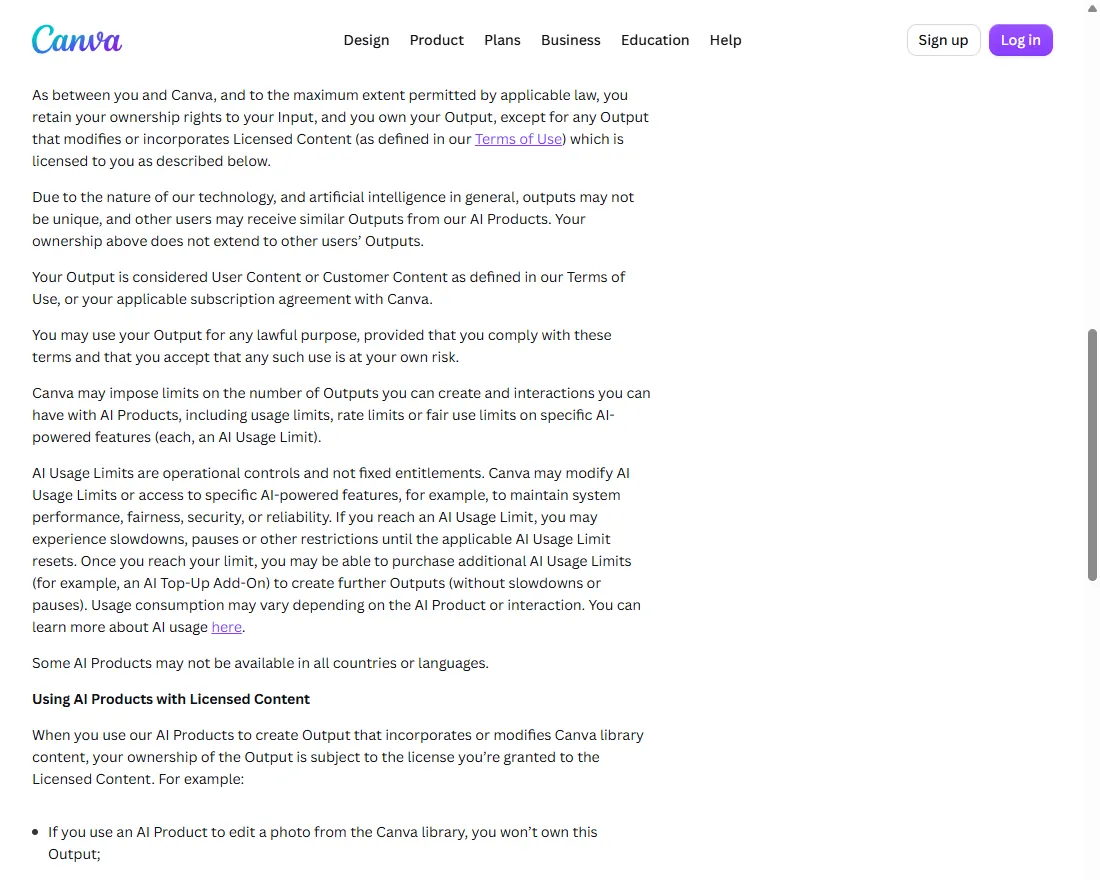
Read the ladder in order and the pattern is hard to miss. The page selling Pro does not mention a limit. The plan card gives a multiple. The FAQ gives a ceiling. The help article attaches three conditions to that ceiling. The contract says it is not an entitlement and may change. The closer you get to the document that binds anyone, the less the number promises. GitHub did something structurally similar when it moved to metered billing, and we walked through the receipts in our piece on the GitHub Copilot pricing change.
The same document carries a smaller line that catches people out later: “If you use an AI Product to edit a photo from the Canva library, you won’t own this Output.” The rule as written covers output that modifies or incorporates Canva’s licensed content, and the example Canva gives is editing a library photo. A generation made from scratch is not what that sentence is about. Worth keeping straight. Rights to AI output are their own subject, and we mapped them across nine tools in our guide to the best AI music generators.
The one price Canva fixes in dollars for the whole planet
Canva sells an add-on called AI Pass that raises your allowance. Its help article gives the price in one sentence, and the sentence is unusual: “AI Pass is USD $100 globally per person, per month.”
Globally. One number, every market, no local conversion, while the Canva Pro price underneath it moves by country. Meanwhile the subscription it attaches to is priced by wherever Canva places you, which is how the same product ends up quoted at 15, 18 and 180 dollars in articles written in the same month. The thing you buy floats. The thing that unlocks it does not.
The subscription is priced by your location. The add-on that removes its limit costs one hundred US dollars anywhere on earth.
What the hundred dollars buys is still described as a multiple: AI Pass offers 40x the Pro allowance or 20x the Business allowance. Against Canva’s current simple-task Premium estimates, both imply up to 8,000 Premium uses (40 × 200 or 20 × 400). That is an inference, not a separately published guarantee, and complex or mixed tasks may yield fewer uses. It is not 80,000 paid Standard uses: Standard is already outside the shared allowance on an ordinary paid plan. Canva’s help article sends readers back to the pricing page rather than printing that Premium result itself.
One more thing the Pass does not do. Canva’s current AI Pass help says paid-plan Standard tools and AI design tools such as Magic Write, animations and AI Voice already sit outside the shared allowance, subject to fair use. Buying a larger Premium/Ultra allowance does not increase a separate monthly Standard number, because the ordinary paid plan has no such number. A hundred dollars a month is useful only if the metered work is what you actually need more of.
The page that sells it has no price on it
Canva has a marketing page for AI Pass. I measured it: 2,705 characters of visible text, zero dollar signs, zero uses of the string USD in the source, and zero occurrences of the words price, pricing or cost. A product that runs to 1,200 US dollars a year has a landing page that never mentions money. Not once.
The AI Pass marketing page still has a broad footnote describing Standard, Premium and Ultra as one combined pool. Read it alongside Canva’s more specific pricing FAQ and AI Pass help: those pages say paid-plan Standard does not draw from the allowance. For a Pro buyer considering AI Pass, the meaningful metered comparison is Premium or Ultra work, and the number of actual actions depends on the tools and prompts used. We have seen another gap between headline and usable limits in QuillBot vs Grammarly.
AI top-ups: Business only, thirty days, then gone
The second way to buy more AI is a one-time top-up, and it is narrower than it sounds. “AI top-ups are currently available for Canva Business users only.” Each one gives “an AI allowance equal to the included monthly AI allowance you get with your Canva Business plan,” and you have thirty days to spend it. After that: “it expires and doesn’t roll over.”
The top-up help page also disagrees with itself. Near the top it says you can add one “as many times as you need,” and its comparison table repeats “purchase as many times as you like.” A few lines later: “Only one top-up can be active at a time. You can purchase a new top-up once your current one expires or runs out.” Both sentences sit on the same page.
The price is missing in a specific, checkable way. The article says “For pricing details, see How do I purchase AI top-ups?” That section exists. It contains a list of click steps and no figure, no dollar sign and no currency. The document points at itself for a number it does not hold.
Where you bought decides what you can buy next
Your purchase channel changes your rights, and the two add-ons split in opposite directions. AI Pass, the big one, is unavailable to anyone who subscribed inside an app store. AI top-ups, the small one, can be bought inside the app store, but only by Canva Business customers, because top-ups are Business-only to begin with. If you are on Pro through the App Store, you get neither.
Canva lists the exclusions for AI Pass without softening them. The exclusion list is long. It is not available on “Canva Free, Education, or Enterprise,” on a free trial, on “a prepaid plan (1-day, 1-week, 1-month, or 1-year),” or on “a subscription managed through the Apple App Store or Google Play Store.” The fix Canva offers app store customers is not a setting: “Cancel through your app store, wait for your billing period to end, then re-subscribe at canva.com.”
Read that as an instruction. It means cancelling a working subscription, going without for the rest of the period, then buying the same plan again somewhere else. All to be allowed to spend another hundred dollars a month. Meanwhile the top-up help says the opposite for the smaller product: “If your subscription is managed through the Apple App Store or Google Play, purchase your AI top-up through the Canva mobile app.” The same channel logic decided what a subscriber could get in our breakdown of what Grammarly actually charges, and it shows up again in the app-store traps we found in the best AI apps for iPhone.
Two other exclusions are worth naming. Enterprise, the most expensive tier Canva sells, cannot buy AI Pass at all, and its allowance is identical to Business. And the prepaid plans in that list, sold by the day and by the week, do not appear on the pricing page anywhere. They exist only as a line in a help article about an add-on they cannot buy.
The other things that move the bill
Four billing behaviours are documented by Canva and absent from every pricing guide I measured. None of them is hidden. All of them live on a help page rather than next to the price.
Inviting a colleague is the big one. Canva puts it plainly: “Inviting someone to your team while on Canva Pro will change your plan to Canva Business.” The billing date moves too. Canva says “Canva fees follow GMT time. We also charge you a day before your billing date,” so a subscription dated the 31st is taken on the 30th, and on the 28th in February. Add a card and a small pre-authorisation appears, “usually around 1 dollar or the local currency equivalent,” reversed within 7 to 10 banking days.
The fourth one catches Affinity owners. Canva bought Affinity, gives the desktop app away, and gates the generative half behind the meter you have just read about: “To use premium features in Affinity, you’ll need a paid Canva subscription.” Free app, metered AI.
The trial deserves its own line, because the contract and the marketing say different amounts of it. Every guide repeats a 30-day free trial. Canva’s Terms of Use, effective 19 August 2026, promise no such thing: “Canva reserves the right to set eligibility requirements and the duration for free trials and pilots.” What the Terms do commit to is the charge at the end: “At the end of your free trial, Canva will charge the relevant subscription fee for the next billing cycle to your nominated payment method, unless you cancel your subscription prior to the end of the free trial.” A price that moves without warning is not unusual in this category either, as we found when Squarespace raised prices and partly walked it back.
On price changes the Terms are specific, and they contradict something the field is publishing. Canva writes: “Canva reserves the right to change its prices and plans at any time. If you’re on a subscription plan and we increase your price, any increase in price will not apply until your next renewal or thirty (30) days after notice, whichever is later.” One page ranking for this query tells readers Canva committed to 60 days’ notice. I searched the current Terms for that promise and found nothing: no “60 days,” no “sixty days,” no “Pricing Promise.” The document in force on the day I read it says thirty.
Refunds, in Canva’s own words
Canva’s refund position is short, and it decides whether the trial is a risk. Read it before the trial ends, not after. “In most cases, Canva subscriptions aren’t refundable, as outlined in our Terms of Use. This helps us keep Canva accessible and affordable while we continue developing new features and improvements.”
Requests are reviewed, and the page explains a refusal in a closed loop: “If your request wasn’t approved, it’s because it’s deemed ineligible after our careful review.” The Terms are blunter about cancellation: cancel and “you will not be entitled to a refund of any fees already paid (except where required by law).” Access runs to the end of the period you paid for. That is the whole promise. If you subscribed through Apple, Canva cannot help either way: “you’ll need to request a refund directly from Apple.”
The add-ons follow the same asymmetry. AI Pass can be removed at any time and runs to the end of the cycle. An AI top-up “can’t be cancelled once purchased,” and whatever you do not spend in thirty days expires. Buying the small one is the only irreversible click in the set. Worth knowing before you press it.
What “up to” is supposed to mean
Canva still uses the words “up to” for its estimated AI ceilings: 20 Standard or Premium uses on Free, 200 Premium uses on Pro, and 20 Ultra uses on Pro. That construction has a published standard behind it in the United States, and the standard is not an opinion piece.
In June 2012 the Federal Trade Commission published a report titled “FTC Report: Many Consumers Believe ‘Up To’ Claims Promise Maximum Results.” It set out the agency’s position for advertisers using the phrase: they should “be able to substantiate that consumers are likely to achieve the maximum results promised under normal circumstances,” because “many consumers are likely to believe that they will achieve the maximum ‘up to’ results.”
The report rested on a commissioned study of 360 shoppers shown an advertisement reading “PROVEN TO SAVE UP TO 47% ON YOUR HEATING AND COOLING BILLS!” Around 45.6 percent of those who saw it said the ad stated or implied savings of 47 percent, against roughly a quarter who mentioned the “up to” qualifier at all. In related settlements earlier that year, the Commission required the companies involved to substantiate that all or almost all consumers were likely to achieve the maximum savings claimed.
Hold Canva’s current text against that. The pricing page gives Free an “up to 20” estimate; its FAQ and help article give Pro up to 200 Premium or 20 Ultra uses. Canva says these figures assume simple prompts, one type of tool and relatively low-consumption tasks. More complex or mixed work can deliver fewer actions. Paid Standard is a separate fair-use case, not another numeric ceiling to compare with those Premium and Ultra estimates.
A word about what this is and is not
Printing a standard next to a page is not an accusation. I am not saying Canva has broken any rule, and nothing here is a legal opinion. The regulator has published what it expects an “up to” number to mean to an ordinary reader, and Canva has published what its own numbers require. You can hold the two side by side and decide what the plan card told you.
There is also a second sentence problem in the same passage. Canva calls those figures “ranges” four separate times, and prints no range anywhere. Every value on the page and in the help article is a single ceiling. A ceiling is not a range. The lower end it warns you about never gets a number.
What ten pages ranking for this query say, and don’t
I opened the ten pages that rank for the canva pro price query and its close variants, measured each one, and counted six things. This is the whole field on 29 August 2026, and Canva’s own pricing page is not in it: across four searches, the vendor does not appear in the top ten for its own price.
| Item | Pages that disclose it (of 10) | Notes |
|---|---|---|
| Allowance exists | 5 | Half of the ranking guides acknowledge that an AI quota exists at all. |
| Absolute number | 3 | Only 3 of 10 state an exact monthly allowance rather than a vague multiplier. |
| AI Pass | 4 | 4 of 10 mention the 100 US dollars a month AI Pass add-on. |
| Currency named | 1 | Only 1 guide explains that the price you see is set by your location, not by the language version you open. |
| Premium is default | 0 | In the August 29 audit, none of the ten ranking guides named Premium as the default quality tier. The old tenfold Standard-to-Premium comparison is no longer current: paid Standard now sits outside the shared allowance, subject to fair use. (warning) |
| AI Product Terms | 0 | Zero ranking guides cite Canva's contract clause that AI Usage Limits are operational controls and not fixed entitlements. (warning) |
Two results stand out. The longest page in the field runs to 3,489 words and was updated in July 2026. It does not contain the words allowance, credit, Ultra or AI Pass at all. It prices Canva as though the AI were not metered. That is the whole field in one page. And a page carrying the section heading “The hidden costs Canva does not put on the pricing page” prints “500 Magic Studio AI credits per month” as a current figure for a meter Canva has retired.
Six of the ten pages sell something adjacent: software spend management, currency transfer, or an affiliate directory.
Six pages give a date somewhere in the text, which sounds reassuring until you line the dates up. Two of them date themselves to August 2026 and give answers that cannot both be right: 18 dollars a month, and 180 dollars a year. A third states its figures are “in USD and current as of June 2026” and says 18 a month with 144 a year. One page whose title ends “Updated pricing” prints 12.99, a figure from two price moves ago, with no date anywhere in the text. Comparing what a vendor advertises with what it charges is the whole method here, and it is the same one we used on Jasper AI pricing and Copy.ai after its cheap plan vanished.
Who prints an absolute number on the plan card
A Canva Pro price with no absolute number attached is not the only convention available in this market. Adobe’s Firefly plans page, opened on 28 August 2026, puts the numbers on the cards themselves. The row is labelled Generative credits, and the four tiers read 2,000, 4,000, 10,000 and 50,000 per month. Below that it counts specific outputs, up to 20, 40 or 100 five-second videos, 6 to 166 minutes of translated audio and video, 200 to 5,000 sound effects.
The honest reading is that Canva sits between two conventions. Creative tools that sell generation by the unit tend to print the unit; if you are weighing standalone retouching credits against a bundled subscription, our breakdown of the best AI image editor in 2026 measures what each edit actually costs. General-purpose chat assistants, where a single request really can cost wildly different amounts of compute, have converged on multiples, and Canva’s stated reason for vagueness is the same one they give. What separates Canva from Adobe is not the vagueness. It is that Canva’s own help centre holds the exact figure and the plan card still declines to repeat it.
Adobe is not clean either, and it would be dishonest to imply otherwise. Its page also uses “Up to” for the per-output counts, and its most eye-catching promise, “Unlimited generations on select models,” carries the qualifier “for the first year” in the same sentence. A number on a card beats a multiplier. It is still not a guarantee.
So should you pay for Canva Pro?
Yes for most people who design regularly, and the reason the Canva Pro price is worth paying has little to do with the AI. Pro buys the premium library, the brand kits, background removal, resizing and 100GB of storage, and those are unmetered. The AI is where the plan card and the reality diverge. Decide on the rest, and treat the allowance as a constraint you now know the shape of.
Four profiles, four different answers.
- If you design only a few things a month, try Free first. Its current allowance is up to 20 Standard or Premium AI uses; switching quality tiers no longer turns 20 into 200. Some tasks are Premium-only, and switching a supported photo task to Standard changes quality rather than creating a tenfold monthly quota.
- If you post daily and generate images, Pro may pay for itself through its design tools and premium library. For AI planning, use “up to 200 simple Premium uses” as an estimate, not six or seven guaranteed finished images a day: complex prompts and re-generations can consume more. If you routinely need far more generation, compare a dedicated generator with Canva rather than assuming AI Pass is the only route.
- If you work with even one colleague, price Business from the start. Inviting someone from Pro moves you there anyway, and Canva charges Business per person. The allowance is not pooled either: Canva says “each member has their own allowance. Allowances aren’t shared or pooled across the team or organization.”
- If you are a teacher, nonprofit or university student, check the actual programme before paying. Education and Nonprofits list Pro-level Premium/Ultra allowance. A university student may be using Canva Free or a campus-provided plan; there is no single allowance to assume for every student.
At 100 US dollars a month, AI Pass costs substantially more than the US$18 monthly Pro subscription and adds a larger Premium/Ultra allowance, not new Standard access. Magic Write, AI Voice, animations and paid Standard tools already sit outside that pool. For sustained generation, compare specialist tools by the unit; a Business top-up is a separate option whose price must be checked in Canva’s purchase flow. For related bundled-versus-specialist choices, see our map of Grammarly alternatives and what actually replaces Jasper.
One last practical step, whatever you choose. Open Canva’s pricing page yourself, read the currency under the number and note the date. The ranking-page comparison here was measured on 28 and 29 August 2026; I rechecked the US Pro rate and AI allowances on 30 September 2026. Prices and product limits can move mid-article, as we saw with Wix and Squarespace.
Field notes
- Method: read Canva’s pricing page, product page, AI Pass page, help articles, Terms of Use and AI Product Terms on 28 and 29 August 2026; rechecked the US Pro price, AI usage, quality-tier and AI Pass help on 30 September 2026; measured ten ranking pages in August; no account was created and nothing was purchased.
- Allowance ladder: Free and Pro Lite list up to 20 Standard or Premium uses and no Ultra; ordinary paid Pro, Teams and Nonprofits have Standard outside the shared allowance (fair use applies) plus up to 200 Premium or 20 Ultra; Business and Enterprise list up to 400 Premium or 40 Ultra; Education lists up to 200 Premium or 20 Ultra. Values are estimates for simple tasks, not fixed conversions.
- Default setting: Premium is the default quality tier. Standard does not draw from the shared allowance on ordinary paid plans, but it still does on Free and Pro Lite. Standard is unsupported for video and unavailable for graphics, audio, 3D, forms, code, charts and sheets.
- Contract: AI Product Terms, effective 26 June 2026, call the limits “operational controls and not fixed entitlements” and warn that “usage consumption may vary”; Terms of Use, effective 19 August 2026, allow price changes “at any time” with 30 days’ notice and set no trial duration.
- Add-ons: AI Pass is “USD $100 globally per person, per month” and its own landing page carries no price at all; AI top-ups are Business-only, last 30 days, cannot be cancelled, and no price is published without logging in.
- Field audit, ten pages: 0 of 10 say Premium is the default, 0 of 10 cite the AI Product Terms, 1 of 10 names the currency in words, 3 of 10 give an absolute allowance figure, and 2 of 10 still describe the retired Magic Studio credit pool as current.
- Sources: Canva pricing, product, AI Pass, AI usage, AI quality tiers, AI top-ups, billing and refund pages; Canva Terms of Use and AI Product Terms; Adobe Firefly plans page; FTC report on “up to” claims and the study behind it.
Frequently Asked Questions
How much is Canva Pro?
It depends on the region and billing period. On 30 September 2026 Canva’s US country setting showed Pro at US$18 per month or US$144 per year; my ordinary session showed UAE dirhams. Check the price and currency in your own checkout. The ranking guides compared earlier in this article were measured in August 2026 and disagreed with one another.
Does Canva Pro have unlimited AI?
No. Canva Pro has an estimated monthly shared allowance of up to 200 Premium or up to 20 Ultra uses for simple tasks; complex tasks may use more of it. Standard AI on an ordinary paid Pro plan does not draw from that pool, subject to fair use. Free and Pro Lite follow different rules.
What is an AI use in Canva?
For Premium or Ultra tools, an AI use draws from your shared monthly allowance; the amount depends on the tool and task complexity. Standard AI on ordinary paid plans does not draw from that pool, although fair use applies. Canva does not publish a fixed rate card converting every named action into an allowance amount, and its terms say usage consumption can vary by product or interaction.
How many AI images can I make on Canva Pro in a month?
Canva lists up to 200 simple Premium uses on Pro, and Premium is the default quality tier. That is not a guarantee of 200 finished images: complex prompts, mixed tools and re-generations can reduce the number. Supported Standard image generation on paid Pro does not draw from the shared allowance, subject to fair use; changing tiers also changes output quality.
What happens when I run out of Canva AI?
Canva’s current AI usage help says paid Standard remains outside the shared allowance, Premium may continue with short pauses, and Ultra stops until the monthly reset. Its quality-tier help contradicts itself about temporary paid Standard/Premium restrictions. Do not assume a guaranteed pause length or a guaranteed 20 complete Ultra conversations; check the Billing → AI usage tracker and plan around the reset date.
Is AI Pass worth 100 dollars a month?
Only if you are generating at industrial volume inside Canva specifically. AI Pass adds no features, gives 40x the Pro allowance, and excludes the design tools that already sit outside the meter. At five to seven times the price of the subscription it attaches to, buying generation from a specialist vendor by the unit and keeping Canva for layout is usually cheaper.
Can I buy an AI top-up on Canva Pro?
No. Canva says “AI top-ups are currently available for Canva Business users only.” Pro subscribers can add AI Pass instead. That door closes too if the subscription is billed through the Apple App Store or Google Play, and Canva’s instruction in that case is to cancel, wait for the period to end, and re-subscribe on the web.
Why is my Canva price different from the price I read online?
Because pricing depends on the region Canva applies to the session, and many guides preserve older figures. In my August checks a British locale URL still showed UAE dirhams and the US-locale path returned a 404. On 30 September Canva’s US country setting displayed US$18 monthly and US$144 yearly. The language in a URL alone does not establish the currency in your checkout.
Do I own the images Canva AI generates for me?
Mostly yes, with one exception written into Canva’s AI Product Terms: “you retain your ownership rights to your Input, and you own your Output, except for any Output that modifies or incorporates Licensed Content.” The example Canva gives is editing a photo from its own library, and it says plainly: “If you use an AI Product to edit a photo from the Canva library, you won’t own this Output.” A generation made from scratch is not covered by that exception.
Is Canva Pro worth it if I only use it a few times a month?
Probably not if you design only a few things a month; try Free first. It currently lists up to 20 Standard or Premium AI uses, not 200 Standard uses. Premium is the default. Switching a supported task to Standard changes quality but does not create a tenfold Free allowance, while video, graphics, audio, charts, forms and code remain Premium-only.
My Take
I would hand Canva Pro to the person who makes a few designs a week and wants the library, the brand kit and the background remover without thinking about any of this. For them the plan is good value and the AI meter may never come up. That is most people, and I do not want the rest of this article to read as a reason not to buy.
I would not hand it to anyone buying it mainly for a guaranteed number of AI generations, and I would not hand AI Pass to almost anybody. Canva’s Pro estimate is up to 200 simple Premium uses or 20 Ultra uses, not a promise of that many finished projects. If your work repeatedly needs more, compare dedicated generation tools by the unit. Canva’s own contract says the limit is an operational control, not a fixed entitlement. Read that paragraph in the AI Product Terms before you decide.