

The best Grammarly alternatives in 2026 are ProWritingAid for serious editing, LanguageTool for multilingual checking, and the tools already built into Word and macOS if you only need typos caught. Before you pick one, know this: two of the most recommended “independent” alternatives belong to the same holding company. I mapped who owns what first.
- What you’re actually replacing in 2026
- The list is smaller than it looks: who owns what
- Two of the four most recommended “independent” Grammarly alternatives share one parent company.
- The six kinds of “Grammarly alternative”
- Alternative #0: the checkers you already have
- Where your text goes: the training question
- Inline checkers: the direct replacements
- ProWritingAid: the deepest editor of the bunch
- LanguageTool: the multilingual pick with an asterisk
- Ginger, Sapling, and the rest of the inline field
- Paraphrasers: QuillBot and Wordtune
- QuillBot: popular, capable, and training on you by default
- Wordtune review: the signals point both ways
- Style editors and the one-time-purchase route
- Multilingual, academic, and team specialists
- Chatbots: the free wildcard
- The offline route: own the software, keep the text
- The generators that keep appearing on these lists
- Free tiers: real floor or disguised trial?
- What the ranking pages won’t tell you
- Who should stay on Grammarly
- Match the tool to your reason for leaving
- Frequently Asked Questions
- What is the best free Grammarly alternative?
- Who owns QuillBot and LanguageTool?
- Is Wordtune still being developed?
- Does QuillBot train its AI on your text?
- Which Grammarly alternatives are a one-time purchase?
- Can ChatGPT replace Grammarly?
- Is there a grammar checker that works offline?
- What happens to LanguageTool’s privacy policy in August 2026?
- Do the built-in checkers in Word and Google Docs make paid tools unnecessary?
- My Take
What you’re actually replacing in 2026
The product you’re leaving no longer exists in the form most reviews describe (we analyzed whether Grammarly is worth it in 2026 separately). In 2025 Grammarly bought the email app Superhuman, then renamed its own parent company Superhuman Platform Inc. after it. Along the way it folded the old Premium plan into a tier called Pro and moved from unlimited checking toward a monthly allowance of AI prompts (each rewrite or generation request draws it down). I broke down what that means for the price you pay in my Grammarly worth-it review.
That change matters here for one reason. Every ranked list of Grammarly alternatives I opened compares candidates against the old product: a $12 grammar checker with unlimited everything. Of the ten pages ranking for this search, exactly one mentions the Superhuman change at all. You’re reading comparisons against a reference point that’s gone.
So this guide does three things the others don’t. It names who owns each tool today. It shows what each one does with the text you type into it. And it matches tools to the actual reason you’re leaving, because “best overall” is a useless verdict when one reader wants a cheaper invoice and another wants their drafts kept out of a training set.
Everything below comes from pages I opened myself in early August 2026: pricing pages, trust centers, privacy policies, corporate brand pages, and the switcher threads on Reddit and Capterra. Where a vendor says nothing, I say so, because an unanswered question is information too.
The list is smaller than it looks: who owns what
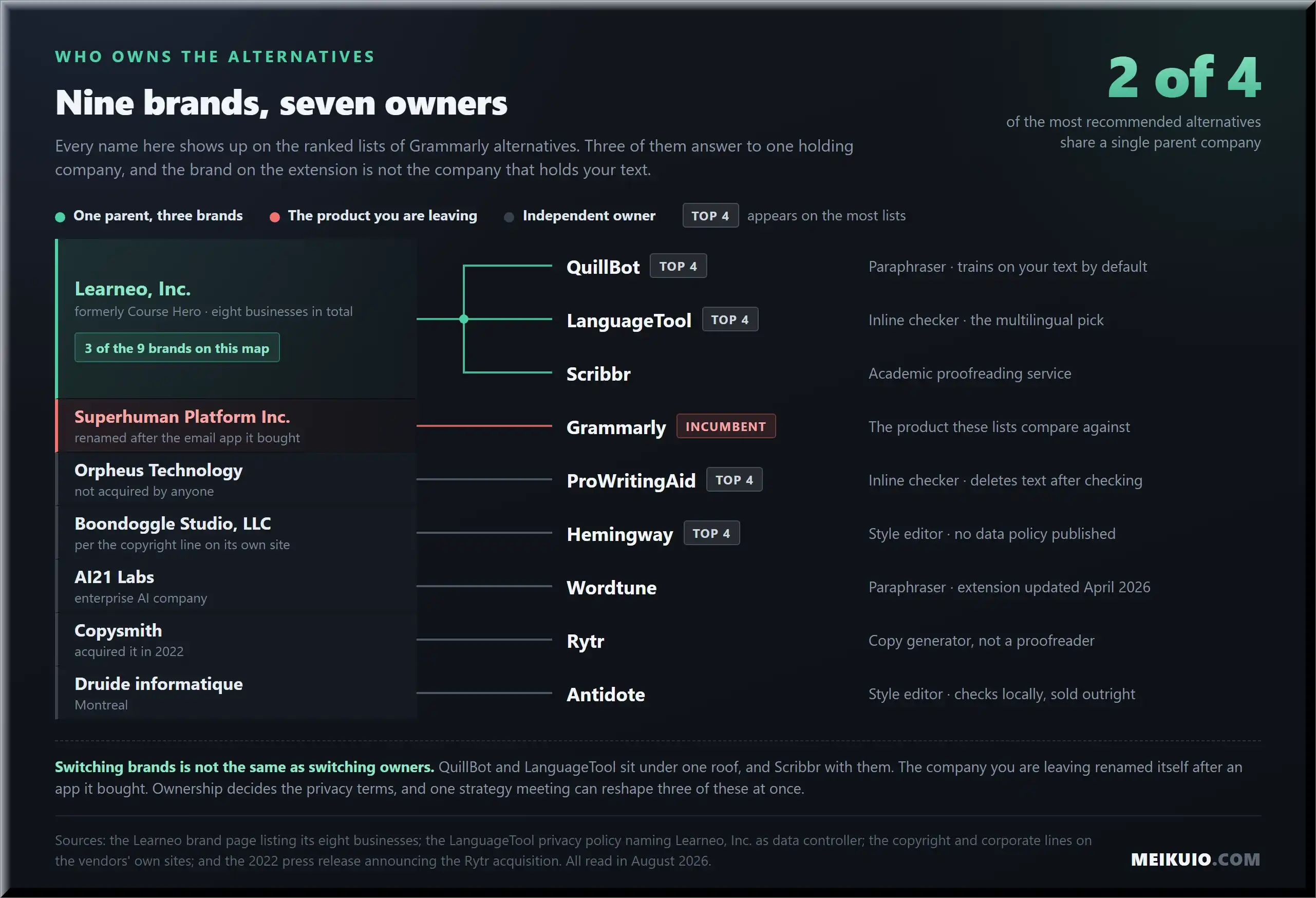
QuillBot and LanguageTool, two names that appear on most lists of Grammarly alternatives, share one parent: Learneo, Inc., the company formerly called Course Hero. So does Scribbr, the academic proofreading brand. I read this on Learneo’s own brand page, which lists eight businesses, and in LanguageTool’s privacy policy, which states plainly: “Learneo, Inc. is the data controller responsible for your personal data.” A data controller is the company legally answerable for what happens to your data; the brand on the extension is not the entity holding it.
More Read

Sit with that for a second. A typical top-ten list offers you ten names. Two or three of them route to the same corporate owner, and the incumbent you’re fleeing has renamed its own parent after an app it bought. The market has fewer independent choices than it has logos.
Two of the four most recommended “independent” Grammarly alternatives share one parent company.
The pattern doesn’t stop there. Wordtune is a product line of AI21 Labs, an enterprise AI company. Hemingway belongs to Boondoggle Studio, LLC, per the copyright line on its own site. Rytr was acquired by Copysmith back in 2022. Microsoft’s Copilot writing features run on OpenAI models, per Microsoft’s own documentation. None of this makes the tools bad. It means “switching away” often means moving inside the same few corporate families, and you deserve to know that before you pick.
In practice this matters three ways. Shared owners mean shared data policies; LanguageTool’s privacy terms are Learneo’s terms, as we’ll see below. Shared owners mean one strategy meeting can reshape three “competitors” at once. And if your reason for leaving is distrust of a big platform, landing on another arm of a big platform isn’t the move you thought you made.
The six kinds of “Grammarly alternative”
Most lists rank a chatbot against a browser extension against a fiction-writing app, as if those were the same purchase. They aren’t. Every tool people recommend as a Grammarly alternative falls into one of six classes, and the class decides whether it can replace what you actually used.
Keep the classes in mind as you read the cards below. A tool isn’t “worse than Grammarly” because it can’t check your email in real time. It might just be a different product that a list crammed into the wrong race.
Alternative #0: the checkers you already have
For a lot of people, the honest answer to “which Grammarly alternative should I buy” is none. Word ships with Microsoft Editor, which also covers Outlook and Edge. Google Docs checks grammar and offers Smart Compose on everything you draft there. Apple Intelligence added system-wide Writing Tools to macOS and iOS: select text, right-click, proofread, done. Your browser spellchecks every field for free. None of it needs an account you don’t already have, and none of it can raise its price on you.
Real switchers land here more often than any list of Grammarly alternatives admits. One Reddit user who paid for years put it this way: “With Apple’s new tools, I just select text, right-click, and proofread. I have cancelled Grammarly.” Another canceled a ten-year subscription after discovering the browser extension and desktop app were draining a laptop battery by about 60%. The built-in layer has no extension to drain anything, no renewal date, and no prompt counter.
The built-ins earn their place in more phone-first workflows too; I covered which mobile AI apps are actually worth paying for in my iPhone AI apps roundup. Before you pay anyone, run this four-point check:
- Does the built-in checker cover every surface you write on, or only the vendor’s own apps?
- Does it process text on your device or in the cloud? (Apple states on-device for most Writing Tools operations; Word and Docs are cloud services.)
- Can you add custom dictionary entries and keep them across devices?
- Does it explain a flag, or just replace your words?
If you only ever wanted typos caught and commas fixed, stop here and pay nobody. The paid tools below earn their money on style depth, cross-app reach, and, increasingly, on what they promise not to do with your text.
Where your text goes: the training question
Every cloud writing assistant reads what you type; that’s the product. The difference is what happens next, and in 2026 it splits the market cleanly. Some vendors train AI models on your text by default. Some delete it after checking. Most reviews don’t mention this axis at all, so I read the policies myself in early August 2026.
Two details matter here. First, QuillBot’s opt-out exists, but you have to find it: Extension Settings, View All Settings, Data and Privacy. Team plan users are excluded from training automatically; individuals are in until they act. To its credit, QuillBot does state that no third-party service provider is allowed to train on your data; the training that happens is in-house. Second, the free and paid versions of the same product can sit on opposite sides of the table. DeepL trains on free-tier text and promises never to touch Pro text. The tier you pick is a privacy decision, not just a feature decision.
And when a vendor says nothing, treat the silence as data. Of the tools on this page, Hemingway’s cloud tier and the two academic specialists Writefull and Paperpal publish no plain answer to the training question at all. I didn’t find hidden abuse; I found nothing, and for paid software handling your drafts, nothing is a strange thing to publish.
Before August 21
LanguageTool’s privacy policy is changing. The page I read carries a preview banner: the updated Learneo policy “goes into effect on August 21, 2026.” The no-training line for LanguageTool inputs survives in the new text, but the umbrella policy says Learneo “may use all of the data we collect… to train our algorithms, AI models and AI products.” “Inputs” reads as the text you submit for checking; the umbrella clause reaches the rest of what an account generates. If privacy is your reason for switching, read the version that’s live when you sign up.
Inline checkers: the direct replacements
If you want what Grammarly actually did, ambient checking that follows you across the browser, Word, and email, this is the only class that delivers it. Two tools dominate the category for good reason, and they solve different problems, so read both cards before deciding. One honesty note up front: I haven’t bench-tested catch rates against Grammarly, and I found no credible published test that has. What follows compares the things that can be verified: reach, limits, ownership, and what happens to your text.
ProWritingAid: the deepest editor of the bunch
ProWritingAid is the closest thing to a straight Grammarly replacement, and for long-form writers it’s the stronger tool. It runs in browsers, Word, and Google Docs, and its reports go far past grammar: sentence-length variety, repeated sentence starts, pacing, dialogue tags. The company behind it is Orpheus Technology, and it’s one of the few names on these lists that hasn’t been bought by anyone.
The free tier is a real trial, not a floor: 500 words at a time, two report runs a day, ten rephrases. Paid runs $30 a month, $120 a year, or a one-time $399 for Lifetime Premium, read on the vendor’s pricing page in August 2026. That lifetime option changes the math. Grammarly Pro’s annual route works out to $144 a year (the full breakdown is in my review linked above), so three years of it costs more than owning ProWritingAid forever.
Fiction writers switch to it and stay: “Grammarly is better for business writing, but is not as useful for fiction,” as one r/selfpublish user put it after moving their novels over. Capterra’s spring 2025 reviews tell the same story from the business side: one publishing-company owner moved from Grammarly Business because ProWritingAid “offers more features and is less expensive,” and another switched after finding Grammarly “too robotic and demanding.” A third switcher kept a hybrid setup, holding on to Grammarly’s phone app while editing on ProWritingAid.
The counterweight comes from an office worker whose employer switched tools on them without asking: “Grammarly is 100 times better! The ProWritingAid is something I paid a lot but becomes quite useless for any writing corrections.” Both experiences are real. The difference is the job: deep editing sessions reward ProWritingAid’s stack of reports, quick fire-and-forget corrections punish its density. The tool is dense. That’s the point.
Best for: novelists, bloggers, and anyone editing long documents who’d rather own a license than rent one. Data note: texts are deleted after checking, per its privacy policy.
LanguageTool: the multilingual pick with an asterisk
LanguageTool is the multilingual pick; even its parent’s brand page describes it as a “multilingual AI-powered writing platform,” and no other tool here treats non-English checking as the main event. The free tier is genuinely usable: 2,000 characters per check and three sentence paraphrases a day, straight from its own comparison page. Premium lifts the ceiling to 150,000 characters and unlimited paraphrasing, and the browser extension is joined by office add-ons.
The asterisk is ownership. LanguageTool is operated by LanguageTooler GmbH in Hamburg, but the data controller is Learneo, the same parent that owns QuillBot. Its inputs are excluded from model training by default, which is better than most. Still, one r/privacy user who left Grammarly for LanguageTool over data concerns watched the August 2026 policy change land and wrote that the tool “was going the way of grammarly.” Switching brands isn’t the same as switching owners. The price is right here. The parent is the question.
There’s a version of LanguageTool nobody’s list mentions: the open-source core can run on your own machine, so your text never leaves it. Setting it up is a small technical project (self-hosters on Reddit run it as a Docker container, and the browser extension can point at your own server instead of the company’s), not a one-click install. For the people willing to do it, the privacy question disappears entirely.
Best for: anyone writing in more than one language, budget switchers who need a real free tier, and tinkerers willing to self-host. Data note: inputs excluded from training; policy changes August 21, 2026.
Ginger, Sapling, and the rest of the inline field
The older names still show up on Grammarly alternatives lists, so I checked whether they’re still standing. Ginger is: the site sells today, and authors’ sites still recommend it, mostly for its sentence rephraser and translation add-ons. It’s a fine budget checker. It hasn’t led its category in years, and no list I read explained why it would beat the two picks above.
Outwrite is a stranger case. The app works and signup is open, but the site’s own copyright line still reads 2022, and that kind of quiet should give you pause before you hand over a card. Sapling points itself at customer-support teams these days; its security page advertises self-hosted deployments and enterprise controls, which tells you who it’s really for. And Linguix, whose homepage calls itself “the only writing assistant you need,” turned up in exactly zero of the user threads I read. A tool can be alive and still have no one vouching for it.
None of these are traps. They’re just answers to a question fewer and fewer people are asking, in a category where the built-ins keep eating the bottom.
Paraphrasers: QuillBot and Wordtune
QuillBot: popular, capable, and training on you by default
QuillBot is a rewriting tool first and a checker second (we put them head-to-head in our QuillBot vs Grammarly comparison). You paste a sentence, it offers a restructured version; that’s the core loop, and it’s good at it, especially for writers working in a second language who want to see their idea phrased three different ways. The free tier takes 125 words per paraphrase in two modes; Premium unlocks the rest of the mode list, a summarizer that jumps from 1,200 to 6,000 words, and a 25,000-word monthly plagiarism checker. We watched the same paraphrasing engine work over text in our AI humanizer test last year.
Two things the lists leave out. QuillBot belongs to Learneo, the Course Hero parent, so picking it over LanguageTool isn’t the corporate diversification you might think it is. And its trust center states that storing your text inputs is “on by default for everyone,” with the training opt-out buried three menus deep. If you rewrite client work or anything under NDA in it, go flip that switch today.
Best for: students and writers working in English as a second language who rework sentences constantly and don’t paste sensitive text. Data note: trains by default, opt-out in extension settings; Team plans excluded automatically.
Wordtune review: the signals point both ways
Wordtune does one thing elegantly: tone-shifting rewrites of individual sentences, with a slider between casual and formal. It’s on half the alternatives lists I audited. Here’s what none of them print.
Wordtune is a product of AI21 Labs, and Israeli tech press reported in 2025 that AI21 had discontinued its development to focus on enterprise AI. That is a fact about what was reported, and it is not the whole picture. I checked the shelves myself in August 2026: the site still sells subscriptions and the signup flow works, the footer still reads “All Rights Reserved © AI21 Labs, 2025”, and AI21’s own newsroom neither confirms nor denies anything.
Then I opened the Chrome Web Store listing, which is where maintenance leaves fingerprints. Wordtune sits at version 9.20.0, updated 19 April 2026, offered by AI21 LABS, INC., with a million users and no sunset notice of any kind. Someone was shipping code to it this year. That doesn’t tell you the product has a roadmap, and it doesn’t unsay what the press reported about AI21’s priorities, but it does contradict the idea that the tool was abandoned in 2025.
So the honest read is a split one: the tool is maintained, and the company has said nothing about where it’s going. Best for: writers who want tone-shifting rewrites and can live with an unannounced roadmap, on a monthly plan rather than an annual one. If you need to know your writing tool will still be a priority in two years, AI21 hasn’t put that in writing anywhere, and the inline checkers above are the safer buy.
Style editors and the one-time-purchase route
This class doesn’t follow you around. You bring your text to it, and in exchange you get something the subscription tools quietly abandoned: software you can buy once. After a year of watching renewal prices climb across this category, that model deserves more attention than the lists give it.
Hemingway app review: the readability scorekeeper
Hemingway doesn’t check grammar so much as grade your prose: it highlights long sentences, passive voice, and adverbs, and assigns a readability score. The web editor is free. The Classic desktop app is a one-time purchase; the ranking pages all quote it around $20, though I couldn’t find the number printed on the vendor’s own homepage, which now leads with a “free 2-week trial” for the subscription tier instead.
That subscription, Hemingway Editor Plus, adds cloud-AI rewrites. The maker, Boondoggle Studio, confirms the AI runs in the cloud, and publishes no data-handling policy I could locate for it. No training statement, no retention period, nothing. For a tool people paste entire manuscripts into, “not stated” is an answer too, and it’s the worst one on this page.
Best for: writers who want tighter prose and are happy with the free web editor or the offline one-time desktop app. Skip Plus until a privacy policy exists. Renewal note: the Classic app you buy once; Plus bills like any subscription.
Antidote: the grown-up option nobody reviews
Antidote, from Montreal’s Druide informatique, is a full desktop suite: corrector, dictionaries, style guides, in English and French. It sells both ways, a perpetual Antidote 12 license or an Antidote+ subscription, and the desktop software works locally. Writers in the r/writing threads treat it as a daily driver: “I think I’m going to be dropping PWA for it. The suggestions for rewrites are much better.”
It appeared on exactly one of the ten ranking pages I audited. Tools without affiliate programs tend to have that problem. The desktop suite also runs its checking locally, which puts Antidote on the short list of options where the training question doesn’t apply. Best for: bilingual writers and anyone who wants professional-grade checking on a license they own.
One warning for the one-time-purchase route generally: read what “lifetime” means before you pay. WhiteSmoke, an older checker still sold today, tells buyers in support email that its lifetime license “shall be valid for three (3) years,” per user reports on Trustpilot. A license you own should not expire.
Multilingual, academic, and team specialists
DeepL Write: the polish specialist
DeepL Write is the tool for a specific person: you write competent English as a second language, and you want it to read native. It doesn’t generate text and it doesn’t nag about adverbs. You paste a paragraph, it returns your own meaning in cleaner phrasing, in English, German, French, or Spanish. Among the Grammarly alternatives here, it’s the one switchers in the European privacy threads bring up unprompted, partly because the company already earned their trust with its translator.
The tier line matters more here than anywhere else on this page. The free version is character-capped and, per DeepL’s own privacy policy, free-tier content is processed “to train and improve our neural networks.” Pro reverses both: no cap, and a flat promise that your data is never stored or used for training. Same brand, opposite deals. Best for: ESL professionals, on Pro specifically if the text is sensitive.
Academics have two names built for them, and they answer a complaint that runs through the research-writing forums: general checkers overcorrect scientific prose, flagging discipline jargon and pushing active voice where a journal doesn’t want it. Writefull, owned by Digital Science, tunes its feedback to scientific writing. Paperpal comes from Cactus Communications, an academic-editing company, and has been shipping steadily, from manuscript pre-checks to a browser extension. Both know what a methods section is, which Grammarly never did.
The gap: neither publishes the plain-language training-and-retention answers I found for ProWritingAid or DeepL. I looked and came back empty, so weigh that before pasting an unpublished dissertation into either. Trinka, a third academic option, is more forthcoming: paid users’ processed data is deleted on a 90-day cycle per its data-security page, a stricter confidential plan exists, and the free tier covers 5,000 words a month.
If you’re leaving Grammarly Business rather than the consumer product, the name that keeps coming up is Writer.com, an enterprise platform built around team style governance. It’s a real product aimed at a buyer who isn’t you: pricing and rollout assume a team, an admin, and an onboarding call. Individuals should look elsewhere on this page.
Chatbots: the free wildcard
The quiet winner of the whole category might be the chatbot you already use. Paste a paragraph into ChatGPT, Claude, or Gemini and ask it to fix the grammar, and it will, and it will explain why. One switcher summed up the appeal: “I canceled Grammarly after ChatGPT came out. I would just ask it to correct my grammar and it also tells you why it’s wrong.”
The cost is friction. A chatbot checks nothing in the background; every correction is a copy-paste round trip, and long documents mean chunking. There’s also a consistency tax: ask the same model to fix the same paragraph twice and you’ll get two different rewrites, where a rule-based checker gives you the same flags every time. For quick, explainable fixes that’s fine. For enforcing one style across forty documents, it isn’t.
Which chatbot edits best is its own rabbit hole: my ChatGPT vs Claude writing comparison runs that head-to-head, the wider field lives in my ChatGPT alternatives guide along with how Grok stacks up, and current subscription costs sit in the AI pricing tracker. Best for: people who want one AI subscription total, not one per job.
The offline route: own the software, keep the text
There’s a whole wing of Grammarly alternatives that the ranking pages barely acknowledge, and it’s the one growing fastest in the communities I read: tools that run on your machine and never phone home. The privacy table above becomes irrelevant here. Text that never leaves your laptop can’t be retained, shared, or trained on.
Harper is the purist’s pick: an open-source checker that, in its own words, “runs entirely on your device.” Linux users and developers adopted it first. The self-hosted LanguageTool server does the same job for anyone comfortable with Docker, with the official browser extension pointed at your own machine instead of Hamburg. And a new wave of small apps wires local AI models into a system-wide hotkey; one Mac developer pitches his app simply as “a Grammarly alternative that runs 100% offline.”
StyleWriter belongs here too: an old-school Windows editing program whose site states it “runs on YOUR computer and NEVER needs an Internet connection.” You buy it once; yearly updates cost $30, and you can skip them without losing the program. It reads like software from another decade because it is, and for plain-English business editing it still works.
The honest caveat: most offline tools check against rules written by linguists, not against the AI models that power cloud tools, so the suggestions are narrower and more literal. You’re trading suggestion depth for total custody of your words. For lawyers, therapists, and anyone under NDA, that trade decides itself.
The generators that keep appearing on these lists
Half the pages ranking for Grammarly alternatives pad their lists with tools that don’t check writing at all. They generate it. Jasper and Writesonic are marketing-copy platforms; I’ve covered what Jasper actually costs and Writesonic’s move upmarket, and both stories are about enterprise pricing, not proofreading. The whole class of AI writers has been climbing away from the $10 casual tier for two years now. Recommending them to someone who wants their emails checked is a category error that pads a list out to “15 best Grammarly alternatives.”
I’m keeping two of them on this page anyway, because the lists put them in front of you and someone should finally explain what they are.
Rytr review: wrong list, honest tool
Rytr generates short marketing copy from templates: product blurbs, ad text, outlines. It’s cheap and it does that job. What it doesn’t do is monitor your writing anywhere, and it was acquired by Copysmith in 2022, another consolidation the lists skip. If you came here to replace a proofreader, Rytr isn’t in your race. If you actually wanted a budget copy generator, it’s a defensible pick.
Sudowrite review: for novelists, not for email
Sudowrite is a fiction-drafting tool that generates story beats and expands scenes, built for novelists and honest about it. It shows up on general alternatives lists anyway, which helps nobody. It won’t proofread your cover letter, it won’t sit in your browser, and it doesn’t pretend to. Its job is different, and so is its buyer.
Novelists who want an idea partner should trial it against ProWritingAid’s fiction reports and Antidote, which actually edit. Everyone else landed on the wrong card, and the lists that sent you here owe you an apology.
Free tiers: real floor or disguised trial?
“Has a free plan” appears next to every tool on every list. The ceilings differ by an order of magnitude, so I pulled them from the vendors’ own pages in August 2026.
The pattern: rule-based checking is cheap to give away, so LanguageTool and Hemingway can afford real free tiers. AI generation burns compute, so anything built on rewriting meters you hard. Match the free tier to your volume before assuming “free” means usable. Every free plan has a ceiling. Find yours before it finds you.
What the ranking pages won’t tell you
Here’s the method, so you can repeat it: pull the top ten organic results for the query, record who publishes each page and who owns the publisher, log where the outbound links route, note the visible dates, and search each page for any mention of the ownership changes above. I ran that pull, re-opened the key pages by hand to verify the pattern, and cross-checked the field against a second search index. It took an afternoon, and no page ranking for the term has done it.
The results: all ten pages belong to competing vendors, affiliate publishers, or app-store operators; not one independent editorial outlet ranks. Four of the ten put their own product at #1. One page in ten mentions the Superhuman change at all. And the strangest finding of the audit: a vendor blog post from June 2024 still ranks in the top ten, and the tool it crowns first is its own.
The dates tell their own story. Six of the ten pages show a visible date at all; the rest leave you guessing. Running the same search through a second index surfaced pages from 2020 still circulating, several owner changes ago in this market. A list of Grammarly alternatives that predates the Superhuman rebrand, the Learneo consolidation, and the death of unlimited checking is a museum exhibit with affiliate links.
The affiliate machinery is visible if you hover. One authors’ site routes every recommendation through internal redirect links before they reach the vendor. Another publisher openly describes the “30% recurring, 90-day cookie affiliate program” it participates in; in plain terms, if you buy within 90 days of clicking, the site collects 30% of what you pay, every billing cycle. To be fair to the field, I expected the free options to be buried entirely, and that turned out wrong: all ten pages mention at least one route that pays them nothing. What none of them do is rank it first, or tell you who owns what they’re ranking.
One count per page. Every page names a route that pays it nothing, but none ranks it first. All publishers are competing vendors, affiliate publishers or app-store operators. The oldest dated page was updated June 2024. Four of ten rank their own product first.
Note
Prices, limits, and policy wording in this article were read on the vendors’ own pages in early August 2026. All of them change; the August 21 LanguageTool policy date is the clearest example. Treat every number as “as of August 2026.”
Who should stay on Grammarly
Switching has losers, and pretending otherwise would make this page no better than the affiliate lists. The office worker quoted earlier found ProWritingAid “quite useless” for quick corrections after an employer-forced migration. Another switcher keeps a foot in both camps, retaining Grammarly’s phone app alongside a new primary tool. A third left LanguageTool feeling burned when its policy shifted under her feet. Grammarly’s ambient everywhere-at-once checking is still the best version of that specific experience, and none of the Grammarly alternatives on this page replicates it completely.
Stay if your workflow is high-volume, short-form, and scattered across twenty tabs, and the new prompt-based limits don’t pinch you in practice. Whether the current price justifies that is a separate question, and I’ve answered it in detail. Leave if you’re paying for depth you don’t use, hitting AI limits you didn’t know existed, or uncomfortable with where your text goes.
Match the tool to your reason for leaving
Ten switchers, and no two exits alike. Across the ten first-person accounts I read (several named more than one reason), four cited price, billing surprises, or a cancellation flow that charged them anyway; three cited bloat, buggy extensions, or battery drain; two dropped to built-in OS tools and stopped paying entirely; two protected a fiction voice; one was force-migrated at work and hated it. No single “best Grammarly alternative” serves them all. The mapping below does.
Or frame it by budget. At $0, you run the built-ins plus LanguageTool’s free tier and lose surprisingly little. Around $30, one month of ProWritingAid covers an editing sprint on a manuscript; cancel after. At $399 once, the lifetime license means never doing renewal math again. The only budget I’d argue against is the one most people default to: a rolling monthly subscription you stopped evaluating after week two.
One more thing before you cancel anything. Check your renewal date first; several of the switchers I read got charged mid-cancellation, and one had to file a PayPal dispute after the button “at the bottom of the page in the corner” didn’t stop the billing. Screenshot the cancellation confirmation. If you’re moving to QuillBot, flip the training opt-out on day one. And read the destination’s privacy policy in its current version, not the version a 2024 review described. Five minutes of paperwork beats a surprise invoice.
Field notes, August 2026
- The field: 10 of 10 ranking pages are vendors or affiliate publishers; 1 of 10 mentions the incumbent’s Superhuman rebrand; 4 of 10 rank their own product first.
- Ownership: Learneo, Inc. owns QuillBot, LanguageTool, and Scribbr.
- Free ceilings: LanguageTool allows 2,000 characters per check; QuillBot paraphrases 125 words in 2 modes; ProWritingAid caps at 500 words.
- One-time purchase: ProWritingAid Lifetime, bought once instead of rented.
- Dated change: LanguageTool’s new privacy policy takes effect August 21, 2026.
- Sources: vendor pricing, trust, and legal pages, read directly.
Frequently Asked Questions
What is the best free Grammarly alternative?
LanguageTool, if you want a dedicated tool: 2,000 characters per check and multilingual support cost nothing. If you only need typos and basic grammar caught, the checkers already inside Word, Google Docs, and macOS are the real answer, and they have no usage ceiling at all.
Who owns QuillBot and LanguageTool?
Both belong to Learneo, Inc., the company formerly named Course Hero, which also owns Scribbr, Symbolab, and CliffsNotes. LanguageTool’s own privacy policy names Learneo as its data controller. Grammarly, meanwhile, is owned by Superhuman Platform Inc. Two “rival” tools, one parent.
Is Wordtune still being developed?
It’s being maintained. The Chrome extension sits at version 9.20.0, updated 19 April 2026 and offered by AI21 LABS, INC. Tech press reported in 2025 that AI21 had discontinued development to focus on enterprise AI, and the company hasn’t addressed that publicly since, so the roadmap is unannounced rather than dead.
Does QuillBot train its AI on your text?
Yes, unless you opt out. QuillBot’s trust center says storing text inputs is “on by default for everyone,” and inputs feed model training. The switch lives under Extension Settings, View All Settings, then Data and Privacy. Team plan users are excluded automatically; individual users are not.
Which Grammarly alternatives are a one-time purchase?
Three real options: ProWritingAid’s Lifetime Premium at $399 once, Hemingway’s Classic desktop app (the ranking pages quote about $20; the vendor’s own page doesn’t print it), and Antidote 12 as a perpetual license. Check what “lifetime” means before paying; WhiteSmoke’s support has told buyers its lifetime license lasts three years.
Can ChatGPT replace Grammarly?
Yes, if you accept copy-paste friction. A chatbot fixes grammar on demand and explains every correction, which no inline checker does, but it monitors nothing in the background. Heavy daily writers usually keep an inline tool; occasional writers increasingly just use the chatbot they already pay for.
Is there a grammar checker that works offline?
Yes. Antidote’s desktop suite works locally, Hemingway’s Classic app is fully offline, and the open-source LanguageTool server can run on your own machine with the browser extension pointed at it. Offline is also the strongest privacy guarantee available: text that never leaves can’t be retained or trained on.
What happens to LanguageTool’s privacy policy in August 2026?
A new Learneo-wide policy takes effect August 21, 2026; the current page shows it as a preview. LanguageTool user inputs remain excluded from model training in the new text, but the umbrella policy lets Learneo use collected data broadly to train its AI products. Reread it after the date if privacy drove your switch.
Do the built-in checkers in Word and Google Docs make paid tools unnecessary?
For typos, agreement errors, and basic grammar, yes, and switchers say so bluntly. Paid tools earn their fee on style analysis, custom rules, cross-app consistency, and explained corrections. If you can’t name which of those you’d use weekly, the built-ins are your answer.
My Take
If I’m handing one recommendation to a friend leaving Grammarly, it’s ProWritingAid, and I’d tell them to skip the monthly plan and take the $399 lifetime license if they’ll still be writing in three years. The tool is deeper, the company is independent, and the privacy policy says deletion instead of training. For a second machine and a second language, LanguageTool’s free tier does more than most paid plans admit.
Who I wouldn’t hand it to: anyone whose whole use case is quick checks inside email and browser tabs. That person either stays on Grammarly with open eyes or drops to the built-in checkers and pays nobody. And if Wordtune tempts you, take it month to month: the extension was updated in April 2026, but AI21 has never said publicly where the product is headed.